
fibtrace
Hop-by-hop forwarding chain validation from the device perspective. Not a traceroute — a FIB trace.
⚠️ Alpha software. fibtrace is under active development. Interfaces, output schemas, and CLI flags may change between 0.x releases. Not recommended for unattended automation or mission-critical change gates until a 1.0 release establishes API stability. See Status & Security.
The Problem
When a network path breaks, traceroute tells you where packets die. It doesn't tell you why.
To find the root cause, you SSH into the first device, check the route table, check the FIB, validate ARP resolution, inspect the egress interface — then move to the next hop and do it all again. Device by device, control plane to data plane, tedious but precise.
Every network engineer knows this workflow. Nobody has automated it.
fibtrace does. Given a target prefix and a starting device, it walks the forwarding chain hop by hop, validating what each device actually knows and what it's actually doing with the traffic. When it finds ECMP, it follows every branch. When it finds a problem, it tells you exactly what broke and where.
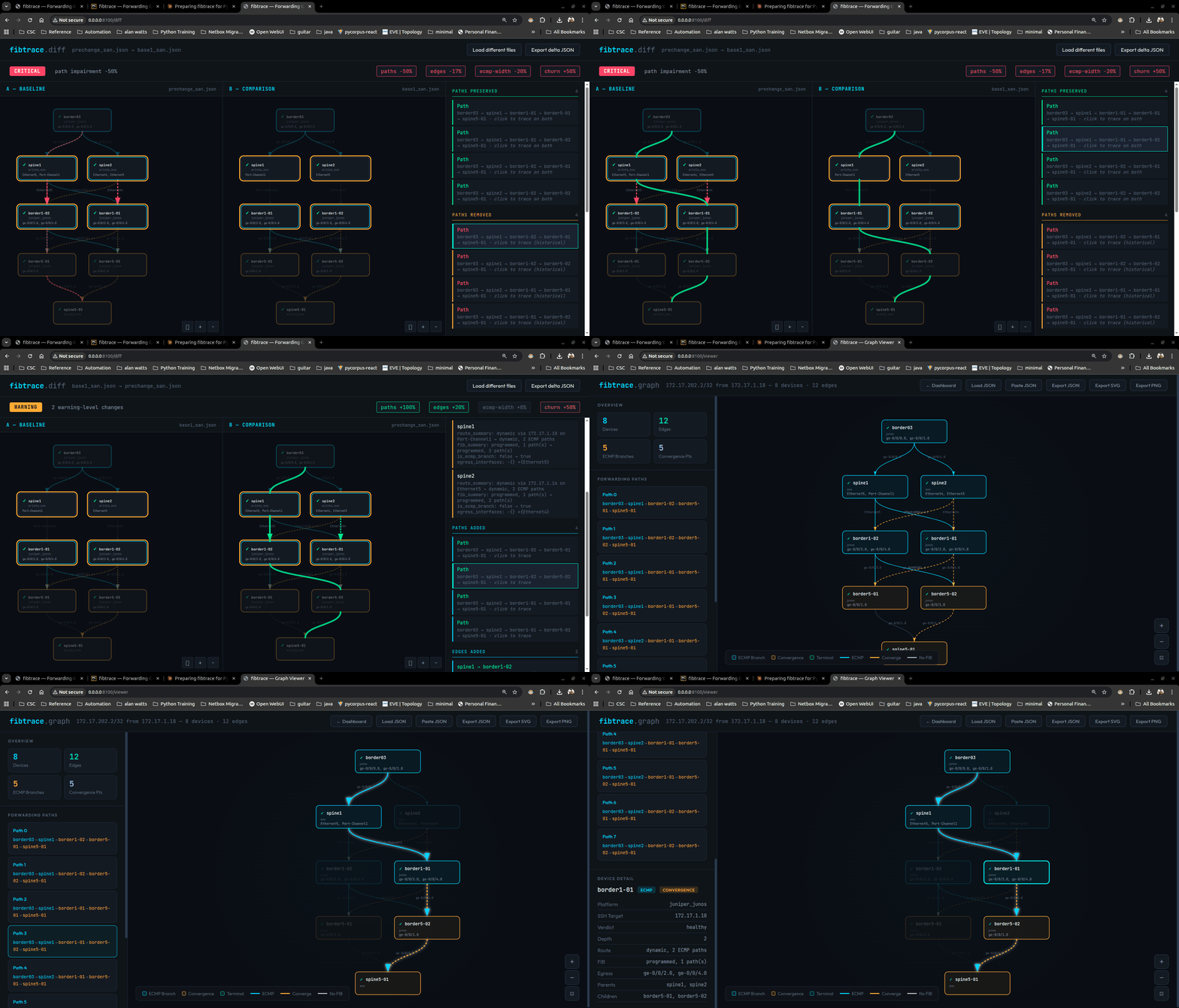
The result is a forwarding graph — a DAG of every device in the path, every ECMP branch, every convergence point, and every forwarding decision between them. Exportable as JSON, Graphviz DOT, or visualized in an interactive HTML viewer.
How It Works
At each hop, fibtrace asks four questions:
- Is there a route? — RIB lookup for the prefix
- Is it in the FIB? — Is the route programmed in the forwarding table?
- Is the next-hop resolved? — ARP entry (IPv4) or ND entry (IPv6), MAC address learned?
- Is the egress link healthy? — Interface up, error counters clean?
Then it follows the next-hop to the next device and repeats. The walk continues until it reaches a connected route (end of path), a black hole (problem found), or an unresolvable next-hop (problem found). ECMP paths are followed as a DAG — every branch is validated, every convergence point is tracked.
Quick Start
On PyPI the package is fibtrace2. The command it installs and the Python package you import are both still fibtrace.
# Core CLI only — walk, diff, view
pip install fibtrace2

# With optional UIs
pip install 'fibtrace2[tui]'        # + Textual TUI
pip install 'fibtrace2[web]'        # + FastAPI web dashboard
pip install 'fibtrace2[tui,web]'    # both UIs
pip install 'fibtrace2[web,ldap]'   # web dashboard with LDAP/AD login

# Headless walk (key auth: ~/.ssh/id_ed25519, id_ecdsa or id_rsa)
fibtrace walk -p 10.1.0.0/24 -s 172.16.1.1 -u admin --domain example.com

# Password auth: put it in the environment, not on the command line
read -rs FIBTRACE_PASSWORD && export FIBTRACE_PASSWORD
fibtrace walk -p 10.1.0.0/24 -s 172.16.1.1 -u admin

# Open the graph viewer (then drag-drop or load JSON files)
fibtrace view
All functionality is exposed through a single fibtrace command with subcommands:
| Subcommand | Purpose |
|---|---|
fibtrace walk |
Headless forwarding chain walker |
fibtrace diff |
Compare two forwarding graphs |
fibtrace view |
Open the HTML graph viewer in a browser |
fibtrace tui |
Textual TUI — live forwarding chain visualization |
fibtrace web |
Run the FastAPI web dashboard |
Run fibtrace <subcommand> --help for subcommand-specific options.
Typical Workflow
# 1. Run a trace, save the graph
fibtrace walk -p 172.17.1.136/32 -s 172.17.1.135 -u admin --skip-mac --nh-source auto --json > trace.json

# 2. Open the viewer
fibtrace view

# 3. Drop trace.json onto the viewer (or click Load JSON / Paste JSON)
#    Click paths in the sidebar to highlight individual ECMP branches
#    Click nodes for device detail (route, FIB, egress, parents/children)
#    Export SVG or PNG for documentation
Pre/Post Change Validation
Snapshot a chain, make a change, snapshot again, and diff the two forwarding graphs to see exactly what changed in the forwarding plane:
# 1. Preflight snapshot
fibtrace walk -p 172.17.202.2/32 -s 172.17.1.18 -u admin --graph preflight.graph.json

# 2. Execute the change (BGP prepend, interface shut, peer cleanup, ...)

# 3. Postflight snapshot
fibtrace walk -p 172.17.202.2/32 -s 172.17.1.18 -u admin --graph postflight.graph.json

# 4. Compare — one-line verdict
fibtrace diff preflight.graph.json postflight.graph.json

# Or a MOP-ready markdown report
fibtrace diff preflight.graph.json postflight.graph.json --markdown -o validation.md

# Or the interactive side-by-side viewer (served by the web app at /diff)
The diff tool reports continuous capacity metrics (path impairment, edge impairment, ECMP-width impairment, path churn) rather than a count of what moved, so a successful rerouting MOP that preserved capacity reads as zero impairment with high churn, while a degradation reads as impairment with the dimension of loss made explicit. A CRITICAL verdict fires when verdicts worsen, devices become unreachable, or path/ECMP impairment crosses 50%.
Forwarding Graph
The core output of fibtrace is a forwarding graph — a directed acyclic graph where nodes are devices, edges are forwarding decisions, and the topology captures every ECMP branch and convergence point in the path.
The graph captures structural properties that a flat hop list cannot:
- ECMP branch points — nodes with multiple outgoing edges
- Convergence points — nodes with multiple incoming edges
- Path enumeration — every unique source-to-terminal path through the DAG
- Edge classification — ECMP siblings, convergence edges, loop edges
Graph Output Formats
JSON (--json or --graph) — Full graph structure with nodes, edges, adjacency, and metadata. The --json flag includes the graph inside the full trace output; --graph writes the graph standalone.
Graphviz DOT (--dot) — Renders with dot -Tpng trace.dot -o trace.png. ECMP branches colored blue, convergence points yellow, terminal nodes green, unreachable nodes red.
HTML Viewer — A standalone browser-based visualizer, packaged with fibtrace and launchable via fibtrace view. Supports drag-drop, file browse, or paste for loading graph JSON. Interactive dark-themed DAG with path highlighting, device detail panel, and SVG/PNG export. No server required.
# Launch the viewer
fibtrace view

# Copy the viewer HTML to a local path (for sharing or embedding)
fibtrace view -o viewer.html
Next-Hop Source Selection
fibtrace collects both RIB and FIB next-hops at every device. The --nh-source flag controls which drives the walk:
| Mode | Behavior | Use When |
|---|---|---|
fib (default) |
FIB next-hops preferred, RIB fallback | FIB parsers are trusted and complete |
rib |
RIB next-hops preferred, FIB fallback | FIB parser has known gaps (e.g., Junos ECMP) |
auto |
Whichever source has more next-hops | Belt and suspenders — always gets the widest ECMP view |
Both sources are always collected and recorded in the graph nodes (route_summary and fib_summary), regardless of which drives the walk. A mismatch between the two is itself useful diagnostic data — it tells you whether the FIB is fully programmed.
TUI
fibtrace also runs as a terminal application with a split-pane layout: a forwarding tree on the left and a live log on the right. Devices appear in the tree as they're discovered, with a spinner while probing and a verdict icon when complete. ECMP branches fork visually as sibling nodes.
# Requires the [tui] extra: pip install 'fibtrace2[tui]'

# Live trace
fibtrace tui -p 10.0.0.0/24 -s 172.16.1.1 -u admin

# Demo mode — replay a mock trace (no network needed)
fibtrace tui --demo
Three log verbosity levels, toggled live with a keypress:
| Key | Level | Shows |
|---|---|---|
b |
Basic | Connection events, per-hop verdicts, ECMP notifications, final summary |
v |
Verbose | + every command sent, parser result (✓/✗), parser type, verdict reasoning |
d |
Debug | + raw output excerpts, timing, parser detail, ECMP branch/convergence points, path enumeration |
The status bar shows completion state, device count, ECMP branches, elapsed time, active log level, and keybindings. Press q to quit.
Web Dashboard
fibtrace also ships a browser-based dashboard — FastAPI + WebSocket-streamed terminal output, interactive graph viewer, side-by-side diff viewer. Drop two graph JSONs onto the /diff page to see path impairment, edge deltas, and ECMP-width changes rendered as dual graphs.
# Requires the [web] extra: pip install 'fibtrace2[web]'

# Local use: binds 127.0.0.1, built-in admin / fibtrace login
fibtrace web --port 8100

# Shared use: hashed local accounts or LDAP, then bind beyond loopback
fibtrace web --hash-password
export FIBTRACE_USERS='{"scott": "scrypt$16384$8$1$..."}'
fibtrace web --host 0.0.0.0 --port 8100
Dashboard users supply their own SSH credentials for every trace: a password, or their own private key pasted or loaded in the browser. The server never lends them its own keys. See Status & Security.
The subprocess model means the web app doesn't import fibtrace internals — each trace runs as a child python -m fibtrace.walker process. That keeps the web layer isolated from walker changes and lets multiple concurrent users run traces without sharing state. See README_WEB.md for deployment details, environment variables, and architecture notes.
Supported Platforms
| Platform | Parsing | IPv4 | IPv6 | Status |
|---|---|---|---|---|
| Arista EOS | Native JSON (| json) |
✅ | ✅ | Tested in production lab |
| Juniper Junos | Native XML (| display xml) |
✅ | ✅ | Tested in production lab (14.1+) |
| Cisco IOS/IOS-XE | Regex (ranked pattern list) | ✅ | ✅ | Tested in production lab |
| Cisco NX-OS | Native JSON (| json) |
✅ | v6 commands ready, parsers pending | Parsers written, untested |
Platform detection is automatic — fibtrace fingerprints each device via prompt analysis and show version output, then selects the correct command set and parser.
Mixed-vendor paths work transparently. The trace adapts its CLI syntax per hop (e.g., CIDR notation for EOS, dotted-mask for IOS, bare IP for Junos host routes) and its output parsing (JSON for EOS/NX-OS, XML for Junos, regex for IOS). Address family is detected from the target prefix and drives command selection automatically.
Verdict Reference
fibtrace evaluates each hop against a truth table and assigns a verdict:
| Verdict | Meaning | Terminal? |
|---|---|---|
HEALTHY |
Route in RIB, programmed in FIB, next-hop resolved, link clean | No — walk continues |
NO_ROUTE |
No RIB entry for the prefix (and no default route) | Yes — path is broken here |
BLACKHOLE |
FIB entry is null/drop | Yes — traffic is discarded |
RIB_ONLY |
Route exists but not programmed in FIB | No — walk continues |
INCOMPLETE_ARP |
Next-hop ARP/ND is unresolved | No — walk continues |
INTERFACE_DOWN |
Egress interface is down | No — walk continues |
INTERFACE_ERRORS |
Error counters above threshold | No — walk continues |
UNREACHABLE |
SSH connection to device failed (after neighbor discovery fallback) | Yes — can't evaluate |
Interface errors and ARP issues are flagged but never stop the trace. The walk always continues to the next hop — reachability is confirmed or denied by the SSH connection, not by error counters on the previous device.
CLI Reference
fibtrace <subcommand> [options]

Subcommands:
  walk   Headless forwarding chain walker (primary interface)
  diff   Compare two forwarding graph JSON files
  view   Open the HTML graph viewer in a browser
  tui    Live forwarding chain visualization (requires [tui] extra)
  web    Run the FastAPI web dashboard (requires [web] extra)

fibtrace walk usage:
  fibtrace walk [-h] -p PREFIX -s SOURCE -u USERNAME
                [--password PASSWORD] [--key-file KEY_FILE]
                [--no-default-key] [--max-depth MAX_DEPTH]
                [--timeout TIMEOUT] [--legacy-ssh]
                [--error-threshold ERROR_THRESHOLD] [--skip-mac]
                [--nh-source {fib,rib,auto}] [--domain DOMAIN] [-v]
                [--debug] [--log LOG] [--no-probe-target] [--json]
                [--graph FILE] [--dot FILE]

Arguments:
  -p, --prefix          Target prefix (e.g., 10.0.0.0/24, 172.16.1.1,
                        2001:db8::/32, or 2001:db8::1)
  -s, --source          Source device IP to start the walk
  -u, --username        SSH username

Authentication (first match wins):
  --password            SSH password (default: $FIBTRACE_PASSWORD)
  --key-file            Path to SSH private key
                        (default: first of ~/.ssh/id_ed25519, id_ecdsa,
                        id_rsa when no password is given)
  --no-default-key      Never fall back to ~/.ssh keys

Environment:
  FIBTRACE_PASSWORD     SSH password
  FIBTRACE_KEY_DATA     PEM private key held in memory (used by the web UI)
  FIBTRACE_KEY_PASSPHRASE  Passphrase for an encrypted key

Walk Options:
  --max-depth           Maximum hop depth (default: 15)
  --timeout             Per-command timeout in seconds (default: 10.0)
  --legacy-ssh          Enable legacy SSH ciphers/KEX for old devices
  --error-threshold     Interface error count threshold (default: 100)
  --skip-mac            Skip MAC table lookups (faster on L3 paths)
  --nh-source           Next-hop source: fib (default), rib, or auto
  --domain              DNS domain suffix for neighbor hostname resolution
  --no-probe-target     Don't SSH to a /32 or /128 target after the hop
                        that delivers it on a connected route
  -v, --verbose         Print per-hop summaries
  --debug               Debug logging

Output:
  --json                Full trace + forwarding graph as JSON to stdout
  --graph FILE          Write forwarding graph JSON to file
  --dot FILE            Write Graphviz DOT to file
  --log FILE            Write full diagnostic JSON to file
Installation
fibtrace uses optional extras to keep the base install small. The walker, diff, and viewer launcher have no UI dependencies; TUI and web components are opt-in.
| Install command | Includes |
|---|---|
pip install fibtrace2 |
walk, diff, view — the headless core |
pip install 'fibtrace2[tui]' |
+ Textual TUI (adds textual, rich) |
pip install 'fibtrace2[web]' |
+ FastAPI web dashboard (adds fastapi, uvicorn, jinja2, itsdangerous, websockets, python-multipart) |
pip install 'fibtrace2[tui,web]' |
Both UIs |
pip install 'fibtrace2[web,ldap]' |
+ LDAP/Active Directory login for the dashboard (adds ldap3, PyYAML) |
pip install 'fibtrace2[dev]' |
All of the above + pytest, build, twine |
Requires Python 3.9 or newer. Uninstall any older fibtrace distribution first (pip uninstall fibtrace); it installs the same fibtrace package and command.
Architecture
fibtrace/
├── __init__.py                 # Package exports + __version__
├── __main__.py                 # python -m fibtrace → CLI dispatcher
├── cli.py                      # Unified CLI dispatcher (subcommands)
├── client.py                   # SSH client (Paramiko invoke-shell wrapper)
├── commands_and_parsers.py     # Platform fingerprinting, command sets, AF-aware dispatch
├── diagnostics.py              # Structured diagnostic capture and formatters
├── diff.py                     # Forwarding graph diff — impairment metrics, verdicts
├── events.py                   # HopEvent dataclass — walker ↔ TUI contract
├── forwarding_graph.py         # DAG representation — nodes, edges, path enumeration, export
├── models.py                   # Vendor-neutral forwarding data models (dual-stack)
├── parsers.py                  # Platform parsers: raw CLI output → model dataclasses
├── theme.tcss                  # TUI dark terminal theme (Textual CSS)
├── tui.py                      # Textual TUI — tree + log split-pane
├── viewer.py                   # Browser launcher for the HTML graph visualizer
├── fibtrace_viewer.html        # Standalone browser-based graph visualizer
├── walker.py                   # BFS chain walker, verdict assessment, graph construction
└── web/                        # FastAPI dashboard (optional, [web] extra)
    ├── app.py                  # FastAPI app, WebSocket terminal streaming, session auth
    ├── auth.py                 # Login providers: local (scrypt), LDAP/AD, ldap+local chain
    ├── hashing.py              # scrypt password hashing (stdlib only)
    ├── __main__.py             # `fibtrace web` entry point (uvicorn launcher)
    ├── templates/              # login, dashboard, graph, viewer, diff pages
    └── static/
Forwarding Graph Construction
The walker builds a ForwardingGraph during BFS traversal. Each walker event maps to exactly one graph mutation:
| Walker Event | Graph Mutation |
|---|---|
| New hop gathered | add_node() + add_edge() from parent |
| ECMP convergence | add_edge() only (node already exists) |
| Unreachable next-hop | add_node(reachable=False) + add_edge() |
| Loop detected | add_edge(is_loop=True) |
ECMP detection is structural — any node with >1 outgoing edges is a branch point. Convergence detection is the inverse — any node with >1 incoming edges is a convergence point. This is more reliable than counting next-hops per-device because it accounts for the actual graph topology, including convergence edges that the per-hop counter would miss.
Walker ↔ TUI Integration
The walker is synchronous (Paramiko blocking SSH). The TUI is async (Textual event loop). They communicate through a single shared type — HopEvent — defined in events.py. Neither side imports the other.
Walker thread                    TUI async loop
─────────────                    ──────────────
ChainWalker.walk()               FibTraceApp._run_live_trace()
  ├─ connect, fingerprint          │
  ├─ emit(hop_start) ──queue.put──→├─ queue.get() → _add_pending_node()
  ├─ gather forwarding state       │
  ├─ emit(hop_done)  ──queue.put──→├─ queue.get() → _update_node_verdict()
  ├─ enqueue next-hops             │
  └─ emit(trace_done) ─queue.put──→└─ queue.get() → _update_status()
The walker pushes HopEvent objects into a thread-safe queue.Queue. The TUI polls at 50ms and processes events on the main Textual thread. No callback set? Zero overhead — the walker runs identically in headless mode.
Design Decisions
Forwarding-plane only. fibtrace doesn't care about OSPF metrics, BGP local-pref, or admin distance. The routing protocol already picked a winner — fibtrace validates whether that winner is actually forwarding packets. Route protocol is recorded as a lightweight enum (connected, static, dynamic) for human context, not as an input to any decision.
Graph, not list. The forwarding path is a DAG, not a sequence. ECMP creates fan-out, convergence creates fan-in, and a flat list can't represent either. The ForwardingGraph builds incrementally during BFS traversal and captures the full topology with structural annotations (branch points, convergence points, loop members). The legacy list[Hop] is maintained for backward compatibility with the TUI tree renderer.
Default route aware. When a device has no specific route but has a default, that's a valid forwarding decision — the device will forward the packet. fibtrace follows the default just like any other route, annotating the hop so you can see where specific routing ends. This matters in leaf-spine and stub networks where edge devices routinely forward via default.
Dual-stack from the ground up. Address family is detected from the target prefix and drives the entire walk — command selection, parser dispatch, next-hop resolution strategy. IPv4 and IPv6 share the same models, walker, and verdict logic. The only AF-specific code is in command templates and the link-local resolver.
Link-local resolution without topology. OSPFv3 (and IS-IS) use link-local next-hops that can't be SSH'd to. Rather than requiring LLDP, CDP, or a topology database, fibtrace correlates across address families: ND gives a MAC, the ARP table gives the IPv4 address that owns that MAC. When the ND table is empty, fibtrace derives the MAC directly from the EUI-64 encoding in the link-local address. Two extra commands per link-local hop, zero external dependencies.
Neighbor discovery fallback. When direct SSH to a FIB next-hop fails, fibtrace queries LLDP and CDP on the parent device's egress interface to find the neighbor's management address. For LAG interfaces, it detects the aggregate and falls back to a filtered full-table query. DNS resolution tries the system name as-is, then with a configurable domain suffix (--domain). Three fallback layers before declaring a device unreachable.
Hostname-based device tracking. Devices are identified by the hostname extracted from the CLI prompt, not by the SSH target IP. In real networks, the same device is reachable via multiple IPs (management, loopback, transit interfaces), and different devices can share IPs (unnumbered interfaces, overlapping transit subnets). The prompt is the canonical identity.
Diagnostic-first. Every command execution is wrapped in a diagnostic record: the exact command sent, the full raw output, which parser was used, what it extracted (or why it failed), and wall-clock timing. Three TUI log levels surface increasing diagnostic detail in real time, and --log dumps the full JSON post-mortem.
Parser Strategy
Three tiers, best to worst:
| Tier | Method | Platforms | Reliability |
|---|---|---|---|
| 1 | Native JSON | Arista EOS, NX-OS | High — structured output |
| 1 | Native XML | Juniper Junos (14.1+) | High — stable across all versions |
| 2 | TextFSM | Cisco IOS/IOS-XE (future) | Medium — template-based |
| 3 | Ranked Regex | Cisco IOS/IOS-XE | Functional — tested against real devices |
Parsers are dispatched via a registry keyed on (Platform, data_type). Data types include: route, fib, arp, nd, arp_by_mac, interface, and mac_table. Adding a new platform means writing parser functions for the relevant data types and registering them.
SSH Client
The SSH client is adapted from Secure Cartography, a production-hardened Paramiko wrapper validated against 350+ devices. Features: invoke-shell mode (required for most network gear), pagination disable shotgun, legacy cipher/KEX support, ANSI sequence filtering, and multi-vendor prompt detection with hostname extraction. Paramiko is pinned to 4.0.0, the version the legacy-device transport is tested on.
Status & Security
Alpha. Core functionality — walker, forwarding graph, diff, viewer — is stable enough for operational use in controlled change windows. Expect breaking changes to CLI flags, graph schema fields, and module paths between 0.x releases. Pin your version if you're scripting against the JSON output or integrating with a pipeline.
What fibtrace does on your devices
fibtrace only runs show commands plus the session pager setting (terminal length 0 and its vendor equivalents). It never enters configuration mode. The target prefix is validated as an IPv4 or IPv6 network before it is placed in any device command.
Device credentials
- Key auth is the default. With no password, the walker uses
--key-file, or else the first of~/.ssh/id_ed25519,id_ecdsaorid_rsa. The SSH agent is never used. - Passwords belong in the environment.
--passwordis visible inpsand lands in shell history;FIBTRACE_PASSWORDdoes neither. - Host keys are not verified. fibtrace accepts any SSH host key (Paramiko
AutoAddPolicy) and does not checkknown_hosts. Something sitting on the management path could impersonate a device and capture a password. Prefer key auth, and run the walker from a host on a trusted management network.
Web dashboard
- Binds 127.0.0.1 by default.
fibtrace webrefuses to bind any other address while the built-inadmin/fibtracelogin or LDAP mock mode is active. The app enforces this as well: those logins only work whenfibtrace webitself confirmed a loopback bind, so starting the app another way (uvicorn directly, behind a proxy) disables them. - Login providers.
localaccounts come fromFIBTRACE_USERSas scrypt hashes (fibtrace web --hash-password); plaintext values still work but log a warning.ldapauthenticates against Active Directory or any LDAP server and requires membership in anallowed_groupsgroup.ldap+localtries the directory first and falls back to local break-glass accounts when it is unreachable. Configuration is in README_WEB.md. - Directory transport. LDAPS or StartTLS, with certificate validation on by default. A failed StartTLS never falls back to a cleartext bind. A cleartext configuration starts, but logs a warning on every start.
- No roles. Anyone who can log in can run traces from the server. Restrict who that is with
allowed_groupsor the local account list. - Users bring their own device credentials. Every trace needs the user's own SSH username plus either a password or their own private key, pasted or loaded from a file in the browser, with an optional passphrase. The server rejects a server-side key file path and launches the walker with
--no-default-key, so a dashboard login never reaches the server account's SSH keys. Password, key and passphrase go to the walker subprocess through its environment (FIBTRACE_PASSWORD,FIBTRACE_KEY_DATA,FIBTRACE_KEY_PASSPHRASE). They never go on its command line or to disk, and are not stored. - Sessions are signed, httponly cookies valid for 24 hours. Set
FIBTRACE_SECRET_KEY; without it a random key is generated at each start, and a restart logs everyone out. - HTTPS. Logins and device passwords cross the wire in the clear without it. Put a reverse proxy (nginx, caddy) in front for TLS, or run
uvicorn fibtrace.web.app:appdirectly with its--ssl-keyfileand--ssl-certfileflags.
Roadmap
The core walk engine, forwarding graph, TUI, and web dashboard are proven across both address families and four vendor platforms. These are the next targets:
- Speed — Async/parallel SSH within a BFS level. ECMP branches at a given depth connect sequentially today; they could connect simultaneously.
- TUI graph integration — Render the forwarding graph DAG in the TUI tree view, replacing the flat hop list.
- TextFSM templates — Replace IOS regex parsers with NTC-templates for better cross-version reliability.
- NX-OS IPv6 parsers — v6 command templates are in place; ND and ARP-by-MAC parsers needed for NX-OS.
- MPLS label path tracing — Models include label stacks and LFIB lookups. Parsers and walker integration needed.
- VXLAN/overlay tracing — Follow the overlay, then validate the underlay for each VTEP-to-VTEP segment.
- Host key verification — Check device host keys against
known_hosts, with a trust-on-first-use option. - SSH-proxy web auth — Authenticate dashboard users by attempting SSH against a designated network device.
License
GPLv3
1 maintainer

Metadata
1 maintainer
Release files for fibtrace2 0.2.0
For a detailed explanation of source distributions (sdists) and built distributions (wheels), please see the package formats documentation.
Source distribution (sdist)
| File | Size | Uploaded | Provenance | Actions |
|---|---|---|---|---|
| fibtrace2-0.2.0.tar.gz | 177.7 kB | Without provenance | Details for fibtrace2-0.2.0.tar.gz |
Built distribution (wheel)
| File | Interpreter | ABI | Platform | Actions Reset |
|---|---|---|---|---|
| fibtrace2-0.2.0-py3-none-any.whl | Python 3 | none | any | Details for fibtrace2-0.2.0-py3-none-any.whl |
Total release size: 354.7 kB
Release files / fibtrace2-0.2.0.tar.gz
| Download URL | fibtrace2-0.2.0.tar.gz |
|---|---|
| Size | 177.7 kB |
| Tags | Source |
|
SHA-256 checksum How to use checksums |
b4ad9d194b77cb934ce7e8bea121113b7657a8fe333677fd9a8b9e01abd7d088
|
|
BLAKE2b-256 checksum How to use checksums |
8c07cd2ad1d545812d63e97e37b1157e798de9e78e3a2b6fe6d6a74f82de8daa
|
| Upload date | |
|
Uploaded using Trusted Publishing? What is trusted publishing? |
No |
| Uploaded via |
twine/7.0.0 CPython/3.13.5
|
Release files / fibtrace2-0.2.0-py3-none-any.whl
| Download URL | fibtrace2-0.2.0-py3-none-any.whl |
|---|---|
| Size | 177.1 kB |
| Tags | Python 3 |
|
SHA-256 checksum How to use checksums |
b180ac5765c818c5607634dadad7609985a3664fd7e60c46afd4273466cc1d66
|
|
BLAKE2b-256 checksum How to use checksums |
e4b85a3d0a64059a353d19b600cb5ba726dbe1f2bbb6433298a7cd6424abdf07
|
| Upload date | |
|
Uploaded using Trusted Publishing? What is trusted publishing? |
No |
| Uploaded via |
twine/7.0.0 CPython/3.13.5
|
Security for fibtrace2 0.2.0
Provenance
Provenance describes where a file came from. On PyPI, provenance is shared via attestations, which provide a verifiable record of the build or publishing details. View details, limitations and caveats.
No provenance found
None of the files in this release were uploaded with provenance metadata.
A note on package security
PyPI is a repository for distributing packages, not a service for auditing them. While third-party security researchers and our staff do their best to detect and remove malicious packages, PyPI cannot guarantee the quality, security or suitability of any given package.
To learn more about protecting yourself from malicious actors, visit our package security documentation.













