
FIDELIOR
FIDELIOR (latin: more reliable) stands for FInite-Difference-Equation LInear OperatoR package.
The purpose of FIDELIOR is to help with numerical solution of partial differential equations (PDE). In order to obtain a numerical solution, continuous functions and differential operators that enter a PDE are discretized. There are two main approaches to such discretization: the finite-difference (FD) method and the finite-element method (FEM). The main idea of the FD approach is to represent various differential operators entering the PDE as finite differences. A linear PDE is represented as a linear system Lu = f, where matrix L represents the action of a differential operator, vector u is the discretized unknown function, and f is the discretized inhomogeneous part. In FEM, the differential operators do not have to be supplied by the user; the FD equations emerge by writing the PDE in the weak form. Obtaining the discretized equation in FEM may be cumbersome. To help with discretization, there is an excellent Python package FEniCS which allows the user to automate the generation of linear systems (such as one given above) from the weak forms. FEniCS provides much flexibility with finite element choice, and thus is a rather large project. The present package, FIDELIOR, strives to do for the FD method the same that FEniCS does for FEM, namely to provide flexibility and convenience in setting up the FD schemes. The user must have the knowledge of how the differential operators are discretized. Some help, however, is provided with automatic generation of FD schemes (NOTE: this was done for the old interface, and I am in the process of rewriting it!). In case of a time-dependent PDE, the user must also provide the time-stepping scheme. We should point out that the stability of a time-stepping scheme is not guaranteed even in the FEM method, and this process is not automated even in FEniCS.
The FIDELIOR package has undergone some changes from the previous version. The most important change was to introduce a better and simpler interface, which allows much more flexibility in setting up complicated boundary conditions and other constraints. Some of the new interface, e.g., the use of == operator for setting up equations, was inspired by FEniCS. At the same time, the code became shorter, as some non-essential features were dropped. However, the functionality of the package did not suffer.
A good introduction to FD methods may be found, e.g., in
- Randall J. LeVeque (2007), Finite Difference Methods for Ordinary and Partial Differential Equations, SIAM, Philadelphia.
Installation
FIDELIOR is now available at Python Package Index PyPI. You can install it by typing the following at the command prompt:
pip install fidelior
Use pip3 if you still have Python2 on your system. Or, if you prefer to use the absolutely latest version, download fidelior folder from src/ directory and put it in the path where Python looks for packages (sys.path).
FIDELIOR requires Python3, NumPy and SciPy to run and Matplotlib if you would like to plot the results. Plotting, in particular, is used in the examples. The sparse matrix calculations may be accelerated by installing PyPardiso. To use GPU capabilities, install CuPy. To accelerate GPU sparse matrix solver, install cuDSS with pip install 'nvmath-python[cu13]' where cu13 is your CUDA version.
After you have installed FIDELIOR, you can try running the script given in the next section to make sure it works. If you would like to test how FIDELIOR works with GPU, try this script which does exactly the same. However, GPU is more efficient for explicit methods than for solving equations (unless you are using cuDSS); in that case, it is advised to use CPU with PyPardiso.
Quick Demo (2D Poisson Equation)
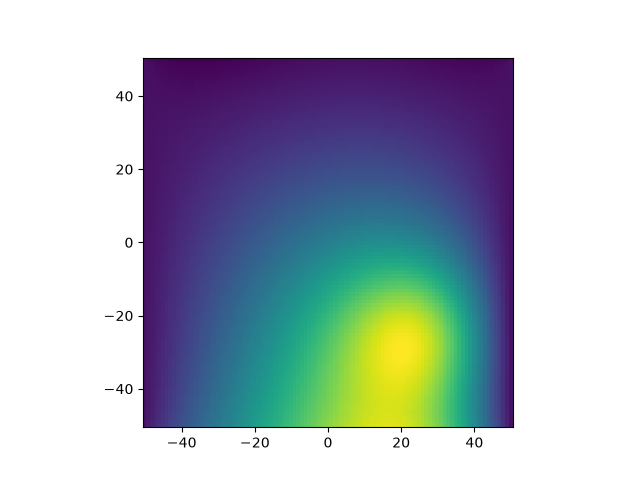
Here is a quick demo of what FIDELIOR can do. The following is a complete program that sets up and solves a Poisson equation in 2D on a 100x100 cell grid and plots and checks the result:
import numpy as np
from matplotlib import pyplot as  plt

import fidelior
import fidelior.core as fdo
from fidelior.core import end, half

from packaging.version import Version
fdoversion = Version(fdo.__version__)
assert fdoversion >= Version('0.8.0a'), "Upgrade FIDELIOR to run this file"

#%% Set up the simple geometry
N = 100
x1 = np.arange(N+1)-N/2; y1 = x1
box = fdo.Box((N, N))
x, y = box.ndgrid(x1, y1)[0:end, 0:end]

# Charge density
x0 = 25; y0 = -25; w = 10;
rho = np.exp(-((x-x0)**2+(y-y0)**2)/(2*w**2))

#%% Set up and solve the problem
problem = fdo.ExtArraySystem('Poisson', box[0:end, 0:end])
phi, = problem.unknowns

# These functions use 'fdo.diff(u, axis)' which is itself defined as
# def diff(u, axis): u.shift(half, axis) - u.shift(-half, axis)
def grad(u):
    return (fdo.diff(u, axis=0), fdo.diff(u, axis=1))
def div(A):
    return fdo.diff(A[0], axis=0) + fdo.diff(A[1], axis=1)

# Unknown electric field
E = grad(-phi)

# Boundary conditions (constraints with which the equation will be solved)
(phi[[0, end], :] == 0).fix('Dirichlet') # on left and right edges
(E[1][1:end-1, [half, end-half]] == 1).fix('Neumann') # Ey = 1 on top and bottom

# Set up and solve the equation
(div(E) == rho).fix(None)
problem.finalize()
phiv = phi(problem.solution)
print('Error =', np.max(abs(div(grad(-phiv))-rho)))

#%% Plot
plt.pcolor(x1, y1, phiv[:,:].T, shading='auto')
plt.gca().set_aspect('equal')
plt.show()
Notice that this script does not use any pre-defined finite-difference approximations to differential operators or boundary conditions. Operators grad, div and custom boundary conditions are defined by the user within these few lines. The script produces the following plot:
In summary, FIDELIOR allows the user
- to represent known and unknown functions as discretized values on a rectangular grid;
- to specify custom finite-difference operators which represent approximations to differential operators;
- to specify constraints (boundary conditions) on unknown discretized functions;
- to set up and solve linear PDE which take into account the given constraints.
Start using FIDELIOR
Capabilites of FIDELIOR are described in the manual and their usage is demonstrated by the included examples.
License

The project is free to use, however, it is protected by copyright. If you would like to use it in your publication, please cite the project webpage (https://gitlab.com/nleht/fidelior). A journal article is in preparation, and when it is available, it will have to be cited. If you have any suggestions for improvement (new features, bug fixes, etc.) please contact the the author, Nikolai G. Lehtinen, at 
The examples are distributed under a less restrictive CC BY 4.0 License 
Acknowledgements
This study was supported by the European Research Council under the European Union's Seventh Framework Programme (FP7/2007-2013)/ERC grant agreement number 320839 and the Research Council of Norway under contracts 208028/F50, 216872/F50, 223252/F50 (CoE), and 335162.
Older versions
See also the previous interface version and the demonstration of some of its capabilities. Some of the examples were converted to the new interface, others are in the process of such conversion.
The former location of the project was here and then here.
See also the 0.7.6 version. In the current version (0.8.x), the interface was further simplified to make it even more intuitive and GPU support was added.
1 maintainer

Metadata
1 maintainer
Release files for fidelior 0.8.3
For a detailed explanation of source distributions (sdists) and built distributions (wheels), please see the package formats documentation.
Source distribution (sdist)
| File | Size | Uploaded | Provenance | Actions |
|---|---|---|---|---|
| fidelior-0.8.3.tar.gz | 29.3 kB | Without provenance | Details for fidelior-0.8.3.tar.gz |
Built distribution (wheel)
| File | Interpreter | ABI | Platform | Actions Reset |
|---|---|---|---|---|
| fidelior-0.8.3-py3-none-any.whl | Python 3 | none | any | Details for fidelior-0.8.3-py3-none-any.whl |
Total release size: 58.0 kB
Release files / fidelior-0.8.3.tar.gz
| Download URL | fidelior-0.8.3.tar.gz |
|---|---|
| Size | 29.3 kB |
| Tags | Source |
|
SHA-256 checksum How to use checksums |
7143a5603acb5bd504efd4b7bc63b639c47a82d94efe2de80a1733f0f5d5c497
|
|
BLAKE2b-256 checksum How to use checksums |
9910fcdce72fdf88163404304406bb4d9c56cc011020b03b25829e32fa5198b3
|
| Upload date | |
|
Uploaded using Trusted Publishing? What is trusted publishing? |
No |
| Uploaded via |
twine/7.0.0 CPython/3.12.3
|
Release files / fidelior-0.8.3-py3-none-any.whl
| Download URL | fidelior-0.8.3-py3-none-any.whl |
|---|---|
| Size | 28.8 kB |
| Tags | Python 3 |
|
SHA-256 checksum How to use checksums |
78435eed39d7becc0ef9b858619545ab7a303b1fae50e2fbad7f3af0da3d7f04
|
|
BLAKE2b-256 checksum How to use checksums |
828a7bc79a550292f47c4d61130981563754cf1a9d6a2f3e89c889dd116b4215
|
| Upload date | |
|
Uploaded using Trusted Publishing? What is trusted publishing? |
No |
| Uploaded via |
twine/7.0.0 CPython/3.12.3
|
Security for fidelior 0.8.3
Provenance
Provenance describes where a file came from. On PyPI, provenance is shared via attestations, which provide a verifiable record of the build or publishing details. View details, limitations and caveats.
No provenance found
None of the files in this release were uploaded with provenance metadata.
A note on package security
PyPI is a repository for distributing packages, not a service for auditing them. While third-party security researchers and our staff do their best to detect and remove malicious packages, PyPI cannot guarantee the quality, security or suitability of any given package.
To learn more about protecting yourself from malicious actors, visit our package security documentation.














