
Fieldwork
Make sense of unfamiliar tables before you start analyzing them. Fieldwork is a Python toolkit for researchers working with pandas: see how records fit together, investigate surprising patterns, and decide what to explore next.
A dataset often arrives as one large export, with repeated records, unevenly filled columns, and little explanation of how it was assembled. Before choosing what to count or compare, you need to understand what each row represents. Fieldwork helps you build that understanding and follow what you find back to the records themselves.
See how the table fits together
A laboratory export might mix information about people, samples, instruments, and measurements across dozens of columns. In the example below, those relationships are buried in 960 rows and 43 columns. Starting with identifiers such as participant and specimen IDs, Fieldwork builds a map that helps you see which details belong together and where repeated measurements enter the picture.
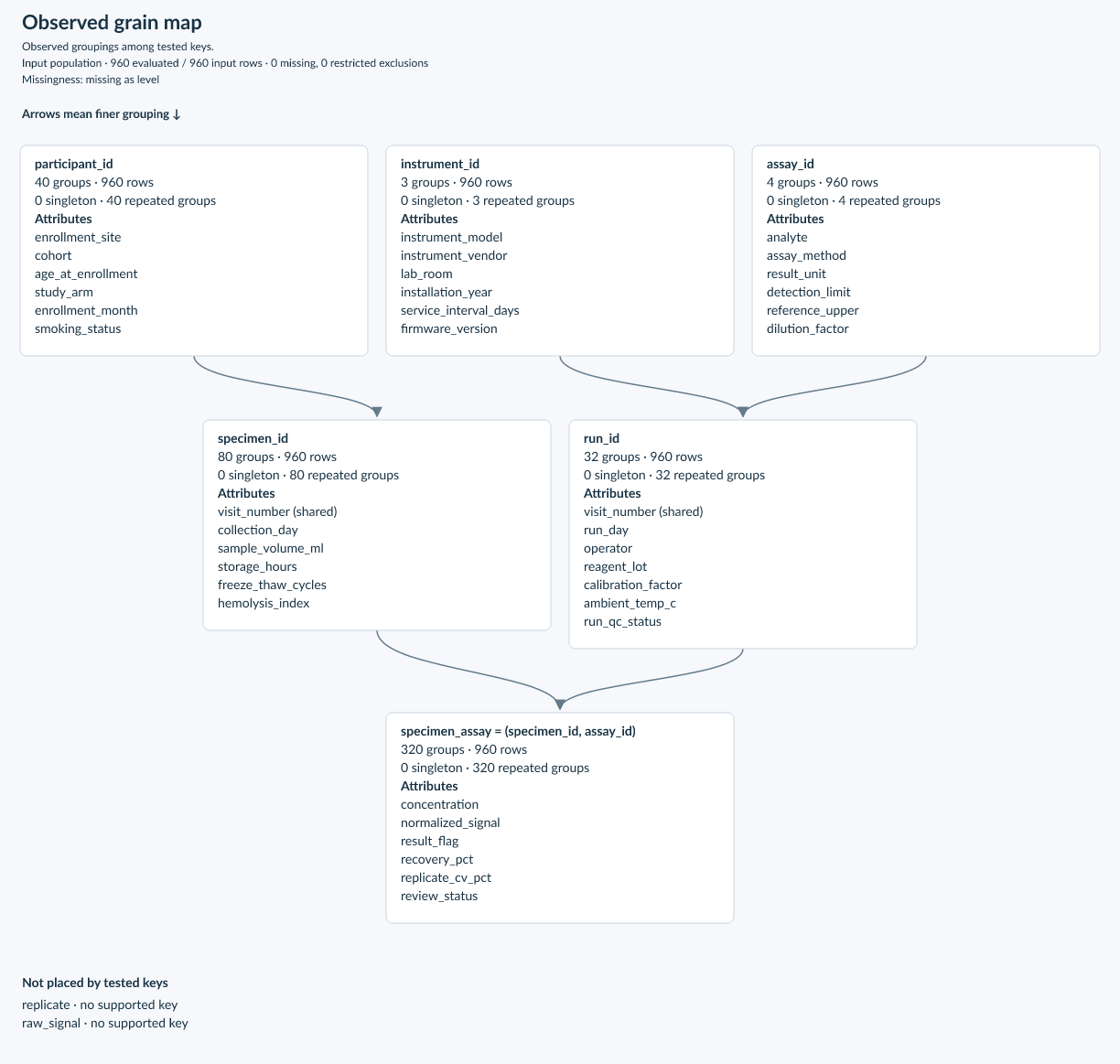
That gives you a starting point for deciding how to group the data, what to count, and which records deserve a closer look. Try the laboratory example to build this map yourself from synthetic data.
Follow the questions that emerge
- Get your bearings. Find groups of fields that appear together and identify how records repeat across the table.
- Investigate a surprise. Follow a pattern to the rows that support it or the exceptions that need explaining.
- Narrow your focus. Explore a particular site, group, or subset to understand how it differs from the rest of the data.
- Build on what you learn. Share findings and figures, save an investigation, and revisit it when the next delivery arrives.
Start with your own data
pip install fieldwork
Load a table and get an overview of patterns worth exploring:
import pandas as pd
import fieldwork as fw

df = pd.read_csv("your-data.csv")
overview = fw.explore(df)
print(overview)
For large tables, use fw.explore(df, progress=True) to see the current phase,
completed work, and elapsed time in a terminal or notebook.
Follow the first investigation to go from an overview to examining individual records, or work through the guided notebook. The documentation covers the tools you can use as your questions become more specific.
Fieldwork 0.3.1 is an alpha release for Python 3.11–3.14, with pandas and NumPy as its only required runtime dependencies.
See the 0.3.1 release notes for two presentation
fixes, and the 0.3.0 release notes for the simplified
result model, the separate explore and profile functions, faster analyses and the
saved-format and API changes. Results saved by 0.2.x must be recomputed.
For contributing and local setup, see the developer documentation. Fieldwork is MIT licensed; see NOTICE for project provenance.
1 maintainer

Metadata
1 maintainer
Release files for fieldwork 0.3.1
For a detailed explanation of source distributions (sdists) and built distributions (wheels), please see the package formats documentation.
Source distribution (sdist)
| File | Size | Uploaded | Provenance | |
|---|---|---|---|---|
| fieldwork-0.3.1.tar.gz | 1.5 MB | Without provenance | Details |
Built distribution (wheel)
| File | Interpreter | ABI | Platform | Reset |
|---|---|---|---|---|
| fieldwork-0.3.1-py3-none-any.whl | Python 3 | none | any | Details |
Total release size: 1.6 MB
Release files / fieldwork-0.3.1.tar.gz
| Download URL | fieldwork-0.3.1.tar.gz |
|---|---|
| Size | 1.5 MB |
| Tags | Source |
|
SHA-256 checksum How to use checksums |
8cc3bb07ab6eb4024f40d64bc4b418ef033e0f9dba94c4914796ffb4ecbf80b9
|
|
BLAKE2b-256 checksum How to use checksums |
f7f3d8420b373912c022f1bc24a6906a00b7d7346906307f4663ade1eb9ffa74
|
| Upload date | |
|
Uploaded using Trusted Publishing? What is trusted publishing? |
Yes |
| Uploaded via |
uv/0.11.26 {"installer":{"name":"uv","version":"0.11.26","subcommand":["publish"]},"python":null,"implementation":{"name":null,"version":null},"distro":{"name":"macOS","version":null,"id":null,"libc":null},"system":{"name":null,"release":null},"cpu":null,"openssl_version":null,"setuptools_version":null,"rustc_version":null,"ci":true}
|
Release files / fieldwork-0.3.1-py3-none-any.whl
| Download URL | fieldwork-0.3.1-py3-none-any.whl |
|---|---|
| Size | 128.2 kB |
| Tags | Python 3 |
|
SHA-256 checksum How to use checksums |
a08c6a6899d41c1cd9fc00751c83ea4f6e0bf4d8cba86656ea30ec2d6f25d483
|
|
BLAKE2b-256 checksum How to use checksums |
9b7488a93f081146a429c70f2adc2d0edded99bcdfaf4c85b9df9a74d228a673
|
| Upload date | |
|
Uploaded using Trusted Publishing? What is trusted publishing? |
Yes |
| Uploaded via |
uv/0.11.26 {"installer":{"name":"uv","version":"0.11.26","subcommand":["publish"]},"python":null,"implementation":{"name":null,"version":null},"distro":{"name":"macOS","version":null,"id":null,"libc":null},"system":{"name":null,"release":null},"cpu":null,"openssl_version":null,"setuptools_version":null,"rustc_version":null,"ci":true}
|
Security for fieldwork 0.3.1
Provenance
Provenance describes where a file came from. On PyPI, provenance is shared via attestations, which provide a verifiable record of the build or publishing details. View details, limitations and caveats.
No provenance found
None of the files in this release were uploaded with provenance metadata.
A note on package security
PyPI is a repository for distributing packages, not a service for auditing them. While third-party security researchers and our staff do their best to detect and remove malicious packages, PyPI cannot guarantee the quality, security or suitability of any given package.














