
FiftyOne: the open-source tool for building high-quality datasets and computer vision models


Project description


The open-source tool for building high-quality datasets and computer vision models
Website • Docs • Try it Now • Tutorials • Examples • Blog • Community








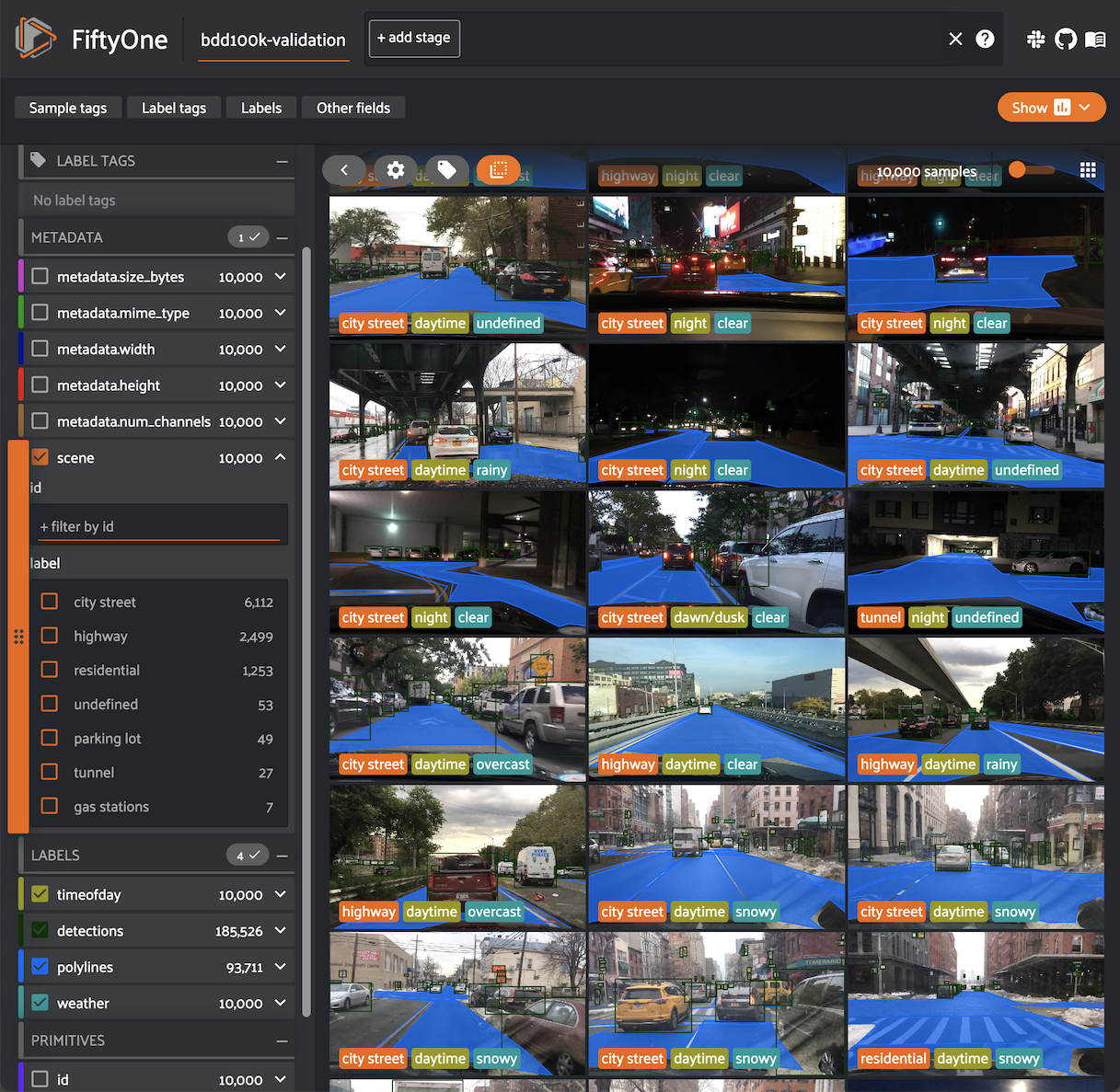
Nothing hinders the success of machine learning systems more than poor quality data. And without the right tools, improving a model can be time-consuming and inefficient.
FiftyOne supercharges your machine learning workflows by enabling you to visualize datasets and interpret models faster and more effectively.
Use FiftyOne to get hands-on with your data, including visualizing complex labels, evaluating your models, exploring scenarios of interest, identifying failure modes, finding annotation mistakes, and much more!
You can get involved by joining our Slack community, reading our blog on Medium, and following us on social media:


Installation
You can install the latest stable version of FiftyOne via pip:
pip install fiftyone
Consult the installation guide for troubleshooting and other information about getting up-and-running with FiftyOne.
Quickstart
Dive right into FiftyOne by opening a Python shell and running the snippet below, which downloads a small dataset and launches the FiftyOne App so you can explore it:
import fiftyone as fo
import fiftyone.zoo as foz

dataset = foz.load_zoo_dataset("quickstart")
session = fo.launch_app(dataset)
Then check out this Colab notebook to see some common workflows on the quickstart dataset.
Note that if you are running the above code in a script, you must include
session.wait() to block execution until you close the App. See
this page
for more information.
Documentation
Full documentation for FiftyOne is available at fiftyone.ai. In particular, see these resources:
Examples
Check out the fiftyone-examples repository for open source and community-contributed examples of using FiftyOne.
Contributing to FiftyOne
FiftyOne is open source and community contributions are welcome!
Check out the contribution guide to learn how to get involved.
Installing from source
The instructions below are for macOS and Linux systems. Windows users may need to make adjustments. If you are working in Google Colab, skip to here.
Prerequisites
You will need:
- Python (3.7 or newer)
- Node.js - on Linux, we recommend using nvm to install an up-to-date version.
- Yarn - once Node.js is installed, you can install
Yarn via
npm install -g yarn - On Linux, you will need at least the
opensslandlibcurlpackages. On Debian-based distributions, you will need to installlibcurl4orlibcurl3instead oflibcurl, depending on the age of your distribution. For example:
# Ubuntu
sudo apt install libcurl4 openssl

# Fedora
sudo dnf install libcurl openssl
Installation
We strongly recommend that you install FiftyOne in a virtual environment to maintain a clean workspace. The install script is only supported in POSIX-based systems (e.g. Mac and Linux).
First, clone the repository:
git clone https://github.com/voxel51/fiftyone
cd fiftyone
Then run the install script:
bash install.bash
NOTE: The install script adds to your nvm settings in your ~/.bashrc or
~/.bash_profile, which is needed for installing and building the App
NOTE: When you pull in new changes to the App, you will need to rebuild it,
which you can do either by rerunning the install script or just running
yarn build in the ./app directory.
Upgrading your source installation
To upgrade an existing source installation to the bleeding edge, simply pull
the latest develop branch and rerun the install script:
git checkout develop
git pull
bash install.bash
Developer installation
If you would like to
contribute to FiftyOne,
you should perform a developer installation using the -d flag of the install
script:
bash install.bash -d
Source installs in Google Colab
You can install from source in Google Colab by running the following in a cell and then restarting the runtime:
%%shell

git clone --depth 1 https://github.com/voxel51/fiftyone.git
cd fiftyone
bash install.bash
Docker installs
Refer to these instructions to see how to build and run Docker images containing source or release builds of FiftyOne.
Generating documentation
See the docs guide for information on building and contributing to the documentation.
Uninstallation
You can uninstall FiftyOne as follows:
pip uninstall fiftyone fiftyone-brain fiftyone-db fiftyone-desktop
Citation
If you use FiftyOne in your research, feel free to cite the project (but only if you love it 😊):
@article{moore2020fiftyone,
  title={FiftyOne},
  author={Moore, B. E. and Corso, J. J.},
  journal={GitHub. Note: https://github.com/voxel51/fiftyone},
  year={2020}
}
Release history Release notifications | RSS feed


Download files
Download the file for your platform. If you're not sure which to choose, learn more about installing packages.
Source Distribution
Built Distribution
Filter files by name, interpreter, ABI, and platform.
If you're not sure about the file name format, learn more about wheel file names.
Copy a direct link to the current filters
File details
Details for the file fiftyone-0.18.0rc0.tar.gz.
File metadata
- Download URL: fiftyone-0.18.0rc0.tar.gz
- Upload date:
- Size: 2.2 MB
- Tags: Source
- Uploaded using Trusted Publishing? No
- Uploaded via: twine/4.0.1 CPython/3.8.10
File hashes
| Algorithm | Hash digest | |
|---|---|---|
| SHA256 |
86d117414894756f8b266b67256903814a9c4815f73ef35b2b69f09cf88a0533
|
|
| MD5 |
bf8b6b2e1b65ccbdf392e70266b40c24
|
|
| BLAKE2b-256 |
59e27f0651e3d57bbf3a0d33a147d21f53b541cb75dd6c3be24fd4c4770286c6
|
File details
Details for the file fiftyone-0.18.0rc0-py3-none-any.whl.
File metadata
- Download URL: fiftyone-0.18.0rc0-py3-none-any.whl
- Upload date:
- Size: 2.3 MB
- Tags: Python 3
- Uploaded using Trusted Publishing? No
- Uploaded via: twine/4.0.1 CPython/3.8.10
File hashes
| Algorithm | Hash digest | |
|---|---|---|
| SHA256 |
32170941419b00ae301d3adf3ca5dbb154f52c9306ce702338ecf3ec5596c4d5
|
|
| MD5 |
7e8faa15f8a0bf300e8d504d0717c600
|
|
| BLAKE2b-256 |
1849ab866b2373aa28c2c2c2527389104314e19f67070075762e51192142c047
|






