
figcite
Keep the DOI and citation attached to an image from the moment you capture it through to the slide it lands on — and out the other side as a credits slide, a bibliography, and a manifest.
A guessed citation never reaches a slide. Everything below follows from that one rule.
pip install figcite            # add '[match]' to identify cropped figures (pulls opencv)

figcite watch                  # Windows: file every snip you take, grounded when it can be
figcite pending                # what it could NOT ground -- confirm or dismiss each one
figcite audit  deck.pptx       # which pictures in a deck have a source
figcite apply  deck.pptx -o deck.cited.pptx   # alt-text, captions, credits slide, manifest
flowchart LR
    A[Snip / PDF crop /<br>own plot / download] --> B{Source<br>grounded?}
    B -- yes --> C[Filed <b>confirmed</b><br>DOI · citation · licence]
    B -- no --> D[Filed <b>unconfirmed</b><br>app · window title · URL · time]
    D --> E[figcite pending]
    E -- confirm --> C
    E -- dismiss --> F[Resolved:<br>not attributable]
    C --> G[Insert into deck]
    G --> H[figcite audit / apply]
    H --> I[Alt-text · captions ·<br>credits slide · manifest · BibTeX]
Contents
- How it works
- Capturing images
- Resolving what could not be grounded
- Where the DOI comes from
- Into the deck
- Reverse lookup: which paper is this figure from?
- Bibliography and licensing
- Command reference
- Install, tests, and the push gate
- Known limits
How it works
Provenance rides along in three places, and they fail differently:
| Layer | Survives | Dies when |
|---|---|---|
1. Embedded in the image bytes (PNG tEXt/XMP, JPEG EXIF) |
Insert → Picture | clipboard paste, "Compress Pictures" — anything that re-encodes |
2. Shape alt-text in the .pptx |
edits, save/reopen, export to tagged PDF | someone deletes and re-inserts the picture |
| 3. Central manifest keyed by sha256 and perceptual dhash | everything above failing | the image is heavily cropped or redrawn |
figcite writes all three. Matching a slide image back to its source tries
them in that order; a dhash match is reported as fuzzy and treated as
unconfirmed.
The rule that shapes the design
DOIs read out of the PDF you cropped from are grounded and marked
confirmed. DOIs inferred from a window title are not, and stay behind
figcite pending until you pick one.
This isn't hypothetical caution. Asking CrossRef for the exact title
"Array programming with NumPy" returns a review of that paper as the top
hit, not the paper — score 37.2, ahead of everything else. A tool that
auto-accepted the top hit would have put the wrong citation on a slide with
full confidence.
tests/test_live.py::test_crossref_title_search_is_untrustworthy_by_design
pins that behaviour so the policy can be revisited if CrossRef ever improves.
Capturing images
Four ways an image arrives. Each one ends with a tagged file you insert into the deck instead of the original.
1. A snip or screenshot (Win+Shift+S)
figcite watch                     # leave running; catches every image you copy
figcite autostart                 # or keep it running across logons
A snip from a browser tab whose title is in your history, or from a local
PDF, is grounded and filed automatically — no step. Everything else, including
a browser tab the history cannot place, lands in figcite pending (next
section).
2. A figure inside a paper PDF
The DOI is read from the PDF itself.
figcite images paper.pdf --page 3                              # list embedded figures + bboxes
figcite grab   paper.pdf --page 3 --image-index 0 -o fig.png
figcite grab   paper.pdf --page 3 --rect 84,126,505,730 --dpi 300 -o fig.png
figcite grab   paper.pdf --page 3 --rect 0.1,0.1,0.9,0.5 --frac   # fractions of the page
3. Your own generated plots
Register at the call site, or patch savefig once and let ordinary code file
itself. Either way the git commit and working directory are stamped in.
import figcite.mplhook as fc

fc.savefig(fig, "out.png", cite="This work", dataset="rnaseq_v3")

# ...or, once, at the top of the script:
fc.install(dataset="rnaseq_v3")
fig.savefig("panel_a.png")      # now filed, no call-site change
4. A file you downloaded
figcite tag downloaded.png --doi 10.1111/mec.12953
figcite tag screenshot.png --url https://example.org/page --cite "Example Org, 2026"
figcite register existing.png --doi 10.1111/mec.12953   # record provenance WITHOUT touching the file
Resolving what could not be grounded
Every clipboard capture is filed, whether or not a citation could be established:
- Grounded (a DOI from the page's URL, or from the PDF the snip came from) → filed confirmed, with the full citation and license.
- Everything else → filed unconfirmed, carrying what was actually observed: which app was in front, what the window title said, what URL was open, and when.
That second case is the point of the design. A screenshot with no resolvable DOI still knows it came from Firefox showing a particular page at a particular minute, and an audit reports that instead of "no source recorded". It is a trail, not a citation, and it is stored as unconfirmed so nothing downstream can print it as one.
figcite pending                                 # the queue, newest first
figcite confirm m0 --doi 10.1111/nph.71477      # you know the source
figcite confirm m0 --pick 1                     # accept a listed candidate
figcite confirm m0 --own-work                   # it is your own figure
figcite dismiss m0 --reason "blank region, not a figure"   # it is not attributable
figcite dismiss --undo d0                       # changed your mind
dismiss is the third terminal state beside confirmed, not a form of it: a
dismissed record carries no citation and can never read as sourced. The reason
is required, because a dismissal with no reason is indistinguishable from a
mistake six months later.
The browser UI
figcite ui --open
Resolve pending captures and audit a deck by looking at the pictures rather than reading paths. Loopback only (127.0.0.1), no auth, single user.
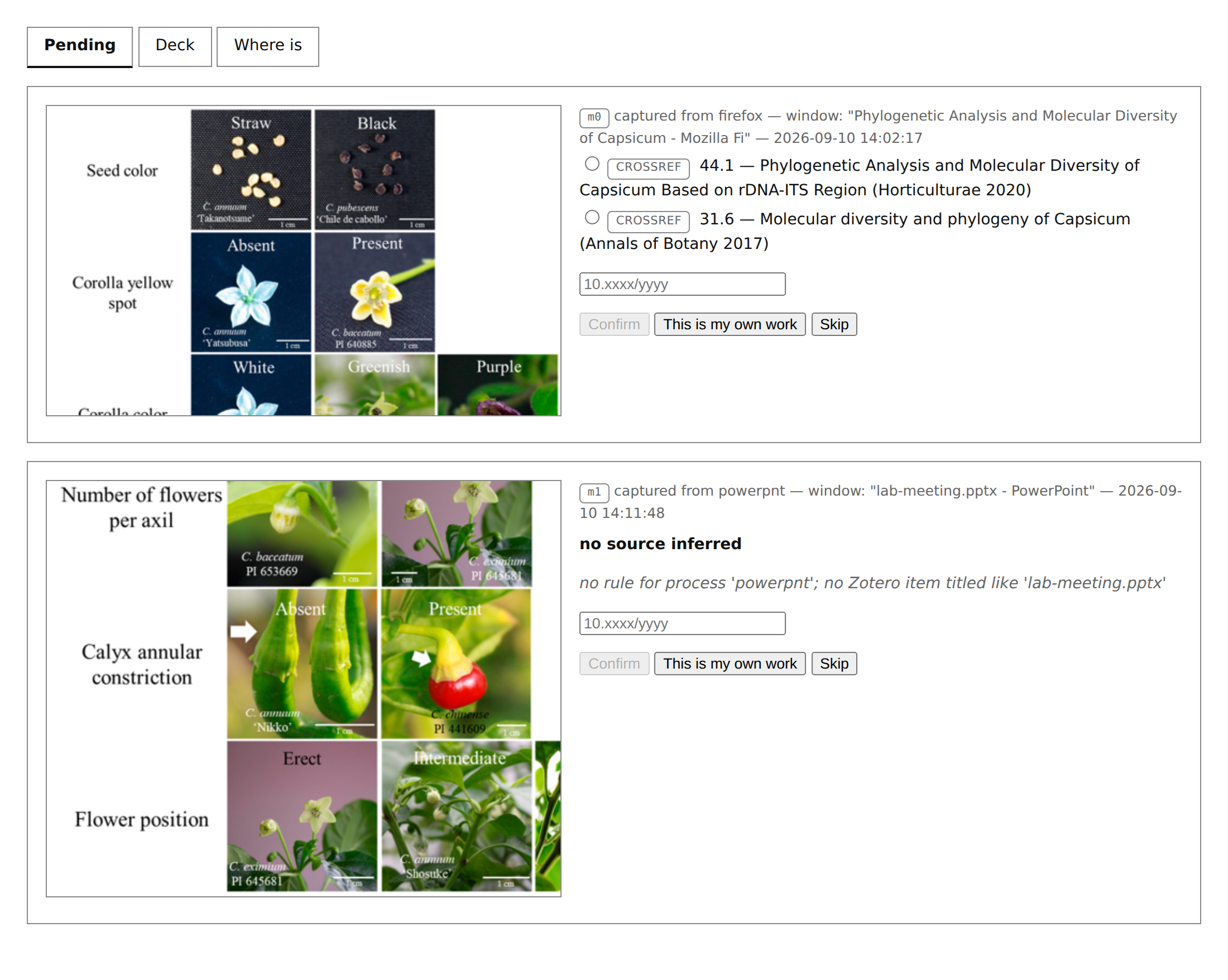
The pending queue in figcite ui. Top: a Firefox snip whose title produced two
CrossRef candidates, neither accepted for you. Bottom: a snip out of a
PowerPoint window, which no rule can ground.
On WSL, open the printed
http://127.0.0.1:<port>literally — notlocalhost. Windows resolveslocalhostto the IPv6::1first, and WSL2 mirrored networking does not forward the host's IPv6 loopback into the VM, solocalhost:<port>hangs until it times out with nothing logged.figcite uialready prints and opens the address that works.
Where the DOI comes from
flowchart TD
    T[Foreground window title<br>at snip time] --> Z{In your<br>Zotero library?}
    Z -- exact, unambiguous title --> G[Grounded · confirmed]
    Z -- ambiguous title --> Q
    Z -- no --> H{Browser?<br>title in history?}
    H -- exact row --> U[URL of the page on screen]
    H -- nearest visit only --> Q
    U --> P["DOI in URL → publisher pattern →<br>PII / PubMed ID → citation_doi meta"]
    P -- DOI verified<br>against CrossRef --> G
    H -- no / private window --> Q[figcite pending<br>+ candidates as leads]
    P -- no DOI --> Q
    T -- a PDF viewer --> F[Read the DOI out of the PDF itself]
    F --> G
Your Zotero library resolves first
A window title is searched against your own library before CrossRef, because CrossRef title search is a search of ~150M works that reliably ranks a review above the paper it reviews, while your library is a few thousand works you chose. Same query, far better prior — and a hit is a paper you demonstrably have.
figcite zotero configure --api-key <key> --library-id <id> --type group
figcite zotero status        # how much of the library can actually resolve
figcite zotero sync          # refresh the local snapshot (auto after 7 days)
figcite zotero resolve "Some paper title"
Credentials are written to ~/.config/figcite/zotero.json mode 0600, not
exported from a shell rc. That is not tidiness: the clipboard watcher is
started by a Windows launcher running wsl.exe … bash -lc, and that shell
inherits no exports at all — measured, every ZOTERO_* variable came back
unset. An env-only credential would leave the watcher unable to resolve
anything, silently.
Only an exact, unambiguous title match is treated as grounded — the same
bar the browser-history route uses. Measured on a real 4,824-item library: 536
items resolve to a DOI (147 from the DOI field, 389 from a doi.org URL — most
items are webpage, which has no DOI field), of which 497 have an unambiguous
title. Twenty-four items share the title "Redirecting"; those ground nothing
and offer candidates instead.
Browser snips are grounded from history
The watcher records the foreground window title at snip time. For a browser that title joins exactly onto a row in the browser's own history, giving the URL of the page that was on screen; the DOI then comes from that URL. Because the URL is the address of the document rather than an inference about which paper was meant, it can be auto-confirmed and filed with no interaction.
Resolution paths, tried in order, each verified against CrossRef:
- The DOI is in the URL (
/doi/10.1111/nph.71477) — offline, instant. Publisher tails like/full,.pdf,/abstractandv2are stripped. - A known publisher URL pattern (
nature.com/articles/s41598-…→10.1038/…). - A publisher article ID: Elsevier/Cell PII, resolved through CrossRef's
alternative-idfilter. ScienceDirect, OUP and Wiley return 403 to an automated page fetch; the CrossRef route works anyway. Cell Press punctuates the PII (S1674-2052(18)30156-4) and Elsevier does not; both normalise to the same identifier. - PubMed/PMC identifiers, via NCBI (
esummaryfor a PMID, the ID converter for a PMCID). - Failing all of those, the page's own
<meta name="citation_doi">— which only works on publishers that serve bots (Nature and PLOS do; OUP, Wiley and bioRxiv do not).
Measured against a real 82-page reading history: 61% auto-grounded without any publisher page fetch (34% from the URL alone, 27% via publisher/PubMed IDs). Several of the remainder are journal homepages and GEO accession pages that legitimately have no DOI.
Only an exact, unambiguous title match grounds a capture. If the title is
not in history, figcite falls back to the visit nearest the capture time — and
that is a guess about which tab was showing, so it stays unconfirmed and goes
to figcite pending. Private-browsing windows leave no history and always
land there too.
A failed lookup is never reported as an absence of provenance. CrossRef
allows one request per second; a loop that trips that limit used to return
"no DOI" for perfectly resolvable papers. Lookups are throttled, and a failure
surfaces as LOOKUP FAILED … retry rather than silently filing the image as
unsourced.
Into the deck
Insert the tagged file into your deck (not the original), then:
figcite audit  deck.pptx                     # coverage report, changes nothing
figcite apply  deck.pptx -o deck.cited.pptx  # alt-text + captions + credits + manifest
apply is idempotent — re-running replaces its own captions and credits slide
rather than stacking a second copy.
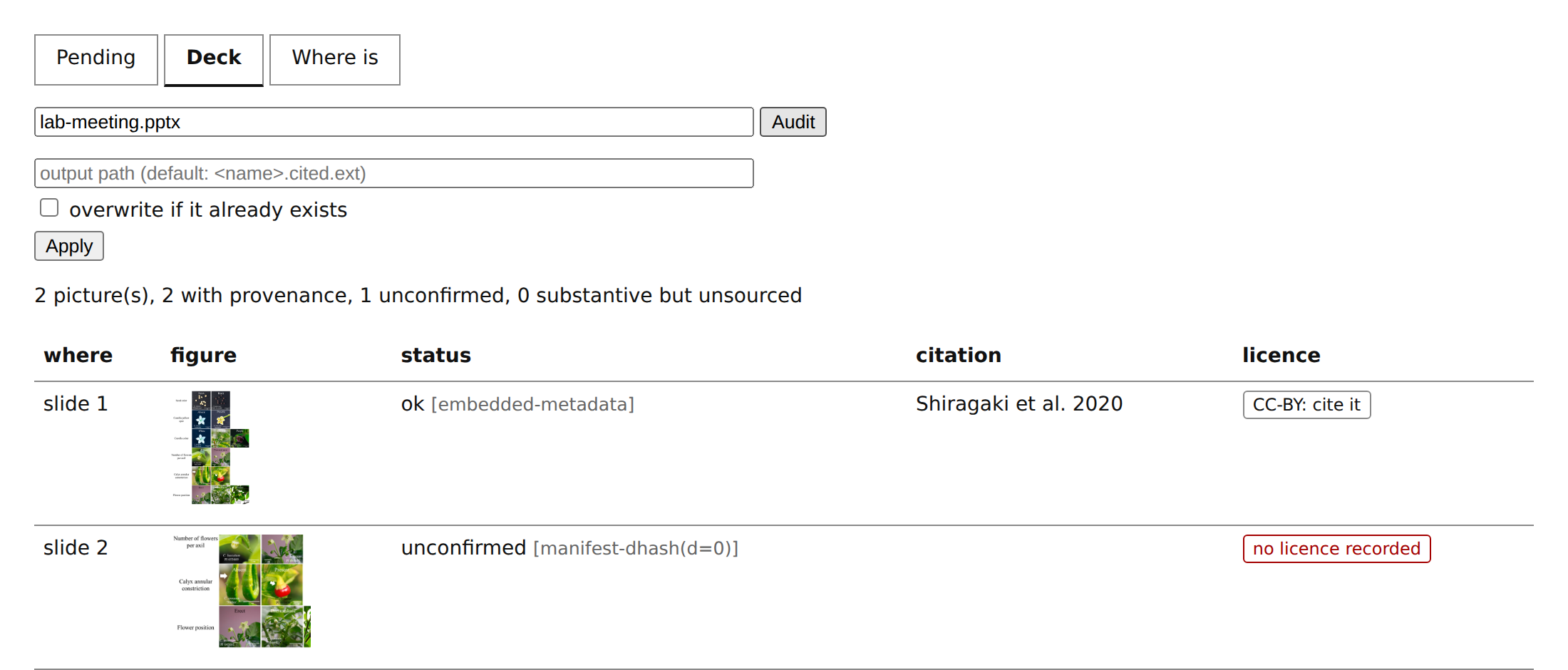
The same audit in the browser. Slide 1 matched by the metadata embedded in the tagged file; slide 2 matched perceptually to a capture that is still pending, so it is reported unconfirmed and gets no credit line.
What apply writes
- Alt-text on every picture: full citation, DOI, license, reuse verdict.
- A small grey caption under each picture:
[1] Shiragaki et al. 2020 · doi:…(--no-captionsto skip). - A numbered "Image credits" slide at the end, paginated at 8 entries per
slide (
--no-creditsto skip). deck.cited.csv/.json— one row per picture, including the ones with no source.
Images with no recorded provenance are named on the credits slide, not
silently dropped: ⚠ 1 image(s) on slide(s) 2 have no recorded source. (The
PDF credits page says page(s) and drops the glyph, which its base font lacks.)
Pictures under 1 inch in both dimensions are treated as decorative and exempt
(--min-inches).
PDF output: Affinity, Illustrator, InDesign, Slides, LaTeX
audit and apply take a .pdf as well as a .pptx, so anything that
exports PDF is covered without parsing a proprietary document format:
figcite audit  board.pdf                     # coverage report, changes nothing
figcite apply  board.pdf -o board.cited.pdf  # captions + credits page + manifest
A PDF export strips embedded image metadata and re-encodes the pixels, so layers 1 and 2 are both gone. The perceptual hash survives — recovery runs entirely through layer 3, which is why the manifest matters more here than anywhere else.
In Affinity specifically, keep placed images linked rather than embedded. The Resource Manager then shows every image's path, the files keep their own metadata and sidecars, and provenance never depends on hashing at all.
![The bottom of a figure on an exported PDF page, with the small grey caption figcite wrote underneath: [1] Shiragaki et al. 2020 · doi:10.3390/horticulturae6040087](https://pypi-camo.freetls.fastly.net/d20538d18367045b147dfac565593a88cd8e2dae/68747470733a2f2f7261772e67697468756275736572636f6e74656e742e636f6d2f6d75736861726e612f666967636974652f6d61737465722f646f63732f696d672f7064662d63617074696f6e2d7a6f6f6d2e706e67)
The caption apply wrote under a figure on a PDF exported from Affinity.

The appended credits page. The unsourced image on the same board is named, not dropped.
How much export mangling survives — measured on 14 real figures × 14 export conditions
300/150/96/72 DPI downsampling × JPEG quality 95/75/50, plus CMYK roundtrips. Affinity's most aggressive preset ("PDF for web") downsamples anything above 108 DPI to 72.
| Transform | Recovered | False matches |
|---|---|---|
| Any downsample tested, down to 64px wide | 14/14 | 0 |
| JPEG quality down to 10 | 14/14 | 0 |
| CMYK roundtrip (print export) | 14/14 | 0 |
| Crop 10% off each edge | 0/14 | 0 |
| Rotate 90° / horizontal flip | 0/14 | 0 |
Worst self-distance under any encoding transform was 5; the nearest pair of different figures sat 15 apart (median 26). The threshold of 6 therefore has roughly 3× headroom — it is measured, not guessed.
So compression and resolution are not the risk. Geometry is: cropping, rotating or flipping an image inside the design app moves every cell of the difference hash and recovery fails. It fails safe — a cropped figure reports no match rather than matching the wrong source — but the provenance is lost. That is another reason to keep images linked in Affinity: a link points at the original file no matter how the placed copy is cropped or rotated.
Verified against PDFs we did not write — Ghostscript and ImageMagick
The table above was produced entirely in-process: PyMuPDF wrote the fixtures, PyMuPDF read them back, and the transforms were applied in PIL. That is self-consistent by construction — it shows the matcher agrees with itself, and cannot show that a PDF from a real exporter is readable at all.
So the same three real project figures were run through ImageMagick and
Ghostscript (/screen, /ebook, /prepress — /screen downsamples to
72 DPI and re-encodes as JPEG, roughly a design app's "PDF for web"). All
three figures recovered through every preset at a perceptual distance of 0–1
against a threshold of 6, and a deliberately unregistered fourth figure
correctly matched nothing.
That run found a real defect. Ghostscript promotes an image's soft mask (its greyscale alpha channel) to a top-level image object, where ImageMagick keeps it as a child. figcite counted the mask as a figure, so the same document audited as 6 images under one writer and 4 under the other, reporting phantom unsourced images. Masks are now excluded by xref, and both writers agree.
Affinity itself is still unverified: it is installed here (Canva.Affinity 3.2.3) but has no scriptable export, so the check needs someone to place
three images and press Export. The staged files are in
Downloads/figcite-affinity-test/.
Reverse lookup: which paper is this figure from?
The reverse of the usual direction. You have an image — a crop from a talk, a figure with no sidecar, something a collaborator sent — and you want to know which paper it is from.
figcite corpus build          # index the open-access figures of your library
figcite corpus status         # how much is indexed
figcite whereis fig.png       # which paper is this from?
corpus build walks the DOIs already in your library, asks Europe PMC which
have an open-access PMC copy, and downloads those figures with their captions
and licences. Every DOI produces an outcome, including the ones that cannot be
indexed, because a coverage count without the reasons is the number that hides
the bug — you cannot tell "not in PMC" from "the fetch broke" from "I never
ran it".
Only open-access papers can be indexed at all. Measured against this author's 535-DOI library:
| 226 (42%) | open access — indexable |
| 143 (27%) | in Europe PMC, no PMC copy |
| 115 (22%) | not in Europe PMC |
| 51 (10%) | PMC copy, but not open access |
So expect to reverse-source a bit under half your library, and expect the
misses to be the paywalled half. A figure that is not found is very often a
figure that could never have been indexed, which is why whereis reports
why it could not answer rather than a bare "no".
 |
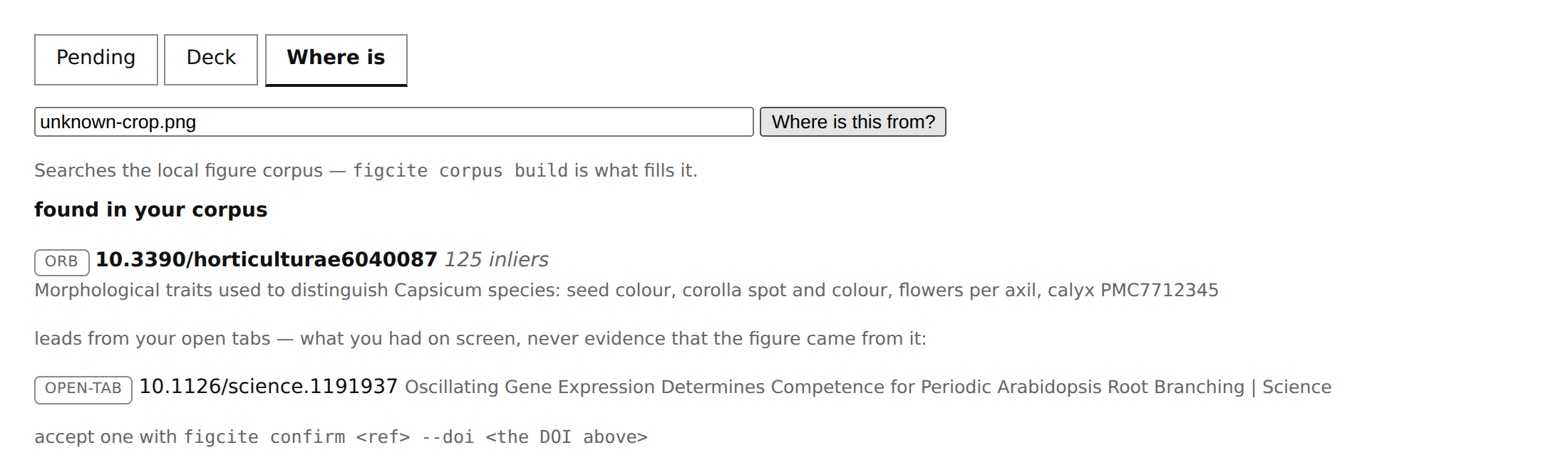 |
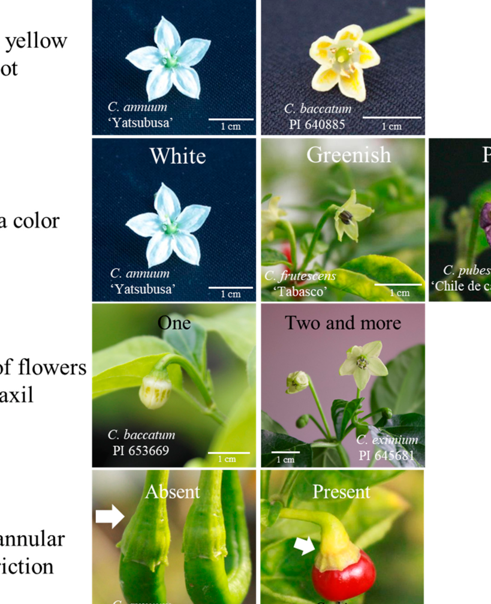
Left: the query, a crop of the middle of a figure, downscaled, carrying no metadata. Right: identified by ORB keypoints. The open browser tab underneath is listed as a lead, deliberately apart from the pixel match.
It answers in three ways, never two
match, no-match, and could-not-decide are kept apart everywhere in this
feature. "I searched your corpus and this figure is not in it" and "I could
not look" license completely different next actions, and collapsing them is
how a tool ends up asserting an absence it never observed. A could-not-decide
always carries its reason — the corpus is empty, the image is too smooth to
identify, the two best candidates are too close to call.
A match is a candidate, never a citation. whereis prints DOIs for you to
confirm; nothing is written to a record on the strength of a pixel match.
In the browser
figcite ui carries the same search on its Where is tab — the same
service.whereis() call the CLI makes, so the two front ends cannot drift.
One thing the screen shows that the CLI does not: your open browser tabs are listed separately, under the pixel matches, labelled as leads. A tab is a note about what you had on screen, never evidence that a figure came from it — and since the tabs are returned even when the corpus search found nothing, a screen that listed them together would turn "not in your corpus" into what looks like a hit.
opencv is optional
pip install 'figcite[match]'
Without it, matching is perceptual-hash only, which recognises the same figure rescaled or re-encoded but is blind to crops — a panel cut out of a figure hashes to something unrelated. With opencv, cropped panels are matched by ORB keypoints scored on RANSAC inliers, which measured a median 38.9× separation between the true source and an unrelated document where raw match counts gave only 1.5×. Measured end to end on a real six-figure paper, two crop positions each: 11 matched, 1 declined for too few features, 0 wrong.
Zero wrong is the number that matters. A tool whose whole premise is refusing to guess must not confidently name the wrong paper.
The same index, queried backwards
Because the corpus knows which figures appear in which papers, a deck audit can also flag a figure you credited to one paper that appears in another:
also published under 10.1234/other
It reports and never rewrites. Republication, a reused panel and a genuine miscredit are indistinguishable from the pixels, and only you know which.
Bibliography and licensing
Handing the bibliography to ghostcite
figcite bib deck.pptx -o deck.bib --check # emits BibTeX, then runs ghostcite
BibTeX, not a DOI list, and the distinction is the whole point: ghostcite catches ghost citations by comparing the byline you claim against the one CrossRef reports, and a bare DOI list claims nothing. Measured — two real DOIs as a plain list produced 0 findings; the same two as BibTeX with one fabricated author produced exactly 1.
Unconfirmed records are excluded by default. Those are a machine's guess about which paper a figure came from, and no bibliography checker can catch that error — the byline would match the DOI perfectly, because both came from CrossRef. Every skip is counted in the output, because a bibliography that is short because entries vanished looks identical to one that is short because the deck was small.
Licensing
Every record carries the publisher's license URL from CrossRef and a conservative reuse verdict:
public-domain · reuse-ok-attribution-required ·
reuse-ok-share-alike-attribution-required · noncommercial-only ·
restricted-no-derivatives · publisher-terms-check-required ·
unknown-ask-publisher
Nothing is assumed reusable by default. CrossRef's retraction flag is checked too, and a retracted source is labelled as such.
Use --adapted-from <DOI> when the figure you cropped was itself reproduced
from an earlier paper — the PDF's own DOI cannot tell you that.
Command reference
| Command | What it does |
|---|---|
| Capture | |
watch |
watch the Windows clipboard for snipped images |
autostart |
keep the clipboard watcher running across logons |
images <pdf> --page N |
list embedded images on a PDF page with bboxes |
grab <pdf> |
crop a figure out of a PDF, DOI attached |
tag <image> |
attach provenance to an existing image file |
register <image> |
record provenance for an existing image without modifying it |
| Resolve | |
pending |
list captured-but-unconfirmed clipboard images |
confirm <ref> |
attach a DOI to a pending capture (--doi, --pick, --own-work) |
dismiss <ref> --reason |
resolve a capture as not attributable; --undo restores |
ui |
browser UI for pending captures, decks, and reverse lookup |
| Sources | |
zotero configure / sync / status / resolve |
resolve against your Zotero library first |
resolve <doi> |
show the citation + license for a DOI |
search "<title>" |
find a DOI by title — candidates only, never an answer |
| Reverse lookup | |
corpus build / status |
the local figure index whereis searches |
whereis <image> |
find which paper a figure came from |
| Decks | |
audit <deck> |
report provenance coverage of a .pptx or .pdf |
apply <deck> -o out |
write alt-text, captions, credits slide, manifest |
bib <deck> -o out.bib |
emit BibTeX for the works a deck's figures came from |
figcite <command> --help for the full options of any of them.
Install, tests, and the push gate
pip install figcite              # dhash matching, all the deck tooling
pip install 'figcite[match]'     # + opencv, for cropped-figure identification
figcite --version
Python 3.10+. The clipboard watcher needs Windows: it is a PowerShell
listener that figcite starts from WSL through powershell.exe. Everything
else runs anywhere.
Tests
python3 -m pytest tests/ -q -m "not live"   # 1203 tests, no network
python3 -m pytest tests/ -q -m live         # 30 tests: real CrossRef, real PDF,
                                            # real clipboard, real ghostcite,
                                            # real Ghostscript/ImageMagick,
                                            # real Microsoft PowerPoint via COM,
                                            # real Europe PMC + PMC Open Data
The live tests drive the actual system boundaries — they are the only ones that
can catch a broken one, since the synthetic tests only prove the code is
self-consistent with itself. They are opt-in, not opt-out. The clipboard
test overwrites your clipboard with a small test bitmap while it runs, and the
PowerPoint test drives the running PowerPoint via COM, so a bare pytest
deliberately excludes them.
Before every push
The unit suite, ruff, and pyright run automatically on git push, via a hook
in the repo:
git config core.hooksPath .githooks # once per clone; hooks are not cloned
This is deliberately not GitHub Actions: a pre-push hook gives a
one-developer repo the same signal with no queue, no runner and no minutes. It refuses the
push if anything fails; git push --no-verify overrides it when you mean to.
Image credits for this README
The figure that appears in the screenshots, crops and PDF renders above is Figure 1 of Shiragaki, K. et al. (2020), Phylogenetic Analysis and Molecular Diversity of Capsicum Based on rDNA-ITS Region, Horticulturae 6(4): 87, https://doi.org/10.3390/horticulturae6040087, licensed CC BY 4.0. It is reproduced, cropped and downscaled here as demo material; no changes were made to its content. Which is, of course, exactly the kind of credit line this tool exists to write.
Known limits
- Clipboard paste strips layer 1. If you paste rather than insert, the image bytes are re-encoded and only the dhash fallback can recover the source. Insert the tagged file from disk when you can.
- JPEG can't hold the structured record — only the human-readable citation goes into EXIF; the rest lives in the sidecar and manifest.
- PowerPoint's "Compress Pictures" is unverified — it is a UI dialog with no COM entry point, so it cannot be driven from a test. The recompression it performs is the class already covered by the Ghostscript/ImageMagick runs above, but that specific button has not been pressed. Everything else about PowerPoint is verified against PowerPoint 16 itself via COM: it inserts without recompressing (3/3 recovered by exact sha256), opens figcite's output without a repair prompt, and a real edit-and-resave still leaves 3/3 recoverable.
- The watcher ignores whatever is already on the clipboard when it starts,
because the focused window at that moment is not where the image came from.
-CaptureExistingopts in. - The watcher is woken, not ticking. It registers with
AddClipboardFormatListenerand sleeps until Windows sendsWM_CLIPBOARDUPDATE(measured: 94ms of CPU per 12 idle seconds before, 0ms after). There is no polling fallback — failing to subscribe printsWATCH_FAILEDand exits, because a fallback would restore the cost silently on the one machine nobody is watching. - A clipboard it cannot read is not a clipboard with nothing on it. The
read has three outcomes — an image, no image, or
CLIPBOARD_UNREADABLEwhen another application is holding it — never the second reported as the third.
1 maintainer

Metadata
1 maintainer
Release files for figcite 0.2.2
For a detailed explanation of source distributions (sdists) and built distributions (wheels), please see the package formats documentation.
Source distribution (sdist)
| File | Size | Uploaded | |
|---|---|---|---|
| figcite-0.2.2.tar.gz | 449.5 kB | Details |
Built distribution (wheel)
| File | Interpreter | ABI | Platform | Reset |
|---|---|---|---|---|
| figcite-0.2.2-py3-none-any.whl | Python 3 | none | any | Details |
Total release size: 586.6 kB
Release files / figcite-0.2.2.tar.gz
| Download URL | figcite-0.2.2.tar.gz |
|---|---|
| Size | 449.5 kB |
| Tags | Source |
|
SHA-256 checksum How to use checksums |
3069ee7ea8f0bdf0ac89ffb5e1504f1d05e92f93f31072df282f32ee4f4e5da1
|
|
BLAKE2b-256 checksum How to use checksums |
6eebb91ea05a24fb23f5f82fd86846766719a682b6770552e9101e88e612abdb
|
| Upload date | |
|
Uploaded using Trusted Publishing? What is trusted publishing? |
No |
| Uploaded via |
twine/6.2.0 CPython/3.13.2
|
Release files / figcite-0.2.2-py3-none-any.whl
| Download URL | figcite-0.2.2-py3-none-any.whl |
|---|---|
| Size | 137.2 kB |
| Tags | Python 3 |
|
SHA-256 checksum How to use checksums |
225ed568cf6a645ac6c53b958360fb8565b2b14a6073300a05d9b4ed1a80cf99
|
|
BLAKE2b-256 checksum How to use checksums |
7ab373a64c4aa4d5830cb2b811bbd988f04f75e30931135d3441fcb18d0449e7
|
| Upload date | |
|
Uploaded using Trusted Publishing? What is trusted publishing? |
No |
| Uploaded via |
twine/6.2.0 CPython/3.13.2
|













