
figtools
figtools is a matplotlib style with helpers for the figures of research papers and slides, inspired by Kieran Healy's Data Visualization (hat tip to Paul Goldsmith-Pinkham for the introduction). It does four things:
- Direct labels. Each series is named at its end, in its own colour, instead of in a legend, and the labels place themselves clear of one another and of the data at whatever size the figure is drawn.
- A check that no label collides with anything.
collisions(fig)measures the drawn figure and reports any label on a line, a marker, a shape or another label, and any text cut off at the edge.saverefuses to write such a figure, andfig-checkchecks every figure in a folder of documents. - Figures at the size of their destination.
savewrites each figure at the exact width of a paper's text column and of a slide, so its type lands on the page at the point sizesetupchose. - Figures a program can read. Every exported figure carries a
digest, its plotted data, inside the image file.
render-digestreads it back as tables, and after a Quarto render a hook writes each document's figures, tables and printed output as text, so a script or a language model working from a paper's figure files or a rendered document reads the values each figure shows. The digest holds every plotted point, a scatter's raw observations included, so for confidential data turn it off withft.setup(digest=False).
These make figtools suited to coding agents. An agent can look at a rendered figure, but each look is costly, approximate and not always the same; the check gives it an exact pass or fail to work towards, and the digest the exact values a figure shows (more below).
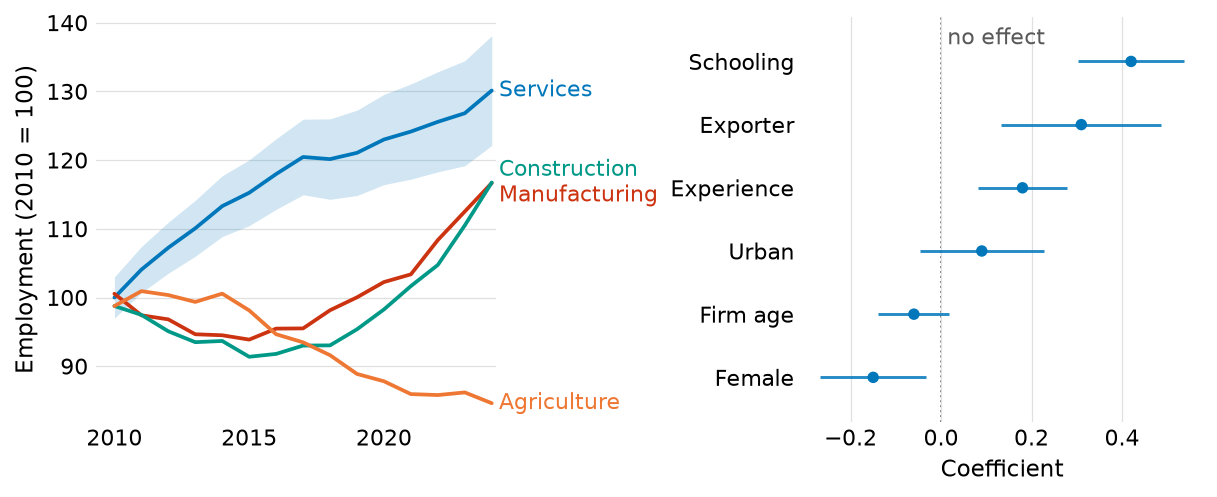
Synthetic data, drawn by docs/readme_figure.py.
Install
pip install figtools
or, in a uv project, uv add figtools.
figtools needs Python 3.11 or later, matplotlib and NumPy. The fig-check
command also reads YAML, and the check extra installs PyYAML for it:
pip install "figtools[check]".
Pin the version in each project that uses figtools. The library decides
sizes, colours and label placement, so a new release can change how a
figure is drawn, and a pinned project changes its figures only when it
upgrades. A uv project pins the version in uv.lock; with pip, pin it
with == in the requirements file. The
changelog
marks each change that alters figures.
Quick start
import matplotlib.pyplot as plt
import numpy as np

import figtools as ft

ft.setup()                                  # the style, once, before any figure

rng = np.random.default_rng(0)
years = np.arange(2000, 2025)
fig, ax = plt.subplots()
for region, growth in [('North', 1.5), ('Centre', 0.7), ('South', -0.4)]:
    y = 100 + growth * (years - 2000) + rng.normal(0, 1, len(years))
    ax.plot(years, y, label=region)
    ft.band(ax, years, y - 3, y + 3)        # in the colour of the line just drawn
ft.refline(ax, 100, '2000 level')           # a grey rule, named on the line
ax.set_ylabel('Employment (2000 = 100)')
ft.label_lines(ax)                          # each line named at its end
ft.save(fig, 'employment')                  # employment.pdf, employment_slides.pdf
save writes employment.pdf, 5.9 inches wide for a paper, and
employment_slides.pdf, 4.1 inches wide for a slide, each carrying the
figure's digest. Before writing each one it checks the figure at that
size, and it raises an error instead of writing a file in which a label
overlaps something. In a notebook the figure also appears below the cell.
python -m figtools prints a short usage guide, and help(ft.label_lines)
gives the full reference of any function.
Gallery
Each figure is drawn from synthetic data by the script linked under it. The scripts run with the tests, which fail if any label collides.
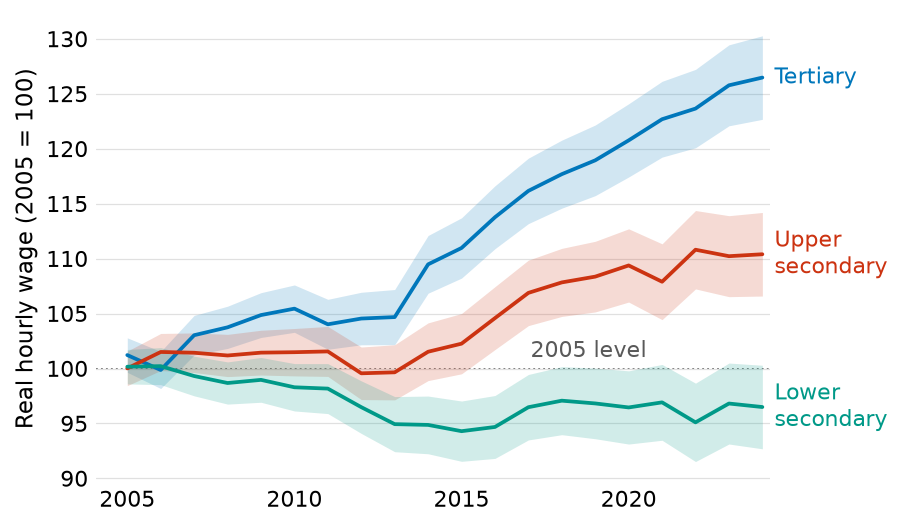 Time series with bands and a named reference rule (script) |
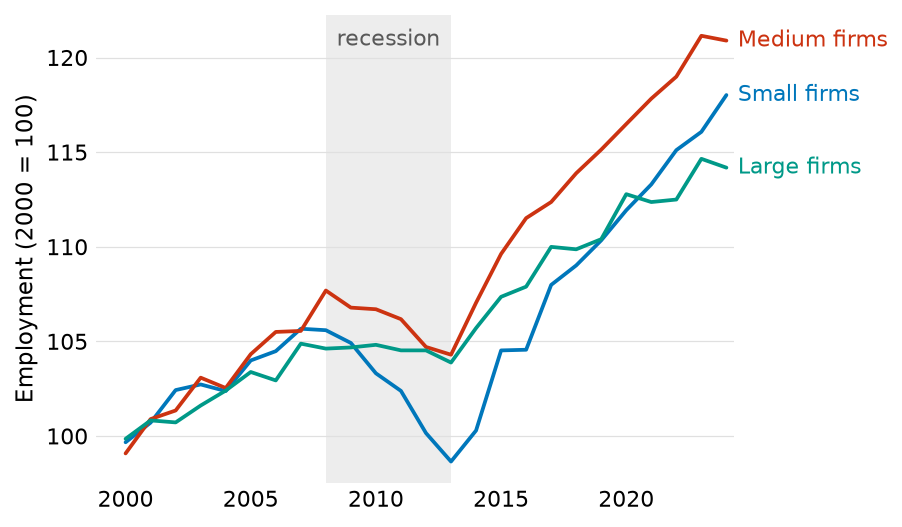 A period shaded and named in place (script) |
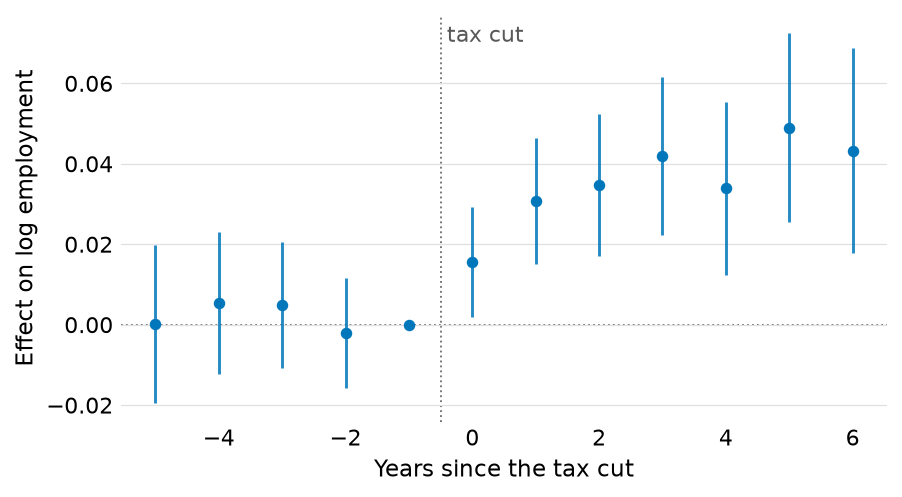 Event study with a zero rule and the treatment date (script) |
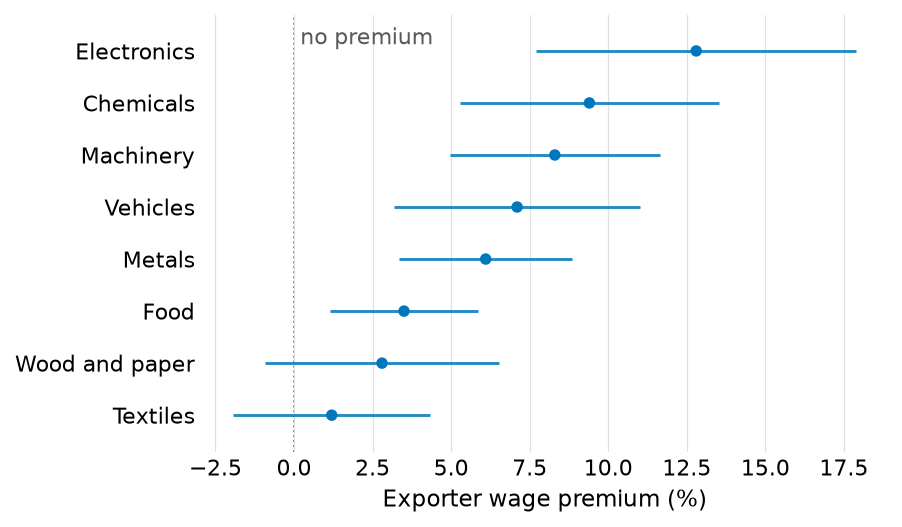 Coefficient plot, ranked (script) |
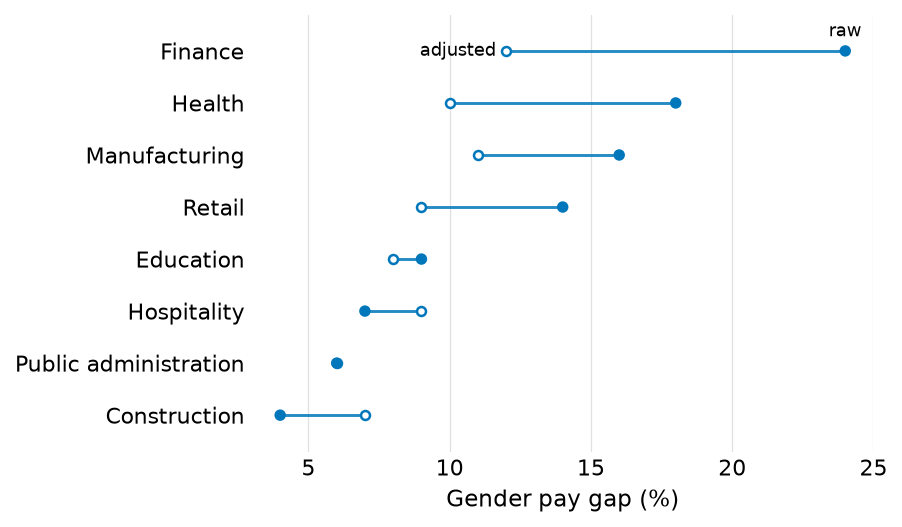 Dumbbell: two measurements per row, told apart by fill (script) |
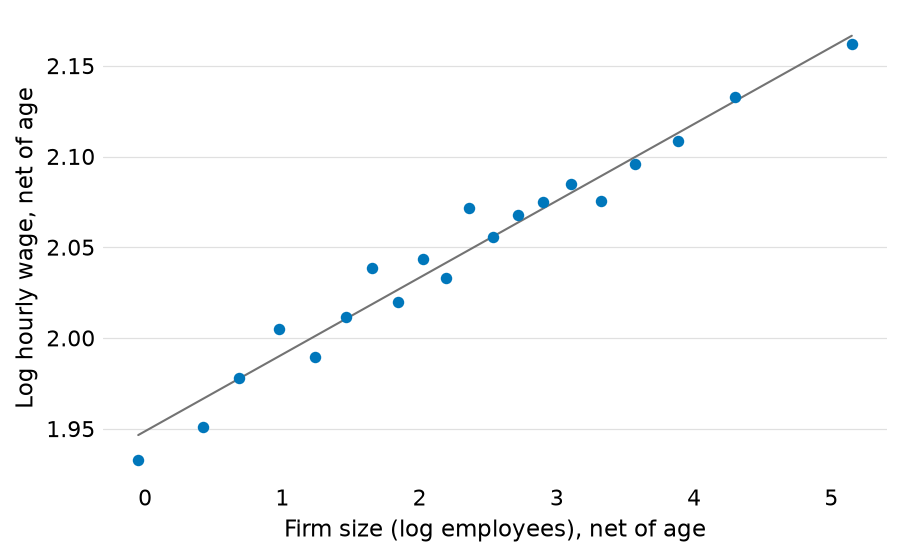 Binned scatter net of a control, with the fitted slope (script) |
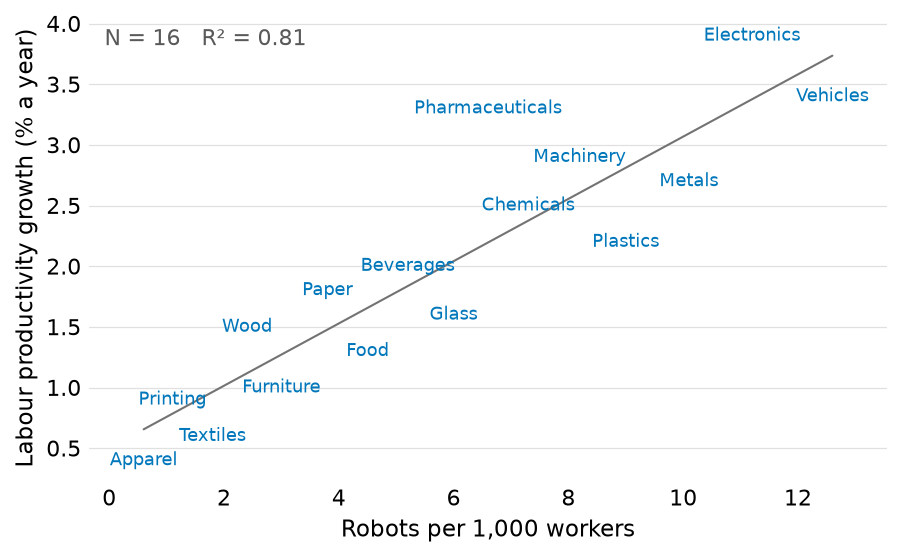 Scatter in which each name is the mark (script) |
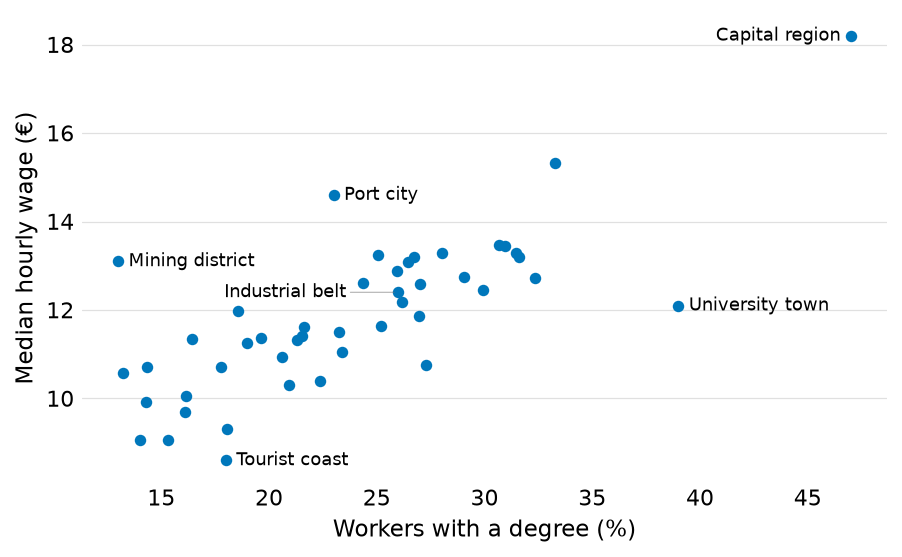 A few points named, each label clear of every point (script) |
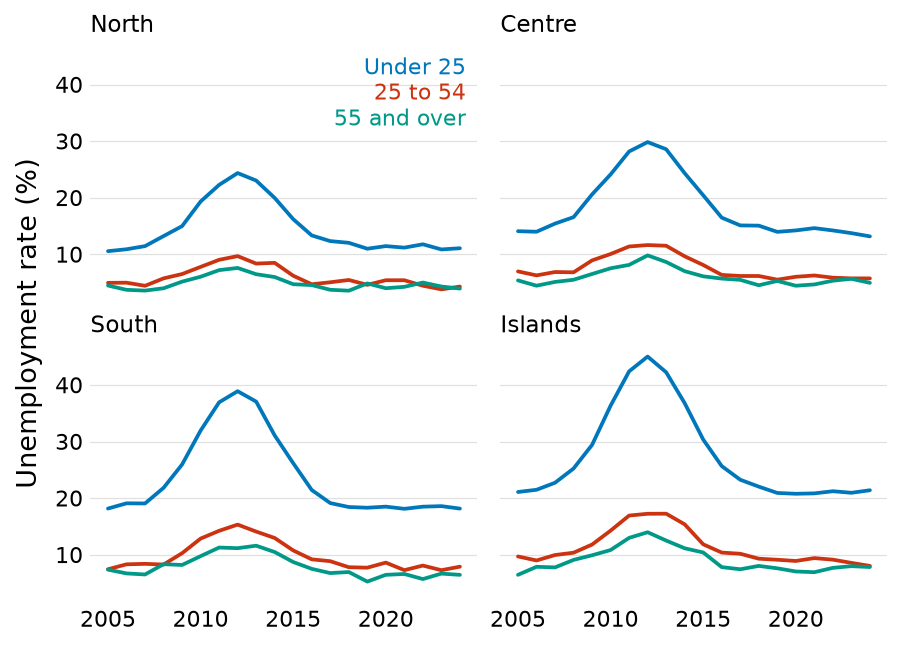 Small multiples with the series named once (script) |
Direct labels
A legend makes the reader hold a colour in memory and move back and forth
between the key and the data; a name at the end of each line does not.
label_lines puts the names in the margin beyond the panel, moves them
clear of one another and of the lines, and draws a hairline leader back to
a line once its label has moved far enough that the pairing stops being
obvious. setup turns on matplotlib's constrained layout, which measures
the margin the labels need and shrinks the axes to fit, so the panel ends
where the data end and the grid stops with it. A tight_layout() call on
such a figure warns and switches the layout engine off. A label wider than
a fifth of the figure is broken at spaces into two or three balanced
lines, decided again at each output size; a label broken by hand, with a
newline, is kept as written.
Where line ends crowd, as in small multiples, key stacks the names in a
free corner, each word in its series' colour. label_points names some
points of a scatter, each name moved clear of the others, of the points and
of the lines; label_scatter prints names as the marks themselves.
Reference rules and shaded periods are named in place too: an unlabelled
rule at 0 or 1 leaves the reader to work out what it marks, so refline and
shade write the name on the rule or the band, where the data leave room.
Checking figures
Direct labelling fails silently: a label on a line or on another label
still renders and raises nothing. collisions(fig) draws the figure and
measures it. It returns one (panel, kind, description) tuple per problem,
and an empty list when the figure is clean. The kinds are
'label/label', 'label/line', 'label/marker', 'label/shape',
'label/outside' (a rule's label outside its panel) and 'text/edge'
(text that runs off the figure). It measures every piece of text, a legend
or a key built from offset boxes counting as one label, against other
text, plotted lines, scatter markers at their drawn size and the outlines
of filled shapes such as bars, arrows and bands. Reference rules and shaded
periods are furniture that any label may cross. A label may sit inside a
shape or clear of it, but not across its edge unless it is pinned in the
shape, as a value written at the end of its bar is. The names
label_scatter prints may overlap one another, since they are the
observations, but any other label over one of them is reported. The
placement helpers steer clear of everything the check measures; the check
catches what they could not resolve and what was drawn by hand.
In a script, assert not ft.collisions(fig) stops on a bad figure. save
runs the check at each size it writes and raises instead of writing a
figure whose labels collide or whose text is cut off at the edge, so a bad
figure never reaches the disk.
fig-check checks every figure in a folder of documents without rendering
them. It runs each document's code as Quarto or Jupyter would (the # %%
cells of a percent-format .py, the Python chunks of a .qmd, the code
cells of a .ipynb), in the folder Quarto runs it in, and measures each
figure at the size an HTML render gives it, read from fig-width and
fig-height as Quarto reads them (7 by 5 inches when nothing sets them).
A .py file counts as a document when it has a # %% [markdown] or
# %% [raw] cell. A figure the document saves with save is measured at
each size and not written, so a check leaves the document's figure files as
they were. It needs the check extra.
fig-check docs                  # every document in docs/
fig-check docs report           # one document, by stem or file name
fig-check docs --figs figures   # also write each figure as a PNG
Every document is checked, even after one fails. The exit code can gate a commit or a CI job:
- 0: every figure is clean.
- 1: some document has overlaps, and none crashed.
- 2: some document raised an error, whose traceback is printed, or the check could not start (wrong arguments, or PyYAML missing).
The digest
A figure is a picture of data that a program cannot read back. figtools embeds a digest in each figure it exports: the plotted data as compressed JSON in the image's metadata, a PNG's text chunk or a PDF's document information. For each panel it holds the axis titles, scales and kinds; each series with its label, colour and values (lines, markers, bars, scatters, bands, intervals, error bars); the reference rules and shaded periods with their names; named points; and notes. A script or a language model working from a paper's figure files or a rendered document can then read what each figure shows. The image itself is unchanged.
The digest holds the data. It embeds every plotted point, raw
observations of a scatter included, up to 5,000 points per series, and
anyone who has the file can read them back. A binned or aggregated figure
carries only the aggregates it plots. For figures of confidential data,
turn the digest off: ft.setup(digest=False) for every figure, or
ft.save(fig, path, digest=False) for one figure's files.
The digest is on by default. It goes into every PDF that save writes, and
into every figure a notebook kernel (Jupyter, VS Code's interactive window)
displays after setup(). Terminal IPython runs no kernel, and there
setup leaves the display alone. To read a digest back:
render-digest figure results/fig1.pdf
prints each panel's values as markdown tables. It takes PNGs and PDFs; a
PDF that LaTeX built from several figure files carries the digest of each.
describe(fig) in figtools.digest returns the digest of a live figure.
With Quarto, a post-render hook collects the digests after each render. In
the project's _quarto.yml:
project:
  post-render: python -m figtools.digest post-render
For each rendered document the hook writes a folder holding outputs.md
(the headings, each figure's values as tables, the page's tables as
markdown and its printed output as code blocks, in document order), one CSV
and one PNG per figure, and a manifest with the render time and a hash of
the source. A document rendered to PDF yields its figures' digests under
pdf/ in the same folder. The folder is
~/.local/share/render-digests/<project folder>/<document path>/, outside
the repository; the environment variable FIGTOOLS_DIGEST_DIR, set to an
absolute folder, moves the root. The manifest records the project's path,
and the hook refuses to overwrite the digest of another project with the
same folder name while that project's folder still holds its
_quarto.yml; give one of them its own root. The digest of a project
that has moved or been deleted is stale, and the next render replaces it.
render-digest where <document>prints the folder of a document.render-digest check <document>exits 0 when the digest matches the source, 1 when the source has changed since the render, and 2 when there is no digest or the digest belongs to another project that still exists.
Both exit 2 with a message when the document lies in no Quarto project.
The hook reads the paths Quarto passes in its environment, so it runs from
a Quarto render only. It finds each output's source at the same path under
the project folder as the output has under the output folder (output-dir,
a website's _site, a book's _book), and reads each figure from the
page, embedded in it or linked in the <document>_files folder Quarto
writes beside it, so the page need not embed its resources. It skips, with
a line saying why, a page made from plain Markdown (.md), which runs no
figtools code, and a PDF that no single document made, such as a book's;
render-digest figure reads the digests such a PDF carries. It fails the
render when an output has two sources among .py, .qmd and .ipynb, or
a page has none at all, and, naming the figure, when a figure lost its
caption to another output of its cell.
Limits, each stated in the digest itself: a series longer than 5,000
points is thinned evenly; a large image grid is given by its shape and
range only; colour or size that varies point by point is not decoded. A
markdown table over about 600 cells is thinned to its first, last and
extreme rows and says so, while the CSV keeps every row. Calling
set_matplotlib_formats after setup() replaces the formatter that adds
the digest; call setup() again after it.
Working with coding agents
A coding agent can look at a rendered figure, but each look costs time and tokens, can miss a small overlap, reads values only approximately, and may not give the same verdict twice. figtools gives it exact, repeatable answers instead, and leaves looking for what no check measures, such as whether a figure reads well:
-
python -m figtoolsprints a short usage guide matching the installed version, written to be read before writing figure code. One line in a project'sAGENTS.mdorCLAUDE.mdpoints an agent at it:Before writing figure code, read the output of `uv run python -m figtools`. -
collisions,saveandfig-checkturn "is this figure readable?" into a check with an exit code, so an agent fixes overlaps until the check passes, without looking at the figure after every change. -
The digest lets an agent read the numbers a figure shows, from a saved PDF (
render-digest figure) or from a render'soutputs.md, so the prose it writes about a figure rests on the figure's values rather than on values read off its pixels. -
Errors name the function and the fix, which an agent can act on directly.
Figures at the size of their destination
save renders each file at the physical width of where it goes, 5.9
inches for a paper's text column and 4.1 inches for a slide by default,
re-solving the label placement at each size. Include the PDFs in LaTeX at
their natural size, with no width= option: the type then lands on the
page at the point size setup chose. Scaling a figure when it is included
is what changes the size of its type. Each file is written whole,
uncropped, so figures built alike come out the same size and subfigures
stacked in a paper line up; the usage guide gives the recipe for figures
read at one scale. Other destinations are a width away:
save(fig, path, widths={'poster': 9.0}) also writes path_poster.pdf.
Rerunning a document rewrites only the figures that changed. Drawing,
checking and writing each PDF is most of what save costs, about 16 of
the 17 seconds a 17-figure document spends in it, and a rewritten file
also looks new to LaTeX, to version control and to a file sync. So each
PDF carries a fingerprint, in its document information, of everything
that decides its bytes: the figure itself, read from its pickle, with
every artist, value, colour, font setting and size in it; the rcParams;
the fonts matplotlib can find; the matplotlib and figtools versions; and
the target, its width and the digest choice. A PDF whose fingerprint
matches is current and is left as it is, without the check, which it
passed when it was written. A change to any of those writes the file
again. A figure that cannot be pickled, as one with a lambda tick
formatter, has no fingerprint and is written every time; a named function
in its place gives it one. A font file replaced on disk under the same
name is the one change the fingerprint does not see.
The style, and what the helpers assume
Each choice below is something the helpers assume. A figure that departs from one still draws, but its labels and its check may not behave as described.
One palette in a fixed order. Paul Tol's vibrant scheme, which readers
with colour-blindness can tell apart, with black in place of its grey:
seven colours, which series receive in the same order in every figure.
Up to four series, the colour alone identifies each; past four, the labels
carry the identification. Since a label names its series by colour,
label_lines raises an error when two lines it would name cannot be told
apart by colour, line style and marker, as happens to the eighth series of
an unstyled plot. A key's colours are chosen by hand, and its entries may
share a colour when their words tell them apart. Grey is kept for
everything that is not data: rules, the grid, shaded periods, notes.
No frame, and a grid on the measured axis only. There are no spines and no tick marks: the grid and the tick labels give the reader every reference needed, and a frame is ink that carries no data. The grid is light, sits behind the data, runs along the axis that carries the measurement only (horizontal lines for a time series, vertical ones for a dot plot), and stops where the data stop.
Ticks at values the data can take. Where everything plotted against an axis is a whole number, so are its ticks. Matplotlib's default steps include 2.5, which labels a sixteen-year axis 2007.5, 2010.0, 2012.5, and whether a panel lands on that step depends on how much margin its labels take, so one longer series name can flip it. An axis of fractional data keeps its fractional ticks; a reference rule at 2020.5 is furniture and does not count as data.
Dots instead of bars. Where a figure compares magnitudes across
categories, dotplot draws a Cleveland dot plot. A bar spends ink on the
length from zero, which misleads when zero is not a meaningful origin; a
dot marks the value alone.
Type from one base size. setup(base=11) puts titles and axis labels
at the base size and every other piece of text (ticks, line labels, key
entries, notes) half a point below it. The one exception is the names that
label_points and label_scatter print at scatter points, two points
smaller again so that many of them fit in the panel. Every helper reads its
sizes from the base, so sizes cannot drift apart element by element, and a
slide deck is setup(base=13) rather than a retouching session. The
default of 11 points is ggplot's base size.
The caption carries the quantity. The helpers assume that the caption names the quantity, its unit and its sign convention, and that each reference rule is named on its line, so the axes carry no title that repeats them. A title is kept where the ticks alone would mislead, as on a scatter whose two axes are different variables.
Limits left to autoscale. A helper moves an axis limit only while that
limit autoscales: label_lines ends the panel at the data, and a rule's
label at the top of the data raises the top to fit. A limit set by hand,
such as a scale shared across figures, is never moved. A rule's label that
then does not fit on its usual side goes to the other side of the rule, or
stays outside the panel for the check to report.
A captioned figure cell shows the figure and nothing else. In a Jupyter
or Quarto document, a cell displays the value of its last statement when
that statement is an expression. A bare matplotlib call such as
ax.set_xlabel(...) returns an object that is then displayed as a second
output, and so is a table. Quarto numbers the figure and that output as
subfigures (a) and (b), gives the caption to the second output, and leaves
the figure without one. The drawing helpers and save return values that
a notebook displays as nothing, so a cell may end on one of them; panels
and collisions return values a notebook shows. End any other figure cell
with plt.show(), and give tables cells of their own. The digest's Quarto
hook fails the render and names any figure whose caption another output
took over.
setup changes the whole process. It sets matplotlib's rcParams
globally, replaces the linear scale with one that applies the whole-number
tick rule to every axes created afterwards by any library, and in a
notebook kernel wraps the formatters that display figures. Code that shares
a process with other plotting can use with ft.style(): instead, which
applies the same inside the block and undoes it on leaving.
Data in any array form. The helpers convert their data with
np.asarray, so lists, NumPy arrays, pandas Series and Polars columns all
work as they are.
Public names
| Name | What it is |
|---|---|
setup(base=11, digest=True) |
Applies the style to the whole process. Call it once, before any figure. |
style(base=11, digest=True) |
The same as setup inside a with block, undone on leaving. |
label_lines(ax) |
Names each line at its end, in its colour, in the margin. Call it once per axes, after every series. |
label_points(ax, x, y, labels) |
Names some points of a scatter, each label moved clear of the others, of the points and of the lines. |
label_last(ax, x, y, text, color) |
One direct label, for a series drawn without a line. |
key(ax, entries) |
Coloured names stacked in a free corner, for small multiples or crowded line ends. |
refline(ax, value, label=None, axis='y') |
A grey reference rule, horizontal or (with axis='x') vertical, named on the line. |
shade(ax, x0, x1, label=None) |
A shaded range of x, named at its top. |
refcurve(ax, x, y) |
A grey background curve (a fit, a 45-degree line, a bound) that labels may cross. |
band(ax, x, lo, hi) |
A confidence band in the colour of the line drawn just before. |
pointrange(ax, x, y, lo, hi) |
Estimates with vertical intervals, for event studies and coefficient profiles. |
dotplot(ax, labels, values, ci=None) |
A Cleveland dot plot ranked by value; with ci, a horizontal coefficient plot. |
binscatter(ax, x, y, controls=None, bins=20) |
Means of y within quantile bins of x, with an OLS fit on every observation. Returns the bin means and the slope. |
label_scatter(ax, x, y, labels) |
A scatter whose marks are the names, with an optional fit line and a note giving N and R². |
panels(n=2) |
A row of n panels sized as one figure. Returns (fig, axes). |
grid_axis(ax, axis) |
Draws the grid on 'x', 'y' or 'both' only. |
collisions(fig) |
Lists each label that overlaps something and each text that runs off the figure. Empty when the figure is clean. |
save(fig, path) |
Writes path.pdf and path_slides.pdf at their exact widths, and refuses any size at which the check fails; a PDF already drawn from the same figure is left as it is. Returns the PDFs' paths. |
load(path) |
Reopens a figure pickled by save(..., retouch=True), and raises for a pickle that any other figtools version wrote. Unpickling runs code from the file: load only files you wrote. |
PALETTE |
The seven colours, in the order series receive them. |
GREY |
The greys for rules, the grid, notes and shaded periods. |
TARGET_WIDTHS |
The widths save writes, in inches: {'paper': 5.9, 'slides': 4.1}. save(..., widths={'poster': 9.0}) also writes path_poster.pdf, and widths={'paper': 6.2} overrides a default. targets= chooses the files, and must name every target widths gives. |
BASE_SIZE |
The default base type size, 11 points. |
__version__ |
The installed version. |
figtools.digest |
Reads and writes the digest; describe(fig) returns a live figure's digest. |
fig-check |
The command that checks every figure in a folder of documents. |
render-digest |
The command that reads digests back and runs the Quarto hook. |
python -m figtools |
Prints the usage guide; python -m figtools readme prints this README. |
The drawing helpers return what they drew (lines, labels, bands, markers)
in a list, so that it can be restyled; rule, label = ft.refline(ax, 0, 'zero') is a typical use. A notebook displays the list as nothing.
Versions and changes
Until version 1.0, a minor release (0.8 to 0.9) may change the interface and how figures are drawn. The changelog lists each release's changes, marks those that alter figures, and gives the steps to upgrade. Read it before upgrading a pinned project, and compare the figures after. CONTRIBUTING.md covers the tests and the release steps.
License
MIT; see LICENSE.
1 maintainer

Metadata
1 maintainer
Release files for figtools 0.9.0
For a detailed explanation of source distributions (sdists) and built distributions (wheels), please see the package formats documentation.
Source distribution (sdist)
| File | Size | Uploaded | |
|---|---|---|---|
| figtools-0.9.0.tar.gz | 720.9 kB | Details |
Built distribution (wheel)
| File | Interpreter | ABI | Platform | Reset |
|---|---|---|---|---|
| figtools-0.9.0-py3-none-any.whl | Python 3 | none | any | Details |
Total release size: 806.6 kB
Release files / figtools-0.9.0.tar.gz
| Download URL | figtools-0.9.0.tar.gz |
|---|---|
| Size | 720.9 kB |
| Tags | Source |
|
SHA-256 checksum How to use checksums |
7e0294f0ccd946eca7a27db26edc3d3f8402659491cda807f421405568762fba
|
|
BLAKE2b-256 checksum How to use checksums |
ed4adba7bf031f1abf29e05636b54e766349afe79f96198a323b24bd7d543cc2
|
| Upload date | |
|
Uploaded using Trusted Publishing? What is trusted publishing? |
Yes |
| Uploaded via |
twine/7.0.0 CPython/3.13.14
|
Provenance
Provenance describes where a file came from. On PyPI, provenance is shared via attestations, which provide a verifiable record of the build or publishing details. View details, limitations and caveats.


PyPI Publish Attestation
PyPI verified that this artifact, at this checksum, originated from the publisher listed below.
Signed by GitHub Actions, verified by PyPI on Oct 19, 2026.
Transparency logRelease files / figtools-0.9.0-py3-none-any.whl
| Download URL | figtools-0.9.0-py3-none-any.whl |
|---|---|
| Size | 85.8 kB |
| Tags | Python 3 |
|
SHA-256 checksum How to use checksums |
a6de2292064f409e2cd97000dd2eb397f71382a83099293a5db524e9b8dda4e3
|
|
BLAKE2b-256 checksum How to use checksums |
61bf06f044f711d8278536ffc48c77b7e060e093b79f092cfea96be3fbf0d916
|
| Upload date | |
|
Uploaded using Trusted Publishing? What is trusted publishing? |
Yes |
| Uploaded via |
twine/7.0.0 CPython/3.13.14
|
Provenance
Provenance describes where a file came from. On PyPI, provenance is shared via attestations, which provide a verifiable record of the build or publishing details. View details, limitations and caveats.
PyPI Publish Attestation
PyPI verified that this artifact, at this checksum, originated from the publisher listed below.
Signed by GitHub Actions, verified by PyPI on Oct 19, 2026.
Transparency log













