
Model Context Protocol (MCP) server for Fiji/ImageJ: macros, discovery, screenshots, and workflows via PyImageJ
Verified details
These details have been verified by PyPIProject links
GitHub Statistics
Maintainers

Project description
Fiji MCP Server




Talk to Fiji / ImageJ in plain English from Cursor, Claude, Gemini, Windsurf, and more.
Open images, run any ImageJ plugin, count cells, measure features, take screenshots to verify — without writing a single line of macro code yourself.
See it in action
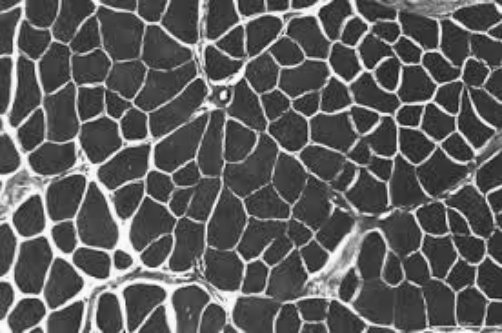
"Open the image, apply a Gaussian blur, show me before and after."
| Before | After |
|---|---|
 |
 |
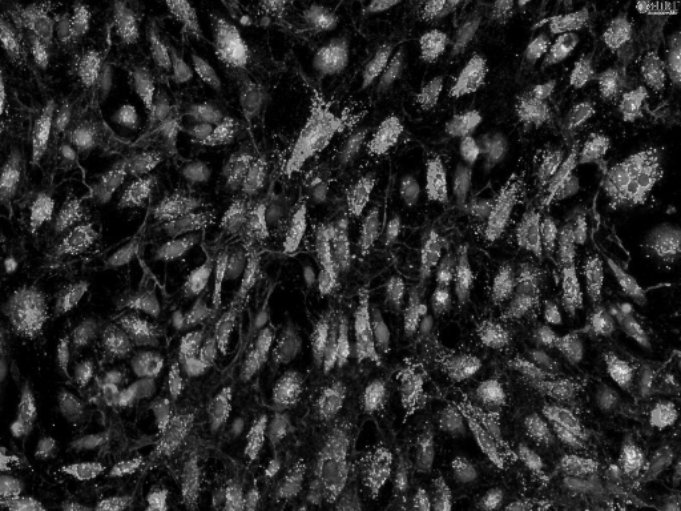
"Threshold the bright spots, outline each object, report area and circularity."
| Input | Outlined objects |
|---|---|
 |
 |
| # | Area | Circularity |
|---|---|---|
| 1 | 1052 | 0.89 |
| 2 | 2840 | 0.72 |
| 3 | 641 | 0.91 |
| 4 | 1902 | 0.68 |
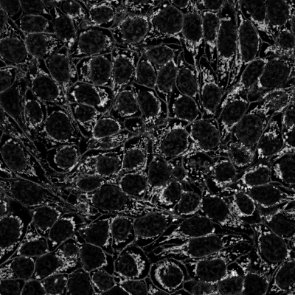
"Skeletonize the mask and summarize branches per tree."
| Mask | Skeleton |
|---|---|
 |
 |
| Tree | Branches | Junctions |
|---|---|---|
| 1 | 14 | 6 |
| 2 | 9 | 7 |
Get started in 3 steps
1 — Install
pip install fiji-mcp-server
You need Python 3.10+, Fiji installed on your machine, and Java (required by PyImageJ). See quickstart if anything needs clarification.
2 — Connect to your AI app
Replace /Applications/Fiji with your actual Fiji folder (the one containing jars/ and plugins/).
| App | One command |
|---|---|
| Claude Desktop | fiji-mcp-install install claude-desktop --fiji-path /Applications/Fiji |
| Cursor | fiji-mcp-install install cursor --fiji-path /Applications/Fiji |
| Claude Code | fiji-mcp-install install claude-code --fiji-path /Applications/Fiji |
| Gemini CLI | fiji-mcp-install install gemini --fiji-path /Applications/Fiji |
| Windsurf | fiji-mcp-install install windsurf --fiji-path /Applications/Fiji |
Then restart the app.
3 — Verify it works
In chat, type:
Run the Fiji MCP health_check tool
You should get back the Fiji version and mode. First startup takes 30–90 seconds while the JVM loads — that's normal.
What to ask
Once connected, just describe what you want:
"Open ./images/cells.tif and tell me the dimensions."

"Apply a Gaussian blur with sigma 4 and show me the result."

"Count the bright objects and give me their areas."

"Search for ImageJ commands related to 'threshold'."

"Open the image, subtract background, threshold, count particles — show me a screenshot after each step."
No macro knowledge needed. The assistant finds the right Fiji plugin, runs it, and can show you a screenshot to verify.
Available tools (19 total)
| Category | Tools |
|---|---|
| Run & I/O | health_check run_macro run_batch_macros open_image save_image |
| Screenshots | screenshot_fiji — full screen, active image, or results table |
| Discover plugins | list_all_commands search_commands describe_plugin list_extensions |
| Image info | list_open_images get_image_info |
| Workflows | run_workflow — chain steps with screenshot verification |
| Results | parse_macro_output compare_screenshots list_macro_templates get_macro_template |
| Session | get_session_trace clear_session_trace |
Documentation
| Quick start | Install, configure, verify — step by step |
| All tools | What every tool does and when to use it |
| Configuration | Environment variables and troubleshooting |
| Architecture | How the pieces fit together |
Author: Suraj Sahu · UC Merced Physics · ssahu2@ucmerced.edu
Related: cellpose_mcp · PyImageJ · FastMCP
License: BSD-3-Clause
Project details
Verified details
These details have been verified by PyPIProject links
GitHub Statistics
Maintainers
Release history Release notifications | RSS feed


Download files
Download the file for your platform. If you're not sure which to choose, learn more about installing packages.
Source Distribution
Built Distribution
Filter files by name, interpreter, ABI, and platform.
If you're not sure about the file name format, learn more about wheel file names.
Copy a direct link to the current filters
File details
Details for the file fiji_mcp_server-0.1.3.tar.gz.
File metadata
- Download URL: fiji_mcp_server-0.1.3.tar.gz
- Upload date:
- Size: 64.9 kB
- Tags: Source
- Uploaded using Trusted Publishing? Yes
- Uploaded via: twine/6.1.0 CPython/3.13.12
File hashes
| Algorithm | Hash digest | |
|---|---|---|
| SHA256 |
150d349e640aaa44959e944f08e6eabe51aa97e896a29ce72f9a0572b6959c04
|
|
| MD5 |
dd814e7f6541191ec6b2ea0ca1aa6e7d
|
|
| BLAKE2b-256 |
b4e99742a13e6869183edd03b713c6a1b8a9172bdd8448f2571db335003b221c
|
Provenance
The following attestation bundles were made for fiji_mcp_server-0.1.3.tar.gz:
Publisher:
publish-pypi.yml on surajinacademia/Fiji_imageJ_mcp
-
Statement:
-
Statement type:
https://in-toto.io/Statement/v1 -
Predicate type:
https://docs.pypi.org/attestations/publish/v1 -
Subject name:
fiji_mcp_server-0.1.3.tar.gz -
Subject digest:
150d349e640aaa44959e944f08e6eabe51aa97e896a29ce72f9a0572b6959c04 - Sigstore transparency entry: 1280132689
- Sigstore integration time:
-
Permalink:
surajinacademia/Fiji_imageJ_mcp@0d3485f700f91a2dc86935d8ed1ff3829daf6fa3 -
Branch / Tag:
refs/tags/v1.0.3 - Owner: https://github.com/surajinacademia
-
Access:
public
-
Token Issuer:
https://token.actions.githubusercontent.com -
Runner Environment:
github-hosted -
Publication workflow:
publish-pypi.yml@0d3485f700f91a2dc86935d8ed1ff3829daf6fa3 -
Trigger Event:
release
-
Statement type:
File details
Details for the file fiji_mcp_server-0.1.3-py3-none-any.whl.
File metadata
- Download URL: fiji_mcp_server-0.1.3-py3-none-any.whl
- Upload date:
- Size: 47.9 kB
- Tags: Python 3
- Uploaded using Trusted Publishing? Yes
- Uploaded via: twine/6.1.0 CPython/3.13.12
File hashes
| Algorithm | Hash digest | |
|---|---|---|
| SHA256 |
b0e6a5de124ece3b5c3ef83cd14becae75bcd7f2d8693ff7bb77d8b535ca7ef8
|
|
| MD5 |
df2aedde6656dcdc82b688c7fdbcbb83
|
|
| BLAKE2b-256 |
77677fcc011db04792af06042549e2eb4e4bb6d39ef1543cf868d92b3db17343
|
Provenance
The following attestation bundles were made for fiji_mcp_server-0.1.3-py3-none-any.whl:
Publisher:
publish-pypi.yml on surajinacademia/Fiji_imageJ_mcp
-
Statement:
-
Statement type:
https://in-toto.io/Statement/v1 -
Predicate type:
https://docs.pypi.org/attestations/publish/v1 -
Subject name:
fiji_mcp_server-0.1.3-py3-none-any.whl -
Subject digest:
b0e6a5de124ece3b5c3ef83cd14becae75bcd7f2d8693ff7bb77d8b535ca7ef8 - Sigstore transparency entry: 1280132704
- Sigstore integration time:
-
Permalink:
surajinacademia/Fiji_imageJ_mcp@0d3485f700f91a2dc86935d8ed1ff3829daf6fa3 -
Branch / Tag:
refs/tags/v1.0.3 - Owner: https://github.com/surajinacademia
-
Access:
public
-
Token Issuer:
https://token.actions.githubusercontent.com -
Runner Environment:
github-hosted -
Publication workflow:
publish-pypi.yml@0d3485f700f91a2dc86935d8ed1ff3829daf6fa3 -
Trigger Event:
release
-
Statement type:






