

File Brain
Your Intelligent Local File Finder





Find what you mean, not just what you say. File Brain runs locally on your machine to index and understand your files.
Sponsored by

Community-powered Reddit engagement from real, verified users.
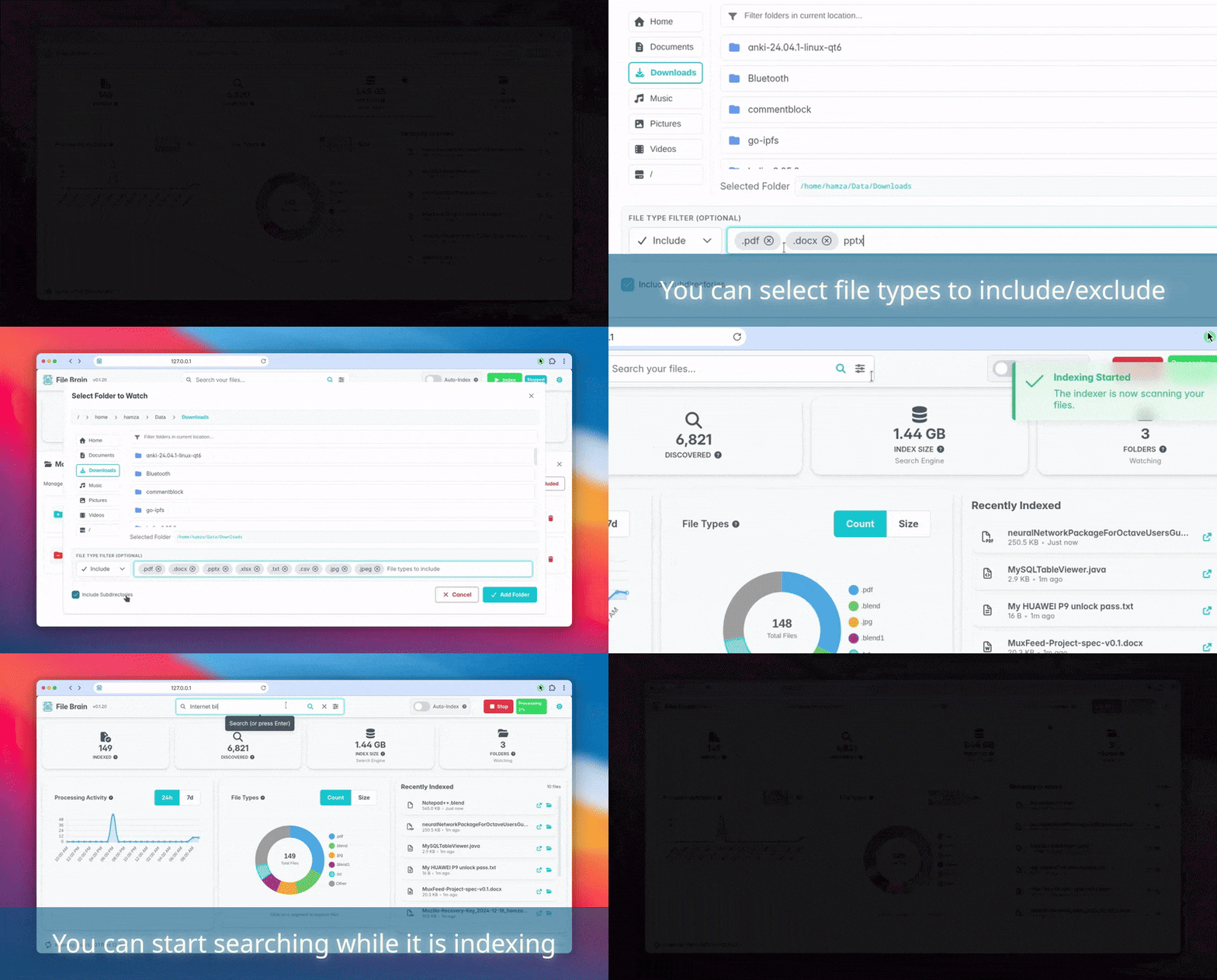
What is File Brain?
File Brain is a desktop application that helps you find files instantly using natural language. Instead of remembering exact filenames, you can ask questions like "flight ticket invoice", and File Brain uses semantic search to understand the meaning and show the relevant files.
Key Features
- 🧠 Find what you mean: Uses advanced Semantic Search -in addition to full text search- to understand the intent behind your query (e.g., search for "worker", find documents mentioning "employee").
- 📝 Typo Resistance: Robust against typos. Search for "iphone" even if you typed "ipnone".
- 📄 Supports Everything: Extracts the content of over 1000 file formats (PDF, Word, Excel, PowerPoint, images, archives, and more).
- 🌍 Cross-Language Search: Search in one language to find documents written in another (e.g., search for "Chair", find documents mentioning "Silla" -in Spanish-).
- 🚀 Fast Matching: Search results are shown within milliseconds, not minutes.
- 👁️ OCR Support: Automatically extracts text from screenshots, and scanned documents.
- ⚡ Auto-Indexing: Detects changes in real-time and updates the index instantly.
- 🛡️ Read-Only & Safe: File Brain only reads your files to index them. It never modifies, deletes, or alters your data in any way.
- 🔒 Privacy First: All indexing and processing happens 100% locally on your machine. Your data never leaves your computer.
Why File Brain?
Most search tools look for exact matches of filenames or content. File Brain goes further by understanding meaning, tolerating typos, and extracting text from images. See how it compares to other popular tools:
| App Name | Price | OS | Indexing | Search Speed | File Content Search | Fuzzy Search | Semantic Search | OCR |
|---|---|---|---|---|---|---|---|---|
| Everything | Free | Windows | No | Instant | No | Wildcards/Regexp | No | No |
| Listary | Free | Windows | No | Instant | No | Yes | No | No |
| Alfred | Free | MacOS | No | Very fast | No | Yes | No | Yes |
| Copernic | 25$/yr | Windows | Yes | Fast | 170+ formats | Partial | No | Yes |
| DocFetcher | Free | Cross-platform | Yes | Fast | 32 formats | No | No | No |
| Agent Ransack | Free | Windows | No | Slow | PDF and Office | Wildcards/Regexp | No | No |
| File Brain | Free | Cross-platform | Yes | Very fast | 1000+ formats | Yes | Yes | Yes |
Prerequisites
- Python 3.11 or higher
- Docker (Must be installed and running)
Installation
Install File Brain easily using pip:
pip install -U file-brain
Getting Started
-
Run the App:
file-brain
-
Initialization Wizard: On the first run, a simple wizard will guide you:
- System Check: Verifies Docker is running.
- Download Components: Downloads the necessary search services.
- Initialize Engine: Starts the background search components.
- Database Migration: checks and updates the database schema if needed.
- Download Embedding Model: Fetches the embedding model for intelligent search.
- Finalize Setup: Initializes the search engine database.
The easy-to-use setup wizard that guides you through downloading models and initializing the search database.
[!TIP] If the automatic wizard fails to start the services or download the models, see the Manual Setup section below.
-
Select Folders: Choose the folders you want to index via the dashboard settings.
-
Indexing:
- Manual Indexing: Performs a deep scan of all files. Great for initial setup.
- Auto-Indexing: Watches for new or changed files and processes them instantly.
[!NOTE] File Brain must be running for the background indexing to process your files.
Visualizing the Interaction
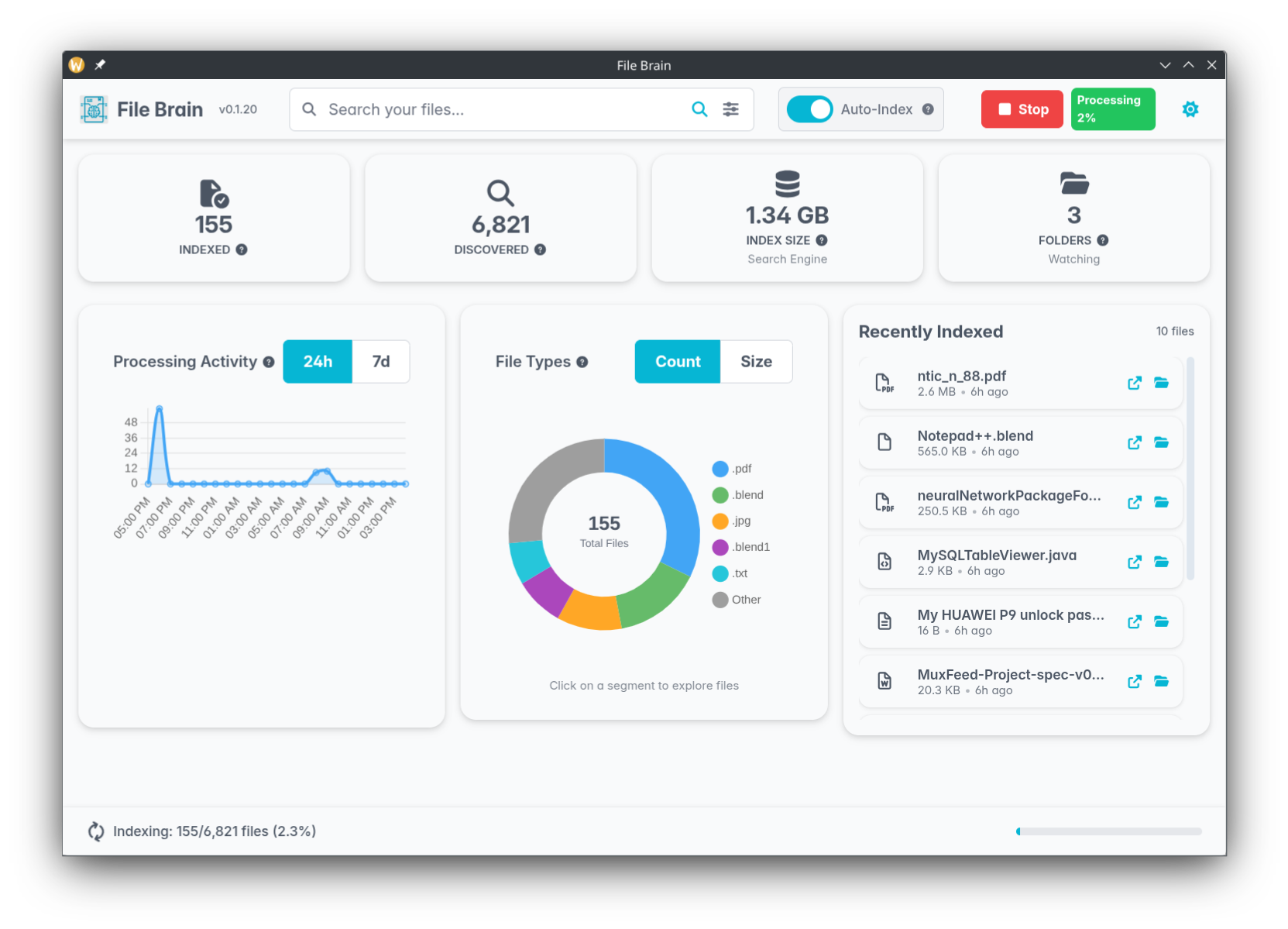
Dashboard
See all your indexed files, storage usage, and recently indexed files at a glance.
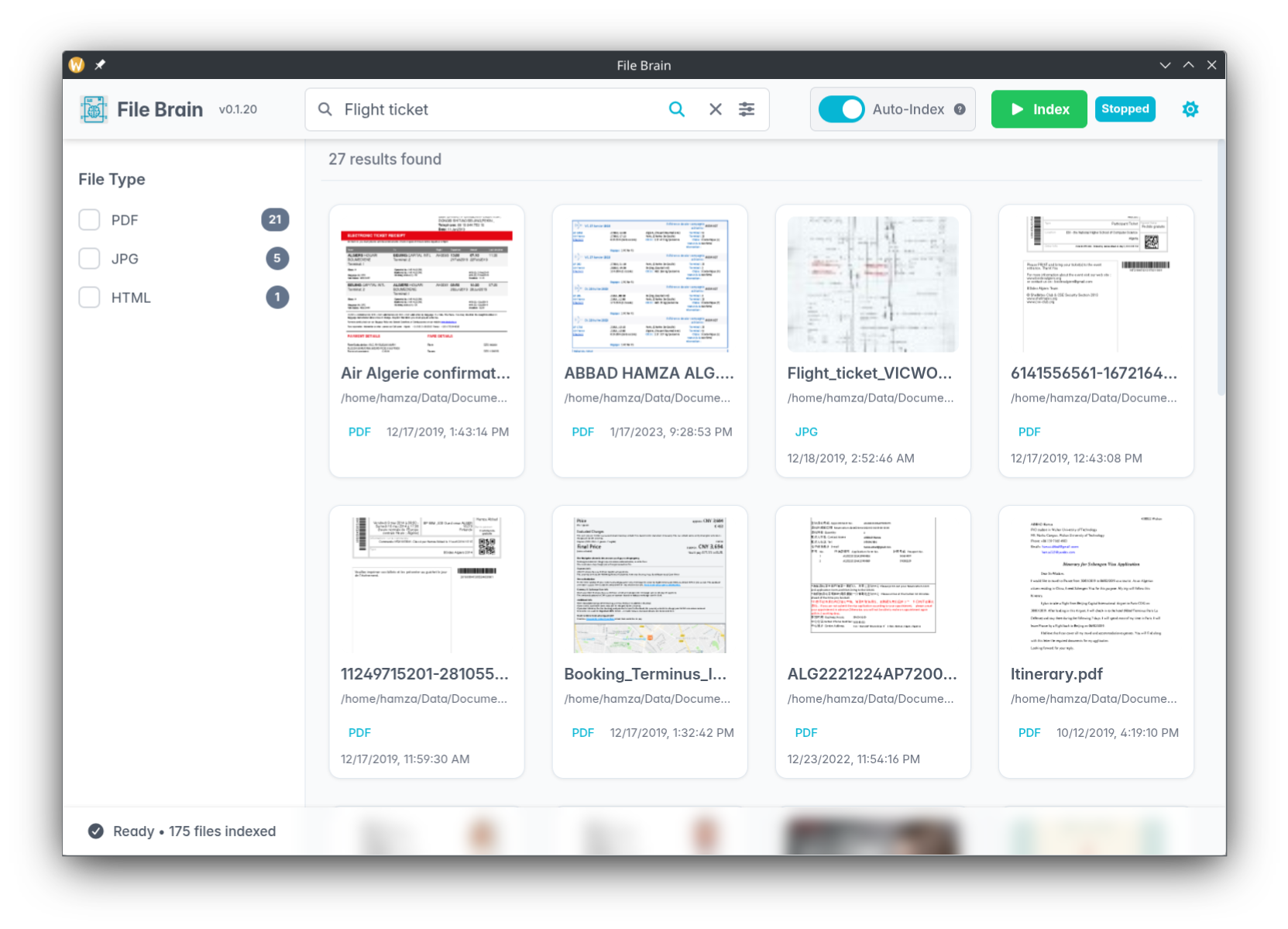
Semantic Search
Search naturally, like "Flight ticket" to find relevant documents even if the filename is different.
PRO Version
Want more power? The PRO version is on the way with advanced capabilities:
- Chat with Files: Ask questions and get answers from your documents.
- Search by File: Find semantically similar files.
- Video Search: Find scenes in your videos.
- Cloud & Network Drives: Connect Google Drive, Dropbox, Box, and network drives.
Check out the website to learn more.
Manual Setup
If the initialization wizard fails, you can manually set up the background services:
1. Prepare Embedding Model Directory
File Brain expects the embedding model to be in a specific system directory. Create it manually:
Linux / macOS:
mkdir -p ~/.local/share/file-brain/typesense-data/models/ts_paraphrase-multilingual-mpnet-base-v2
Windows (PowerShell):
New-Item -Path "$env:LOCALAPPDATA\file-brain\typesense-data\models\ts_paraphrase-multilingual-mpnet-base-v2" -ItemType Directory -Force
2. Download the Model Files
You can browse the files in the Hugging Face repository. Download these three files into the directory created above:
3. Pull Docker Images
Run the following commands to manually pull the required services. Choose the Typesense image based on your system capabilities:
For CPU (Default, works on all systems):
docker pull hamza5/tika:latest-full
docker pull typesense/typesense:29.0
For NVIDIA GPU (Faster indexing):
docker pull hamza5/tika:latest-full
docker pull hamza5/typesense-gpu:29.0-cuda11.8.0-cudnn8-runtime-ubuntu22.04
[!NOTE] File Brain automatically detects if you have an NVIDIA GPU and the necessary Docker runtime. You can override this behavior by setting the
FILEBRAIN_GPU_MODEenvironment variable toforce-gpu,force-cpu, orauto(default).
Note: Once the images are pulled and the model files are in place, File Brain will handle starting the services automatically on the next run.
1 maintainer

Metadata
1 maintainer
Release files for file-brain 0.1.28
For a detailed explanation of source distributions (sdists) and built distributions (wheels), please see the package formats documentation.
Source distribution (sdist)
| File | Size | Uploaded | |
|---|---|---|---|
| file_brain-0.1.28.tar.gz | 1.7 MB | Details |
Built distribution (wheel)
| File | Interpreter | ABI | Platform | Reset |
|---|---|---|---|---|
| file_brain-0.1.28-py3-none-any.whl | Python 3 | none | any | Details |
Total release size: 3.5 MB
Release files / file_brain-0.1.28.tar.gz
| Download URL | file_brain-0.1.28.tar.gz |
|---|---|
| Size | 1.7 MB |
| Tags | Source |
|
SHA-256 checksum How to use checksums |
cafcf5017cf81eca2f033ab5a95a4e723a51b619fe6cdc344fdb72e6e81d6233
|
|
BLAKE2b-256 checksum How to use checksums |
51b6bd981fc76b99573c9a71600da51274597ecd2d7f207c418530e86c5e2ae4
|
| Upload date | |
|
Uploaded using Trusted Publishing? What is trusted publishing? |
Yes |
| Uploaded via |
twine/6.1.0 CPython/3.13.12
|
Provenance
Provenance describes where a file came from. On PyPI, provenance is shared via attestations, which provide a verifiable record of the build or publishing details. View details, limitations and caveats.


PyPI Publish Attestation
PyPI verified that this artifact, at this checksum, originated from the publisher listed below.
Signed by GitHub Actions, verified by PyPI on Apr 10, 2026.
Transparency logRelease files / file_brain-0.1.28-py3-none-any.whl
| Download URL | file_brain-0.1.28-py3-none-any.whl |
|---|---|
| Size | 1.8 MB |
| Tags | Python 3 |
|
SHA-256 checksum How to use checksums |
cb6df139a9d333fbe71e381e826fc6105ff6363a8ecf01157cd69739651c6eff
|
|
BLAKE2b-256 checksum How to use checksums |
a150de941f7ee4eba3151e362252edc5346a8c443ae49dbd706fdd796b1c4288
|
| Upload date | |
|
Uploaded using Trusted Publishing? What is trusted publishing? |
Yes |
| Uploaded via |
twine/6.1.0 CPython/3.13.12
|
Provenance
Provenance describes where a file came from. On PyPI, provenance is shared via attestations, which provide a verifiable record of the build or publishing details. View details, limitations and caveats.
PyPI Publish Attestation
PyPI verified that this artifact, at this checksum, originated from the publisher listed below.
Signed by GitHub Actions, verified by PyPI on Apr 10, 2026.
Transparency log













