

File Observer






Know what's in your files before you open them.
A one-shot, read-only observation pass — not a file watcher. Point it at a directory, get one deterministic JSON manifest of what's inside, before you ingest it.
File Observer makes a single read-only pass over a directory and tells you exactly what's inside — file types, metadata, conversation patterns, author fingerprints, structural signals — all in one deterministic JSON manifest. You run it on demand; it doesn't stay resident or watch for changes. It reads everything. It changes nothing.
(If you already know Apache Tika: think a deterministic Tika built for pipelines.)
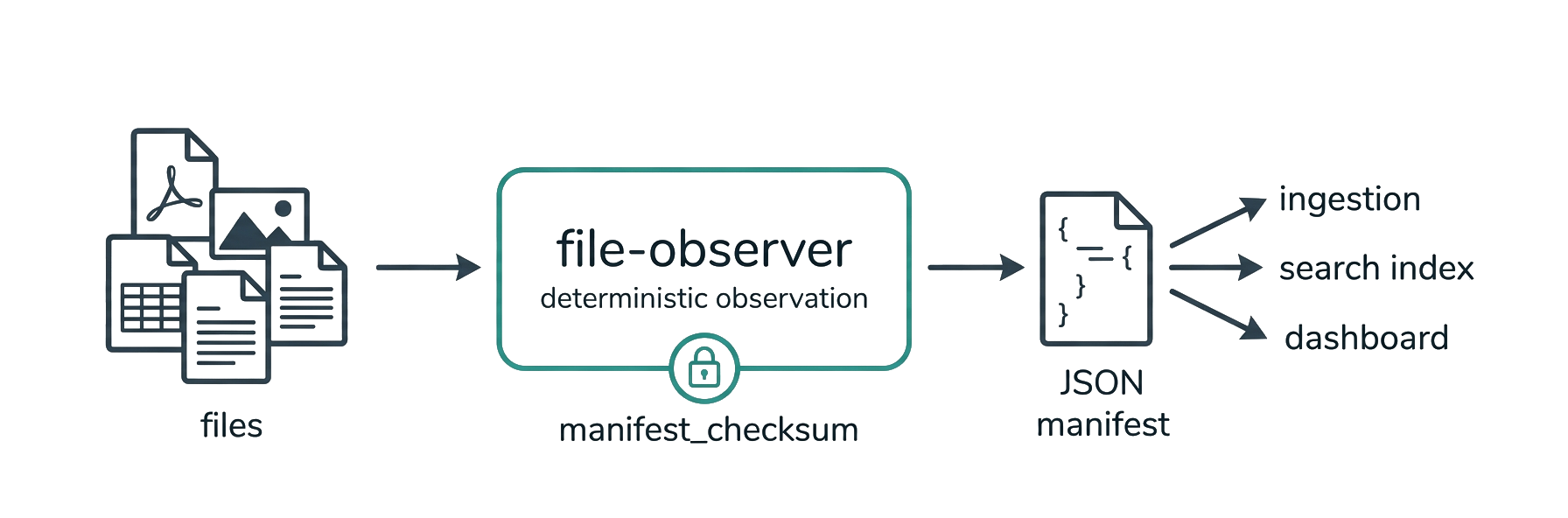
pip install file-observer
fo ./your-project --specialists
Scanned 4,366 files (3,526 text, 840 binary) in 31 directories.

1,163 supported (336 with specialist metadata). 3,203 unsupported extensions.
Quality: 676 clean, 3,690 degraded. 4 safety flags, 2 polyglots.

Vectors: author_aggregate found 64 distinct authors across 114 files.
chatlog matched 22 files. reference_tokens ran on 806 files (2,164 URLs,
382 paths, 262 @mentions). filename_patterns matched 84 of 4366 files.

Largest directories: tika-parsers (2,037), tika-pipes (459), tika-core (440).
That's the human-readable summary. The full manifest is structured JSON — here's a truncated file object so you can see the data contract before you install:
{
  "schema_version": "1.25",
  "context": { "scanner_version": "1.50.0", "logic_version": "1.26.0", "...": "…" },
  "files": [
    {
      "path": "docs/report.pdf",
      "mime_type": "application/pdf",
      "checksum_sha256": "9f86d081884c7d65…",
      "is_binary": true,
      "requires_specialist_tool": true,
      "specialist_tool": "pdf_extraction",
      "safety_flags": ["has_javascript"],
      "signal_provenance": {
        "requires_specialist_tool": { "layer": "derived", "method": "specialist_tools_registry", "trigger": "extension_match" }
      },
      "...": "…"
    }
  ],
  "vectors_collected": [
    { "vector_id": "chatlog", "method_version": 12, "identity_digest": "a3f1c2…", "...": "…" }
  ],
  "manifest_checksum": "7d2bafef…",
  "manifest_signature": { "algorithm": "hmac-sha256", "key_id": "default", "value": "…" }
}
Every derived field carries a signal_provenance entry; every vector an identity_digest; the whole manifest a checksum and optional HMAC signature.
New here? Walk through the tutorial (first scan → pipeline integration) or run the examples — self-contained, one per concept.
| Package | file-observer |
| CLI | file-observer or fo (shorthand) |
| Version | 1.50.0 |
| Schema | 1.25 |
| Python | >= 3.12 (tested on Linux, macOS, Windows) |
| License | AGPL-3.0 (commercial license available) |
| Tests | 1000+ (run pytest for the exact count) + a 49,879-file / 13-tree shakedown — ran clean (zero fatal errors), see "Validated at scale" below |
Why File Observer?
Your pipeline needs to know what it's processing before it processes it. File Observer is the observation layer that sits at the front of any document pipeline — ingestion, classification, OCR, embedding, audit. It tells the pipeline what's coming without touching the files. (Need to react to filesystem changes as they happen? That's a watcher like watchdog or watchfiles — a different tool.)
- Deterministic. Same files + same config = identical manifest, every time. Cross-environment variance is explained, never hidden.
- Auditable. Every derived field has a provenance trace — which method, which trigger, which inputs. Nothing is a black box.
- Honest.
nullmeans "not observed within bounds," not "not present." Safety flags are observations, not assessments. The scanner records; the consumer interprets. - Verified. Cryptographic identity digests on every vector. HMAC-signed manifests. Chain-of-custody across incremental scans.
What it observes
26 file types, 4 capability tiers
| Tier | Runs for | What it extracts |
|---|---|---|
| Universal | Every file | Identity, checksum, MIME, file signatures, polyglot detection, routing flags |
| Baseline | Text files | Encoding, preview, tags, frontmatter, chatlog detection, reference tokens, filename patterns |
| Structural | Text files | Title, headings, CSV headers, JSON/YAML/XML/TOML keys, technology hints |
| Specialist | Supported formats (opt-in) | PDF pages, image dimensions + capture EXIF, video container/capture metadata, audio tags + properties, email envelopes, spreadsheet / document / presentation structure |
Supported specialist formats:
- Documents —
.pdf,.docx,.doc,.odt,.rtf - Spreadsheets —
.xlsx,.xls,.ods - Presentations —
.pptx,.ppt,.odp - Images —
.png,.jpg/.jpeg,.heic/.heif/.avif,.tiff/.tif,.jp2(dimensions; + EXIF capture metadata on JPEG/HEIC/HEIF/AVIF/TIFF —.png/.jp2are dimensions only) - Video —
.mp4,.mov,.m4v(codec/duration/dimensions + QuickTime capture device & GPS-presence) - Audio —
.mp3(ID3 tags + format/bitrate/duration) - Email —
.msg,.eml - Chatlog —
.jsonl(content-detected)
Observation vectors with cryptographic identity
| Vector | What it finds |
|---|---|
| chatlog | Conversation patterns — turns, speakers (per-speaker counts/alternation), section markers. Detects prose transcripts and conversational JSON/JSONL across common schemas (role/from/speaker + text/value/content). Works on .txt, .md, .jsonl, .json. |
| reference_tokens | @mentions, wiki links, code blocks, URLs, emails, file paths, ticket numbers |
| author_aggregate | Cross-format author normalization. Spots template defaults vs real humans. (WHO authored.) |
| provenance | Production provenance — normalized toolchains (producer/creator via a closed table), production_years, and digitization (born_digital / scanned / ocr_detected / unknown). Cross-format: PDF + OOXML app.xml. (WHAT-TOOL / WHEN / digitization.) |
| filename_patterns | Date prefixes, version markers, numbered revisions, template names, UUIDs, copy suffixes |
| lexicon (when a lexicon is supplied) | Per-category counts of a consumer-supplied term lexicon (--lexicon) — an observation, never a verdict. Carries a content-hash dictionary_id; the terms are never emitted. (v1.38) |
Plus preservation, fact_block, and ai_session — run file-observer --schema for the complete, always-accurate vector list. Each vector carries an identity digest (SHA-256). Same digest = same rules + same tuning = same output. Always. (These are observation vectors — named, fingerprinted observations — not embedding vectors for a vector database.)
Safety and integrity
- Safety flags — detects JavaScript in PDFs, macros in DOCX, OLE objects in RTF, external entities in XML
- Manifest checksum — SHA-256 over the canonical manifest
- HMAC signatures — optional signed manifests for audit chains
- Delta scanning — diff two manifests from separate runs to see added/modified/removed files. Snapshot-to-snapshot, not live change events.
- Per-directory summary — corpus shape visible at a glance
- Duplicate detection — files grouped by identical content checksum (
quality.duplicate_clusters); surfaces redundant copies for migration/dedup - Per-specialist stats — attempted/succeeded/failed per specialist tool, so extraction quality is visible, not implied
Quick start
Install
pip install file-observer

# Optional: specialist format support
pip install "file-observer[all]"       # every optional specialist (one line — recommended)
pip install "file-observer[msg]"       # .msg/.doc/.xls/.ppt (OLE2 formats)
pip install "file-observer[security]"  # Hardened XML parsing
pip install "file-observer[mcp]"       # MCP server (use it from an AI agent — see below)
pip install "file-observer[dev]"       # Full dev environment
No install at all — run it straight from PyPI with uv or pipx:
uvx file-observer ./project --stdout | jq '.quality'     # uv: zero-install, cached
pipx run file-observer ./project --stdout                # pipx: same idea
Docker — no Python needed; scan a mounted directory, manifest to stdout:
# mount the directory to scan read-only at /data; capture the manifest OUTSIDE it
docker run --rm -v "/path/to/scan:/data:ro" ghcr.io/russalo/file-observer > manifest.json
# pass your own args (default is `--stdout .`):
docker run --rm -v "/path/to/scan:/data:ro" ghcr.io/russalo/file-observer /data --specialists --stdout
The image bundles libmagic + all optional specialists. (Builds from the Dockerfile; published to GHCR on each release.) Mount your data read-only and keep the output file outside the scanned tree, so a manifest you redirect into the same folder isn't picked up by a later scan.
GitHub Action — scan a repo in CI and capture the manifest as an artifact:
- uses: russalo/file-observer@v1.50.0     # pin a release tag
  id: scan
  with:
    path: .                                # directory to scan (default ".")
    args: --specialists                    # extra CLI args (default "--specialists")
    output: file-observer-manifest.json    # where to write the manifest
- uses: actions/upload-artifact@v4
  with:
    name: file-observer-manifest
    path: ${{ steps.scan.outputs.manifest-path }}
The action installs file-observer[all] into an isolated venv (it doesn't touch your workflow's Python) and writes the manifest via --stdout. Output: manifest-path. Diff it against a baseline, gate a job on quality/safety_flags with jq, or just archive it for audit.
Use it from an AI agent (MCP)
file-observer[mcp] ships an MCP server so an AI agent can scan a file tree as a tool — a safe "look before you touch" pass over unknown or untrusted files. Because File Observer is read-only, never executes file content, stays in-tree, and never crashes, it's safe to point at files you don't trust: the agent gets a deterministic manifest of what's there before opening or ingesting anything. The scanner has no model and never reads for meaning, so it can't be prompt-injected.
Run the stdio server (or uvx --from "file-observer[mcp]" file-observer-mcp), then add it to your MCP client (Claude Desktop / Claude Code) config:
{
  "mcpServers": {
    "file-observer": { "command": "file-observer-mcp", "args": [] }
  }
}
Four read-only tools, built for an agent's context budget (progressive disclosure):
| tool | what |
|---|---|
scan_summary(path) |
start here — a compact overview: counts, types, and notable observations (chatlogs, MIME mismatches, polyglots, macros/JS, geotagged, at-risk formats). ~300 tokens on a big folder. |
scan_file(path) |
the full observation record for one file — drill in after the summary flags something. |
scan_directory(path, max_files) |
the full manifest (checksum-identical to a CLI scan with the same specialists setting); guarded — refused before scanning if the tree exceeds max_files, bounding both context size and work (a huge tree isn't read). |
describe_surface() |
the complete output schema — the reference when writing a consumer. |
It observes and reports — it never judges whether a file is safe; the agent interprets. Server-startup flags: --root <dir> (restrict scans to a subtree), --lexicon/--lexicon-index (apply a content screen), --trusted-only (force safe mode). Per-call tool params mirror the CLI safe surfaces — trusted_only=true, receipt=true, and previous_manifest_path for a delta. See examples/08-mcp-server/.
Treat the returned manifest as untrusted data. The scanner can't be prompt-injected, but the manifest reports attacker-controllable strings verbatim — filenames, content_preview, embedded metadata — so a consumer must treat those file-derived fields as data, not instructions. Prefer the fo-derived signal (counts, safety_flags) over the verbatim strings. Those flags are routing signals, not a verdict — an absent flag means "nothing observed," never "safe," so unflagged files stay untrusted. You can still route on the signal: send flagged files to stricter (blocking) review and the rest through a lighter (advisory) path, rather than an all-or-nothing gate. Sensitive config (the --lexicon terms) is passed to the server at startup, never as a tool argument, so it never enters the agent's context (why). Full detail on the trust boundary in SECURITY.md.
Optional: libmagic sharpens content-based MIME detection. As of v1.3 it's no longer required — without it (Windows, minimal containers) File Observer falls back to a built-in pure-Python content sniff for common binary formats (archives, images, data, media), then extension-based inference. Install it for the widest coverage:
sudo apt install libmagic1    # Debian/Ubuntu
brew install libmagic         # macOS
pip install python-magic-bin  # Windows (or rely on the pure-Python fallback)
Scan
# Quick scan (`fo`, `file-observer`, and `python -m file_observer` are the same entry point)
fo ./project

# Manifest straight to stdout — pipe-friendly (no file written)
fo ./project --stdout | jq '.quality'

# Deep scan with specialist metadata
fo ./project --specialists

# Named profile with JSONL output
fo ./project --profile deep_extract --format jsonl

# Delta scan against a previous manifest, signed
fo ./project --previous-manifest ./last.json --signing-key-file ./key

# Screen untrusted files against a consumer term lexicon (JSON or EasyList-style
# text; repeatable + composable via --lexicon-index) — counts + a lexicon_match flag
fo ./uploads --specialists --lexicon terms.txt --stdout

# Compact tamper-evident audit receipt (a per-file receipt_id join key), safe to persist
fo ./uploads --specialists --receipt --stdout
The lexicon and receipt are the detect and audit ends of the "consume untrusted files safely" arc (safe mode below is the hand-off). See examples/10-lexicon-screen/ and the tutorial.
Safe mode — feed untrusted files to a model
A manifest is a report about untrusted files, so it echoes attacker-controllable strings (filenames, content_preview, extracted metadata) — pasting a raw manifest into an LLM's context is a prompt-injection vector. --trusted-only projects the manifest down to only what File Observer computed — counts, types, hashes, safety_flags — nulling every file-derived string and adding a per-file path_id correlation handle. Safe by construction to feed a model:
fo ./untrusted-uploads --trusted-only --stdout | your-llm-pipeline
Every field is labeled fo_derived (trusted) vs file_derived (attacker-controllable) in fo --schema, so you can also build your own projection. See examples/09-trusted-only/ and the tutorial.
Use in code
from pathlib import Path
from file_observer import scan, scan_to_json, manifest_to_json

manifest = scan("./documents")                       # one call, sane defaults
manifest = scan("./documents", specialists=True)     # opt-in format extraction
json_str = scan_to_json("./documents")               # straight to a JSON string
# (the explicit Scanner(...)/ScannerConfig(...) path stays available for full control)

# Human-readable summary
print(manifest.summary)

# Find conversation logs
for f in manifest.files:
    if f.is_chatlog and f.specialist_metadata:
        chat = f.specialist_metadata["chatlog"]
        print(f"{f.path}: {chat['turn_count']} turns, {chat['speaker_labels']}")

# Triage via quality block
q = manifest.quality
print(f"{q.clean_files}/{q.total_files} clean, {q.safety_flags} safety flags")

# Write manifest
Path("manifest.json").write_text(manifest_to_json(manifest))
Every scan also produces a standalone Markdown report (report_v{version}_{timestamp}.md) — readable in any browser, shareable, no JSON parsing required.
Use cases
Document pipeline preprocessing
Point File Observer at an incoming document folder before your ingestor touches it. Know which files need OCR, which have specialist metadata, which are mislabeled, and which carry safety flags — before processing begins.
AI training data curation
Scanning AI conversation logs, knowledge bases, and document corpora? File Observer detects chatlog patterns in .txt, .md, and .jsonl files, counts turns and speakers, and surfaces reference tokens (URLs, @mentions, code blocks) across thousands of files. Built for the datasets that train and evaluate language models.
Audit and compliance
Every field has a provenance trace. Every vector has a cryptographic identity digest. Manifests can be HMAC-signed with chain-of-custody across incremental scans. When the auditor asks "how do you know this file contains X?" — the manifest answers.
Knowledge management and vault analysis
Run File Observer against an Obsidian vault, a Confluence export, or a shared drive. The per-directory summary shows corpus shape instantly. Reference tokens reveal link density, cross-references, and structural patterns. Author aggregation spots template defaults vs real contributors.
Migration and deduplication
Moving files between systems? File Observer gives you checksums, MIME analysis, format signatures, and polyglot detection for every file. Delta scanning tracks what changed between runs. Filename patterns catch copy suffixes, numbered revisions, and UUID-named files.
Security triage
Safety flags surface JavaScript in PDFs, macros in DOCX files, OLE objects in RTF, and external entities in XML — without opening or executing anything. Surface them to your security pipeline, where your own policy decides quarantine or triage. The flags are structural observations, not verdicts — expect false positives and negatives, and tune your own thresholds.
How it works
fo ./corpus --specialists
  |
  +-- Universal tier     Every file: checksum, MIME, signatures, routing
  +-- Baseline tier      Text files: encoding, preview, tags, chatlog detection
  +-- Structural tier    Text files: title, headings, keys, technology hints
  +-- Specialist tier    Format-specific: PDF, images, video, audio, email, spreadsheets, documents, presentations
  +-- Vector pass        chatlog, reference_tokens, filename_patterns (per-file)
  +-- Corpus vectors     author_aggregate (after all files processed)
  +-- Summary            Human-readable paragraph + per-directory breakdown
  |
  +-- Output: manifest.json + report.md
One file failure never halts the scan. Errors are captured per-file, per-stage. The manifest is always complete.
Configurable depth
| Profile | Baseline | Specialists | Use case |
|---|---|---|---|
fast_sort |
8KB | Off | Quick triage, file routing |
general |
64KB | Off | Standard observation |
deep_extract |
1MB | On | Full metadata extraction |
Per-extension overrides let you give specific formats more budget:
fo ./docs --specialists --extension-override .pdf:specialist_budget=524288
Validated at scale
File Observer has run cleanly — zero fatal errors — across 12 real-world corpora totaling 28,756 files. (This measures robustness, not extraction accuracy; precision/recall benchmarks are planned.)
| Corpus | Files | What it tested |
|---|---|---|
| Apache Tika | 4,366 | 152 document specialists, 69 PDFs, 57 spreadsheets, 13 emails |
| OBS Studio | 5,201 | Large C/C++ project, 91 filename patterns |
| AutoGPT | 3,945 | AI platform, 1,612 @mentions; chatlog FP-hardening validation (raw detections cut sharply by v1.2.x) |
| FastAPI | 3,002 | Documentation-heavy Python, chatlog tuning validation |
| OpenPreserve | 753 | Adversarial format samples, 285 PDFs |
| Claude Code logs | 125 | Real AI conversation transcripts, JSONL chatlog detection |
| Flask, tmux, self-scan | 11K+ | Diverse code repos |
Documentation
| Document | What it covers |
|---|---|
| Tutorial | Guided tour from first scan to pipeline integration — start here |
| Examples | Runnable, self-contained examples, one per concept |
| SCHEMA.md | The complete output surface (generated by --schema) |
| HISTORY.md | Every version from v0.1 to the current release, with specs and compliance reports |
| PUBLIC_CONTRACT.md | Consumer stability commitments — what you can rely on |
| LIMITATIONS.md | What File Observer deliberately doesn't do |
| CONVENTIONS.md | Internal naming, versioning, and tracking |
| v1.50.0 RFC Specification | Current release spec — Public-face pass (what a PyPI / GitHub reader meets before the first scan). The deprecated scanner import shim (v1.0.1) is removed — the generic top-level name no longer occupies every install (import file_observer, always; the import path was never under the manifest contract). py.typed shipped so Typing :: Typed is true; README links absolute (relative links 404 on the PyPI page); LICENSE is the verbatim AGPL text (GitHub + license scanners now detect it; the dual-license terms live in LICENSING.md) with SPDX license metadata; CI tests 3.12/3.13/3.14; the sdist stops shipping tests without their fixtures; python -m file_observer; MCP tests skip (not error) without the [mcp] extra on pytest ≥ 9. Manifest byte-identical — LOGIC_VERSION 1.26.0 / SCHEMA_VERSION 1.25 frozen. |
| v1.49.0 RFC Specification | Prior release spec — Chatlog: the JSON message floor becomes conditional on content shape. A two-message session now detects when the roles are recognised conversational values AND the content is utterance-shaped — the floor is qualified, not lowered. Grounded on LongMemEval (0/7 at two turns, 100% at ≥3). Strictly additive (is_chatlog False→True only, the v1.29 precedent). Two further changes were specified and falsified during implementation — the RFC keeps them as documented residuals with the measurements that killed them. LOGIC 1.25.0→1.26.0, SCHEMA 1.25 frozen, chatlog mv 11→12. v1.0.0 RFC remains the binding schema-freeze contract. |
| v1.48.0 RFC Specification | Prior release spec — Download-origin observation (xattr / ADS). A new provisional origin block records whether a file arrived from outside the machine — the signal a file's own content cannot carry, and which survives a document-management pipeline rewriting the file. Reads a named allowlist (com.apple.quarantine, Windows Zone.Identifier, user.xdg.origin.url), never an enumeration. Surfaces the flag and the zone, never the URL — the same line fo draws at gps_present. LOGIC 1.24.6→1.25.0, SCHEMA 1.24→1.25; every manifest's checksum moves once (the v1.36/v1.45 ungated class). v1.0.0 RFC remains the binding schema-freeze contract. |
| v1.47.0 RFC Specification | Prior release spec — Promotion pass: the presentation + audio namespaces → stable (the third promotion pass, and the pair v1.31 deferred as "season next pass"). Designation-only: every extracted value is byte-identical (stability lives only in --schema); manifest_checksum moves for every manifest only because schema_version (1.23→1.24) is in the preimage, as on any SCHEMA bump. LOGIC_VERSION frozen 1.24.6, SCHEMA 1.23→1.24. Held: the chatlog family (alpha-locked), fact_block/ai_session/lexicon_match (too young), format_signatures/is_polyglot (held-by-design). v1.0.0 RFC remains the binding schema-freeze contract. |
| v1.46.0 RFC Specification | Native-Windows / NTFS hardening (from a native-NTFS shakedown). (A) reparse-aware discovery containment — discovery walks with os.walk and prunes NTFS junctions/reparse-point dirs before descending (Windows-only), so a crafted out-of-tree or cyclic junction can't escape the tree, double-count, or hang the scan; POSIX byte-identical (v1.8.1 file-symlink containment retained); (B) pin .csv → text/csv (restores csv_headers on the Windows no-libmagic path); (C) byte-safe --watch/--schema stdout. A+B are cross-platform routing-LOGIC changes (Linux real-corpus output byte-identical); LOGIC_VERSION 1.23.0→1.24.0, SCHEMA 1.23 unchanged. (Patches v1.46.1–v1.46.8 refined it — the shipped reparse-prune now gates on the name-surrogate tag bit; see HISTORY.) |
| v1.45.0 RFC Specification | Decouple the human summary from the determinism contract + refresh it. The per-scan summary is a derived view of already-checksummed data, yet it was inside manifest_checksum — so every prose refresh cost a LOGIC_VERSION bump. v1.45 excludes the whole summary from the checksum (a one-time bump, every checksum moves once), after which summary refreshes are free forever; the summary stays one coherent readable field (a sidecar would fragment it). Consequence: the summary becomes a non-sealed, unsigned derived view — trust the sealed machine fields. Rides free in the same release: the summary now surfaces the lexicon vector, fact_block count, and ai_session token sums (gated on presence; tokens counted, never priced). LOGIC_VERSION 1.22.0→1.23.0 (one-time), SCHEMA 1.23 unchanged. |
| v1.44.0 RFC Specification | Prior release spec — Lexicon category breakdown survives --trusted-only. Safe mode (--trusted-only) is the mode you feed a manifest to a model, and the bring-your-own lexicon is the guardrail pre-screen — but together they were silently dropping the per-category breakdown a consumer routes on (category names are dynamic dict keys, dropped by the projection's attacker-label defense). The whole lexicon path is counts + consumer-config names (never file bytes), so v1.44 names a third trust class consumer_config and keeps the category breakdown in safe mode, via a scoped relaxation inside lexicon_match only + a completeness guard + a no-file-content canary. A projection change → default manifest byte-identical, LOGIC_VERSION/SCHEMA_VERSION UNCHANGED (1.22.0 / 1.23). Unblocks per-category tiered routing (#135). v1.0.0 RFC remains the binding schema-freeze contract. |
| v1.43.0 RFC Specification | Prior release spec — Lexicon source loader (distribution format + composition). How a consumer sources the bring-your-own lexicon moves from one flat JSON file to the way risk/blocklist term lists are actually distributed (uBlock/EasyList/hosts). Two formats normalize to the same internal shape: JSON (with optional load-time header keys) + an EasyList-style text list (! Title: header, [category] sections, one-term-per-line, !/# comments). Composition via repeatable --lexicon flags (union, order-independent) + a --lexicon-index subscription file. Source provenance stays load-time-only — never in the manifest; dictionary_id stays content-anchored. fo composes local files, never fetches (the offline charter). A loader/front-door upgrade → LOGIC_VERSION/SCHEMA_VERSION UNCHANGED (1.22.0 / 1.23); an equivalent term set resolves byte-identical. v1.0.0 RFC remains the binding schema-freeze contract. |
| v1.42.0 RFC Specification | Prior release spec — Screening receipt + bridge id (--receipt). A compact, audit-friendly projection of a scan: an envelope (versions, manifest_checksum + signature, scan_id, dictionary_id) + a per-file record (receipt_id, path_id, checksum, size, mime, safety_flags, lexicon hit-summary). The receipt_id is a tamper-evident hash of (manifest_checksum + path + file hash) — the explicit join key a downstream read/skip log references, so fo's observation and the orchestrator's decision "actually meet." Safe by construction (no raw path). fo never records the read/skip decision (the charter boundary). A projection of existing observation → LOGIC_VERSION/SCHEMA_VERSION UNCHANGED (1.22.0 / 1.23); new receipt_doc_version. Phase 3 of the r/mcp consumption-safety plan. v1.0.0 RFC remains the binding schema-freeze contract. |
| v1.41.0 RFC Specification | Prior release spec — Lexicon self-sweep over file-derived metadata. The v1.38 lexicon scans a file's body; a risk term can hide in metadata the body scan never sees (a filename, an EXIF make/model, a PDF producer, an office application string). v1.41 reuses the same matcher over the file-derived metadata strings and reports a new provisional lexicon_match.metadata sub-block — kept separate from the body so a consumer sees where. The lexicon_match safety_flag now fires on a body or metadata hit. Dormant without a lexicon (existing manifests byte-identical); LOGIC_VERSION 1.21.0→1.22.0 (values move on lexicon scans only), SCHEMA 1.22→1.23 (additive, provisional). Phase 2 (detection) of the r/mcp consumption-safety plan. v1.0.0 RFC remains the binding schema-freeze contract. |
| v1.40.0 RFC Specification | Prior release spec — Field trust classification + --trusted-only safe mode. Every manifest field is classified fo_derived (trusted — counts, types, hashes, flags) vs file_derived (untrusted / attacker-controllable — filenames, content_preview, extracted metadata strings). --schema now annotates each field with its trust, and --trusted-only emits a projection that keeps only the trusted fields (nulling the attacker-controllable strings, adding a path_id correlation handle) — safe by construction to feed a model. A projection of existing observation: the default manifest is byte-identical, so LOGIC_VERSION/SCHEMA_VERSION are UNCHANGED (1.21.0 / 1.22; schema_doc_version bumps for the annotation). v1.0.0 RFC remains the binding schema-freeze contract. |
| v1.39.0 RFC Specification | Prior release spec — MCP front-door: lexicon + delta. The v1.37 MCP server predated v1.38 lexicon, so the agent front-door couldn’t run the guardrail pre-screen. v1.39 threads the lexicon (server-startup --lexicon flag — terms never cross the MCP wire) + delta scanning (previous_manifest_path tool param) through the existing tools. Front-door: manifest byte-identical to a CLI scan with the same settings, so LOGIC_VERSION/SCHEMA_VERSION are UNCHANGED (1.21.0 / 1.22). v1.0.0 RFC remains the binding schema-freeze contract. |
| v1.38.0 RFC Specification | Prior release spec — Bring-your-own-lexicon term observer. When a consumer supplies a category-tagged lexicon (--lexicon / ScannerConfig(lexicon=…)), fo counts each category's terms (word-boundary, literal) in every text file over a full-file bounded read and reports per-category counts + density — an observation, never a verdict (the consumer thresholds) — plus a lexicon_match safety_flag on any hit. Values-neutral engine: the terms are consumer-private runtime config, never echoed into the manifest (only counts + a content-hash dictionary_id). Dormant when no lexicon is supplied (existing manifests byte-identical). New provisional lexicon_match namespace + lexicon vector. LOGIC_VERSION 1.20.0→1.21.0 (moves only for lexicon-supplied scans); SCHEMA 1.21→1.22 (additive). v1.0.0 RFC remains the binding schema-freeze contract. |
| v1.37.0 RFC Specification | Prior release spec — MCP server (agent-native front-door). A new file-observer-mcp stdio server + [mcp] extra exposes fo's existing manifest/summary/schema through the Model Context Protocol — read-only, deterministic, 4 tools with progressive disclosure (scan_summary/scan_file/scan_directory/describe_surface). A safe "look before you touch" primitive for agents facing untrusted files. A NEW SURFACE: the manifest is checksum-identical to scan(), so LOGIC_VERSION/SCHEMA_VERSION are UNCHANGED (the v1.26 scan() / v1.28 --stdout front-door precedent). v1.0.0 RFC remains the binding schema-freeze contract. |
| v1.36.0 RFC Specification | Prior release spec — defusedxml → purexml XML-dependency changeover. fo's XML hardening (OOXML/ODF specialists + structural XML-keys tier) moves from defusedxml to purexml — a pure-stdlib, zero-dependency, oracle-gated-to-defusedxml drop-in (MIT; capability-proven 2,695/0 on fo's own corpus). fo opts into purexml's structural caps (max_depth/max_attributes/max_bytes), so it now refuses a pathologically-deep/oversized XML that defusedxml parsed (a catchable ValueError → the field degrades, never crashes). Parse output byte-identical on real files. LOGIC_VERSION 1.19.0→1.20.0 (the structural-caps behavior, on pathological input only); SCHEMA unchanged (1.21). ⚠ manifest_checksum moves on every manifest (the dependency record changed). v1.0.0 RFC remains the binding schema-freeze contract. |
| v1.35.0 RFC Specification | Prior release spec — AI-session per-model usage attribution. A new provisional ai_session.usage_by_model — a deterministic list of per-model token-usage sums, keyed on the model co-located with each usage dict (Claude message.model / OpenAI response.model / Gemini modelVersion, all measured 100% co-located). Invariant: usage == elementwise sum of usage_by_model (the session path untouched). Model verbatim (incl. markers); model-less turns → the null bucket; never priced. LOGIC_VERSION 1.18.0→1.19.0 (values move on ai_session corpora; ai_session method_version 1→2); SCHEMA 1.20→1.21 (new field, provisional). v1.0.0 RFC remains the binding schema-freeze contract. |
| v1.34.0 RFC Specification | Prior release spec — Chatlog session axes. The chatlog specialist emits three new provisional flat scalars: first_timestamp/last_timestamp (min/max turn timestamp, normalized to canonical ISO-8601 UTC) + cwd (the session's working directory). A deterministic pure function of the file (observe, don't derive) — gives a downstream index a time axis + a project attr on the session. LOGIC_VERSION 1.17.0→1.18.0 (values move on timestamped/cwd-bearing chatlog corpora); SCHEMA 1.19→1.20 (new fields, provisional). v1.0.0 RFC remains the binding schema-freeze contract. |
| v1.33.0 RFC Specification | AI-session observation, increment 1. On an is_chatlog-detected AI session log (Claude Code / OpenAI / Gemini), fo emits a new provisional ai_session namespace: token-usage sums (canonical fo names, null-per-absent, vendor raw keys preserved) + a producer-schema fingerprint (vendor/surface/models/id_prefix/object_types/schema_mismatch) anchored on id-prefix + object-type. Observe-only — sums are never priced. LOGIC_VERSION 1.16.0→1.17.0 (values move manifest_checksum on AI-session corpora); SCHEMA 1.18→1.19 (new namespace, provisional). v1.0.0 RFC remains the binding schema-freeze contract. |
| v1.32.0 RFC Specification | Generic kv-fact-block specialist (FR #114). When a text file's body (frontmatter stripped) is dominated by key: value lines, fo emits the observed pairs verbatim + generic (new provisional fact_block namespace: pair_count/pairs/duplicate_keys) — never a per-consumer schema. A content-shape detector like is_chatlog; a sentence-value veto keeps it off dialogue (measure-first: prose 0/397, dialogue 0/60, fact-blocks 497/497). LOGIC_VERSION 1.15.3→1.16.0 (new content-detection routing); SCHEMA 1.17→1.18 (new namespace, provisional). v1.0.0 RFC remains the binding schema-freeze contract. |
| v1.31.0 RFC Specification | Prior — Promotion pass: capture-metadata → stable. The v1.16 image-EXIF fields (make/model/orientation/datetime_original/gps_present/xmp_present) and the entire v1.17–1.20 video namespace graduate provisional → stable — settled logic since ship, exiftool-oracle-validated, corpus-proven, and red-teamed. Designation-only: the manifest is byte-identical (stability lives only in --schema); LOGIC_VERSION unchanged (1.15.3); SCHEMA 1.16→1.17 (a promotion = contract change). v1.0.0 RFC remains the binding schema-freeze contract. |
| v1.30.0 RFC Specification | Prior — CLI robustness: fail loud (rc=2) on invalid input (nonexistent / non-directory source, --workers < 1, --preview-max < 0; a missing --previous-manifest warns) instead of a silent rc=0 empty manifest, and the default output moves out of the installed package dir to ./file-observer-manifests/ in the cwd (and discovery now skips that dir so a re-scan never observes its own output). Valid scans are byte-identical except a tree that contains fo's own file-observer-manifests/ dir, now skipped (LOGIC 1.15.0→1.15.1; SCHEMA unchanged). Surfaced by bestiary via the GitHub-issues feedback model (#109/#110). v1.0.0 RFC remains the binding schema-freeze contract. |
| v1.29.0 RFC Specification | Prior — chatlog detection recognizes agentic (tool-turn) sessions: a turn with a conversational role + a text-bearing block (backward-compat) or a distinctive agentic block (thinking / tool_use / tool_result) counts in detection and turn-counting signals. Recovers tool-heavy Claude Code logs the text-centric gate missed. is_chatlog strictly additive; chatlog signal values move for agentic logs (LOGIC 1.14.1→1.15.0; SCHEMA unchanged). v1.0.0 RFC remains the binding schema-freeze contract. |
| v1.28.0 RFC Specification | --stdout: write the manifest to stdout (no file), pipe-friendly for Docker/pipelines (file-observer . --stdout | jq). Output routing only; manifest byte-identical (LOGIC + SCHEMA unchanged). v1.0.0 RFC remains the binding schema-freeze contract. |
| v1.27.0 RFC Specification | JSON Schema artifact — JSON Schema artifact: a committed, generated docs/manifest.schema.json (draft 2020-12) for any-language manifest validation/codegen, emitted by --schema --schema-format json-schema. Describes the manifest; LOGIC + SCHEMA unchanged. v1.0.0 RFC remains the binding schema-freeze contract. |
| v1.26.0 RFC Specification | One-call public API (scan / scan_to_json): from file_observer import scan; m = scan("./folder"). Python-surface ergonomics only; the manifest is byte-identical (LOGIC + SCHEMA unchanged). |
| v1.25.0 RFC Specification | Audio & legacy presentation extraction (Candidate B, phase 2): .mp3 (new audio namespace — ID3 tags + format/bitrate/duration) + legacy .ppt (OLE2 title/author/application/slide_count, extends presentation) (SCHEMA 1.16). |
| v1.24.0 RFC Specification | Office & media extraction (Candidate B, phase 1): OOXML/ODF office (.pptx/.odp/.odt/.ods) + .jp2/.tiff dimension & EXIF extraction; new presentation namespace (SCHEMA 1.15). |
| v1.20.0 RFC Specification | Prior — video.creation_date_qt (the Apple QuickTime creationdate key, capture moment + timezone). |
| v1.19.0 RFC Specification | Prior — human-readable surfaces refresh (scan summary + --schema --format summary prose). |
| v1.18.0 RFC Specification | Prior — video capture device + GPS-presence (Apple QuickTime keys). |
| v1.17.0 RFC Specification | Prior — video container metadata (codec/duration/dims/creation_date). |
| v1.16.0 RFC Specification | Prior — image capture-metadata (EXIF for JPEG & HEIC, GPS-presence → geotagged). |
| v1.15.0 RFC Specification | Prior — cross-platform hardening (CI OS matrix + HEIC/HEIF/AVIF detection). |
API Reference
Core classes
Scanner(source_dir: Path, config: ScannerConfig | None = None)
Scanner.scan() -> ScanManifest
Configuration
ScannerConfig(
    enable_specialists=False,    # Enable format-specific extraction
    preview_max_chars=1000,      # Content preview length
    sample_size=8192,            # Binary detection sample
    baseline_max_bytes=65536,    # Text decode limit
    specialist_budget=131072,    # OOXML read budget
    format="json",               # "json" or "jsonl"
    exclude_hidden=False,        # Skip dot-files
    ignore_file=None,            # Path to .scannerignore
    previous_manifest=None,      # Delta scan reference
    signing_key=None,            # HMAC signing key
)
Output
manifest_to_json(manifest)      # Pretty-printed JSON
manifest_to_jsonl(manifest)     # NDJSON streaming format
manifest_to_markdown(manifest)  # Human-readable report
Key data classes
ScanManifest— top-level: context, stats, quality, vectors_collected, summary, files[]FileRecord— per-file: path, mime, checksum, encoding, specialist_metadata, reference_tokens, filename_patterns, safety_flags, signal_provenance, errorsScanContext— environment fingerprint: versions, platform, dependenciesVectorRecord— vector identity, digest, scope, applied count, summary
Contributing
We welcome contributions. See CONTRIBUTING.md for the full guide.
Quick version:
- Fork and clone
pip install -e ".[dev]"and run tests- Sign the CLA on your first PR
- One concern per PR, tests required, determinism preserved
License
File Observer is dual-licensed:
- Open source under AGPL-3.0 — use freely, contribute back
- Commercial license available for cases where AGPL terms don't fit
Which one applies to you
The AGPL is fine — no commercial license needed — for:
- Internal use: running File Observer inside your own organization, including on private servers, with no obligation to publish anything.
- Personal projects, research, and evaluation.
- Open-source projects that are themselves AGPL-compatible.
You likely want a commercial license if you:
- Embed File Observer in a proprietary product you distribute without releasing that product's source under the AGPL.
- Offer it over a network as a service (SaaS). The AGPL's network clause (§13) means that if users interact with a modified version over a network, you must offer them its complete corresponding source. A commercial license removes that obligation.
- Distribute File Observer (or a derivative) to third parties without the AGPL's source-disclosure requirements.
In short: AGPL obligations are triggered by distribution and by network use of modified versions, not by private internal use. If you're unsure whether your use triggers them, that's exactly what a commercial license resolves.
Contact russalo@russalo.com for commercial terms.
This is a plain-language summary, not legal advice or a substitute for the license text. Where this summary and the license differ, the license governs.
Trademarks
Apache® and Apache Tika™ are trademarks of the Apache Software Foundation. The Unix file command is referenced descriptively. File Observer is an independent project and is not affiliated with, endorsed by, or sponsored by the Apache Software Foundation; any reference to Apache Tika is comparative only.
Built by Russalo. The scanner records. The consumer interprets. The identity digest makes the recording auditable.
1 maintainer

Metadata
1 maintainer
Release files for file-observer 1.50.0
For a detailed explanation of source distributions (sdists) and built distributions (wheels), please see the package formats documentation.
Source distribution (sdist)
| File | Size | Uploaded | |
|---|---|---|---|
| file_observer-1.50.0.tar.gz | 255.0 kB | Details |
Built distribution (wheel)
| File | Interpreter | ABI | Platform | Reset |
|---|---|---|---|---|
| file_observer-1.50.0-py3-none-any.whl | Python 3 | none | any | Details |
Total release size: 477.6 kB
Release files / file_observer-1.50.0.tar.gz
| Download URL | file_observer-1.50.0.tar.gz |
|---|---|
| Size | 255.0 kB |
| Tags | Source |
|
SHA-256 checksum How to use checksums |
6b6adaec47e284969b4697833b4e0fcb0b7bda983f6322be892afc39254df5d1
|
|
BLAKE2b-256 checksum How to use checksums |
310a34b2e7d58928b1b7855f6dfa55492d87cfb653d75e6f25b78b6ff872a408
|
| Upload date | |
|
Uploaded using Trusted Publishing? What is trusted publishing? |
Yes |
| Uploaded via |
twine/7.0.0 CPython/3.13.14
|
Provenance
Provenance describes where a file came from. On PyPI, provenance is shared via attestations, which provide a verifiable record of the build or publishing details. View details, limitations and caveats.


PyPI Publish Attestation
PyPI verified that this artifact, at this checksum, originated from the publisher listed below.
Signed by GitHub Actions, verified by PyPI on Sep 20, 2026.
Transparency logRelease files / file_observer-1.50.0-py3-none-any.whl
| Download URL | file_observer-1.50.0-py3-none-any.whl |
|---|---|
| Size | 222.6 kB |
| Tags | Python 3 |
|
SHA-256 checksum How to use checksums |
0ceb0074fb9373d3ed32b0804c20b33a9ad506811161249757207b622f6e1bc3
|
|
BLAKE2b-256 checksum How to use checksums |
8cc391a08f93adff173646be44012fd777df7aab630bf262522abc04e83fc8af
|
| Upload date | |
|
Uploaded using Trusted Publishing? What is trusted publishing? |
Yes |
| Uploaded via |
twine/7.0.0 CPython/3.13.14
|
Provenance
Provenance describes where a file came from. On PyPI, provenance is shared via attestations, which provide a verifiable record of the build or publishing details. View details, limitations and caveats.
PyPI Publish Attestation
PyPI verified that this artifact, at this checksum, originated from the publisher listed below.
Signed by GitHub Actions, verified by PyPI on Sep 20, 2026.
Transparency log













