
📐 ⏱ 🧮 File-Size-Age Metrics Exporter

Prometheus exporter providing size and age metrics about files.
⚙🔧 Installation ⚙🔧
Example installation on Debian / Ubuntu:
# required for creating Python virtualenvs:
apt update
apt install -y python3-venv

# create a virtualenv in /opt:
python3 -m venv /opt/fsa-metrics

# update 'pip' and install the 'file-size-age-metrics' package:
/opt/fsa-metrics/bin/pip install --upgrade pip
/opt/fsa-metrics/bin/pip install file-size-age-metrics
🏃 Running in foreground mode 🏃
This is mostly relevant for testing configuration settings and checking if the
exporter works as expected - to do this either activate the previously created
Python environment or call the fsa-metrics script using the full path to that
environment.
A configuration file is required for running the metrics exporter. Simply copy
the config-example.yaml file to e.g. config.yaml and adjust the settings
there (alternatively, call fsa-metrics --config SHOWCONFIGDEFAULTS to have a
configuration example printed to stdout). Then run the exporter like this:
fsa-metrics --config config.yaml
The exporter running in foreground can be terminated as usual via Ctrl+C.
👟 Running as a service 👟
adduser --system fsaexporter
SITE_PKGS=$(/opt/fsa-metrics/bin/pip show file-size-age-metrics |
    grep '^Location: ' |
    cut -d ' ' -f 2
)
cp -v "$SITE_PKGS"/resources/systemd/fsa-metrics.service  /etc/systemd/system/
cp -v "$SITE_PKGS"/resources/config-example.yaml  /etc/fsa-metrics.yaml
vim /etc/fsa-metrics.yaml  # <- adapt settings to your requirements
systemctl daemon-reload
systemctl edit fsa-metrics.service
The last command will open an editor with the override configuration of the service's unit file. Add a section like this at the top of the override file, specifying where to find your configuration file for the service:
[Service]
### configuration file for the FSA exporter service:
Environment=FSA_CONFIG=/etc/fsa-metrics.yaml
Note: on Ubuntu 20.04 the systemct edit command will present you with an
empty file, so you will have to copy the respective lines from below or the
provided central unit file.
Finally enable the service and start it right away. The second line will show
the log messages on the console until Ctrl+C is pressed. This way you should
be able to tell if the service has started up properly and is providing metrics
on the configured port:
systemctl enable --now fsa-metrics.service
journalctl --follow --unit fsa-metrics
Open ports for the fsa-metrics exporter:
SOURCE="any"  # <-- put an IP address here to restrict access more
PORT="16061"  # <-- adjust in case it's changed from this default value
ufw allow from $SOURCE to any port $PORT
🪂 Running via cron ⏰
In case you need the metrics exporter on a system where you are lacking
administrative privileges, running the exporter in kind of a
poor-man's'service approach through cron using a wrapper script is
absolutely feasible!
The wrapper script assumes the fsa-metrics venv will be placed in
$HOME/.venvs/, if that's not the case the path prefix in the script requires
to be adjusted.
mkdir -pv "$HOME/.venvs"
VENV_PATH="$HOME/.venvs/fsa-metrics"
python3 -m venv "$VENV_PATH"
"$VENV_PATH/bin/pip" install --upgrade pip
"$VENV_PATH/bin/pip" install file-size-age-metrics
SITE_PKGS=$("$VENV_PATH/bin/pip" show file-size-age-metrics |
    grep '^Location: ' |
    cut -d ' ' -f 2
)
cp -v "$SITE_PKGS/resources/config-example.yaml" "$VENV_PATH/fsa-metrics.yaml"
cp -v "$SITE_PKGS/resources/run-metrics-exporter.sh" "$VENV_PATH/bin/"
Obviously you also want to adapt the settings in the .yaml config file.
Now the wrapper can be put into a cron-job (crontab -e) that e.g. executes
once a minute and it will take care to only launch a new instance of the metrics
exporter if none is running. For example:
* * * * * $HOME/.venvs/fsa-metrics/bin/run-metrics-exporter.sh
Visualization in Grafana
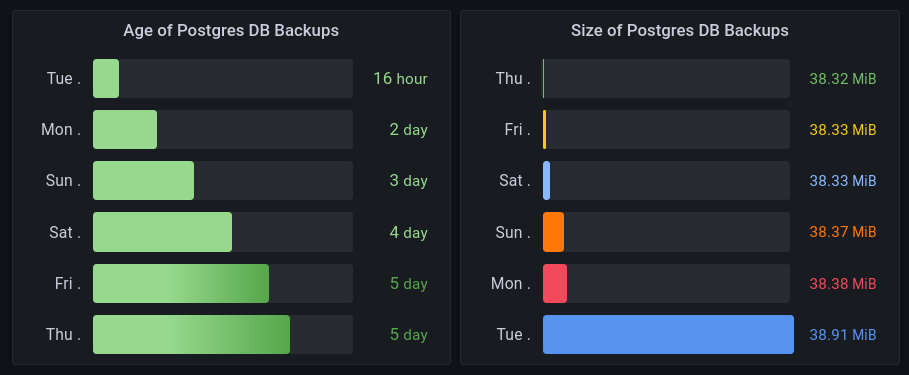
To visualize data in a way as shown in the example panel above, queries like the following ones may be used:
sort(fsa_age_seconds{instance="pg_server.example.xy"})
sort(fsa_size_bytes{instance="pg_server.example.xy"})
Known limitations
Currently only a single directory tree can be monitored. Adding support for monitoring several trees with a single process is planned though.
Scalability and resource usage considerations
The exporter is designed with code simplicity as a goal, it's not optimized for efficiency or low resource usage. A few numbers on an average laptop running the exporter on a rather large file tree (not recommended, just for demonstration purposes):
- Number of files monitored: ~200'000
- Memory consumption: ~350 MB
- Metrics collection duration: < 10s
Metadata
Release files for file-size-age-metrics 1.0.0
For a detailed explanation of source distributions (sdists) and built distributions (wheels), please see the package formats documentation.
Source distribution (sdist)
| File | Size | Uploaded | |
|---|---|---|---|
| file_size_age_metrics-1.0.0.tar.gz | 22.5 kB | Details |
Built distribution (wheel)
| File | Interpreter | ABI | Platform | Reset |
|---|---|---|---|---|
| file_size_age_metrics-1.0.0-py3-none-any.whl | Python 3 | none | any | Details |
Total release size: 46.4 kB
Release files / file_size_age_metrics-1.0.0.tar.gz
| Download URL | file_size_age_metrics-1.0.0.tar.gz |
|---|---|
| Size | 22.5 kB |
| Tags | Source |
|
SHA-256 checksum How to use checksums |
b41a55bc859410c7359b543aa2b79651e683d2d96e457b276dad33a1e2028454
|
|
BLAKE2b-256 checksum How to use checksums |
3729b6bfe804e574c21526cf650831f917a91b007157b826fb7b56dc50b54a94
|
| Upload date | |
|
Uploaded using Trusted Publishing? What is trusted publishing? |
Yes |
| Uploaded via |
twine/6.1.0 CPython/3.12.8
|
Provenance
Provenance describes where a file came from. On PyPI, provenance is shared via attestations, which provide a verifiable record of the build or publishing details. View details, limitations and caveats.


PyPI Publish Attestation
PyPI verified that this artifact, at this checksum, originated from the publisher listed below.
Signed by GitHub Actions, verified by PyPI on Feb 6, 2025.
Transparency logRelease files / file_size_age_metrics-1.0.0-py3-none-any.whl
| Download URL | file_size_age_metrics-1.0.0-py3-none-any.whl |
|---|---|
| Size | 23.9 kB |
| Tags | Python 3 |
|
SHA-256 checksum How to use checksums |
93a5e7db66bc623f96ebfd9fab4b4611a2dbfaf9845da6c1fec2f52eb2f0e488
|
|
BLAKE2b-256 checksum How to use checksums |
fe0ebf54a194233fdb7edfaa25c3ef0e3e88378de15236c4b4c33e503c4e43e2
|
| Upload date | |
|
Uploaded using Trusted Publishing? What is trusted publishing? |
Yes |
| Uploaded via |
twine/6.1.0 CPython/3.12.8
|
Provenance
Provenance describes where a file came from. On PyPI, provenance is shared via attestations, which provide a verifiable record of the build or publishing details. View details, limitations and caveats.
PyPI Publish Attestation
PyPI verified that this artifact, at this checksum, originated from the publisher listed below.
Signed by GitHub Actions, verified by PyPI on Feb 6, 2025.
Transparency log













