
File Crawler index files and search hard-coded credentials.

Project description
File Crawler







FileCrawler officially supports Python 3.8+.
Main features
- List all file contents
- Index file contents at Elasticsearch
- Do OCR at several file types (with tika lib)
- Look for hard-coded credentials
- Much more...
Parsers:
- PDF files
- Microsoft Office files (Word, Excel etc)
- X509 Certificate files
- Image files (Jpg, Png, Gif etc)
- Java packages (Jar and war)
- Disassembly APK Files with APKTool
- Compressed files (zip, tar, gzip etc)
- SQLite3 database
- Containers (docker saved at tar.gz)
- E-mail (*.eml files) header, body and attachments
Indexers:
- Elasticsearch
- Stand-alone local files
Extractors:
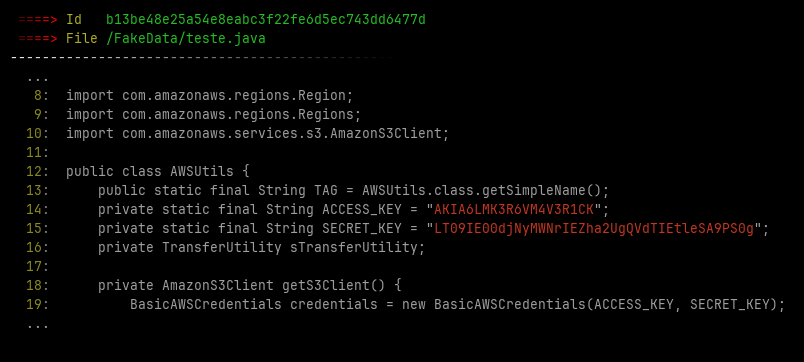
- AWS credentials
- Github and gitlab credentials
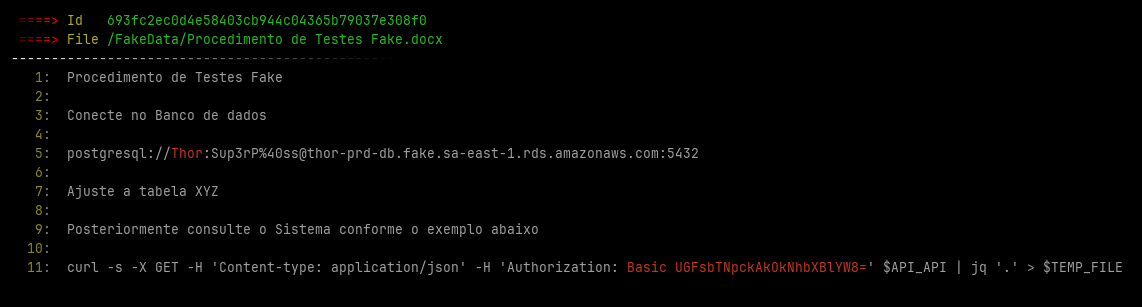
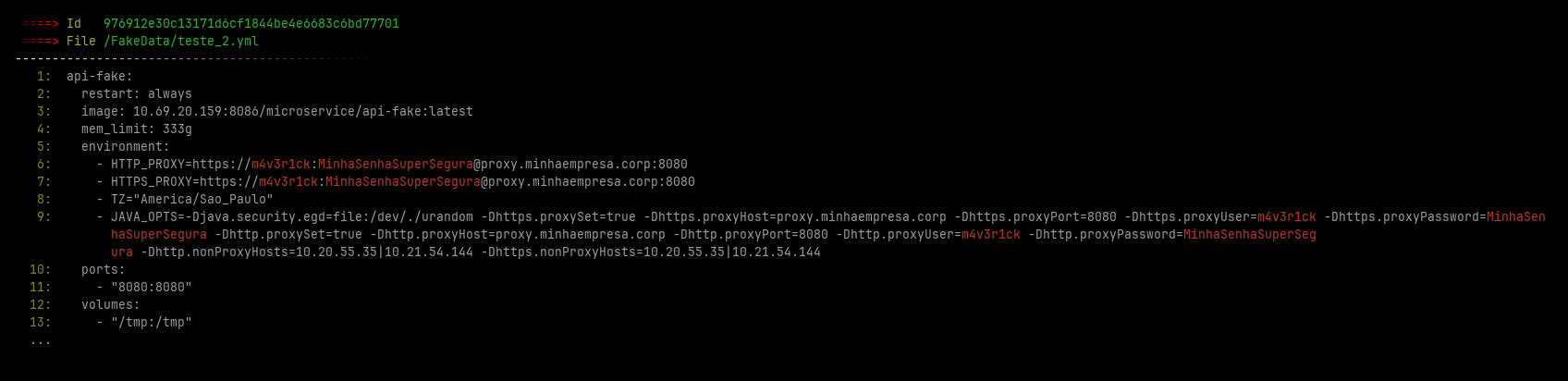
- URL credentials
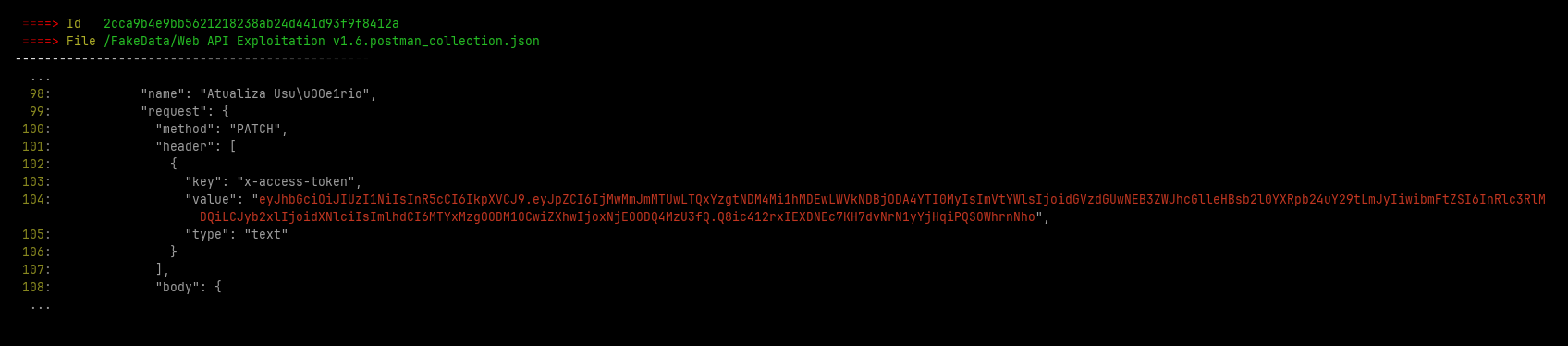
- Authorization header credentials
Alert:
- Send credential found via Telegram
IntelX Parser
Motivated by several reasons I decided to move IntelX specific rules to a new tool called IntelParser available at https://github.com/helviojunior/intelparser/
Sample outputs
In additional File Crawler save some images with the found leaked credentials at ~/.filecrawler/ directory like the images bellow
Installing
Dependencies
apt install default-jre default-jdk libmagic-dev git
Installing FileCrawler
Installing from last release
pip install -U filecrawler
Installing development package
pip install -i https://test.pypi.org/simple/ FileCrawler
Running
Config file
Create a sample config file with default parameters
filecrawler --create-config -v
Edit the configuration file config.yml with your desired parameters
Note: You must adjust the Elasticsearch URL parameter before continue
Run
# Integrate with ELK
filecrawler --index-name filecrawler --path /mnt/client_files -T 30 -v --elastic

# Just save leaks locally
filecrawler --index-name filecrawler --path /mnt/client_files -T 30 -v --local -o /home/out_test
Help
$ filecrawler -h

File Crawler v0.1.3 by Helvio Junior
File Crawler index files and search hard-coded credentials.
https://github.com/helviojunior/filecrawler

usage:
    filecrawler module [flags]

Available Integration Modules:
  --elastic                  Integrate to elasticsearch
  --local                    Save leaks locally

Global Flags:
  --index-name [index name]  Crawler name
  --path [folder path]       Folder path to be indexed
  --config [config file]     Configuration file. (default: ./fileindex.yml)
  --db [sqlite file]         Filename to save status of indexed files. (default: ~/.filecrawler/{index_name}/indexer.db)
  -T [tasks]                 number of connects in parallel (per host, default: 16)
  --create-config            Create config sample
  --clear-session            Clear old file status and reindex all files
  -h, --help                 show help message and exit
  -v                         Specify verbosity level (default: 0). Example: -v, -vv, -vvv

Use "filecrawler [module] --help" for more information about a command.
How-to install ELK from scratch
Docker Support
Build filecrawler only:
$ docker build --no-cache -t "filecrawler:client" https://github.com/helviojunior/filecrawler.git#main
Using Filecrawler's image:
Goes to path to be indexed and run the commands bellow
$ mkdir -p $HOME/.filecrawler/
$ docker run -v "$HOME/.filecrawler/":/u01/ -v "$PWD":/u02/ --rm -it "filecrawler:client" --create-config -v
$ docker run -v "$HOME/.filecrawler/":/u01/ -v "$PWD":/u02/ --rm -it "filecrawler:client" --path /u02/ --no-db -T 30 -v --elastic --index-name filecrawler
Build filecrawler + ELK image:
$ sysctl -w vm.max_map_count=262144
$ docker build --no-cache -t "filecrawler:latest" -f Dockerfile.elk_server https://github.com/helviojunior/filecrawler.git#main
Using Filecrawler's image:
Goes to path to be indexed and run the commands bellow
$ mkdir -p $HOME/.filecrawler/
$ docker run -p 443:443 -p 80:5601 -p 9200:9200 -v "$HOME/.filecrawler/":/u01/ -v "$PWD":/u02/ --rm -it "filecrawler:latest"

#Inside of docker run
$ filecrawler --create-config -v
$ filecrawler --path /u02/ -T 30 -v --elastic --index-name filecrawler
Using Docker with remote server using ssh forwarding
$ mkdir -p $HOME/.filecrawler/
$ docker run -v "$HOME/.ssh/":/root/.ssh/ -v "$HOME/.filecrawler/":/u01/ -v "$PWD":/u02/ --rm -it --entrypoint /bin/bash "filecrawler:client"
$ ssh -o StrictHostKeyChecking=no -Nf -L 127.0.0.1:9200:127.0.0.1:9200 user@server_ip
$ filecrawler --create-config -v
$ filecrawler --path /u02/ -T 30 --no-db -v --elastic --index-name filecrawler
Credits
This project was inspired of:
Note: Some part of codes was ported from this 2 projects
To do
Release history Release notifications | RSS feed


Download files
Download the file for your platform. If you're not sure which to choose, learn more about installing packages.
Source Distribution
File details
Details for the file filecrawler-0.1.21.tar.gz.
File metadata
- Download URL: filecrawler-0.1.21.tar.gz
- Upload date:
- Size: 595.0 kB
- Tags: Source
- Uploaded using Trusted Publishing? No
- Uploaded via: twine/6.1.0 CPython/3.12.8
File hashes
| Algorithm | Hash digest | |
|---|---|---|
| SHA256 |
0565820fa5092a44b32a6f5d27e9e6f0886a7910c2de65802d93c6510501369d
|
|
| MD5 |
5cc199fedbaa77101e0d66d3041a075d
|
|
| BLAKE2b-256 |
ac1f0e31ce6854d7710057c7bbefdc474d96f7e8d17253e0ac9a39f5a681169f
|






