
Browse, share, and publish files on the Janelia file system


Project description
Fileglancer

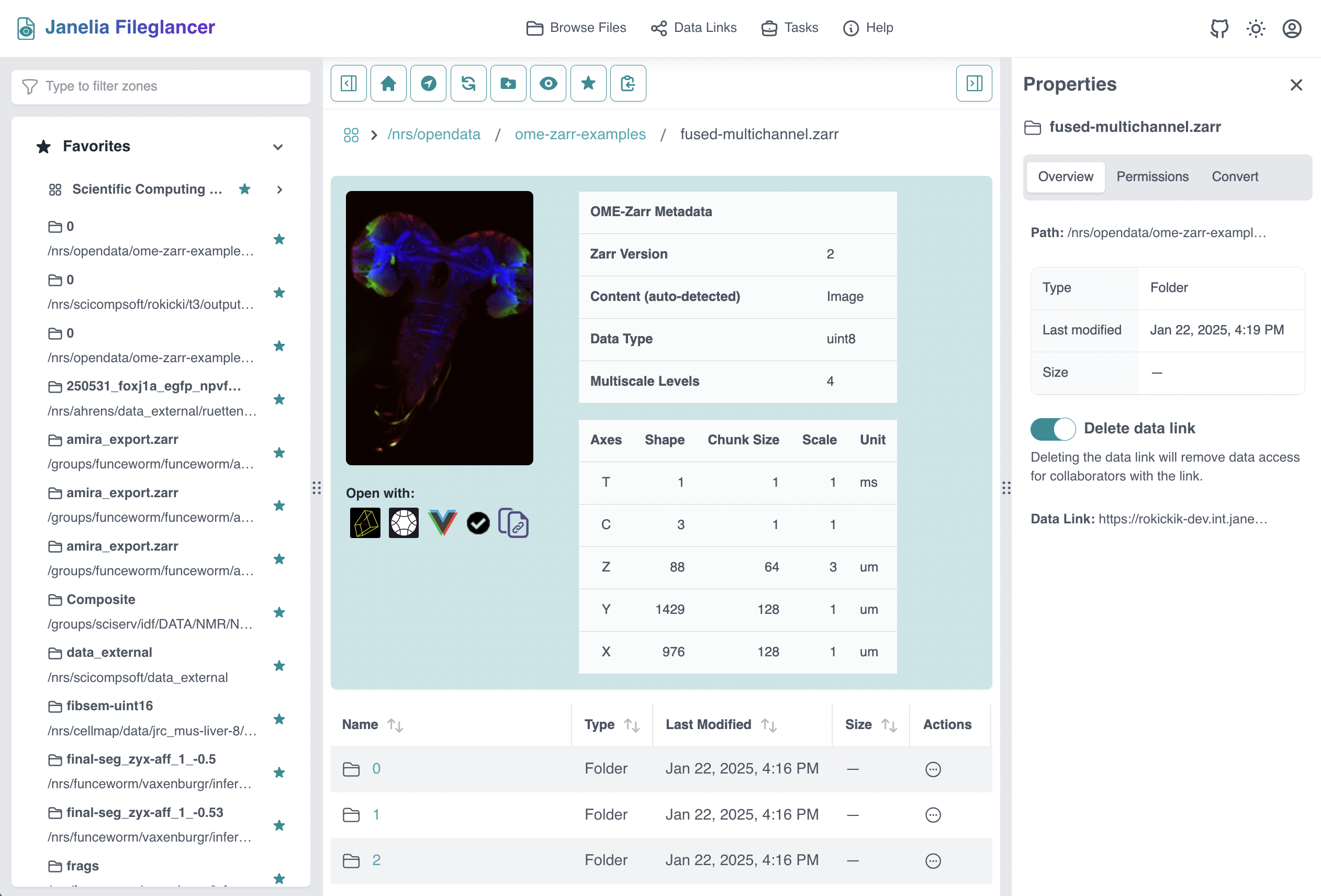
Fileglancer is a web application designed to allow researchers to easily browse, share, and manage large scientific imaging data using OME-NGFF (i.e. OME-Zarr). Our goal is to reduce the friction experienced by users who want to easily share their data with colleagues at their institution. Simply browse to your data, click on the Neuroglancer link, and send that link to your collaborator.
Core features:
- Browse and manage files on network file shares (NFS) using an intuitive web UI
- Create shareable Data Links for any file share path, allowing web-based anonymous access to your data
- Shareable links to Neuroglancer and other viewers
- Run Apps (compute jobs) on any infrastructure supported by py-cluster-api
- Integration with the x2s3 proxy service, to easily share data on the internet
See the documentation for more information.
Installation
Personal Deployment
Fileglancer can be run in a manner similar to Jupyter notebooks, by starting a web server from the command-line:
# Install from PyPI
pip install fileglancer

# Start the server
fileglancer start
This will start your personal server locally and open a web browser with Fileglancer loaded. By default, only your home directory (~/) will be browsable. You can browse and view your own data this way, but links to data will only work as long as your server is running. To share data reliably with others, you will need a persistent shared deployment.
Shared Deployments
Fileglancer is primarily intended for shared deployments on an intranet. This allows groups of users to share data easily. If you are on the internal Janelia network navigate to "fileglancer.int.janelia.org" in your web browser and login with your Okta credentials. If you are outside of Janelia, you'll need to ask your System Administrator to install Fileglancer on a server on your institution's network.
Software Architecture
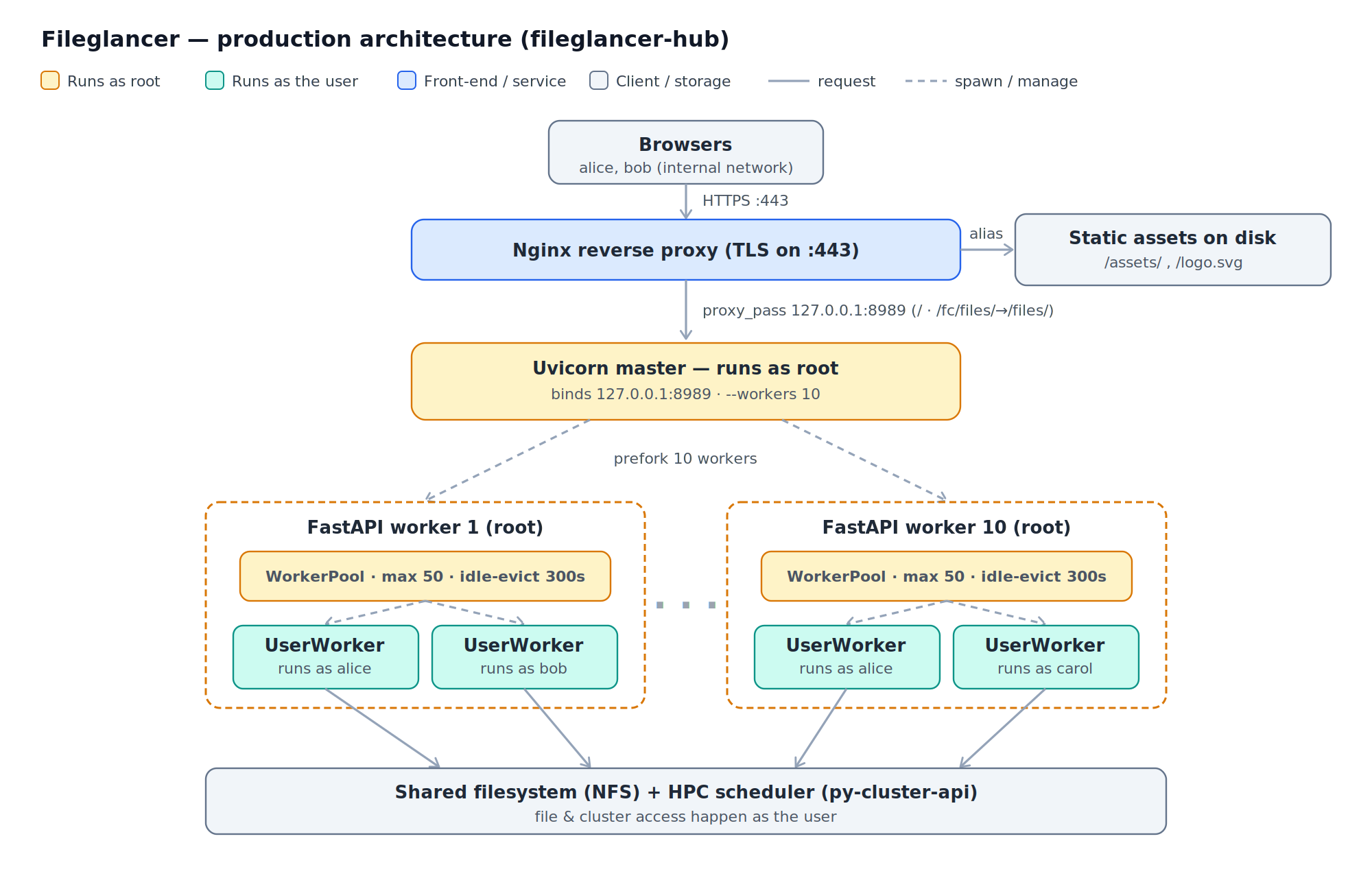
Fileglancer has a React front-end and a FastAPI backend. Uvicorn is used to manage the set of FastAPI workers. Each FastAPI worker manages a worker pool of user-specific worker processes that run as the user, inspired by JupyterHub's method of spinning up individual user servers using setuid. This allows each logged in user to access their resources on the network file systems and submit jobs to a compute cluster. The backend database access is managed by SQLAlchemy, which supports many databases including Sqlite and Postgresql.
Documentation
Related repositories
- fileglancer-hub - Production deployment files
- fileglancer-janelia - Janelia-specific customizations
- fileglancer-docs - Documentation website
Release history Release notifications | RSS feed


Download files
Download the file for your platform. If you're not sure which to choose, learn more about installing packages.
Source Distribution
Built Distribution
Filter files by name, interpreter, ABI, and platform.
If you're not sure about the file name format, learn more about wheel file names.
Copy a direct link to the current filters
File details
Details for the file fileglancer-3.0.0a0.tar.gz.
File metadata
- Download URL: fileglancer-3.0.0a0.tar.gz
- Upload date:
- Size: 9.0 MB
- Tags: Source
- Uploaded using Trusted Publishing? No
- Uploaded via: twine/6.2.0 CPython/3.14.4
File hashes
| Algorithm | Hash digest | |
|---|---|---|
| SHA256 |
1ac432a9a93ce12348fb3cb62d8ff19f66da8b2825ea5e341d78f46184ad4f2e
|
|
| MD5 |
58d7006f92d06874be8f5e16a00cde79
|
|
| BLAKE2b-256 |
c8606db4ca860e6d152544b14e1a4834b90320b27ab529f37312e2df3f437cfa
|
File details
Details for the file fileglancer-3.0.0a0-py3-none-any.whl.
File metadata
- Download URL: fileglancer-3.0.0a0-py3-none-any.whl
- Upload date:
- Size: 8.3 MB
- Tags: Python 3
- Uploaded using Trusted Publishing? No
- Uploaded via: twine/6.2.0 CPython/3.14.4
File hashes
| Algorithm | Hash digest | |
|---|---|---|
| SHA256 |
a301d29319b44d4dab9959029ee8a6273db78ef0e96abdced772f8fde412e3aa
|
|
| MD5 |
9e1d9406e11fc17968ece02c714de5da
|
|
| BLAKE2b-256 |
f66cadd890dfccd05e01c1302a05d9a3168074c66cd3819c5e05a50945a28791
|






