







LOCAL FILE INTELLIGENCE
Provenance. Metadata. Investigative Pivots.
Runs locally. Keeps every finding tied to its source.
Quick start · How it works · Evidence sources · Metadata · Pivots · Graph · Images · MCP · Exports · Live report
FileGrail is a local file intelligence tool for examining where files came from, what they contain, what they reveal about their history, and how they relate to other evidence.
It combines file provenance, operating-system and application traces, embedded metadata, file structure and investigative identifiers, including those found in document content, in one evidence model.
Every finding keeps its source, match basis, location and available time context. Independent records can corroborate each other or remain visibly in conflict.
FileGrail makes no network requests during analysis. The structural core has zero runtime dependencies.
Normal examination is read-only.
Quick start
Requires Python 3.10+ on Linux, macOS or Windows.
pipx install filegrail
or:
uv tool install filegrail
Analyze a file:
filegrail suspicious.pdf
Analyze a directory:
filegrail ./evidence
Extract investigative pivots from metadata, provenance and supported document content:
filegrail ./evidence --pivots
Create a self-contained HTML investigation report:
filegrail ./evidence --pivots --html -o report.html
Build a timeline:
filegrail ./evidence --timeline
Examine a collection of images and write a detailed HTML examination report:
filegrail image ./photos --out examination.html
Expose FileGrail to an MCP-compatible AI agent:
filegrail mcp --root ./evidence
View the live example investigation report
What can FileGrail tell you?
| Investigation question | Evidence FileGrail can use |
|---|---|
| Where did this file come from? | Browser history, OS origin attributes, quarantine records, archives, torrents, shell history, sidecars, mail transport and other local traces |
| What does the file reveal about itself? | EXIF, XMP, IPTC, C2PA, PDF and Office structures, media tags, telemetry, email, PE resources, font tables and other embedded metadata |
| What happened to it locally? | Recent-file records, Windows shortcuts, filesystem timestamps, trash records, sync context and shell activity |
| What is inside it? | Identifiers found in document content, attachments, embedded objects, archive members and other carried files |
| What can I investigate further? | URLs, domains, IPs, emails, accounts, hashes, CVEs, wallets, people, organizations and other structured identifiers |
| Which files are connected? | Shared identifiers, hashes, authors, camera serials, XMP lineage, archive membership, torrents and evidence-backed relationships |
| What does an image's structure show? | JPEG structure and quantization tables, embedded previews and thumbnails, shared camera attributes and optional pixel diagnostics |
| Where does the evidence disagree? | Origin conflicts, timestamp inconsistencies, metadata conflicts, file-size mismatches, signature mismatches and C2PA hard-binding failures |
FileGrail does not automatically turn recorded metadata into attribution.
A camera model is not a person.
An author field is not identity proof.
A filename match is not an exact-path match.
A C2PA claim is not automatically trusted.
A timestamp written by an application is not automatically ground truth.
Those distinctions remain visible in the output.
How it works
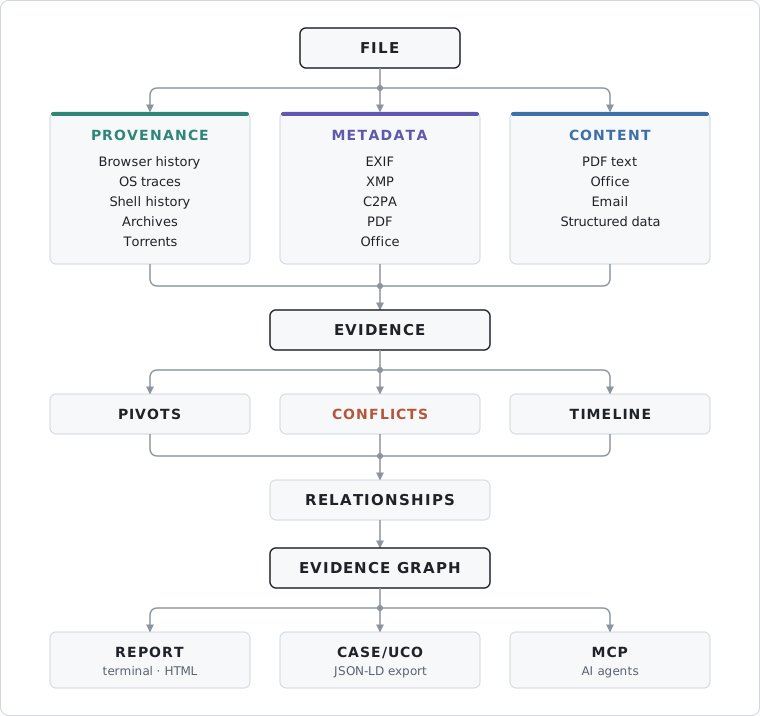
A file is examined across several independent evidence layers.
Origin
Evidence describing how the file reached the examined environment.
Examples include browser downloads, operating-system origin attributes, quarantine records, shell fetch commands, archives, torrents, sidecars and mail transport.
Metadata
Information stored inside the file itself.
Examples include authors, devices, software, timestamps, GPS, document history, camera and lens information, PDF structures, XMP history, C2PA manifests, telemetry and executable metadata.
Activity
Evidence that the local environment handled the file.
Examples include recent-file records, Windows shortcuts, filesystem timestamps, trash metadata, synchronization roots and shell commands.
Content
With --pivots, supported documents are inspected for structured investigative identifiers.
The source text itself is not added to the report.
Relationships
Files are connected to identifiers, authors, devices, containers and other files only where FileGrail has an evidence basis for the relationship.
Corroboration and conflicts
Independent observations remain independent.
FileGrail can show when several records agree and when they contradict each other without automatically deciding which source is true.
Match basis
Every evidence record preserves how it became associated with the file.
| Match basis | Meaning |
|---|---|
embedded |
Read directly from the file |
file-attribute |
Attached to this exact file by the operating system or filesystem |
recorded-path |
An external record contains the file path |
sidecar |
Associated through a separate sidecar file |
name+size |
File name and exact size match |
filename |
File name only |
container-member |
Read from or associated through a container member |
sync-root |
File exists inside a supported synchronized location |
A filename-only association is not presented as equivalent to an attribute attached to the exact file.
Evidence sources
FileGrail combines evidence embedded inside files with traces stored elsewhere on the examined system.
| Source | Information read |
|---|---|
| Chromium-family browser history | Download URL, referrer, timestamp, recorded path and size from Chrome, Chromium, Brave, Edge and Vivaldi |
| Firefox history | Download URL, timestamp, recorded path and size where available |
Windows Zone.Identifier |
HostUrl, ReferrerUrl, ZoneId |
| macOS Where From | Origin URL and referrer |
| macOS quarantine | Origin, referrer, downloading application and quarantine time |
| Linux XDG attributes | Origin and referrer URLs |
| Shell history | Fetch commands and other commands referencing files |
| Archives | Members, sizes and relationships to extracted files |
| Embedded files | Attachments and packaged objects inside messages, PDFs and Office documents |
| Torrent files | Trackers, client, comment, info hash, magnet link and members |
| Torrent client stores | qBittorrent, Transmission and Deluge records |
yt-dlp sidecars |
Page URL, uploader, channel, publication date, extractor and fetch time |
| Linux Recent Documents | Recently opened paths |
| Windows Recent shortcuts | .lnk records associated with previously opened files |
| Sync folders | Nextcloud, Dropbox, Syncthing and OneDrive context |
| Freedesktop trash | Original path and deletion time |
| Filesystem | Creation and modification timestamps |
| Messenger naming patterns | WhatsApp and Telegram Desktop patterns, treated as weak associations |
Inspect available local sources:
filegrail doctor
Analyze a copied or mounted profile:
filegrail doctor --home /mnt/profile
filegrail /mnt/evidence --home /mnt/profile
Without --home, FileGrail reads supported records from the profile of the user running the command.
Evidence coverage
A missing result is not the same thing as a source being searched successfully and containing nothing.
Each source records one of four states:
searched
partial
unavailable
disabled
Coverage can also include artifact counts, records read, unreadable paths, skipped paths, active profile and scan options.
This context accompanies machine-readable graph exports as well as scan JSON.
Metadata and file structure
FileGrail keeps original field names and decoded values rather than reducing everything to a small normalized metadata set.
| Metadata block | Examples of data extracted |
|---|---|
| EXIF | Camera, lens, software, capture time, GPS, JFIF/JFXX and ICC information |
| MakerNotes | Camera body and lens serials, lens model, shutter count, firmware, frame number, owner name and vendor-specific identifiers |
| XMP | Creating application, author, title, document IDs and derivation |
| XMP history | Recorded editing steps and timestamps |
| IPTC | By-line, credit, source, copyright, caption, keywords, place and creation date |
| Photoshop resources | Resolution, JPEG settings, thumbnails, paths, workflow URLs and version information |
| C2PA | Producing application, actions, ingredients, digital source declarations and hard-binding state where supported |
| Producer, creator, author, dates, document IDs, incremental updates, encryption, attachments, scripts, forms, links and signature structures | |
| OOXML | Application, author, last editor, company, template, revision count, editing time, external relationships and DDE fields |
| OLE/CFB | Document properties, storage information, orphaned entries, VBA/XLM indicators and embedded-object paths |
| OpenDocument | Application, author, title, creation date and editing statistics |
| Media containers | Recorder or encoder, dates, locations, tracks, tags, telemetry and device information |
| Transport headers, relay hops, message identifiers and selected message properties | |
| PE/COFF | Target machine, linker, PDB information, Rich header, version resources and signature presence |
| Fonts | Family, designer, foundry, version, licence, vendor, dates, embedding rights and variation axes |
| Web documents | Author, publisher, dates, canonical URL, Open Graph, Twitter Cards, JSON-LD, Microdata and RDFa |
Presence of active-content indicators such as VBA, XLM, JavaScript or PDF actions is reported as an observation.
FileGrail does not classify a document as malicious.
C2PA interpretation
Where supported, FileGrail reports whether an asset still matches the hard binding in its C2PA manifest.
The claim signature itself is not verified.
FileGrail does not validate the C2PA certificate chain and does not present a signer as trusted.
Authenticode and PDF signature structures are handled the same way: their presence can be reported without implying trust or cryptographic validity.
File identification
An extension is only a filename claim.
FileGrail performs two complementary checks.
Signature checks
Supported file signatures are compared with the declared extension.
Recognized families include JPEG, PNG, GIF, TIFF, WebP, PDF, RTF, ZIP, gzip, bzip2, XZ, Zstandard, 7-Zip, RAR, TAR, OLE Compound File, ISO Base Media, Matroska, Ogg, FLAC, MP3, WAV, AVI, SQLite, ELF, PE, Mach-O, HTML, SVG and XML.
Legitimate container formats are not treated as mismatches simply because they use ZIP or OLE internally.
PRONOM identification
Every scanned file on disk is identified from its bytes using a packaged release of the PRONOM file-format registry.
The result can include:
PUID
format name
format version
For example:
fmt/412
Microsoft Word for Windows
2007 onwards
Formats built on ZIP and OLE containers are identified by what the container holds.
The registry release used for the scan is recorded in JSON under run.format_registry.
Files whose bytes do not match a known signature are left unidentified. Nothing is guessed from the extension.
Files carried inside archives and documents are not yet PRONOM-identified.
The registry data contains public sector information licensed under the Open Government Licence v3.0.
Supported formats
Support differs by operation. A format supported for metadata extraction is not automatically supported for pivot search in its content, cleaning or image examination.
| Family | Examples |
|---|---|
| Images | JPEG, PNG, APNG, TIFF, WebP, HEIC, HEIF, AVIF, PSD, PSB, DNG, NEF, CR2, ARW, ORF, RW2 |
| Documents | PDF, DOCX, DOCM, XLSX, XLSM, PPTX, PPTM, legacy Office, OpenDocument, RTF, EPUB, Jupyter |
| Video and audio | MP4, MOV, M4V, M4A, 3GP, MKV, WebM, WAV, AIFF, AVI, FLAC, OGG, Opus, MP3, APE, Musepack, WavPack |
| Executables | EXE, DLL, SYS, SCR, OCX, CPL, DRV, EFI |
| Fonts | TTF, OTF, TTC, OTC, WOFF |
| EML, MSG | |
| Archives | ZIP, JAR, WHL, TAR, TGZ, GZ, BZ2, XZ |
| Structured and text data | TXT, Markdown, reStructuredText, JSON, NDJSON, YAML, TOML, INI, CSV, TSV, HTML, XML |
| Geospatial | GPX, KML, KMZ, GeoJSON |
| Personal information | vCard, iCalendar |
| Investigation and graph data | GEXF, GraphML, XMind, FreeMind, JSON Canvas, Maltego MTGX |
| Provenance artifacts | BitTorrent .torrent, yt-dlp .info.json |
The full mapping of extensions, readers, metadata blocks, signature detection and pivot rules is maintained in docs/FORMATS.md.
Files inside files
Supported carried files are treated as files of their own.
Examples include:
ZIP
└── image.jpg

EML
└── attachment.pdf

PDF
└── attachment.docx

DOCX
└── embedded-object.xls
A carried file can have:
- its own metadata;
- its own evidence;
- its own pivots;
- its own timestamps;
- its carrier as a parent;
- a membership relationship in the graph;
- inherited carrier origin where applicable.
Nothing is unpacked into the scanned directory.
Carrier reading is bounded, and nested content is currently read one level deep.
Supported archive families are ZIP, JAR, WHL, TAR, TGZ, GZ, BZ2 and XZ.
Document content
--pivots can search supported document content as well as provenance and metadata.
filegrail ./case --pivots
Metadata and provenance only:
filegrail ./case --pivots --meta
Content only:
filegrail ./case --pivots --content
The source text itself is not included in the report. Only detected identifiers and their locations are retained.
Content can be read from:
- text and structured files;
- CSV and TSV cells;
- HTML, XML and SVG;
- GPX, KML, KMZ and GeoJSON;
- GEXF, GraphML and mind-map formats;
- PDF pages;
- Word documents;
- Excel workbooks;
- PowerPoint presentations;
- OpenDocument files;
- EPUB chapters;
- XMind and Maltego MTGX;
- EML and MSG message bodies.
Where possible, FileGrail records locations such as:
line 12
page 7
slide 4
sheet 2
row 4 · column 3
comments
footnotes
placemark 2
At most 1 MB of text and 64 document parts are inspected per file.
Encrypted PDFs are not treated as plaintext.
FileGrail does not perform OCR.
Investigative pivots
Values from metadata, provenance and content are normalized into identifiers that can be correlated across files.
Each pivot can preserve:
- type;
- original value;
- normalized value;
- source file;
- evidence source;
- field or document location;
- occurrence count;
- corpus;
- relationships to graph entities.
Values appearing in multiple files are surfaced as shared pivots.
Network and infrastructure
url
domain
hostname
ipv4
ipv6
asn
onion
tracker
Identity and accounts
email
person
org
handle
message_id
Security and hashes
md5
sha1
sha256
sha512
cve
cwe
ghsa
Hosts and systems
path
registry
sid
executable
mac
Geographic and physical identifiers
geo
postcode
vin
Financial, company and tax identifiers
iban
bic
aba
vat
nip
regon
ein
crn
cik
Cryptocurrency
btc
bch
ltc
doge
xmr
eth
Sensitive values
secret
ssn
Recognized secrets and US Social Security numbers are represented by type and fingerprint rather than exposed as raw values.
Detectors apply validation and contextual filtering to reduce common false positives.
Analysis and correlation
Timeline
filegrail ./case --timeline
Timeline events can come from:
- provenance records;
- embedded metadata;
- local activity;
- XMP history;
- filesystem timestamps;
- mail;
- supported application records.
Timestamp offsets are preserved and events with different offsets are ordered by the instant they represent.
Corroboration
Independent records can support the same investigative context.
Examples include browser history and Zone.Identifier pointing to the same source, several metadata blocks recording the same creator, or the same camera serial appearing across multiple images.
Correlation is not automatically converted into attribution.
Conflicts
FileGrail surfaces material disagreements such as:
- conflicting origin URLs;
- file-size mismatch;
- weak filename-only association;
- creation after recorded arrival;
- impossible timestamp order;
- XMP history out of sequence;
- EXIF, IPTC, PDF or XMP disagreement;
- C2PA hard-binding failure;
- extension contradicting recognized file structure.
A conflict indicates evidence worth reviewing. It does not decide which source is correct.
File relationships and lineage
XMP lineage
FileGrail uses XMP identifiers including:
xmpMM:DocumentID
xmpMM:InstanceID
xmpMM:OriginalDocumentID
xmpMM:DerivedFrom
to connect related files across editing, export and derived renditions.
Relationships can include:
derived from
source of
descends from
original of
same document
common ancestor
A shared ancestor is not automatically treated as direct derivation.
Clustering
filegrail ./photos --cluster
Files can be grouped around shared:
- camera body serial;
- lens serial;
- camera make and model;
- recorded author.
A shared model identifies a device class, not one physical device.
Compare
filegrail compare original.docx edited.docx
Compares two files across identifying metadata, origin route and capture-time interval.
Explain
filegrail explain document.pdf
Shows the evidence behind findings associated with a file, including source, match basis, decoded fields, timestamps and related paths or containers.
Evidence graph
A scan can become a graph of files, identifiers, devices, authors and containers.
file
 ├── email
 │    └── domain
 ├── URL
 │    └── host / domain
 ├── camera serial
 ├── author
 ├── archive
 ├── torrent
 └── SHA-256
Relationships retain the evidence behind them.
An edge can preserve:
- relationship type;
- direction;
- evidence source;
- evidence category;
- match basis;
- location;
- occurrence count;
- timestamp where available.
A relationship supported by several independent grounds remains one relationship carrying those grounds.
Derived relationships also preserve the rule and source value from which they were produced.
When hashing is enabled, identical files meet at the same SHA-256 node instead of creating pairwise file-to-file links.
Graph and forensic exports
GraphML
filegrail ./case --graphml -o graph.graphml
Nodes include readable labels and types. Relationships include their type and occurrence count as weight.
Suitable for workflows involving tools such as Gephi, NetworkX and Neo4j.
CSV relationships
filegrail ./case --graph-csv -o relationships.csv
One relationship is written per row with both endpoints, node types, labels, relationship type, weight and evidence.
Run-level metadata is written separately to:
relationships.csv.meta.json
because it describes the scan rather than one individual edge.
CASE/UCO JSON-LD
filegrail ./case --case-jsonld -o case.json
FileGrail exports its evidence graph as CASE/UCO JSON-LD for standards-based forensic interchange.
Relationships remain first-class objects carrying their own evidence.
The export can also record:
- FileGrail as the analytic tool;
- the investigative action;
- inputs and results;
- provenance;
- case and examiner context where available.
Identifiers are deterministic without claiming more than the evidence supports.
A file with SHA-256 can be identified by its content. Without a hash, its identity is scoped to where it was found.
A filename alone is never treated as file identity.
Where UCO has no appropriate class, FileGrail preserves the observable rather than forcing it into a misleading type.
The exporter:
- makes no network request;
- uses no JSON-LD runtime library;
- is validated against CASE 1.5.0.
HTML investigation reports
filegrail ./case --pivots --html -o report.html
The report is a single portable HTML file with no external assets and no network requests.
It can include:
- investigation summary;
- key findings;
- evidence coverage;
- file index;
- decoded evidence;
- timeline;
- investigative pivots;
- conflicts;
- XMP lineage;
- evidence graph;
- graph pan and zoom;
- multiple graph layouts;
- search and filters;
- node details;
- relationship explorer;
- SVG graph export;
- sortable tables;
- copy-as-TSV;
- cross-links between evidence;
- full-report search;
- dark screen theme;
- print layout.
filegrail image writes its own detailed HTML report for image examination. See FileGrail Image.
FileGrail Image
Image forensics with a separate HTML report.
filegrail image provides a dedicated workflow for still-image examination.
It examines EXIF and JPEG structure for disagreements and, with filegrail[image] installed, runs the kind of analyses known from Sherloq or FotoForensics: error level analysis (ELA), noise residual, bit planes, luminance gradient and histograms.
filegrail image ./photos \
  --out examination.html \
  --case 2026/014 \
  --examiner "J. Nowak"
The normal provenance and metadata scan is combined with structural examination of the image.
The same examination is available as JSON:
filegrail image ./photos --json > examination.json
It contains every fact, conflict and review signal with the method behind it, method coverage, JPEG structure and evidence records. Images and pixel diagnostics are not included.
Report sections
| Section | Purpose |
|---|---|
| Summary | Images examined, decode coverage, conflicts, review signals and recorded values |
| Images | Image facts, metadata, evidence coverage and structural details |
| Findings | Numbered disagreements and review signals |
| Shared attributes | Make, body serial, lens and JPEG encoding fingerprint |
| Dates | Recorded capture times on one axis |
| Locations | Recorded coordinates as an area map, local plot and table |
| Evidence | Every recorded value with category, source and match basis |
JPEG structure
The structural pass can record:
- encoding and dimensions;
- component sampling;
- quantization tables;
- Huffman tables;
- restart interval;
- scans;
- comments;
- trailing bytes after the end marker;
- exact or nearest IJG quantization-quality match.
The EXIF pass walks IFD0, EXIF, GPS, Interoperability, SubIFDs and IFD1.
A valid IFD1 thumbnail is retained for examination.
Structural disagreements can become numbered findings.
Optional pixel diagnostics
Install:
pip install 'filegrail[image]'
This adds Pillow and NumPy.
Available outputs include:
| Output | Purpose |
|---|---|
| Working image | Bounded decoded representation used for diagnostics |
| Embedded preview | Preview stored inside the file or vendor block |
| Preview comparison | Embedded preview compared with the decoded image |
| Histogram | Distribution by channel and luminance |
| Luminance gradient | Direction of local brightness changes |
| Noise residual | Local variation remaining after image content is reduced |
| Bit planes | Selected individual bits of the luminance channel |
| Error level analysis | Recompression comparison at two declared qualities |
These are review aids.
FileGrail does not convert them into an authenticity or manipulation score.
Image options
| Option | Purpose |
|---|---|
-o, --out FILE |
Destination report |
-j, --json |
Examination as JSON, without images |
--case REF |
Case reference |
--examiner NAME |
Examiner name |
--redact |
Remove text-sensitive information and pixel-bearing outputs |
--embed |
Embed images in the HTML page |
--image-budget MB |
Bound generated image data |
--no-recurse |
Disable recursive traversal |
SHA-256 is recorded for every examined image.
Metadata removal
clean is an explicit operation separate from normal read-only analysis.
filegrail clean ./publish --out ./clean
Original files are not modified.
Supported families:
| Family | Extensions |
|---|---|
| JPEG | .jpg .jpeg .jpe |
| PNG | .png .apng |
| SVG | .svg |
| ISO BMFF media | .mp4 .m4v .m4a .mov .qt .3gp |
| Microsoft OOXML | .docx .docm .dotx .xlsx .xlsm .xltx .pptx .pptm |
| OpenDocument | .odt .ods .odp .odg .ott .otp |
Applicable EXIF, XMP, IPTC, Content Credentials, text/comment blocks, document properties and container timestamps are removed.
Pixels, vector paths, audio and video streams remain unchanged.
Check the expected result without writing copies:
filegrail clean ./publish --check
After cleaning, the output is scanned again and supported metadata that remains is reported.
| Option | Purpose |
|---|---|
--out DIR |
Destination for cleaned copies |
--check |
Report the expected result without writing files |
--overwrite |
Replace existing destination files |
--type NAME |
Filter by file family |
--ext LIST |
Filter by extension |
--no-recurse |
Disable recursive traversal |
-j, --json |
JSON output |
Metadata removal is not anonymization.
Information may remain in pixels, content, sensor characteristics, codec characteristics, unsupported structures, embedded resources or identifiers outside known metadata blocks.
AI agents and MCP
FileGrail can expose its deterministic analysis to AI agents through the Model Context Protocol.
filegrail mcp --root ~/case
Most MCP clients take the server as a command in their configuration:
{
  "mcpServers": {
    "filegrail": {
      "command": "filegrail",
      "args": ["mcp", "--root", "/path/to/case"]
    }
  }
}
Instead of opening every file itself, an agent can ask FileGrail targeted questions about a scan.
| MCP tool | Result |
|---|---|
scan |
Summary, findings, conflicts, pivots, formats and coverage |
files |
Files filtered by evidence or format |
file |
Evidence and conflicts for one file |
findings |
Findings across the scan |
pivots |
Identifiers filtered by type or sharing |
neighbors |
Evidence-backed graph relationships for one node |
image |
Image examination without pictures: JPEG structure, quality estimate, embedded previews, conflicts and review signals |
compare |
Two files side by side |
The MCP server is:
- read-only;
- restricted to the directories given with
--root(repeatable; default: the current directory); - profile-independent unless started with
--profileor--home DIR; - zero-dependency;
- local from FileGrail's side.
clean is not exposed to agents.
Values read from examined files are treated as untrusted file content, not instructions. Values longer than 1000 characters are shortened.
FileGrail itself makes no network requests. An external AI client may send returned evidence to its model provider.
Automation and exports
FileGrail can be used from shell scripts, Python, notebooks and other analytical systems.
JSON
filegrail ./case --json > report.json
With pivots:
filegrail ./case --pivots --json > report.json
Example: list origin URLs:
filegrail ./case --json |
  jq -r '.files[] |
         .path as $file |
         .evidence[] |
         select(.category == "origin" and .url) |
         "\($file)\t\(.url)"'
Example: email pivots:
filegrail ./case --pivots --json |
  jq -r '.identifiers[] |
         select(.type == "email") |
         .normalized'
Example: PRONOM formats:
filegrail ./case --json |
  jq -r '.files[] |
         select(.formats | length > 0) |
         "\(.formats[0].puid)\t\(.formats[0].name)\t\(.path)"'
Structured-output schemas
| Command | Schema |
|---|---|
scan |
filegrail.scan/2 |
explain |
filegrail.explain/2 |
compare |
filegrail.compare/2 |
doctor |
filegrail.doctor/1 |
clean |
filegrail.clean/1 |
image |
filegrail.image/1 |
Schema versions change when structured-output meaning or compatibility changes, not for every implementation change.
The documented commands and options, exit codes, extras and JSON schemas follow semantic versioning. HTML reports, the terminal layout and the Python modules can change in any release.
Validation
FileGrail includes validation and differential testing for several core areas.
The repository contains a corpus builder that generates minimal specimens for the formats and extensions claimed by the project together with expected results.
CI compares overlapping extraction results against ExifTool.
File-format identification is compared with DROID using the same PRONOM registry release.
CASE/UCO output is validated with the official CASE 1.5.0 validator in a dedicated test job.
Reference tools are used as independent checks where their scope overlaps with FileGrail, not as runtime dependencies.
Usage
filegrail <path> [options]
filegrail <command> [options]
Running filegrail without arguments shows the command overview without starting a scan.
Commands
| Command | Purpose |
|---|---|
filegrail PATH |
Analyze a file or directory |
filegrail scan PATH |
Explicit scan form |
filegrail image PATH --out FILE |
Digital image examination |
filegrail explain FILE |
Explain the evidence behind one file |
filegrail compare A B |
Compare two files |
filegrail doctor |
Inspect available evidence sources |
filegrail clean PATH --out DIR |
Write metadata-cleaned copies |
filegrail clean PATH --check |
Check cleaning without writing files |
filegrail mcp --root DIR |
Expose read-only analysis over MCP |
filegrail menu |
Interactive command menu |
filegrail help COMMAND |
Command-specific help |
filegrail --version |
Print the installed version |
Common scan options
| Option | Purpose |
|---|---|
--brief |
Compact report |
-v, --verbose |
Expanded evidence |
--pivots |
Extract pivots from metadata, provenance and content |
--meta |
Pivot search limited to metadata and provenance |
--content |
Pivot search limited to document content |
--timeline |
Build a timeline |
--cluster |
Group files by supported shared attributes |
--unknown-only |
Show files without evidence |
--hash |
Compute SHA-256 |
--type NAME |
Filter by file family |
--ext LIST |
Filter by extension |
--limit N |
Bound selected result lists |
--home DIR |
Use another profile for local evidence |
--redact |
Redact supported credentials |
-j, --json |
JSON output |
--html |
HTML report |
--graphml |
GraphML export |
--graph-csv |
CSV relationship export |
--case-jsonld |
CASE/UCO JSON-LD export |
-o, --out FILE |
Output destination |
--no-recurse |
Disable recursive scanning |
--no-skip |
Include normally skipped build/cache/vendor directories |
--no-shell-history |
Exclude shell history |
--no-archives |
Do not inspect carried files or use inherited archive origin |
--color, --no-color |
Control ANSI colour |
One primary output mode is selected at a time.
Exit codes
| Code | Meaning |
|---|---|
0 |
The command ran successfully; for clean and clean --check, every copy came out clean |
1 |
clean only: supported metadata remained, or would remain, in at least one copy |
2 |
Invalid command input, such as a missing path, wrong argument count or unknown option |
Local-first operation
FileGrail:
- makes no network requests during analysis;
- performs no OSINT enrichment itself;
- does not upload files;
- does not submit hashes;
- does not query reputation services;
- does not require external metadata tools at runtime;
- can operate in offline analysis environments.
External enrichment can be performed explicitly downstream.
Read-only analysis
Normal analysis never modifies examined files or local evidence stores.
FileGrail does not modify browser databases, shell histories, operating-system provenance attributes, archive contents or torrent records.
Application databases are read from FileGrail's own copy where necessary.
filegrail clean is the explicit exception: it creates separate cleaned output files.
Malformed or unsupported input results in partial or absent readings rather than invented values.
Privacy and redaction
Reports can contain sensitive investigative information including URLs, paths, commands, identities, infrastructure, GPS coordinates, financial identifiers and secrets.
filegrail ./case --redact
Recognized credentials in URLs, commands and secret formats are replaced with fingerprints so repeated values remain correlatable.
Other personally identifiable or investigative values are not automatically hidden.
Review reports before sharing them.
Limitations
FileGrail can only analyze evidence that still exists and that its readers understand.
Important limitations include:
- cleared browser or application records cannot be reconstructed from nothing;
- removed provenance attributes cannot be recovered;
- recorded authors, device identifiers, GPS and timestamps may have been edited;
- filename, archive and torrent associations do not prove authorship or intent;
- camera model alone does not identify a physical device;
- image diagnostics such as ELA, gradients, residuals and bit planes are review aids, not manipulation detectors;
- JPEG quality estimates describe the observed quantization tables, not necessarily the first save;
- C2PA hard binding is checked where supported, but certificate-chain and signer trust are not verified;
- Authenticode presence does not establish signer trust;
- PDF signature structures do not establish signature validity;
- scanned PDF pages require external OCR;
- encrypted or unsupported structures may remain unread;
- metadata cleaning does not guarantee anonymity.
FileGrail is not a chain-of-custody management system, full disk-forensics suite, malware sandbox, automatic attribution engine, monitoring agent or OSINT enrichment service.
It does not replace analyst judgment.
Development
Install development dependencies:
pip install -e '.[dev]'
Run tests:
pytest
Lint:
ruff check .
Type checking:
mypy src/filegrail
FileGrail targets Python 3.10+.
Additional test-only extras are kept separate from the runtime package.
Documentation
License
Apache-2.0.
1 maintainer

Metadata
1 maintainer
Release files for filegrail 1.1.1
For a detailed explanation of source distributions (sdists) and built distributions (wheels), please see the package formats documentation.
Source distribution (sdist)
| File | Size | Uploaded | Provenance | |
|---|---|---|---|---|
| filegrail-1.1.1.tar.gz | 1.7 MB | With provenance | Details |
Built distribution (wheel)
| File | Interpreter | ABI | Platform | Reset |
|---|---|---|---|---|
| filegrail-1.1.1-py3-none-any.whl | Python 3 | none | any | Details |
Total release size: 2.3 MB
Release files / filegrail-1.1.1.tar.gz
| Download URL | filegrail-1.1.1.tar.gz |
|---|---|
| Size | 1.7 MB |
| Tags | Source |
|
SHA-256 checksum How to use checksums |
504c59f9f6ae1fd05f9378ba08799830dfbff5bcade69a7e17077d753187044c
|
|
BLAKE2b-256 checksum How to use checksums |
6a7cf080b9de55e0d6feffa069a389e3cfe3dbc934721b607c1e6a6d2856dcd2
|
| Upload date | |
|
Uploaded using Trusted Publishing? What is trusted publishing? |
Yes |
| Uploaded via |
twine/7.0.0 CPython/3.13.14
|
Provenance
Provenance describes where a file came from. On PyPI, provenance is shared via attestations, which provide a verifiable record of the build or publishing details. View details, limitations and caveats.


PyPI Publish Attestation
PyPI verified that this artifact, at this checksum, originated from the publisher listed below.
Signed by GitHub Actions, verified by PyPI on Oct 4, 2026.
Transparency logRelease files / filegrail-1.1.1-py3-none-any.whl
| Download URL | filegrail-1.1.1-py3-none-any.whl |
|---|---|
| Size | 633.3 kB |
| Tags | Python 3 |
|
SHA-256 checksum How to use checksums |
b130f38cb2a5ec658a0ec55c98d86e7b3445708cf710724e37ead7341cdff8bf
|
|
BLAKE2b-256 checksum How to use checksums |
69423a909f92a9e0f942a1e0fa100200f64e76de73b66f9e7d6c5744d442aba0
|
| Upload date | |
|
Uploaded using Trusted Publishing? What is trusted publishing? |
Yes |
| Uploaded via |
twine/7.0.0 CPython/3.13.14
|
Provenance
Provenance describes where a file came from. On PyPI, provenance is shared via attestations, which provide a verifiable record of the build or publishing details. View details, limitations and caveats.
PyPI Publish Attestation
PyPI verified that this artifact, at this checksum, originated from the publisher listed below.
Signed by GitHub Actions, verified by PyPI on Oct 4, 2026.
Transparency logSecurity for filegrail 1.1.1
Provenance
Provenance describes where a file came from. On PyPI, provenance is shared via attestations, which provide a verifiable record of the build or publishing details. View details, limitations and caveats.
Full provenance
All 2 files in this release have been uploaded with provenance metadata.
Attestation for filegrail-1.1.1.tar.gz
PyPI Publish Attestation
PyPI verified that this artifact, at this checksum, originated from the publisher listed below.
Signed by GitHub Actions, verified by PyPI on Oct 4, 2026.
Transparency logA note on package security
PyPI is a repository for distributing packages, not a service for auditing them. While third-party security researchers and our staff do their best to detect and remove malicious packages, PyPI cannot guarantee the quality, security or suitability of any given package.
To learn more about protecting yourself from malicious actors, visit our package security documentation.














