




fileio-wrapper
This Python package is a wrapper for the file.io Restful API, allowing for easy 'uploading' and 'downloading' of files and retrieval of account information, such as storage usage and other relevant metrics.
What is file.io?
File.io is a cloud storage service that allows users to easily upload files, share them via links, and automatically delete them after download or within a set time period for added security. By default, the service is configured to delete files after they have been downloaded once.
Methods
| Method | Auth? | Restful API | fileio_wrapper |
|---|---|---|---|
| Upload | Optional | POST / | Fileio.upload() fileio.upload |
| Download | Optional | GET /{key} | Fileio.download fileio.download |
| List Files | Required | GET / | fileio.list |
| Account Information | Required | GET /me | fileio.me |
| Update All | Required | PUT /{key} | fileio.update(mode='replace_all') |
| Update Parital | Required | PATCH /{key} | fileio.update(mode='replace_partial') |
| Delete | Required | DELETE /{key} | fileio.delete |
Usage
Install the package
pip install fileio-wrapper
Import the package
Import Example:
from fileio_wrapper import Fileio
Authentication
Some methods in this service do not require authentication, which means that you can upload or download files without needing to authenticate.
Authentication Declaration:
Fileio(api_key)Authentication Example:
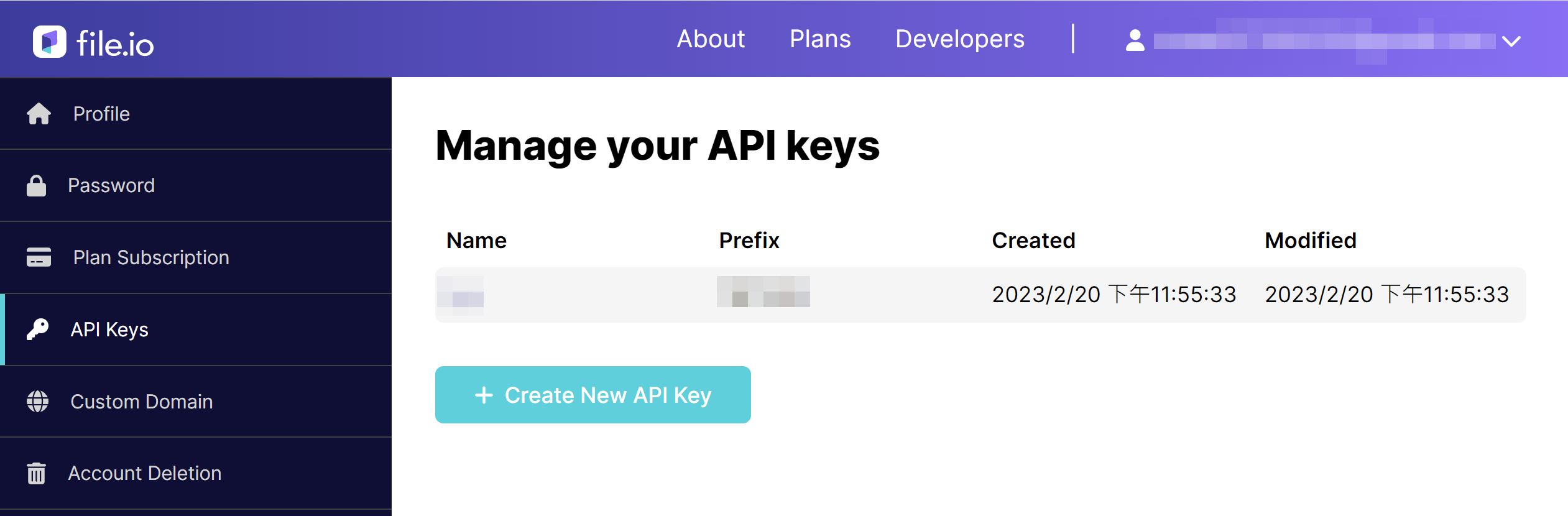
- To generate your API key for file.io, go to https://www.file.io/account/apikeys
- To authenticate a Fileio instance, include the necessary credentials during construction
fileio_api_key = 'XXXXXXX.XXXXXXX-XXXXXXX-XXXXXXX-XXXXXXX'
fileio = Fileio(fileio_api_key)
Upload
Uploading files to file.io is easy and can be done without authentication. However, if you authenticate with the service, you can manage your uploaded files and have access to greater storage capacity by purchasing a paid plan.
Upload Declaration:
Fileio.upload(file[, expires][, max_downloads][, auto_delete])
fileio.upload(file[, expires][, max_downloads][, auto_delete])
Upload Parameter
Parameter Description Default Value Free Account Limit fileThe filepath of the file to upload expiresThe expiration date of the uploaded file 14 days 1 year max_downloadsThe maximum number of times the file can be downloaded 1 1 auto_deleteWhether to delete the file when it expires or has reached the maximum number of downloads TrueTrueUpload Example:
from datetime import datetime, timedelta
from fileio_wrapper import Fileio

fileio_api_key = 'XXXXXXX.XXXXXXX-XXXXXXX-XXXXXXX-XXXXXXX'
filepath = './file.txt'

# Uploade files without authentication
# > The expiration date cannot be more than one year
# > Both max downloads and auto_delete are unnecessary and cannot be changed
Fileio.upload(filepath)
Fileio.upload(filepath, expires="20221231T235959")

# Uploade files with authentication
fileio = Fileio(fileio_api_key)
fileio.upload(filepath)  # Default: expires='14d', max_downloads=1, auto_delete=True
fileio.upload(filepath, expires=None)  # The file never expires (requires a paid plan).
fileio.upload(filepath, expires="10m")  # Expiration time specified in a count-down format "^[1-9][\d]*[y|Q|M|w|d|h|m|s]$".
fileio.upload(filepath, expires="20221231T235959")  # Expiration time specified in ISO 8601 format.
fileio.upload(filepath, expires=datetime(2023, 1, 1))  # Expiration time specified as a datetime object.
fileio.upload(filepath, expires=timedelta(seconds=60000))  # Expiration time specified as a timedelta object from now.
fileio.upload(filepath, max_downloads=None)  # No limit on the number of times the file can be downloaded (requires a paid plan).
fileio.upload(filepath, max_downloads=10)  # The file can be downloaded up to 10 times (requires a paid plan).
fileio.upload(filepath, auto_delete=True)  # The file will not be automatically deleted after it expires or reaches max_downloads (requires a paid plan).

# The response is a dictionary containing information about the uploaded file.
resp = fileio.upload(filepath)
success = resp['success']  # True if upload was successful
status = resp['status']  # HTTP status code
key = resp['key']  # ID of uploaded file
link = resp['link']  # Link to file (not a direct link)
Download
You can download the file from file.io without authentication. Notice that each file can only be downloaded once by default and will be automatically deleted afterwards, regardless of whether you authenticate or not. The maximum number of downloads allowed for a file is determined by the uploader, and can be increased with a paid account.
Download Declaration:
Fileio.download(key[, file])
fileio.download(key[, file])
Download Parameter
Parameter Description Default keyIdentity of uploaded file fileFilepath of file to download NoneDownload Example:
from fileio_wrapper import Fileio

fileio_api_key = 'XXXXXXX.XXXXXXX-XXXXXXX-XXXXXXX-XXXXXXX'
key = 'ZDu1og7rOkJq'

# Download without Authentication
Fileio.download(key)

# Download with Authentication
# > Assuming the uploaded file is named "original_name.txt"
fileio = Fileio(fileio_api_key)
fileio.downlaod(key)  # Raw-Byte in key 'content'
fileio.downlaod(key, '')  # Raw-Byte in key 'content'
fileio.download(key, "folder")  # Download to ./filder/original_name.txt
fileio.download(key, "assigned_name.txt")  # Download to ./assigned_name.txt

# Response is dict of downloaded file information if file parameter is assigned.
resp = fileio.download(key, "folder")
success = resp['success']  # True if upload was successful
status = resp['status']  # HTTP status code
key = resp['key']  # ID of uploaded file
path = resp['path']  # Directory of downloaded file located
name = resp['name']  # Filename of Downloaded file
List Files
List File in an account. Authenticate is needed to call the method.
List Declaration:
fileio.list([search][, sort][, offset][, limit])List Parameter
Parameter Description Default searchFilter filename
(Can't search other field)NonesortSort on specific field NoneoffsetReturn start index NonelimitMax returned item NoneList Example:
from fileio_wrapper import Fileio

fileio_api_key = 'XXXXXXX.XXXXXXX-XXXXXXX-XXXXXXX-XXXXXXX'

fileio = Fileio(fileio_api_key)

# List all items in the account
fileio.list()

# List items with filename containing 'txt'
fileio.list(search='txt')

# List items and sort by size
fileio.list(sort='size')

# List items starting from the fourth element
fileio.list(offset=3)

# List at most 5 items
fileio.list(limit=5)

# If the 'file' parameter is assigned, the response is a dictionary of information for the downloaded file
resp = fileio.list()
for item in resp['nodes']:
    key = item['key']  # Identity of the file
    link = item['link']  # Link to the file (this is not a direct link)
    name = item['name']  # Name of the file
    size = item['size']  # Size of the file in bytes
Account Information
Retrive Account Information, such as account plan level and restriction. Authenticate is needed to call the method.
Me Declaration
fileio.me()Me Example
from fileio_wrapper import Fileio

fileio_api_key = 'XXXXXXX.XXXXXXX-XXXXXXX-XXXXXXX-XXXXXXX'

# Get account information with authentication
fileio = Fileio(fileio_api_key)
resp = fileio.me()

# Extract account details from response
storage_limit = resp['maxStorageBytes']  # Maximum storage limit in bytes
storage_used = resp['usedStorageBytes']  # Amount of storage used in bytes
can_get_direct_url = resp['directDownload']  # Whether direct download URLs are available (0 for free accounts)
rate_limit = resp['rateLimit']  # Maximum number of API calls allowed per second
Update
Update an uploaded file by providing its key and modifying its attributes, such as the expiration date, maximum number of downloads, or even the file itself associated with the key. Authenticate is needed to call the method.
Update Declaration:
fileio.update(key[, file][, expires][, max_downloads][, auto_delete][, mode='replace_partial'])
fileio.update(key, file[, expires][, max_downloads][, auto_delete], mode='replace_all')
Update Parameter
Parameter Description Default Value Free Account Limit keyIdentity of uploaded file fileThe filepath of the file to upload expiresThe expiration date of the uploaded file 14 days 1 year max_downloadsThe maximum number of times the file can be downloaded 1 1 auto_deleteWhether to delete the file when it expires or has reached the maximum number of downloads TrueTruemode'replace_partial'
or 'replace_all''replace_partial' Update Example:
from datetime import datetime, timedelta
from fileio_wrapper import Fileio

fileio_api_key = 'XXXXXXX.XXXXXXX-XXXXXXX-XXXXXXX-XXXXXXX'
filepath = './file.txt'

fileio = Fileio(fileio_api_key)

# Update file to another only
fileio.update(key, file=filepath)
fileio.update(key, file=filepath, mode='replace_partial')

## Update expiration date only
fileio.upload(key, expires=None)  # The file never expires (requires a paid plan).
fileio.upload(key, expires="10m")  # Expiration time specified in a count-down format "^[1-9][\d]*[y|Q|M|w|d|h|m|s]$".
fileio.upload(key, expires="20221231T235959")  # Expiration time specified in ISO 8601 format.
fileio.upload(key, expires=datetime(2023, 1, 1))  # Expiration time specified as a datetime object.
fileio.upload(key, expires=timedelta(seconds=60000))  # Expiration time specified as a timedelta object from now.

## Update max_downloads or auto_delete only
fileio.upload(key, max_downloads=None)  # No limit on the number of times the file can be downloaded (requires a paid plan).
fileio.upload(key, max_downloads=10)  # The file can be downloaded up to 10 times (requires a paid plan).
fileio.upload(key, auto_delete=True)  # The file will not be automatically deleted after it expires or reaches max_downloads (requires a paid plan).

# Update all fields at once.
# If a field is not assigned a value, the default value will be used.
fileio.update(key, file=filepath, mode='replace_all')  # Default: expires='14d', max_downloads=1, auto_delete=True
fileio.update(key, max_download=1)  # The API returned an error response. Since this mode requires updating all fields, the file parameter is mandatory.

# Response is dict of uploaded file information after update
resp = fileio.update(filepath)
success = resp['success']  # True if upload was successful
status = resp['status']  # HTTP status code
key = resp['key']  # ID of uploaded file
link = resp['link']  # Link to file (not a direct link)
Delete
Delete Declaration:
fileio.delete(key)Delete Parameter
Parameter Description keyIdentity of uploaded file Delete Example
from fileio_wrapper import Fileio

fileio_api_key = 'XXXXXXX.XXXXXXX-XXXXXXX-XXXXXXX-XXXXXXX'
key = 'ZDu1og7rOkJq'

# Delete files with authentication
fileio.delete(key)
Reference
MIT License
Copyright (c) 2023 Chumicat
Permission is hereby granted, free of charge, to any person obtaining a copy of this software and associated documentation files (the "Software"), to deal in the Software without restriction, including without limitation the rights to use, copy, modify, merge, publish, distribute, sublicense, and/or sell copies of the Software, and to permit persons to whom the Software is furnished to do so, subject to the following conditions:
The above copyright notice and this permission notice shall be included in all copies or substantial portions of the Software.
THE SOFTWARE IS PROVIDED "AS IS", WITHOUT WARRANTY OF ANY KIND, EXPRESS OR IMPLIED, INCLUDING BUT NOT LIMITED TO THE WARRANTIES OF MERCHANTABILITY, FITNESS FOR A PARTICULAR PURPOSE AND NONINFRINGEMENT. IN NO EVENT SHALL THE AUTHORS OR COPYRIGHT HOLDERS BE LIABLE FOR ANY CLAIM, DAMAGES OR OTHER LIABILITY, WHETHER IN AN ACTION OF CONTRACT, TORT OR OTHERWISE, ARISING FROM, OUT OF OR IN CONNECTION WITH THE SOFTWARE OR THE USE OR OTHER DEALINGS IN THE SOFTWARE.
1 maintainer

Metadata
1 maintainer
Release files for fileio-wrapper 1.0.3
For a detailed explanation of source distributions (sdists) and built distributions (wheels), please see the package formats documentation.
Source distribution (sdist)
| File | Size | Uploaded | |
|---|---|---|---|
| fileio-wrapper-1.0.3.tar.gz | 14.4 kB | Details |
Built distribution (wheel)
| File | Interpreter | ABI | Platform | Reset |
|---|---|---|---|---|
| fileio_wrapper-1.0.3-py3-none-any.whl | Python 3 | none | any | Details |
Total release size: 24.7 kB
Release files / fileio-wrapper-1.0.3.tar.gz
| Download URL | fileio-wrapper-1.0.3.tar.gz |
|---|---|
| Size | 14.4 kB |
| Tags | Source |
|
SHA-256 checksum How to use checksums |
46fce8fb9ae294269b9798ea1e9a14b14231877d383e0cfee112fec9e7230366
|
|
BLAKE2b-256 checksum How to use checksums |
c647d97b0cdf26555ba214e9c96a03a4d2146b7ec2226c0a5da5314bae7ca20a
|
| Upload date | |
|
Uploaded using Trusted Publishing? What is trusted publishing? |
No |
| Uploaded via |
twine/4.0.2 CPython/3.11.3
|
Release files / fileio_wrapper-1.0.3-py3-none-any.whl
| Download URL | fileio_wrapper-1.0.3-py3-none-any.whl |
|---|---|
| Size | 10.3 kB |
| Tags | Python 3 |
|
SHA-256 checksum How to use checksums |
76bbff98825c8028f5e9ba232ef7a06185c9d6d70453531be5d7e51891886cdc
|
|
BLAKE2b-256 checksum How to use checksums |
3dc38f3c0e61b8f1d386f61f8e669bb1bd9a75fbbe377e01432802bc6998133e
|
| Upload date | |
|
Uploaded using Trusted Publishing? What is trusted publishing? |
No |
| Uploaded via |
twine/4.0.2 CPython/3.11.3
|














