
A knowledge base with file tracking and document note integration

Project description
fkb: A knowledge base with file tracking and document note integration
Author: ArktisDev
Date: January 15, 2023
Derived from kb
Purpose
My ideal knowledge base should interface directly with the file hierarchy already on disk and allow me to add tags as well as longer notes to any digital object I choose. After searching for a long time I wasn't able to find a satifactory non-proprietary program that did this while also working on Linux, Mac, and Windows. Some programs even required using a GUI which wasn't going to work on a headless server for example. I eventually found kb which has a great minimalist design and functions as a lightweight CLI but doesn't actually fulfill all my requirements.
Although kb does a great job of organizing notes it does not allow attaching notes to files which exist on the file hierarchy. For example I would be able to add a pdf file to KB but I would not be able to write a detailed note about the pdf file. Because of this I wrote fkb, a derivative of kb which allows adding files to the knowledge base and attaching notes to each file. As a result of this notes not attached to a file are not allowed in fkb while they are allowed in kb.
This sort of functionality is extremely useful for organizing all sorts of documents. Personally I use it to organize textbooks and academic papers as well as personal documents, cooking recipes, and images. Any sorts of documents can be organized using fkb.
Installation
I use Python 3.9 but vermin claims it should work with at least Python 3.6.
To install the most recent stable version just use pip:
pip install --user filekb
Usage
After installing fkb for the first time it will prompt you to setup the directory to store fkb data as well as the root directory for your knowledge base. Files outside this root directory cannot be added to the knowledge base.
Listing objects
List all objects using the fkb list command. It is optional to include additional filters on the objects. These are documented in the fkb list --help help menu.
Below you can see two quantum mechanics textbooks added to fkb.

If you add a title to filter by only objects matching the filter are shown

Specifying the --verbose option the file path on disk of the added objects is shown.

Adding objects
You can add objects to the database with fkb add <path_to_object>. Both absolute and relative paths work but the object must exist in your configured root directory. Additional options allow you to configure the author, category, and tags.

Updating objects
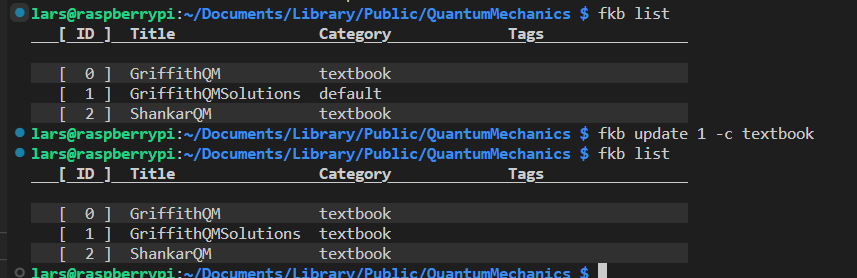
Once an object has been edited, it's title, category, author, tags can all be updated using the fkb update command. Since I didn't add a category to my solutions manual I added, let's do that now
Adding a note to an object
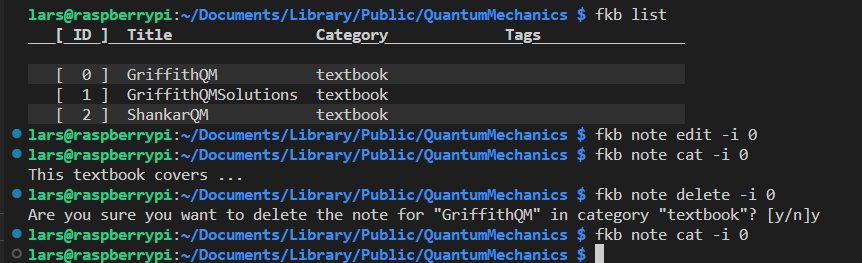
Given the id of an object fkb note edit can be used to edit a note for that object. This will open a text file in whichever editor you decided in the configuration of fkb. Once a note exists, it can be written to terminal using fkb note cat. In the example my note contains "This textbook covers...". The note can also be deleted completely with the fkb note delete command.
Searching through notes
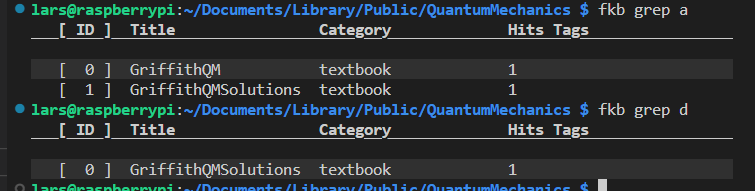
Searching through notes can be done using the fkb grep command. In this example I added the text "a b c" to the GriffithQM object and "a b c d" to the GriffithQMSolutions object.
Backups
Backups of the knowledge base can be made with fkb backup export. The backup can then be imported using fkb backup import. It is not supported to import a backup using a different root knowledge base directory or fkb internal storage directory. This would be a good feature to implement however!
Erasing knowledge base
The knowledge base can be erased using the fkb erase command. If you wish to keep configuration files but wipe only objects added to the knowledge base you can specify the option fkb erase --db.
Watch for file changes
Because fkb keeps track of actual files on the disk, it should react to those files being renamed and moved by automatically updating the database entries for those files. The fkb watch command runs an infinite loop using the watchdog package to track file changes in the knowledge base root directory. I personally start fkb watch using a systemd user service that runs in the background, but there are at least 10 different ways to run fkb watch in the background automatically.
Below is an example of what fkb watch does running in the background. My changes to the file names are automatically propagated to the knowledge base.

Copyright
Copyright 2023, ArktisDev
This program is free software: you can redistribute it and/or modify it under the terms of the GNU General Public License as published by the Free Software Foundation, either version 3 of the License, or (at your option) any later version.
This program is distributed in the hope that it will be useful, but WITHOUT ANY WARRANTY; without even the implied warranty of MERCHANTABILITY or FITNESS FOR A PARTICULAR PURPOSE. See the GNU General Public License for more details.
You should have received a copy of the GNU General Public License along with this program. If not, see https://www.gnu.org/licenses/.
Release history Release notifications | RSS feed

Download files
Download the file for your platform. If you're not sure which to choose, learn more about installing packages.
Source Distribution
Built Distribution
Filter files by name, interpreter, ABI, and platform.
If you're not sure about the file name format, learn more about wheel file names.
Copy a direct link to the current filters
File details
Details for the file filekb-0.1.1.tar.gz.
File metadata
- Download URL: filekb-0.1.1.tar.gz
- Upload date:
- Size: 255.5 kB
- Tags: Source
- Uploaded using Trusted Publishing? No
- Uploaded via: twine/4.0.2 CPython/3.9.2
File hashes
| Algorithm | Hash digest | |
|---|---|---|
| SHA256 |
f39efa27eda54a0b9c2cfcfbeec3615953faea056fceb57bde9e66c21912c547
|
|
| MD5 |
eb0628fff024656eb1b907646225d26d
|
|
| BLAKE2b-256 |
340c3b0674ffa254dd66ca4a432515a35622845a3ca8f9113a82e27b8065b5a5
|
File details
Details for the file filekb-0.1.1-py3-none-any.whl.
File metadata
- Download URL: filekb-0.1.1-py3-none-any.whl
- Upload date:
- Size: 44.4 kB
- Tags: Python 3
- Uploaded using Trusted Publishing? No
- Uploaded via: twine/4.0.2 CPython/3.9.2
File hashes
| Algorithm | Hash digest | |
|---|---|---|
| SHA256 |
0547deb82c4dd4508fb9843dc81e7aa871139e98685cdc9c6bacabe83d1c095f
|
|
| MD5 |
34da5bd8fc2e6b5c0d9beca07c5a05d9
|
|
| BLAKE2b-256 |
a021e0ace495601d1ce7f1ecea23efb3764b6344e49ffa97c420323419135471
|






