
Query CSV and Parquet files using SQL

Project description
filequery
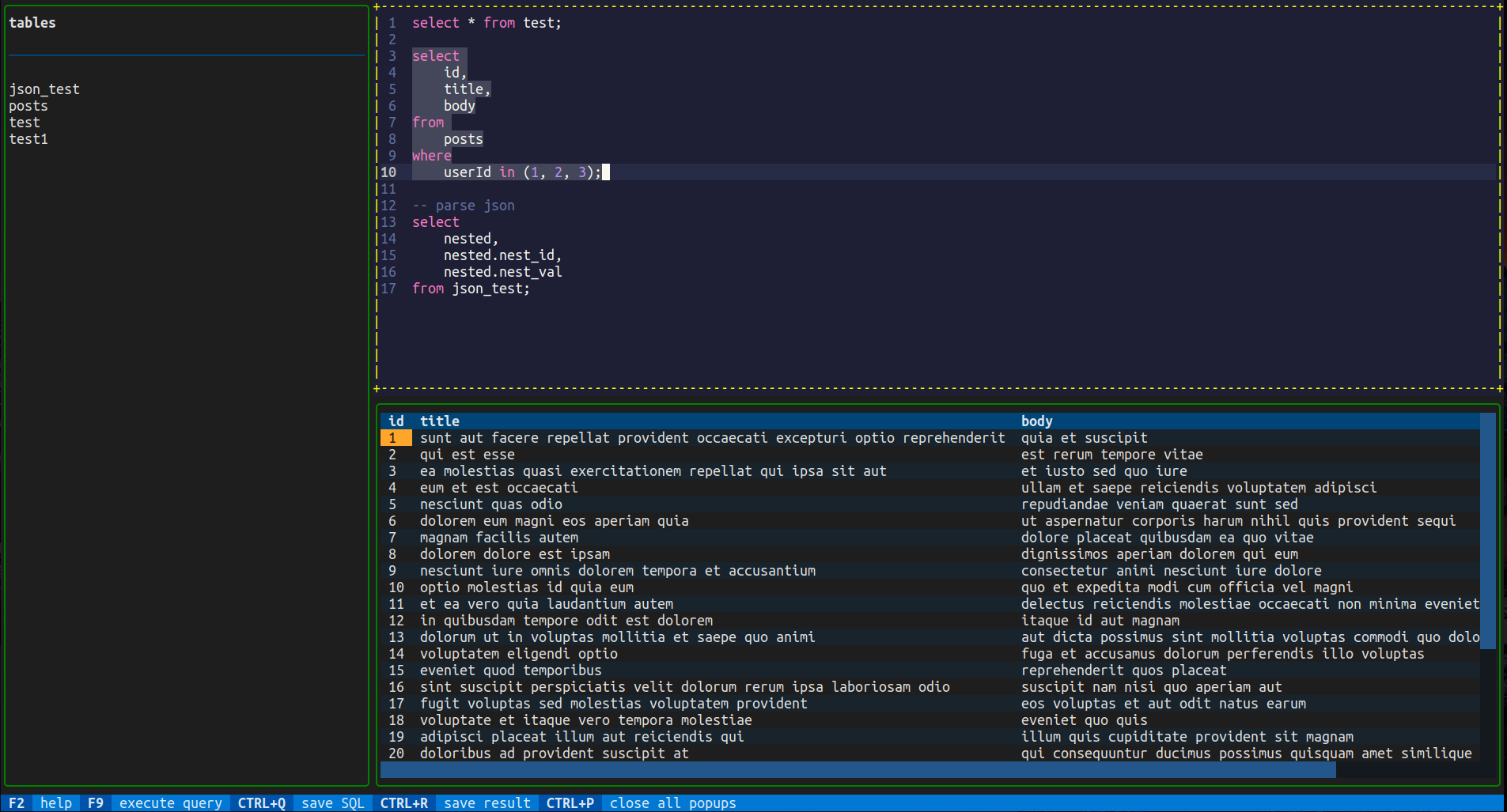
Query CSV and Parquet files using SQL. This uses DuckDB behind the scenes so any valid SQL for DuckDB will work here.
Demo
CLI

TUI
Installation
pipx install filequery
or
pip install filequery
CLI usage
Run filequery --help to see what options are available.
usage: filequery [-h] [-f FILENAME] [-d FILESDIR] [-q QUERY] [-Q QUERY_FILE] [-o OUT_FILE [OUT_FILE ...]] [-F OUT_FILE_FORMAT] [-D DELIMITER] [-c CONFIG] [-e]

options:
  -h, --help            show this help message and exit
  -f FILENAME, --filename FILENAME
                        path to a CSV, Parquet or JSON file
  -d FILESDIR, --filesdir FILESDIR
                        path to a directory which can contain a combination of CSV, Parquet and JSON files
  -q QUERY, --query QUERY
                        SQL query to execute against file
  -Q QUERY_FILE, --query_file QUERY_FILE
                        path to file with query to execute
  -o OUT_FILE [OUT_FILE ...], --out_file OUT_FILE [OUT_FILE ...]
                        file to write results to instead of printing to standard output
  -F OUT_FILE_FORMAT, --out_file_format OUT_FILE_FORMAT
                        either csv or parquet, defaults to csv
  -D DELIMITER, --delimiter DELIMITER
                        delimiter to use when printing result or writing to CSV file
  -c CONFIG, --config CONFIG
                        path to JSON config file
  -e, --editor          run SQL editor UI for exploring data
For basic usage, provide a path to a CSV or Parquet file and a query to execute against it. The table name will be the file name without the extension.
filequery --filename example/test.csv --query 'select * from test'
TUI usage
To use the TUI for querying your files, use the -e flag and provide a path to a file or directory.
filequery -e -f path/to/file.csv
or
filequery -e -f path/to/file_directory
Examples
filequery --filename example/json_test.json --query 'select nested.nest_id, nested.nest_val from json_test' # query json
filequery --filesdir example/data --query 'select * from test inner join test1 on test.col1 = test1.col1' # query multiple files in a directory
filequery --filesdir example/data --query_file example/queries/join.sql # point to a file containing SQL
filequery --filesdir example/data --query_file example/queries/json_csv_join.sql # SQL file joining data from JSON and CSV files
filequery --filesdir example/test.csv --query 'select * from test; select sum(col3) from test;' # output multiple query results to multiple files
filequery --filename example/ndjson_test.ndjson --query 'select id, value, nested.subid, nested.subval from ndjson_test' # query nested JSON in an ndjson file
You can also provide a config file instead of specifying the arguments when running the command.
filequery --config <path to config file>
The config file should be a json file. See example config file contents below.
{
    "filename": "../example/test.csv",
    "query": "select col1, col2 from test"
}
{
    "filesdir": "../example/data",
    "query_file": "../example/queries/join.sql",
    "out_file": "result.parquet",
    "out_file_format": "parquet"
}
See the example directory in the repo for more examples.
Module usage
You can also use filequery in your own programs. See the example below.
from filequery.filedb import FileDb

query = 'select * from test'

# read test.csv into a table called "test"
fdb = FileDb('example/test.csv')

# return QueryResult object
res = fdb.exec_query(query)

# formats result as csv
print(str(res))

# saves query result to result.csv
res.save_to_file('result.csv')

# saves query result as parquet file
fdb.export_query(query, 'result.parquet', FileType.PARQUET)
Development
Packages required for distribution should go in requirements.txt.
To build the wheel:
pip install -r requirements-dev.txt
make
Testing
To test the CLI, create a separate virtual environment perform an editable.
python -m venv test-env
. test-env/bin/activate
pip install -e .
To run unit tests, stay in the root of the project. The unit tests add src to the path so filequery can be imported properly.
python tests/test_filequery.py
Release history Release notifications | RSS feed


Download files
Download the file for your platform. If you're not sure which to choose, learn more about installing packages.
Source Distribution
Built Distribution
Filter files by name, interpreter, ABI, and platform.
If you're not sure about the file name format, learn more about wheel file names.
Copy a direct link to the current filters
File details
Details for the file filequery-0.2.1.tar.gz.
File metadata
- Download URL: filequery-0.2.1.tar.gz
- Upload date:
- Size: 18.3 kB
- Tags: Source
- Uploaded using Trusted Publishing? No
- Uploaded via: twine/4.0.2 CPython/3.10.12
File hashes
| Algorithm | Hash digest | |
|---|---|---|
| SHA256 |
debb4588b18dca8ae533d8cf187909245726d7983e6c0450e09462a8a24fd5cf
|
|
| MD5 |
cd7a7de7c0d7d40978ee369e7049c313
|
|
| BLAKE2b-256 |
b728f9139fe21912bb555e1b59b5ea6b81efa1dcf69ac34fb6221358c729ab0c
|
File details
Details for the file filequery-0.2.1-py3-none-any.whl.
File metadata
- Download URL: filequery-0.2.1-py3-none-any.whl
- Upload date:
- Size: 13.9 kB
- Tags: Python 3
- Uploaded using Trusted Publishing? No
- Uploaded via: twine/4.0.2 CPython/3.10.12
File hashes
| Algorithm | Hash digest | |
|---|---|---|
| SHA256 |
cff2c3dbcb2f6a4ea2f2e6cce4c09226055354dbded5793bf58ff46f7eb2a199
|
|
| MD5 |
d37b2dec40b357f2b1f6b306620ce125
|
|
| BLAKE2b-256 |
36aa11f5fb5a68d64380a6ed897e5d8e54503c5d77d96028ea2bf22b39d100de
|






