
This release is a pre-release and may not be stable for production use.
FileWave Extra Metrics
The purpose of Extra Metrics is to augment a standard FileWave installation with additional metrics and dashboard capabilities.
Overview
Extra Metrics provides a series of dashboards and prometheus metrics related to how your fleets deployments are progressing. The information can be used to show "at-a-glance" insights into the software patch status, device health and user specific deployments. In as many cases as possible the Dashboard panels are linked into the FileWave Web in some way to provide a way to "drill down" into the information.
Features:
- Example dashboards are included in this project; and will be installed automatically.
- Configuration & validation is mostly automation via the extra-metrics-config command (run as sudo please)
Requirements
Before you begin - it's very important to ensure that you meet the requirements for this additional module.
Minimum FileWave system requirements:
- The Extra Metrics system runs only on the Linux version of FileWave (unless you configure it manually on Mac)
- FileWave Version 14+: Extra Metrics requires version 14 or higher of the FileWave product. It will fail to configure on anything less.
- SSH: You will need SSH access to your FileWave Server.
- Create an API Key specifically for this module (with inventory create rights). You will require the base64 text, this can be obtained from the Manage Administrators -> Application tokens screen.
- Make sure your server has SSL certificates - self signed certs are not enough.
- You must have an externally reachable DNS name.
Installation
These instructions assume you will be installing Extra Metrics directly on your FileWave Server, which already has Python3.7 (or later) installed.
We highly recommend installing Extra Metrics into its own python virtual environment. Doing so ensures that the introduction of this module cannot interfere with the operational integrity of your FileWave Server.
DO NOT INSTALL EXTRA METRICS DIRECTLY INTO THE PYTHON RUNTIME ENVIRONMENT OF YOUR FILEWAVE SERVER.
If you are unsure about the above statement - STOP - contact your FileWave SE or support. Your FileWave Server installation can be destroyed by mis-understanding the impact of this configuration.
Installation Steps (requires SSH)
Assuming you are already logged into your FileWave Server using SSH, follow along to set up the virtual environment, install the Extra Metrics package and configure it for use.
For the purpose of these instructions we are assuming a non-root user called gregor has been created.
$ /usr/local/filewave/python/bin/pyvenv $HOME/extra-metrics
$ source $HOME/extra-metrics/bin/activate
Your terminal prompt changes - the name of the virtual env should show up:
(extra-metrics) $ pip install filewave-extra-metrics
At this stage the python package for Extra Metrics is installed but not configured; before completing configuration you need an API Key (and SSL certs)
Create & configure an Inventory API Key
Extra Metrics should be configured with an Inventory API Key in order to access Inventory and create the inventory groups and queries. You will need the base64 text version of this API Key, which can be obtained from the Manage Administrators -> Application tokens dialog in the FileWave Administrator console.
Please create a unique access token (API Key) for the Extra Metrics module
Note: the extra-metrics-config command is created by installing the filewave-extra-metrics package; you will need the full path to this command if you are using sudo.
Once you have the API key; use the following commands to configure the server properly (you need to re-run this if the DNS name or API key changes).
$ export CONFIG_PATH=`which extra-metrics-config`
$ export API_KEY='insert-your-api-key-here'
# export DNS_NAME='dns-name-of-fw-server-here'
$ sudo $CONFIG_PATH --api-key $API_KEY --external-dns-name $DNS_NAME
You will see output similar to the following, confirming that the dashboards have been imported, YAML files written and that the configuration was successful.
[extra-metrics] [INFO] loading the configuration from file /usr/local/etc/filewave/extra_metrics.ini
[extra-metrics] [INFO] saved configuration to file: /usr/local/etc/filewave/extra_metrics.ini
[extra-metrics] [INFO] wrote dashboard file: /usr/local/etc/filewave/grafana/provisioning/dashboards/extra-metrics-Applications.json
[extra-metrics] [INFO] wrote dashboard file: /usr/local/etc/filewave/grafana/provisioning/dashboards/extra-metrics-Deployment.json
[extra-metrics] [INFO] wrote dashboard file: /usr/local/etc/filewave/grafana/provisioning/dashboards/extra-metrics-PatchStatus.json
[extra-metrics] [INFO]
[extra-metrics] [INFO] Configuration Summary
[extra-metrics] [INFO] =====================
[extra-metrics] [INFO] API Key: eZBlNWFlNTYwLTqZZWEtNDMwYS1iNTa0LTlmZTkxODFjOdaxNH6=
[extra-metrics] [INFO] External DNS: srv.cluster.tech
[extra-metrics] [INFO] detected FileWave instance running version: 14.0.0
Upgrade the grafana-pie-chart plugin (for best results)
The pie chart plugin likely needs an update. You can upgrade it to the latest version using the following command:
$ grafana-cli --pluginsDir /usr/local/filewave/instrumentation_data/grafana/plugins plugins update grafana-piechart-panel
Restarting Services
If this is the first time you have installed the Extra Metrics module; you will need to tell supervisord to reload its configuration and to start the extra_metrics job.
$ /usr/local/filewave/python/bin/supervisorctl update
Validating
Note: it can take a few seconds (60 or so) for the metrics to be collected by prometheus and made available.
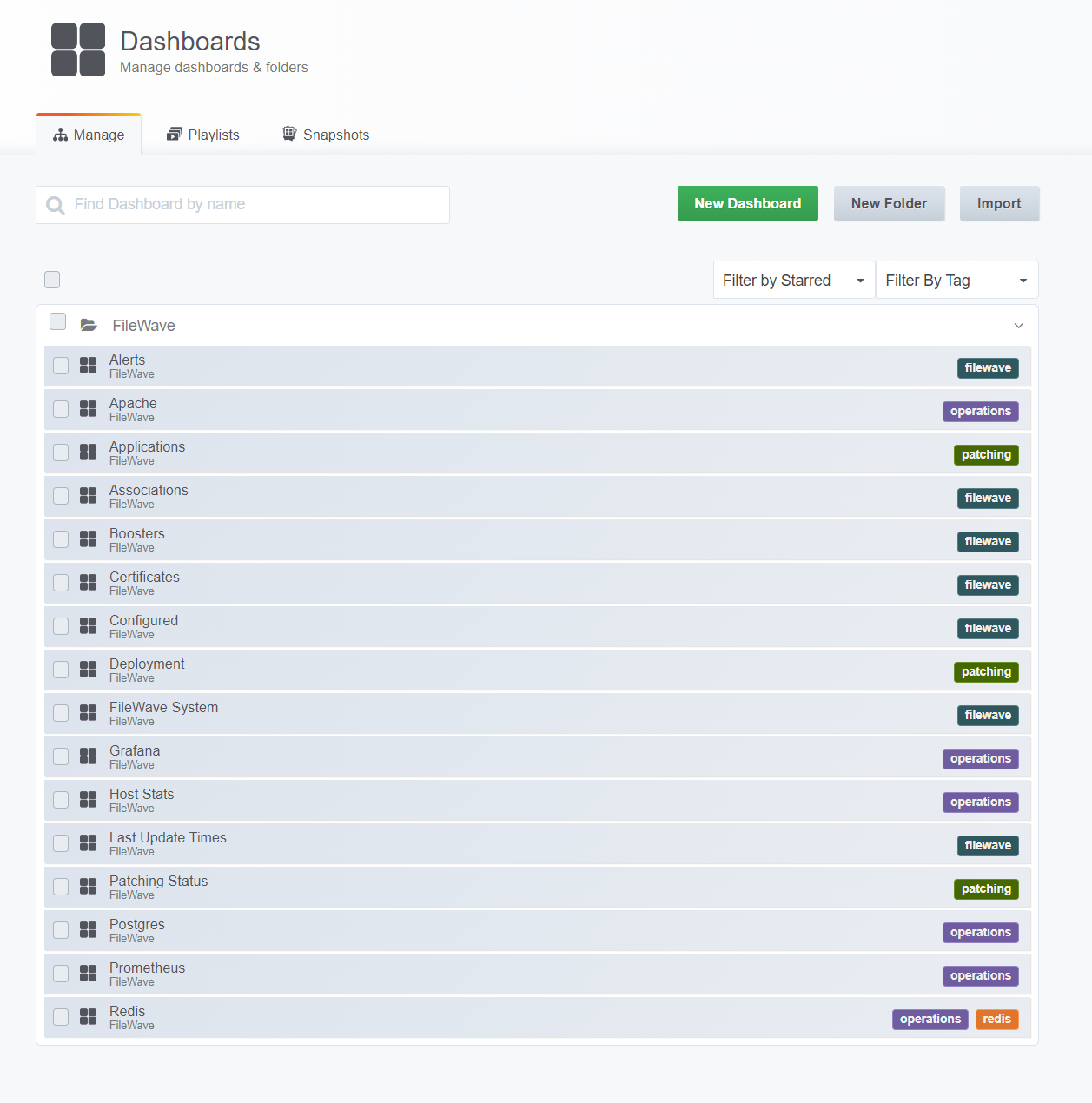
When you view the list of dashboards available in Grafana, you'll see 3 new ones - each with a 'patching' tag, as shown below:
Upgrading
To upgrade the Extra Metrics module; just run the install command again but include an '--upgrade' flag. It is recommended to run the "config" portion of the setup again to make sure that any configuration & dashboard panel changes have been applied as well and then restart services.
$ pip install --upgrade filewave-extra-metrics
$ sudo $CONFIG_PATH
$ /usr/local/filewave/python/bin/supervisorctl update
# /usr/local/filewave/python/bin/supervisorctl restart extra_metrics
Hint: don't skip this - SSL Certs
Make sure you have an SSL certificate, it must be valid, trusted by everyone (not just the server) and absolutely under no circumstances should it be self signed.
Just do this - you'll save yourself untold pain. Trust me I'm still healing.
Reference
Adjust supervisorctl to include --storage.tsdb.allow-overlapping-blocks?
How can I be notified of updates?
Subscribe to this RSS feed: https://pypi.org/rss/project/filewave-extra-metrics/releases.xml
Developers
To upload to PyPi, ensure you have the credentials in a pypi.config file (not checked into source control), then the ./rebuild_for_pypi.sh and ./upload_to_pypi.sh scripts are your friends.
An example pypi.config file contains:
[pypi]
username = __token__
password = pypi-AgEIcH.....<add your really long token here>
What information is exported by Extra Metrics?
Software Patch Status
The software update (patch status) of clients is calculated using software update catalogs as well as information delivered by clients about the updates they require.
Panels provided:
- A birds eye view of the entire fleet's patch status - represented via percentage numbers of patch deployment, grouped by state (success, pending installation and warning/error).
- Numbers related to (critical) updates that are not fully deployed.
- Links into the FileWave web UI to make remediation or further investigation easier.
Device Health
The whole fleet of devices is continuously sending data back to the FileWave Inventory system which is used to calculate device health.
Panels provided:
- Device health summary - a grouping of all devices by health state. The health of a device is calculated as follows:
- TBD (disk space, outstanding patches)
Changelog
19-Jun-2020 (v32):
- new: configuration for the polling delay, default is 30m (but re-queries happen automatically on model update and query changes)
- new: work on making it possible to run this on a Mac server (experimental at this point)
- cleaned up links on the Patch Status dashboard and fixed the tags/links to other dashboards
- wrote unit tests to make sure that the dashboard JSON is correct before deploying it
- corrected install/pip requirements that were missing
17-Jun-2020 (v29):
- experimental: re-runs app queries if any new query is updated, model update is run - this paves the way for reducing the number of polling requests being made, once more events are being sent from the FW server
- the app version dashboard now properly reflects the queries in the group 'Extra Metrics Queries - Apps', there is now one panel for each query.
- the app version dashboard now contains a quicklinks panel; allowing users to quickly get into the web UI for each of their app queries
- the server version check is now performed via a REST call instead of using local binaries and parsing that result
- changed to asyncio under the hood to allow for subscriptions to FW server events and removed dependancy on TimeLoop module
1 maintainer

Metadata
1 maintainer
Release files for filewave-extra-metrics 1.0.33rc10
For a detailed explanation of source distributions (sdists) and built distributions (wheels), please see the package formats documentation.
Source distribution (sdist)
| File | Size | Uploaded | Provenance | Actions |
|---|---|---|---|---|
| filewave-extra-metrics-1.0.33rc10.tar.gz | 328.0 kB | Without provenance | Details for filewave-extra-metrics-1.0.33rc10.tar.gz |
Built distribution (wheel)
| File | Interpreter | ABI | Platform | Actions Reset |
|---|---|---|---|---|
| filewave_extra_metrics-1.0.33rc10-py3-none-any.whl | Python 3 | none | any | Details for filewave_extra_metrics-1.0.33rc10-py3-none-any.whl |
Total release size: 375.6 kB
Release files / filewave-extra-metrics-1.0.33rc10.tar.gz
| Download URL | filewave-extra-metrics-1.0.33rc10.tar.gz |
|---|---|
| Size | 328.0 kB |
| Tags | Source |
|
SHA-256 checksum How to use checksums |
b01d248ccaad8173718caced0675b6c8abfc634379c21cbc6cf27e88810f17a3
|
|
BLAKE2b-256 checksum How to use checksums |
c0abe9236856f498ce8629e3ecd333a499451004b65277acc629935ab426b7b7
|
| Upload date | |
|
Uploaded using Trusted Publishing? What is trusted publishing? |
No |
| Uploaded via |
twine/3.1.1 pkginfo/1.5.0.1 requests/2.23.0 setuptools/47.1.1 requests-toolbelt/0.9.1 tqdm/4.46.1 CPython/3.8.3
|
Release files / filewave_extra_metrics-1.0.33rc10-py3-none-any.whl
| Download URL | filewave_extra_metrics-1.0.33rc10-py3-none-any.whl |
|---|---|
| Size | 47.7 kB |
| Tags | Python 3 |
|
SHA-256 checksum How to use checksums |
2d64ab71810fe0e848240fab8d72690bb3ec2ee530f2539b11534cec3d51bb9e
|
|
BLAKE2b-256 checksum How to use checksums |
67dd8bcc64dc65ee3c98db68f056c5c8af63752222ef6cf06fe7e82b5beb1788
|
| Upload date | |
|
Uploaded using Trusted Publishing? What is trusted publishing? |
No |
| Uploaded via |
twine/3.1.1 pkginfo/1.5.0.1 requests/2.23.0 setuptools/47.1.1 requests-toolbelt/0.9.1 tqdm/4.46.1 CPython/3.8.3
|
Security for filewave-extra-metrics 1.0.33rc10
Provenance
Provenance describes where a file came from. On PyPI, provenance is shared via attestations, which provide a verifiable record of the build or publishing details. View details, limitations and caveats.
No provenance found
None of the files in this release were uploaded with provenance metadata.
A note on package security
PyPI is a repository for distributing packages, not a service for auditing them. While third-party security researchers and our staff do their best to detect and remove malicious packages, PyPI cannot guarantee the quality, security or suitability of any given package.
To learn more about protecting yourself from malicious actors, visit our package security documentation.














