
Filler-Cut
A hardware-agnostic (AMD / Intel / NVIDIA) CLI tool that detects and cuts filler words ("um", "uh" — Turkish: "ııı", "şey", "yani") and unnecessary silences from video files using speech analysis.

v0.1 — see DESIGN.md for the architecture. Türkçe: README.tr.md
Windows application (installer)
Download: grab Filler-Cut-Setup-<version>.exe from the
Releases page.
The build is unsigned, so Windows SmartScreen (and Smart App Control, if you have it on) may block the first run with "Windows protected your PC". This warning is expected (it flags the missing code signature, not malware): choose More info → Run anyway. If Smart App Control is enabled it can refuse outright — turning it off is a system-wide decision, so the alternative is running from source (see Install).
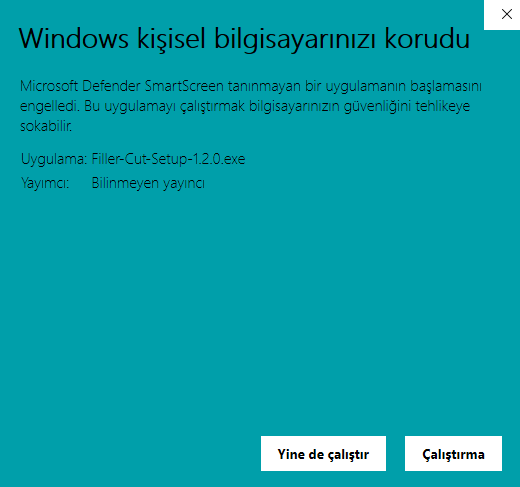
The lack of a signature is an accepted trade-off; an application to SignPath (free code signing for open-source projects) is under review. Once signed, this warning goes away.
Filler-Cut-Setup-<version>.exe installs per-user (no admin, no UAC) into
%LOCALAPPDATA%\Programs\Filler-Cut and adds a Start Menu entry that opens
the interface directly. The installer speaks Turkish and English, and resolves
both prerequisites:
- WebView2 — runs Microsoft's official Evergreen Bootstrapper if the runtime is missing. If that fails the install still completes, with a warning that Filler-Cut will fall back to your browser.
- ffmpeg — not bundled (licence groups differ). If it is missing the
finish page says so and offers
winget install ffmpeg, or a manual link when winget is unavailable. It never blocks the install.
Uninstalling keeps your downloaded model. The program folder is removed,
but %LOCALAPPDATA%\fillercut (whisper.cpp binary + model, ~570 MB) and your
settings stay. The uninstaller asks whether to delete them — default no.
.\scripts\build_setup.ps1 # exe build + installer -> dist_setup\
The executables
scripts/build_exe.ps1 alone produces the standalone folder the installer
ships:
| exe | what |
|---|---|
fillercut.exe |
the console CLI — every command documented below |
fillercut-ui.exe |
no console; opens the interface directly |
The packaged build defaults to the whisper.cpp (Vulkan) backend, so the
first launch runs the setup wizard and then uses GPU acceleration on AMD,
Intel and NVIDIA alike. pip install users are unaffected — there the
default is still faster-whisper.
ffmpeg is not bundled; it stays a system dependency (see Requirements). The executables are unsigned, so SmartScreen may warn on first launch.
.\scripts\build_exe.ps1 # clean build + smoke tests -> dist\fillercut
Third-party components are listed in packaging/THIRD_PARTY_NOTICES.md,
which the installer also copies next to the executables.
Requirements
- Python ≥ 3.10
- ffmpeg and ffprobe on
PATH(system dependency — download)
Install
python -m venv .venv
# Windows: .venv\Scripts\activate
pip install -e .            # the CLI itself
pip install -e ".[cuda]"    # NVIDIA acceleration (cuBLAS/cuDNN for faster-whisper)
pip install -e ".[dev]"     # development: pytest, ruff, mypy
Backend & hardware support
| Hardware | faster-whisper (default) |
whispercpp |
|---|---|---|
| NVIDIA GPU | ✅ CUDA (official wheel) | ✅ official cublas package |
| CPU (everyone) | ✅ int8 | ✅ official bin-x64 package |
| AMD GPU | ❌ CTranslate2 has no ROCm support | ✅ Filler-Cut Vulkan build (see below) or GGML_HIP=ON build (ROCm 7+) |
| Intel GPU | ❌ | ✅ Filler-Cut Vulkan build (see below) |
Note: upstream whisper.cpp Windows releases ship no Vulkan/HIP binaries
(see issue #3673). Filler-Cut fills that gap with its own workflow:
.github/workflows/vulkan-build.yml (whisper.cpp v1.9.1, -DGGML_VULKAN=ON)
— on a v* tag push it builds and attaches the
fillercut-whisper-cli-vulkan-win-x64.zip to the Releases page (permanent,
no login needed); it can also be triggered manually from the Actions tab
(artifact only). The package is vendor-agnostic: one binary for
NVIDIA/AMD/Intel. On an RTX 4050 it matched CUDA speed (see KNOWN_ISSUES.md
KI-1); only the very first run pays a one-time ~10 s shader compilation. No code changes are needed on the Filler-Cut side —
the binary path comes from the whispercpp_binary config key.
Vulkan package setup (releases/v0.3.0+)
For AMD/Intel users who want GPU acceleration (or NVIDIA users who don't want a CUDA install), a ready-made package is on the Releases page:
-
Download
fillercut-whisper-cli-vulkan-win-x64.zip, extract it (e.g.C:\tools\fillercut-whisper\). -
Download the model: ggerganov/whisper.cpp →
ggml-large-v3-turbo-q5_0.bin(~1.6 GB). -
Create
filler-cut.tomlyourself in the folder where you run Filler-Cut (not shipped with the repo; paths are machine-specific, gitignored):config_version = 1 [asr] backend = "whispercpp" whispercpp_binary = 'C:\tools\fillercut-whisper\whisper-cli.exe' whispercpp_model = 'C:\modeller\ggml-large-v3-turbo-q5_0.bin'
-
fillercut video.mp4— that's it.
The first run pays a one-time ~10 s shader compilation (cached to disk).
Proof the GPU is active is the ggml_vulkan: Found 1 Vulkan devices line
in the output. No CUDA Toolkit / Vulkan SDK needed; an up-to-date GPU
driver is enough.
Usage
fillercut video.mp4
Outputs, written next to the input (or to --output):
video_temiz.mp4— the cut videovideo_temiz.json— the cut report (every cut with itsreasonchain)video_transkript.json— the word-level transcript (kept even if you decline at the review step)
Options (identical to fillercut --help, which is Turkish — the CLI is
Turkish-only; these are one-to-one translations):
--config PATH      TOML config file (default: filler-cut.toml).
--aggressive       Also cut candidate fillers (şey, yani, hani, işte).
-y, --yes          Skip the review confirmation (render without asking).
-o, --output PATH  Output MP4 path (default: <name>_temiz.mp4).
--open             Open the review HTML in the default browser once written.
--interactive      Approve cuts one by one in the browser (local server, v0.3).
--cikti mp4|xml    Output branch: rendered video (default) or NLE project.
--srt              Also write the transcript as <video name>.srt.
--version          Print the version and exit.
Before rendering, a review summary is printed and confirmation is asked
(skipped with --yes) — real output from a 15 s test clip:
[1/6] EXTRACT — 16 kHz mono WAV çıkarılıyor…
[2/6] TRANSCRIBE — transkript çıkarılıyor…
[3/6] DETECT — filler ve sessizlikler tespit ediliyor…
[4/6] PLAN — kesim planı kuruluyor…
[5/6] REVIEW
Kesim sayısı: 4
Kademe dağılımı: 1 kesin filler, 0 aday filler, 4 sessizlik
Kazanılan süre: 00:03 (00:14 → 00:11), %22.28
                 İlk 5 kesim
┌───┬───────────┬───────┬─────────┬─────────────────────────────────────┐
│ # │ Başlangıç │ Bitiş │ Tür     │ Neden (reason)                      │
├───┼───────────┼───────┼─────────┼─────────────────────────────────────┤
│ 1 │ 00:03     │ 00:04 │ filler  │ sessizlik 1018ms (…) + kesin        │
│   │           │       │         │ filler: 'Eee,' [padding +80/-120ms] │
│ 2 │ 00:06     │ 00:07 │ silence │ sessizlik 704ms (…)                 │
└───┴───────────┴───────┴─────────┴─────────────────────────────────────┘
Render edilsin mi? [y/N]:
[6/6] RENDER — segmentler encode ediliyor…
Bitti: konusma_temiz.mp4 (%22.28 kazanım)
rapor: konusma_temiz.json
transkript: konusma_transkript.json
The first run downloads the Whisper model (~1 GB); later runs use the cache.
NLE project (FCP7 XML) and subtitles
If you would rather fine-tune the cuts in your own editor, --cikti xml
renders nothing and writes video.xml instead:
fillercut video.mp4 --cikti xml --srt -y
video.xml— an FCP7 (xmeml) timeline. Open it with File > Import in Premiere or DaVinci Resolve; it references the source video, so there is no re-encode and you can drag the cut boundaries around. RENDER never runs on this branch.video.srt— a standard subtitle file (--srt). Both land in the folder given by--output. Subtitles are on the cut timeline: words inside a removed region are dropped and the rest shift earlier, so the file drops straight onto the rendered video or the XML timeline. The source-timed record stays invideo_transkript.json.
Cut boundaries are snapped to frames in favour of speech: a segment's start rounds down and its end rounds up. No syllable is ever clipped; at most one frame spills into the cut.
Example video_temiz.json (truncated):
{
  "original": { "ms": 14814, "human": "00:14" },
  "cut_total": { "ms": 3300, "human": "00:03" },
  "remaining": { "ms": 11514, "human": "00:11" },
  "saved_percent": 22.28,
  "cut_count": 4,
  "tiers": { "kesin_filler": 1, "aday_filler": 0, "silence": 4 },
  "cuts": [
    {
      "start_ms": 3164,
      "end_ms": 4182,
      "duration_ms": 1018,
      "kind": "filler",
      "reason": "sessizlik 1018ms (noise=-35dB, min=0.4s) + kesin filler: 'Eee,' [padding +80/-120ms]"
    }
  ]
}
Web UI
fillercut ui
On first launch, if the whisper.cpp engine or a model is missing, a setup
wizard appears: pick a model, press one button, and it downloads (with a
progress bar, resume on interruption and SHA-256 verification) into
%LOCALAPPDATA%\fillercut. Jobs cannot start until it finishes. Prefer the
terminal? fillercut setup does the same, and fillercut setup --durum
reports what is installed and where it came from.
Opens Filler-Cut in its own desktop window (pywebview + the Windows
WebView2 runtime), backed by a local server on http://127.0.0.1:8765
(loopback only — never binds beyond localhost). Without WebView2 — or without
the optional pywebview package — nothing breaks: it falls back to your
browser and prints one line saying why. Pick a video with the server-side
file browser (files are not uploaded; the tool reads them from disk, and
browsing is confined to your home directory), choose Normal/Aggressive mode,
and watch the 6-stage pipeline progress live.
For the native window: pip install "fillercut[native]".
If your videos live on another drive (D:, E:\ …), the browser is
confined to your home directory by default. Extend the jail by adding
allowed roots in filler-cut.toml:
config_version = 1
[ui]
izinli_kokler = ['D:\', 'E:\Videolar']
If you'd rather not list drives one by one, izinli_kokler = ["*"] allows
every mounted drive on the machine; the list is refreshed per request
(not frozen at startup), so a USB disk plugged in later shows up on its own.
⚠️ Security:
"*"lists all your drives to the localhost UI; it is not recommended on a shared or untrusted machine — list drives individually there.
These roots are read only from the config file — there is no UI control
that changes them, so the security boundary can't be moved from inside the
page. A nonexistent root makes fillercut ui stop with a clear error. With
more than one root, a root switcher (Ev / D:\ …) appears above the browser.
You can also drag and drop a video: in the desktop window, drop the file onto the page or press "Dosya seç…" to open the native Windows file dialog. Drag and drop does not work in browser mode — browsers do not hand the page a file's disk path — and the UI says so and points you at the file browser, which is the picker in that mode.


After PLAN the run pauses for review: you get the video with a waveform timeline, every cut drawn on it, and a cut list. There you can
- play with skip mode on (cuts are skipped) or off (hear the original),
- undo any cut with one click — it stays in the list, greyed out, and one more click brings it back,
- drag a cut boundary; it snaps to the nearest silence edge,
- drag on empty timeline to add a cut of your own,
- snap a cut to silence with one click (
Y) — the "Sessizliğe yasla" button on every row pushes both boundaries outward to the first silence edge, at most 500 ms per direction; it stops early at a neighbouring cut, so cuts never merge, - turn the magnet off (
M) when you want a boundary exactly where you drop it — snapping is on by default, and the toggle is shown in the header.
The header keeps a live line — how many cuts, how much will be removed, what the new duration will be — so you see the gain before you commit to it.
Approving renders. The result screen shows the output path, the time saved, a
breakdown by cut type (definite/candidate filler, silence, your own cuts), and
which filler words were cut (eee ×3, ııı ×1…) — plus a "show in folder"
button for each output. Your edits are recorded in the report too
(tiers.manuel, duzenleme).

Options: --port (default 8765), --config PATH (the same
filler-cut.toml the CLI uses), --no-native (force browser mode),
--native (require the native window — error out if unavailable),
--no-browser (start the server, open nothing).
First-run setup
fillercut setup
Downloads the Vulkan whisper-cli build (from this repo's releases) and a
GGML model (from ggerganov/whisper.cpp on Hugging Face). Options:
--model NAME to choose a model, --yes for unattended/CI, --durum to
report status instead of downloading.
| model | size | when |
|---|---|---|
ggml-large-v3-turbo-q5_0 |
547 MB | recommended — speed/accuracy balance |
ggml-small-q5_1 |
190 MB | slow connection or tight disk |
ggml-large-v3-q5_0 |
1.08 GB | quality-weighted, slowest |
Paths resolve in this order, first existing candidate wins:
filler-cut.toml → FILLERCUT_WCPP_BINARY/FILLERCUT_WCPP_MODEL → the
wizard's own %APPDATA%\fillercut\config.json. So an existing setup never
sees the wizard, and the wizard never overwrites your configuration.
The wizard installs the Vulkan build only — one binary for AMD, Intel and
NVIDIA. The CUDA path stays manual for advanced users (see
[asr].whispercpp_binary). ffmpeg remains a system dependency.
If port 8765 is busy the run does not fail: it falls back to a free port
and tells you which one. If Filler-Cut is already running on that port, a
second fillercut ui does not start a second server — it prints the address
of the one that is already up.
Approving without any edits produces byte-for-byte the same file as the CLI run — the review screen adds control, not a different renderer.
Jobs live in memory only — restarting the server drops them (the tool tells you so instead of hanging). Rendered files stay on disk.
License
MIT — see LICENSE.
1 maintainer

Download files
Download the file for your platform. If you're not sure which to choose, learn more about installing packages.
Source Distribution
Built Distribution
Filter files by name, interpreter, ABI, and platform.
If you're not sure about the file name format, learn more about wheel file names.
Copy a direct link to the current filters
File details
Details for the file fillercut-1.3.0.tar.gz.
File metadata
- Download URL: fillercut-1.3.0.tar.gz
- Upload date:
- Size: 1.2 MB
- Tags: Source
- Uploaded using Trusted Publishing? No
- Uploaded via:
twine/7.0.0 CPython/3.12.10
File hashes
| Algorithm | Hash digest | |
|---|---|---|
| SHA256 |
c672b30459c7ca8425300690ef9a520eafb17d34375d75cd6f5477918cb1f64e
|
|
| MD5 |
22d3297e982362b751dd761765cbf642
|
|
| BLAKE2b-256 |
88903e4f6021ad3f202bb1905e129d956140811033c0610e0f1cc7c73d9eba8c
|
File details
Details for the file fillercut-1.3.0-py3-none-any.whl.
File metadata
- Download URL: fillercut-1.3.0-py3-none-any.whl
- Upload date:
- Size: 248.8 kB
- Tags: Python 3
- Uploaded using Trusted Publishing? No
- Uploaded via:
twine/7.0.0 CPython/3.12.10
File hashes
| Algorithm | Hash digest | |
|---|---|---|
| SHA256 |
7bd4d9ea7eb4280327aa108e11a1c53c0e18f985e9ac0d90e5e823a33e8903b2
|
|
| MD5 |
277ca114d50ffa6d19a32a317865f77d
|
|
| BLAKE2b-256 |
47c94dfd5203035baf96d28abc8d40fb3dde64babe352d4595016803f368805f
|














