
A Framework for Automatic Evaluation of Flood Inundation Mapping Predictions Evaluation

Project description
Flood Inundation Mapping Predictions Evaluation Framework (FIMPEF)
 |
This repository provides a user-friendly Python package and source code for the automatic evaluation of flood inundation maps. It is developed under Surface Dynamics Modeling Lab (SDML), Department of Geography and the Environment at The University of Alabama, United States. |
Background
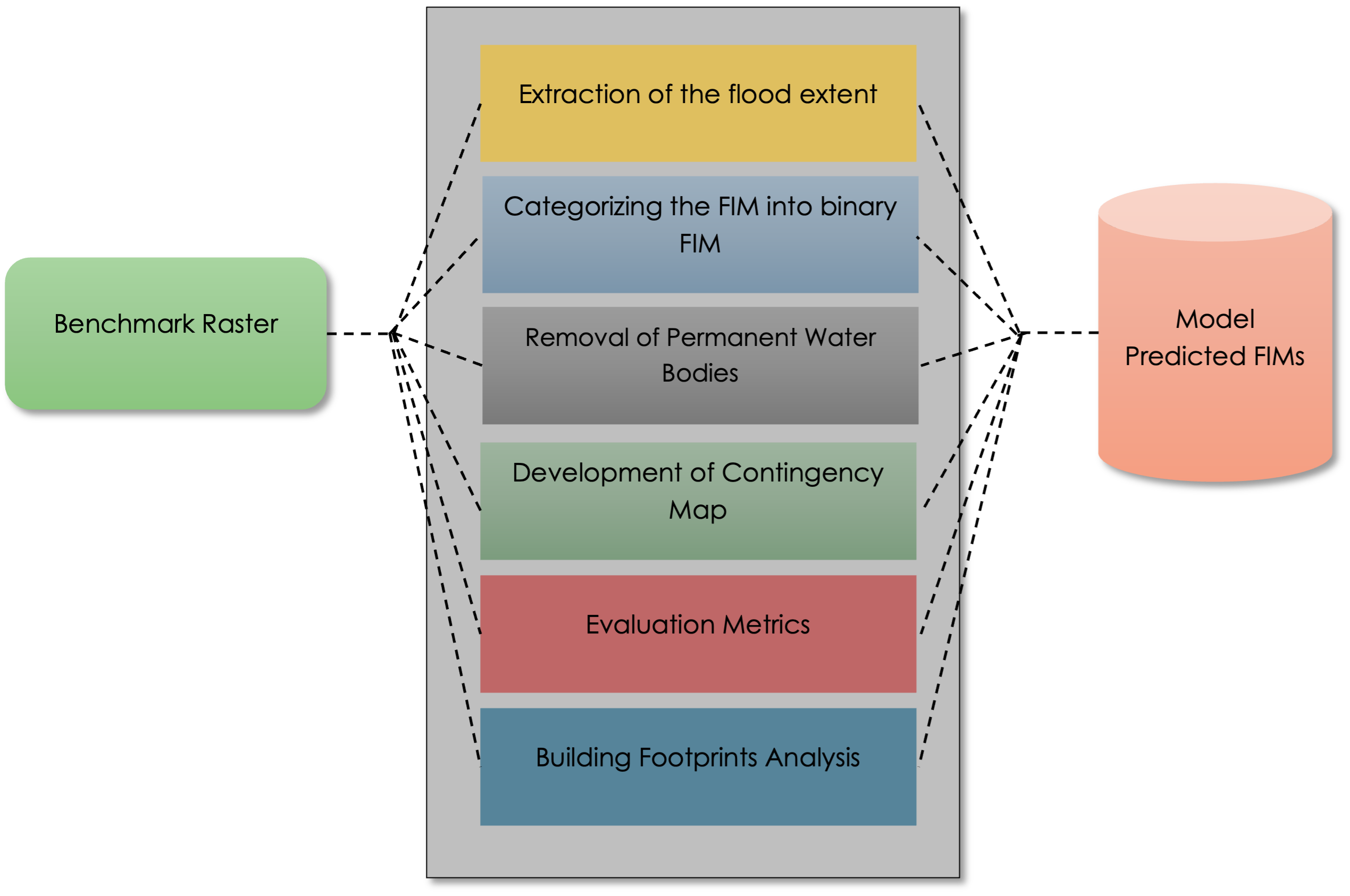
The accuracy of the flood inundation mapping (FIM) is critical for model development and disaster preparedness. The evaluation of flood maps from different sources using geospatial platforms can be tedious and requires repeated processing and analysis for each map. These preprocessing steps include extracting the correct flood extent, assigning the same projection system to all the maps, categorizing the maps as binary flood maps, removal of permanent water bodies, etc. This manual data processing is cumbersome and prone to human error.
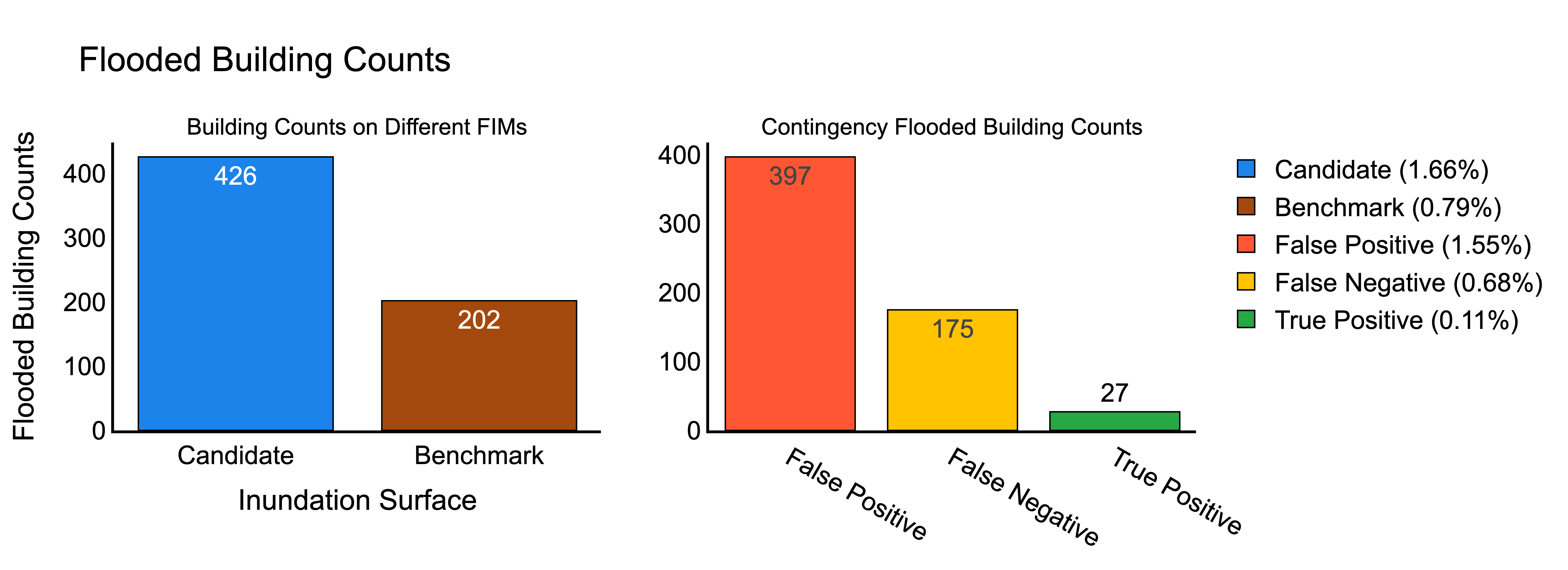
To address these issues, we developed Flood Inundation Mapping Prediction Evaluation Framework (FIMPEF), a Python-based FIM evaluation framework capable of automatically evaluating flood maps from different sources. FIMPEF takes the advantage of comparing multiple target datasets with large benchmark datasets. It includes an option to incorporate permanent waterbodies as non-flood pixels with a user input file or pre-set dataset. In addition to traditional evaluation metrics, it can also compare the number of buildings inundated using a user input file or a pre-set dataset.
Framework Usage
This framework is published as a python package in PyPI (https://pypi.org/project/fimpef/).For directly using the package, the user can install this package using python package installer 'pip' and can import on their workflows:
#Install to use this framework
pip install fimpef

#Use this framework in your workflows using poetry
poetry add fimpef
Import the package to the jupyter notebook or any python IDE.
#Import the package
import fimpef as fp
from pathlib import Path    #For path management
Repository Structure
FIMPEF/
├── Input Rasters/
│   └── Case 1/
│       └── RG_benchmark.tif  (Benchmark FIM (B-FIM) for Hurricane Mathew, Oct 09, 2016, North Carolina. Make sure to enter the name 'benchmark' while naming the raster)
│       └── OWP_09_NC.tif     (Model FIM (M-FIM) for Hurricane Mathew, Oct 09, 2016, North Carolina. (NOAA OWP HAND FIM))
├── PWB/
│   └── PWB.shp               (Shapefile of Permanent Water Bodies)
├── BuildingFootprint/
│   └── NC_bldg.shp            (Geopackage of building footprints.The building footprint used is Microsoft release under Open Data Commons Open Database Liocence. Here is the link https://automaticknowledge.co.uk/us-building-footprints/ User can download the building footprints of the desired states from this link.)
├── FIMPEFfunctions.py         (Contains all functions associated with the notebook)
├── FIMPEF.ipynb               (The main notebook code to get FIM)
├── FIMPEF_package.ipynb       (FIMPEF package version 0.1.2)
└── README.md                  (This file)
Main Directory Structure
The main directory contains the primary folder for storing the case studies. If there is one case study, user can directly pass the case study folder as the main directory. Each case study folder must include a B-FIM with a 'benchmark' name assigned in it and different M-FIM in tif format. For mutilple case studies,the main directory should contain the seperate folders for individual case studies.For example, if a user has two case studies they should create two seperate folders as shown in the Figure below.
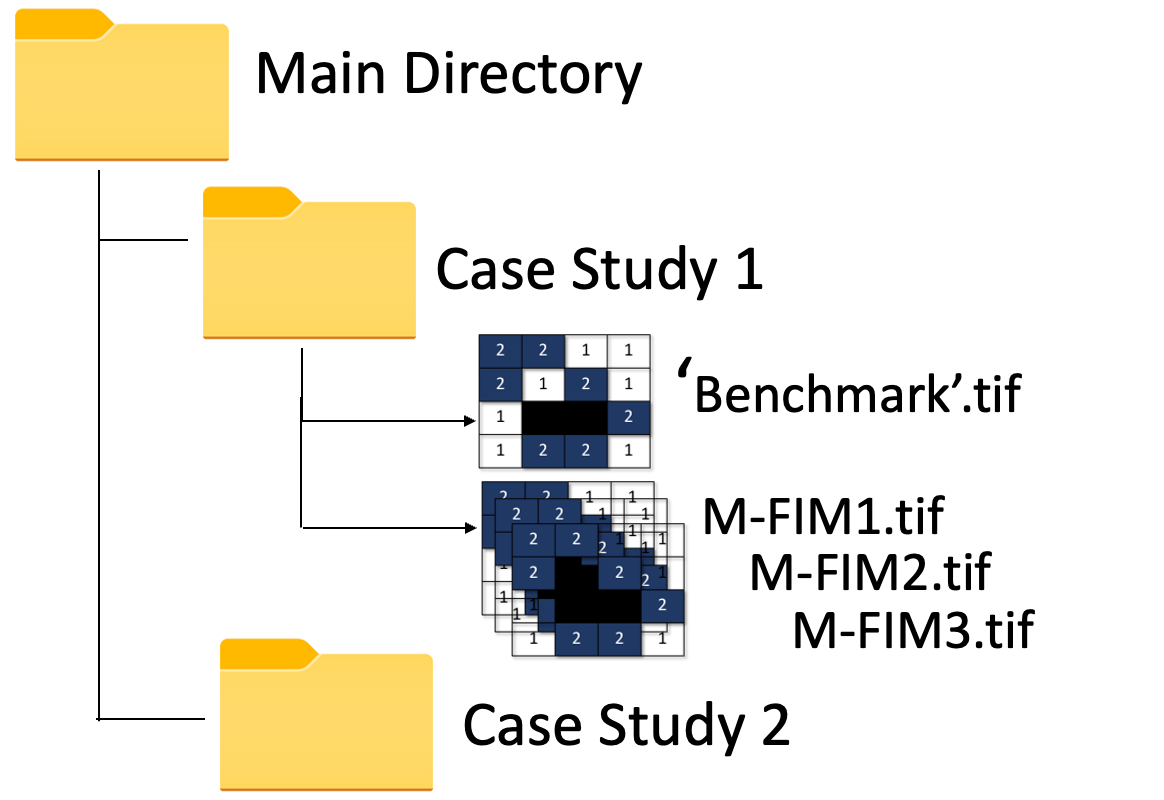
Main_dir = Path('./Main_dir')
Permanent Water Bodies
In this work the 'USA Detailed Water Bodies' from ARCGIS hub is used. Here is the link https://hub.arcgis.com/datasets/esri::usa-detailed-water-bodies/about. User can input their own permanent water bodies shapefile as .shp and .gpkg format. User need to assign the shapefile of the permanent water bodies as -
PWD_dir = Path('./ESRI_PWB/USA_Detailed_Water_Bodies.shp')
Methods for Extracting Flood Extents
Smallest raster: The framework will first check all the raster extents (benchmark and FIMs). It will then determine the smallest among all the rasters. A shape file will then be created to mask all the rasters.
Convex Hull : Another provision of determining flood extent is the generation of the minimum bounding polygon along the valid shapes. The framework will select the smallest raster extent followed by the generation of the valid vector shapes from the raster. It will then generate the convex hull (minimum bounding polygon along the valid shapes).
User-Defined vector flood extent : User can give input an already pre-defined flood extent vector file.
User can enter the following methods
- 'smallest_extent'
- 'convex_hull'
- 'AOI' -User defined boundary
method_name = "smallest_extent"
For the method 'AOI', user need to pass the shapefile of the AOI.
AOI = Path('./AOI.shp')
Executing the Evaluation Module
User can directly run the evaluation module of FIMPEF by calling the function EvaluateFIM.
fp.EvaluateFIM(Main_dir, PWD_dir, method_name)
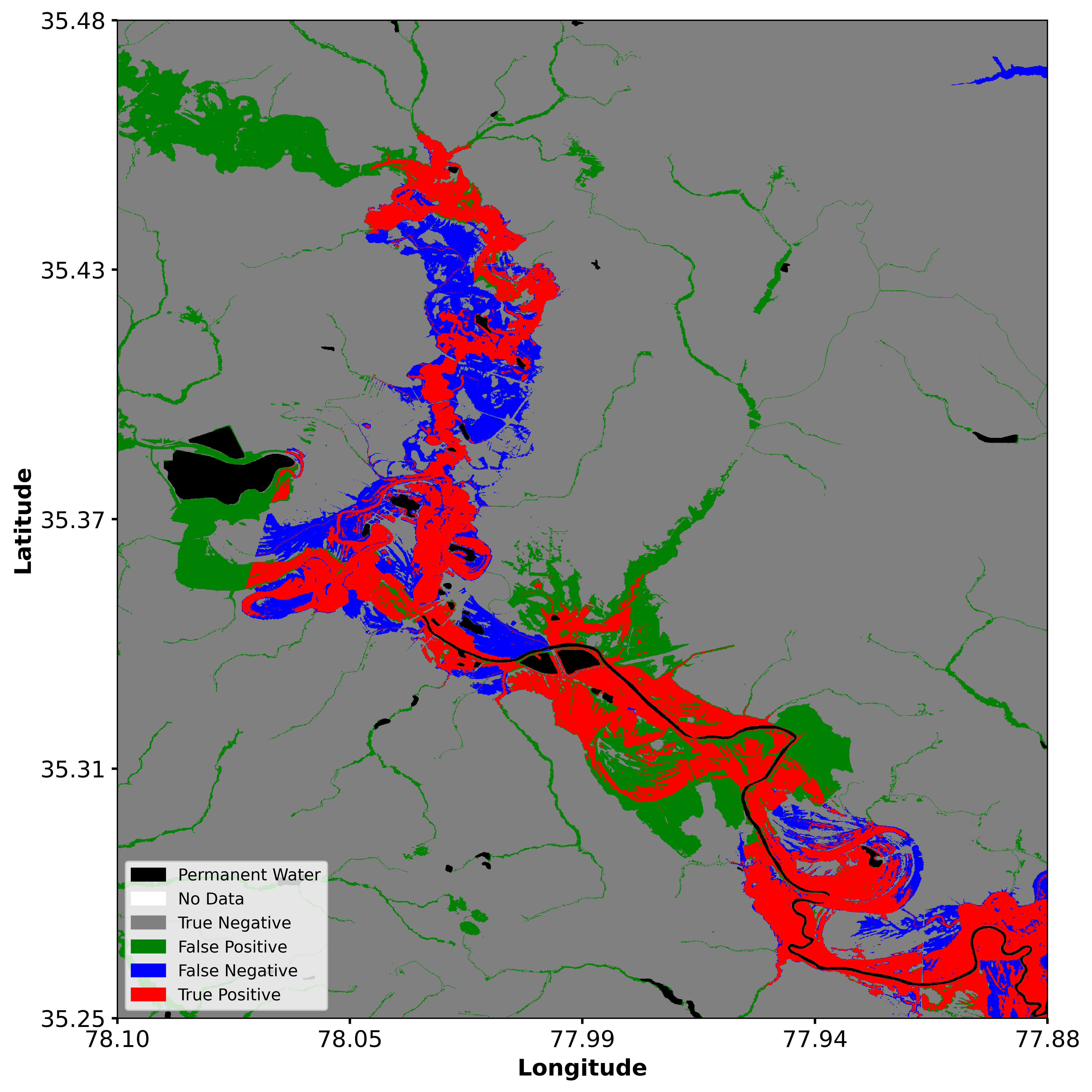
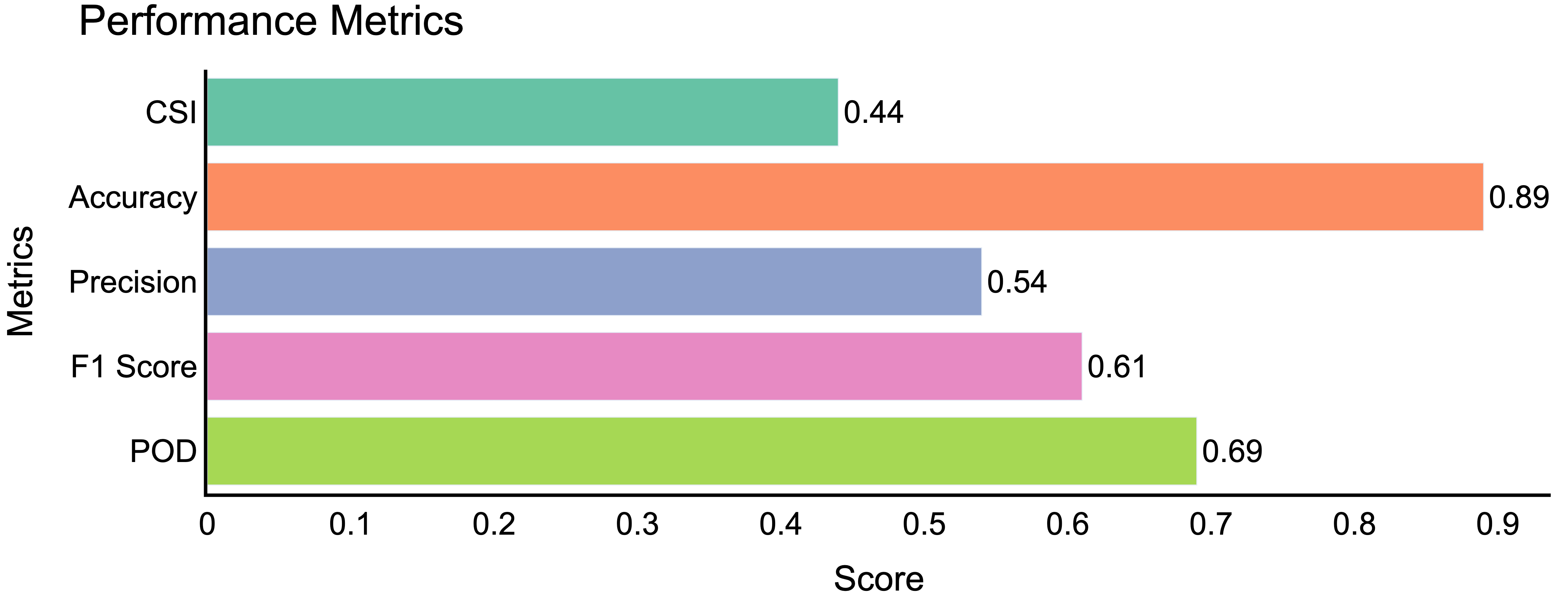
The outputs from the function EvaluateFIM includes generated files in TIFF, SHP, CSV, and PNG formats, all stored within the output folder. Users can visualize the TIFF files using any geospatial platform. The TIFF files consist of the binary Benchmark-FIM (Benchmark.tif), Model-FIM (Candidate.tif), and Agreement-FIM (Contingency.tif). The shp files contain the boundary of the generated flood extent. For better understanding,users can print the agreement maps and the evaluation scores as png using the functions PrintContingencyMap and PlotEvaluationMetrics.
fp.PrintContingencyMap(Main_dir, method_name)
fp.PlotEvaluationMetrics(Main_dir, method_name)
Evaluation of Building Footprints
The building footprint used is Microsoft release under Open Data Commons Open Database Licence. Here is the link https://automaticknowledge.co.uk/us-building-footprints/ User can download the building footprints of the desired states from this link. If the user already have a building footprint shapefile, user can pass the building footprint as .shp or .gpkg. For building footprint evaluation with B-FIM, users can use the function EvaluationWithBuildingFootprint.
building_footprint = Path('./BuildingFootprint.gpkg/.shp')
fp.EvaluationWithBuildingFootprint(Main_dir, method_name, building_footprint= building_footprint)
Another flexibility of FIMPEF that it already has the msfootprint package that will allow the users to automatically evaluate the buildings without passing the building shapefile. To utilize this functionality, the users should have a valid Google Earth Engine account.The user need to specify the country name before executing this function. For more detail of this package user can go through the following link ().
country = 'US'
fp.EvaluationWithBuildingFootprint(Main_dir, method_name, country= country)
The outputs of the building footprint analysis generated in .CSV format and .png format and stored in the output folder.
Citation
If you use this repository or its components in your work, please cite it as follows:
Dipsikha Devi, Supath Dhital, Dinuke Munasinghe, Anupal Baruah, Sagy Cohen. "FIMPEF" GitHub, 2024, .https://github.com/dipsikha-devi/FIMPEF
Acknowledgements
 |
Funding for this project was provided by the National Oceanic & Atmospheric Administration (NOAA), awarded to the Cooperative Institute for Research to Operations in Hydrology (CIROH) through the NOAA Cooperative Agreement with The University of Alabama. |
For More Information
Contact Sagy Cohen (sagy.cohen@ua.edu) Dipsikha Devi, (ddevi@ua.edu) Supath Dhital, (sdhital@crimson.ua.edu)
Release history Release notifications | RSS feed


Download files
Download the file for your platform. If you're not sure which to choose, learn more about installing packages.
Source Distribution
Built Distribution
Filter files by name, interpreter, ABI, and platform.
If you're not sure about the file name format, learn more about wheel file names.
Copy a direct link to the current filters
File details
Details for the file fimpef-0.1.40.tar.gz.
File metadata
- Download URL: fimpef-0.1.40.tar.gz
- Upload date:
- Size: 43.4 kB
- Tags: Source
- Uploaded using Trusted Publishing? No
- Uploaded via: poetry/1.8.5 CPython/3.11.7 Darwin/24.3.0
File hashes
| Algorithm | Hash digest | |
|---|---|---|
| SHA256 |
88311dc702aa486f3c56e84602a84f2f8629f360ee4ddff157f6036236e404c6
|
|
| MD5 |
48c9f54df46e032da9cc84a407b563a1
|
|
| BLAKE2b-256 |
eda268a589c19cbffe5573f4ad730cfe7a7d6eaf2d1978a3308221a05772ee16
|
File details
Details for the file fimpef-0.1.40-py3-none-any.whl.
File metadata
- Download URL: fimpef-0.1.40-py3-none-any.whl
- Upload date:
- Size: 18.2 kB
- Tags: Python 3
- Uploaded using Trusted Publishing? No
- Uploaded via: poetry/1.8.5 CPython/3.11.7 Darwin/24.3.0
File hashes
| Algorithm | Hash digest | |
|---|---|---|
| SHA256 |
e10773bb36f88a6ef339d9d05fda00f721388b251c039d1fb5faf5e57301f7fa
|
|
| MD5 |
9ce8115cc73c2677a93544af4e10a2a0
|
|
| BLAKE2b-256 |
7afbd1dbc1c44c67cffd91985e1f1789290394d17f427d27e3fbf9a16d9d0d5f
|






