
Voice AI observability dev tool for Pipecat

Project description
 Finchvox - elevated debugging for Pipecat Voice AI apps
Do your eyes bleed like a Vecna victim watching Pipecat logs fly by? Does flipping between audio recordings, transcripts, and logs damage your ⌘+tab keys from frequent use? If so, meet Finchvox, a local debugger purpose-built for Voice AI apps.
Finchvox unifies conversation audio, logs, and traces in a single UI, highlighting voice-specific problems like interruptions and high user <-> bot latency.
👇 Click the image for a short video:
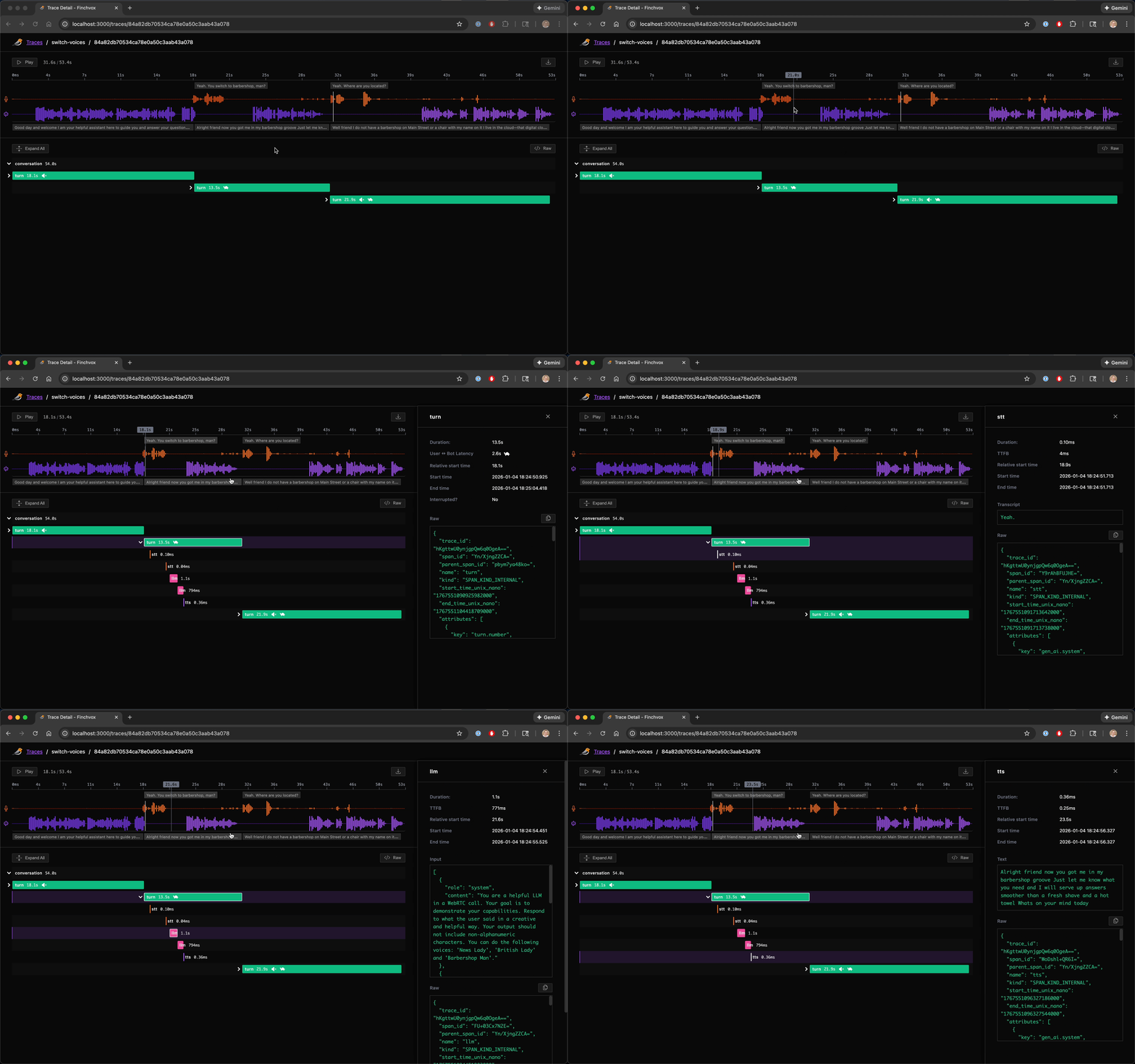
Table of Contents
Prerequisites
- Python 3.10 or higher
- A Pipecat Voice AI application
Installation
# uv
uv add finchvox "pipecat-ai[tracing]"

# Or with pip
pip install finchvox "pipecat-ai[tracing]"
Setup
- Add the following to the top of your bot (e.g.,
bot.py):
import finchvox
from finchvox import FinchvoxProcessor

finchvox.init(service_name="my-voice-app")
- Add
FinchvoxProcessorto your pipeline, ensuring it comes aftertransport.output():
pipeline = Pipeline([
    # SST, LLM, TTS, etc. processors
    transport.output(),
    FinchvoxProcessor(), # Must come after transport.output()
    context_aggregator.assistant(),
])
- Initialize your
PipelineTaskwith metrics, tracing and turn tracking enabled:
task = PipelineTask(
    pipeline,
    params=PipelineParams(enable_metrics=True),
    enable_tracing=True,
    enable_turn_tracking=True,
)
Configuration
The finchvox.init() function accepts the following optional parameters:
| Parameter | Default | Description |
|---|---|---|
endpoint |
"http://localhost:4317" |
Finchvox collector endpoint |
insecure |
True |
Use insecure gRPC connection (no TLS) |
capture_logs |
True |
Send logs to collector alongside traces |
log_modules |
None |
Additional module prefixes to capture (e.g., ["myapp"]) |
By default, logs from pipecat.*, finchvox.*, and __main__ are captured. Use log_modules to include logs from your own modules.
Usage - Finchvox server
uv run finchvox start
For the list of available options, run:
uv run finchvox --help
Troubleshooting
No spans being written
- Check collector is running: Look for "OTLP collector listening on port 4317" log message
- Verify client endpoint: Ensure Pipecat is configured to send to
http://localhost:4317
Release history Release notifications | RSS feed


Download files
Download the file for your platform. If you're not sure which to choose, learn more about installing packages.
Source Distribution
Built Distribution
Filter files by name, interpreter, ABI, and platform.
If you're not sure about the file name format, learn more about wheel file names.
Copy a direct link to the current filters
File details
Details for the file finchvox-0.0.3.tar.gz.
File metadata
- Download URL: finchvox-0.0.3.tar.gz
- Upload date:
- Size: 8.0 MB
- Tags: Source
- Uploaded using Trusted Publishing? No
- Uploaded via: uv/0.9.18 {"installer":{"name":"uv","version":"0.9.18","subcommand":["publish"]},"python":null,"implementation":{"name":null,"version":null},"distro":{"name":"macOS","version":null,"id":null,"libc":null},"system":{"name":null,"release":null},"cpu":null,"openssl_version":null,"setuptools_version":null,"rustc_version":null,"ci":null}
File hashes
| Algorithm | Hash digest | |
|---|---|---|
| SHA256 |
971be831d8a37a896a2eceef97cf5d1f55912c8b9d38fdab95f8dfda12fa7f9a
|
|
| MD5 |
2dc12292dd33ac605c9e005b9d6ca495
|
|
| BLAKE2b-256 |
1e1e08bede83ea8d9deb00226029c048809ef93a4510fa22be3dc1db87752229
|
File details
Details for the file finchvox-0.0.3-py3-none-any.whl.
File metadata
- Download URL: finchvox-0.0.3-py3-none-any.whl
- Upload date:
- Size: 124.4 kB
- Tags: Python 3
- Uploaded using Trusted Publishing? No
- Uploaded via: uv/0.9.18 {"installer":{"name":"uv","version":"0.9.18","subcommand":["publish"]},"python":null,"implementation":{"name":null,"version":null},"distro":{"name":"macOS","version":null,"id":null,"libc":null},"system":{"name":null,"release":null},"cpu":null,"openssl_version":null,"setuptools_version":null,"rustc_version":null,"ci":null}
File hashes
| Algorithm | Hash digest | |
|---|---|---|
| SHA256 |
885674e916ece596b999b07a87e9578a06087ba156e8fe7055f812a8faebfb01
|
|
| MD5 |
f080428694b72f0b2d26e77a767bf42c
|
|
| BLAKE2b-256 |
4c8a38ce4eadd79164528f093e6b0493e05342ca02d170ef22f6eb18d4a34206
|






