
find_delay 2.18

Author: Romain Pastureau
What is find_delay?
find_delay is a Python package that tries to find the delay where a time series appears in another via cross-correlation. It can theoretically work with any time series (see the examples in the demos folder, but was created to try to align audio files. Read the documentation here!
How to
The best way to use this function is to install the find_delay module for Python by running
py -m pip install find-delay.
You can then import the function by writing from find_delay import find_delay (or from find_delay import find_delays
if you want to locate multiple excerpts in one big time series).
You can also run demos/demo.py to get four examples (in that case, you will need to download the .wav files present in the repository and place them in the same folder for examples 3 and 4).
Quick use for audio files
To find when an excerpt starts in an audio file, use the find_delay function and fill only the first two parameters,
by indicating the path to the corresponding WAV files; leave the other parameters default (just set plot_figure = True
if you want to visualize the output of the function).
Specifics
The function accepts two arrays containing time series - the time series can be of different frequency or amplitude.
The function can then calculate the envelope of the time series (recommended for audio files) and apply a band-pass filter to the result.
The function can also resample the arrays (necessary when the two time series do not have the same frequency).
Finally, the function performs the cross-correlation between the two arrays.
The results can be then plotted if the corresponding parameters are activated, and the function returns the delay at which to find the second array in the first by selecting the delay with the maximum correlation value (optionally, the function can also return this correlation value).
Dependencies
- Python >= 3.8 (>= 2019-10-14)
- Numpy >= 1.16 (>= 2019-01-14) for handling the numerical arrays
- Scipy >= 1.5 (>= 2020-19-21) for loading the WAV files, performing the resampling, calculating the envelope, and applying a band-pass filter.
- Matplotlib >= 3.2 (>= 2020-04-03) for the plots
The indicated minimum versions are for ensuring environment compatibility with other modules - using the most updated versions of Python and the required modules is recommended as older versions may not be supported or be subject to vulnerabilities.
Examples
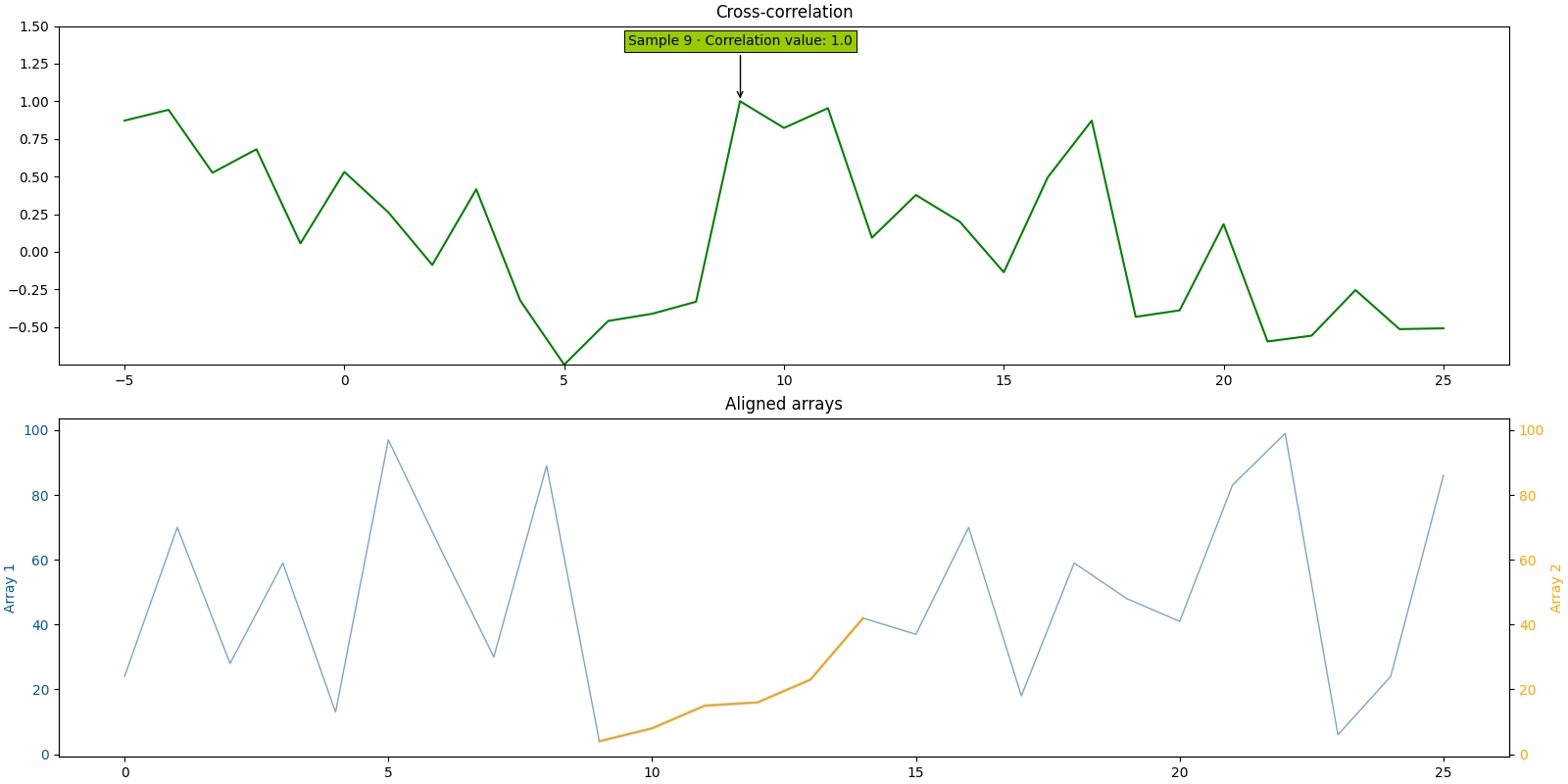
Delay between two numerical time series
array_1 = [24, 70, 28, 59, 13, 97, 63, 30, 89, 4, 8, 15, 16, 23, 42, 37, 70, 18, 59, 48, 41, 83, 99, 6, 24, 86]
array_2 = [4, 8, 15, 16, 23, 42]

find_delay(array_1, array_2, compute_envelope=False, plot_figure=True, path_figure="figure_1.png")
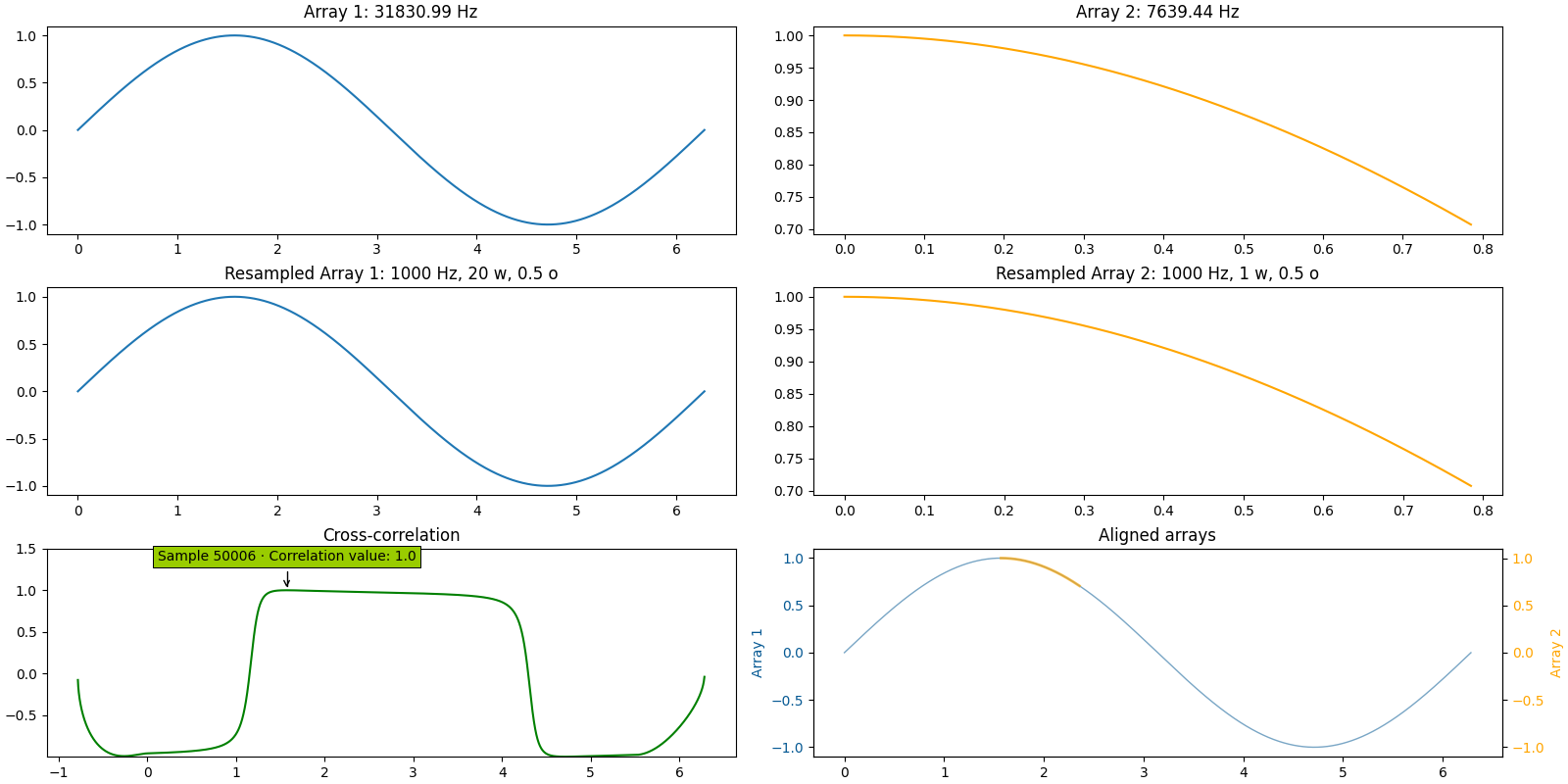
Delay between a sine function and a portion of it, different frequencies
timestamps_1 = np.linspace(0, np.pi * 2, 200001)
array_1 = np.sin(timestamps_1)
timestamps_2 = np.linspace(np.pi * 0.5, np.pi * 0.75, 6001)
array_2 = np.sin(timestamps_2)

find_delay(array_1, array_2, 100000 / np.pi, 6000 / (np.pi / 4),
           compute_envelope=False, resampling_rate=1000, window_size_res=20000, overlap_ratio_res=0.5,
           resampling_mode="cubic", plot_figure=True, path_figure="figure_2.png", plot_intermediate_steps=True,
           verbosity=1)
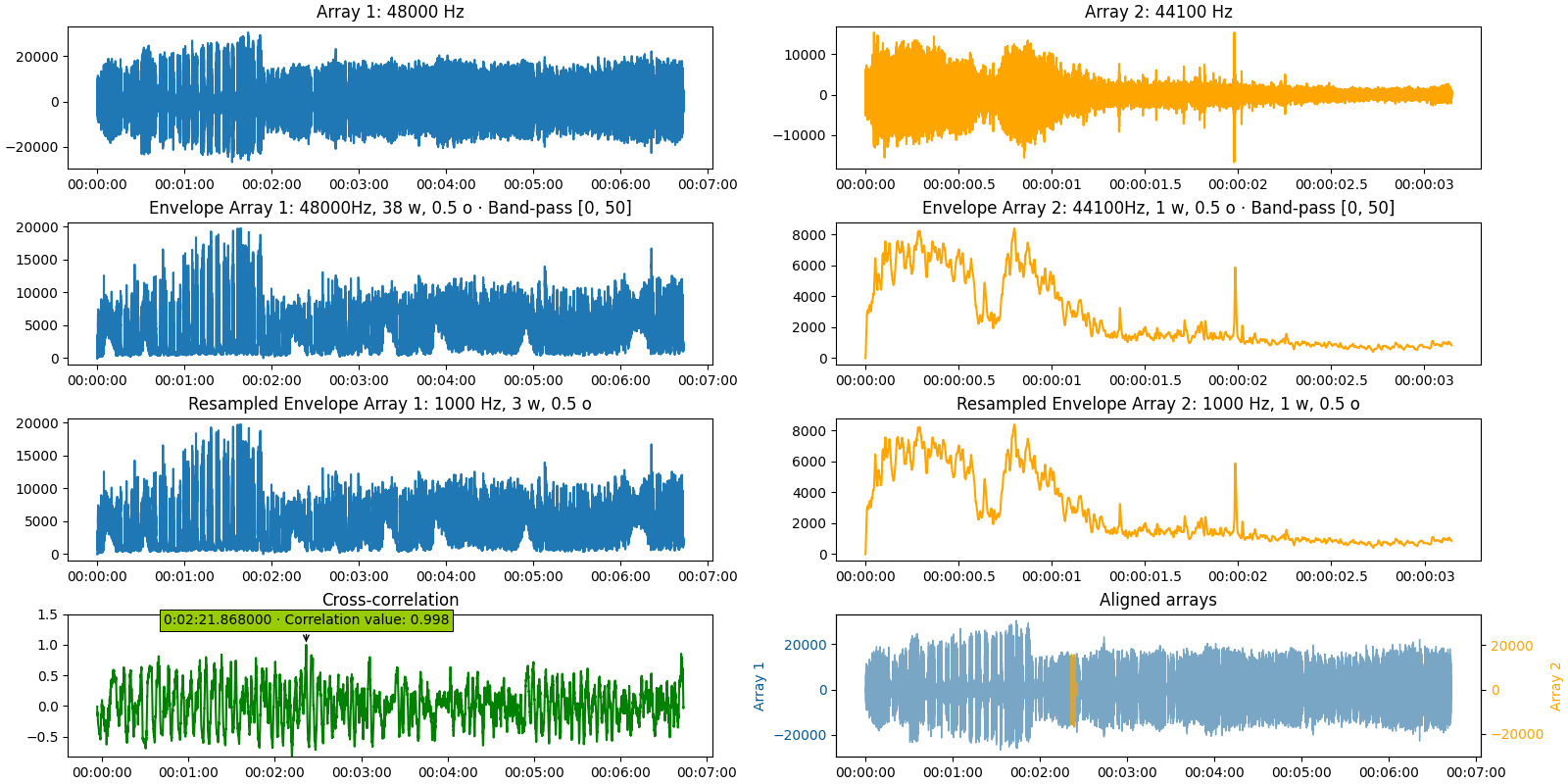
Delay between an audio file and an excerpt from it
find_delay("i_have_a_dream_full_speech.wav", "i_have_a_dream_excerpt.wav",
           return_delay_format="timedelta",
           plot_figure=True, path_figure="figure_3.png", plot_intermediate_steps=True,
           verbosity=1)
Latest version
2.18 (2025-06-29)
- Corrected a bug where passing
"average"for the parametermono_channelwould return an error if one of the files was mono. ̀̀* Corrected a bug that did not display properly the cross-correlation peak when usingmin_delayormax_delay. - The parameter
return_delay_formatcan now be set interchangeably between"index"or"sample". - Added a new parameter
return_none_if_below_threshold. - The parameter
return_correlation_valuecan now be set on"array". In that case, an 2-dimensional array of all the correlation values and their corresponding timestamps or indices is returned. - Added new tests.
If you detect any bug, please open an issue.
Thanks! 🦆

1 maintainer

Metadata
1 maintainer
Release files for find-delay 2.18
For a detailed explanation of source distributions (sdists) and built distributions (wheels), please see the package formats documentation.
Source distribution (sdist)
| File | Size | Uploaded | |
|---|---|---|---|
| find_delay-2.18.tar.gz | 482.5 kB | Details |
Built distribution (wheel)
| File | Interpreter | ABI | Platform | Reset |
|---|---|---|---|---|
| find_delay-2.18-py3-none-any.whl | Python 3 | none | any | Details |
Total release size: 520.0 kB
Release files / find_delay-2.18.tar.gz
| Download URL | find_delay-2.18.tar.gz |
|---|---|
| Size | 482.5 kB |
| Tags | Source |
|
SHA-256 checksum How to use checksums |
2a2745a40c2e07c3c0b2b351623b281711e870c390004523770ce688cfaa107a
|
|
BLAKE2b-256 checksum How to use checksums |
402d8686cd6b7a1899109d447c66fe77ba408fd7182f3ab49470a9b806e2160f
|
| Upload date | |
|
Uploaded using Trusted Publishing? What is trusted publishing? |
No |
| Uploaded via |
twine/6.0.1 CPython/3.12.6
|
Release files / find_delay-2.18-py3-none-any.whl
| Download URL | find_delay-2.18-py3-none-any.whl |
|---|---|
| Size | 37.5 kB |
| Tags | Python 3 |
|
SHA-256 checksum How to use checksums |
77ec81d74e8c02e0487d60b870863a0112ed1a6f643547ed4ae92d4390add262
|
|
BLAKE2b-256 checksum How to use checksums |
b0396495cde8cc900ead674637486e0c886e1946991cc24e272811ca3d35d19e
|
| Upload date | |
|
Uploaded using Trusted Publishing? What is trusted publishing? |
No |
| Uploaded via |
twine/6.0.1 CPython/3.12.6
|














