
Safe duplicate finder & reviewer for macOS — exact + perceptual image matching, review-first deletion to Trash
Verified details
These details have been verified by PyPIProject links
GitHub Statistics
Maintainers

Project description
findupe



See your duplicate photos side by side, pick what goes, and nothing disappears without your OK.
findupe finds exact duplicates (any file type, zero false positives) and same-photo-different-format duplicates (HEIC / JPEG / RAW, re-encodes, resized exports) on your Mac, then lets you review everything visually in an HTML report before anything moves — to the real macOS Trash, never deleted outright.
Built for photographers: keeping X.CR3 + X.jpg side by side is intentional and is
never flagged. Only surplus copies within a format (X copy.jpg, X_2.jpg,
a re-imported CR3) become deletion candidates.
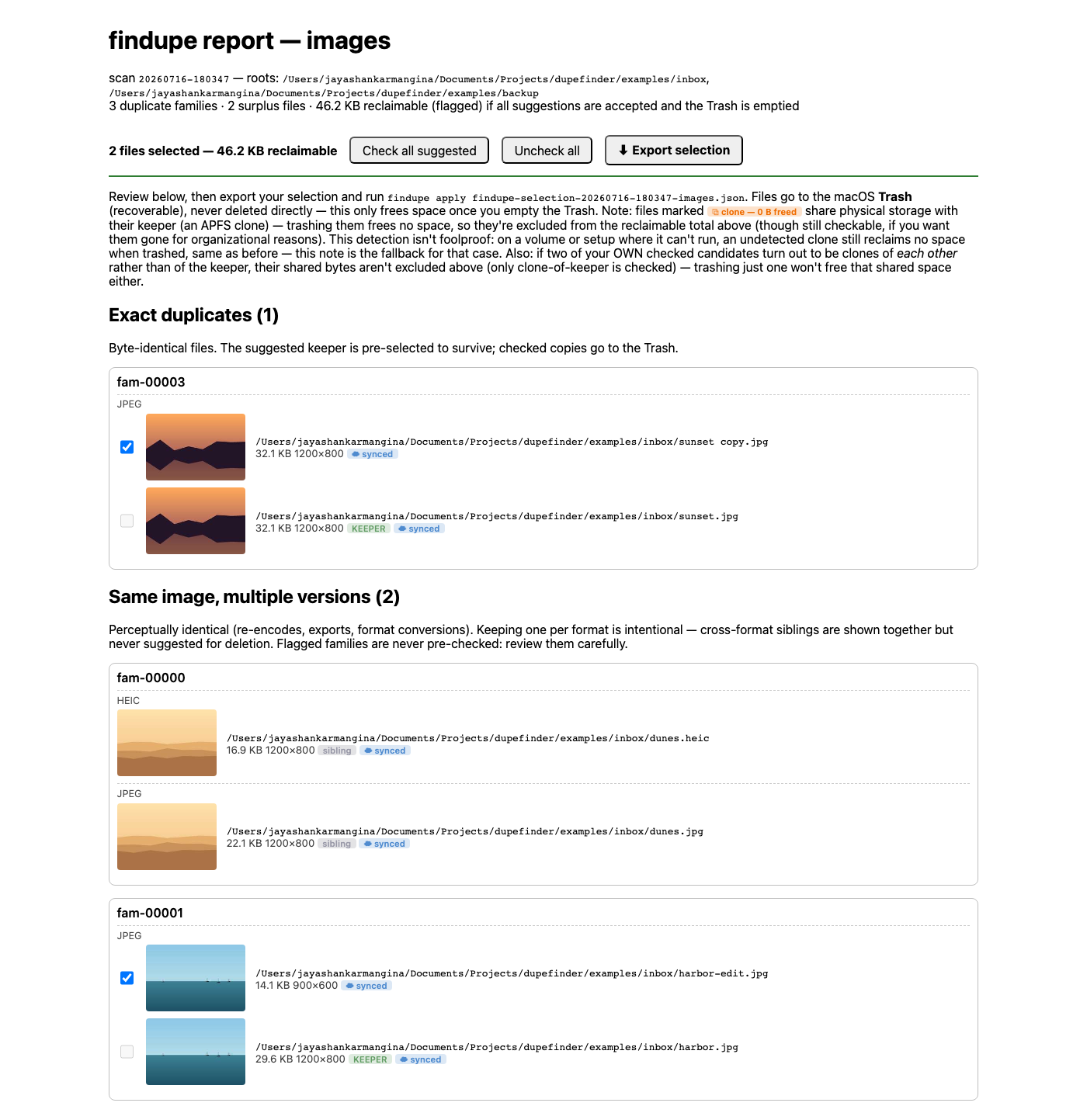
Quickstart
pipx install findupe
findupe --demo     # scans a small bundled sample and opens the report — no setup needed
--demo gives you a real report to click through immediately. When you're ready to
point it at your own photos, the flow is the same one shown below:

findupe scan ~/Pictures/inbox "/Volumes/Extreme SSD/photos"— writes an HTML report.- Open the report, check the boxes you agree with (sensible ones are pre-checked), click Export selection.
findupe apply <selection>.json --dry-runto preview, then without--dry-runto move the checked files to the Trash (typed confirmation required).findupe undoany time — restores from the Trash by content, not by guessing names.
Nothing is deleted outright: checked files go to the real Trash (recoverable, "Put Back" works), and the last copy of anything always survives — enforced independently of what the report UI shows you.
Install
Requires macOS.
pipx install findupe
# or
uv tool install findupe
Then findupe --help. Running on a non-macOS platform refuses immediately with a
clear error — the Trash integration (Finder/AppleScript) and clone-detection notes
are macOS/APFS-specific.
Workflow
scan writes two reports — one for images (exact + perceptual matching), one
for everything else (PDFs, text, archives, ... — exact-hash matches only,
since perceptual matching never applies to non-images). Review and apply each
independently.
1. findupe scan ~/Pictures/inbox "/Volumes/Extreme SSD/photos"
2. open report-images.html   # photo/image duplicates — thumbnails, adjust checkboxes
   open report-other.html    # everything else — plain checkbox + path + size rows
3.                           # click "Export selection" on each ->
                              #   findupe-selection-<id>-images.json
                              #   findupe-selection-<id>-other.json
4. findupe apply findupe-selection-<id>-images.json --dry-run   # preview
   findupe apply findupe-selection-<id>-other.json  --dry-run   # preview
5. findupe apply findupe-selection-<id>-images.json            # typed confirmation
   findupe apply findupe-selection-<id>-other.json             # typed confirmation
6. findupe undo                                             # list restore points
   findupe undo <manifest>                                  # put everything back
How it works
findupe flags two kinds of duplicates: files that are byte-for-byte identical, and photos that look like the same shot even across formats or exports (HEIC, JPEG, RAW). It's tuned to leave burst shots and RAW+JPEG pairs alone — those are usually intentional, not duplicates — and everything is re-checked right before anything actually moves, not just at scan time.
Matching tiers, calibration numbers, and the full safety model live in docs/architecture.md.
Documentation
- Reading your report — sections, badges, and flags explained
- Architecture — matching tiers and the full safety model
- FAQ — common questions
- How-to — recipes: multi-root scans, excluding paths, history, stats, undo
- CONTRIBUTING.md — dev setup, commit conventions, release pipeline
Project details
Verified details
These details have been verified by PyPIProject links
GitHub Statistics
Maintainers
Release history Release notifications | RSS feed


Download files
Download the file for your platform. If you're not sure which to choose, learn more about installing packages.
Source Distribution
Built Distribution
Filter files by name, interpreter, ABI, and platform.
If you're not sure about the file name format, learn more about wheel file names.
Copy a direct link to the current filters
File details
Details for the file findupe-0.6.0.tar.gz.
File metadata
- Download URL: findupe-0.6.0.tar.gz
- Upload date:
- Size: 1.3 MB
- Tags: Source
- Uploaded using Trusted Publishing? Yes
- Uploaded via: twine/6.1.0 CPython/3.13.13
File hashes
| Algorithm | Hash digest | |
|---|---|---|
| SHA256 |
f4af5f8180f6ce17a0986035c99e06de8782925eed740e1103f2da3a0e620bad
|
|
| MD5 |
87feba3ee42bed2a088759cb6da57f20
|
|
| BLAKE2b-256 |
d75cb6b0520fcaf9e88c8c6f04a3cf36dd5690e7273a6f5de169ecd78c92f9e2
|
Provenance
The following attestation bundles were made for findupe-0.6.0.tar.gz:
Publisher:
release.yml on jyshnkr/findupe
-
Statement:
-
Statement type:
https://in-toto.io/Statement/v1 -
Predicate type:
https://docs.pypi.org/attestations/publish/v1 -
Subject name:
findupe-0.6.0.tar.gz -
Subject digest:
f4af5f8180f6ce17a0986035c99e06de8782925eed740e1103f2da3a0e620bad - Sigstore transparency entry: 2194967559
- Sigstore integration time:
-
Permalink:
jyshnkr/findupe@ec743966b7e1707cbfdd7d93ccaa0b88398659c4 -
Branch / Tag:
refs/heads/main - Owner: https://github.com/jyshnkr
-
Access:
public
-
Token Issuer:
https://token.actions.githubusercontent.com -
Runner Environment:
github-hosted -
Publication workflow:
release.yml@ec743966b7e1707cbfdd7d93ccaa0b88398659c4 -
Trigger Event:
push
-
Statement type:
File details
Details for the file findupe-0.6.0-py3-none-any.whl.
File metadata
- Download URL: findupe-0.6.0-py3-none-any.whl
- Upload date:
- Size: 118.3 kB
- Tags: Python 3
- Uploaded using Trusted Publishing? Yes
- Uploaded via: twine/6.1.0 CPython/3.13.13
File hashes
| Algorithm | Hash digest | |
|---|---|---|
| SHA256 |
e249f0f7e9d1e671923d1450175f8a1584b756c673544403b6a452508b724ee0
|
|
| MD5 |
03d7781f9a6d5a6337d983a4ebef75ad
|
|
| BLAKE2b-256 |
1abb60004777beb5eb16647d15668c5898088c063b2ef76982a41287129c0c3d
|
Provenance
The following attestation bundles were made for findupe-0.6.0-py3-none-any.whl:
Publisher:
release.yml on jyshnkr/findupe
-
Statement:
-
Statement type:
https://in-toto.io/Statement/v1 -
Predicate type:
https://docs.pypi.org/attestations/publish/v1 -
Subject name:
findupe-0.6.0-py3-none-any.whl -
Subject digest:
e249f0f7e9d1e671923d1450175f8a1584b756c673544403b6a452508b724ee0 - Sigstore transparency entry: 2194967566
- Sigstore integration time:
-
Permalink:
jyshnkr/findupe@ec743966b7e1707cbfdd7d93ccaa0b88398659c4 -
Branch / Tag:
refs/heads/main - Owner: https://github.com/jyshnkr
-
Access:
public
-
Token Issuer:
https://token.actions.githubusercontent.com -
Runner Environment:
github-hosted -
Publication workflow:
release.yml@ec743966b7e1707cbfdd7d93ccaa0b88398659c4 -
Trigger Event:
push
-
Statement type:






