



Develop, verify and deploy crypto trading strategies at a glance.
Key Features
- One-line download of Binance history, cached locally, that also works on Google Colab and other US-hosted machines
- Pandas-vectorised backtests (uses vectorbt as backend)
- TA-Lib wrappers to compose strategies and filters in one line
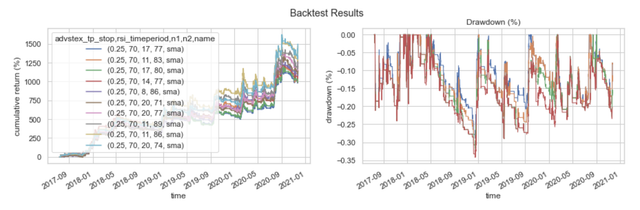
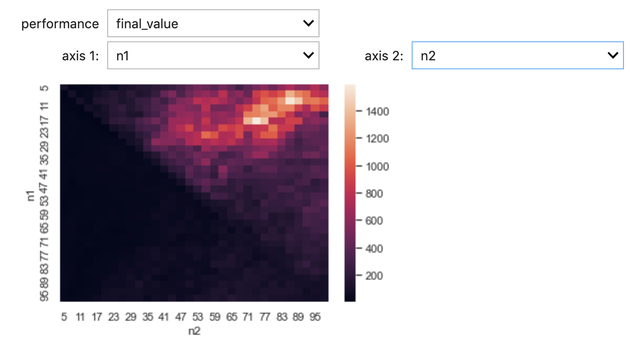
- Interactive backtest charts and parameter-optimisation dashboards
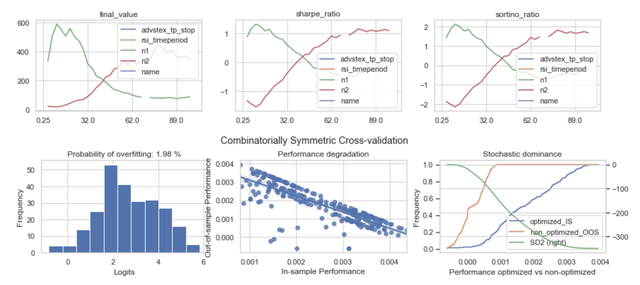
- Probability of backtest overfitting (combinatorially symmetric cross-validation)
- Free on-chain metrics (hash rate, exchange flows, SOPR) without API keys
- Live trading on Binance spot, deployable to Google Cloud Functions
- Works on Colab, Jupyter and VS Code, Python 3.10 – 3.13
- Companion of the Hahow online course; its notebooks live in hahow-crypto-course
Installation
pip install finlab_crypto              # research and backtesting
pip install "finlab_crypto[trade]"     # + live trading on Binance
TA-Lib ships as a binary wheel, no C library to install.
Colab Example

Usage
Get Historical Price
import finlab_crypto

ohlcv = finlab_crypto.crawler.get_all_binance('BTCUSDT', '4h')
ohlcv.head()
Klines come from Binance's public market-data endpoint (data-api.binance.vision), which needs no API key and is not geo-restricted. They are cached in ./history/, so later calls only download new candles.
Trading Strategy
@finlab_crypto.Strategy(n1=20, n2=60)
def sma_strategy(ohlcv):
    sma1 = ohlcv.close.rolling(sma_strategy.n1).mean()
    sma2 = ohlcv.close.rolling(sma_strategy.n2).mean()
    return sma1 > sma2, sma1 < sma2
Backtest
# default fee and slippage are 0.1% and 0.1%
portfolio = sma_strategy.backtest(ohlcv, {'n1': 20, 'n2': 60}, freq='4h', plot=True)
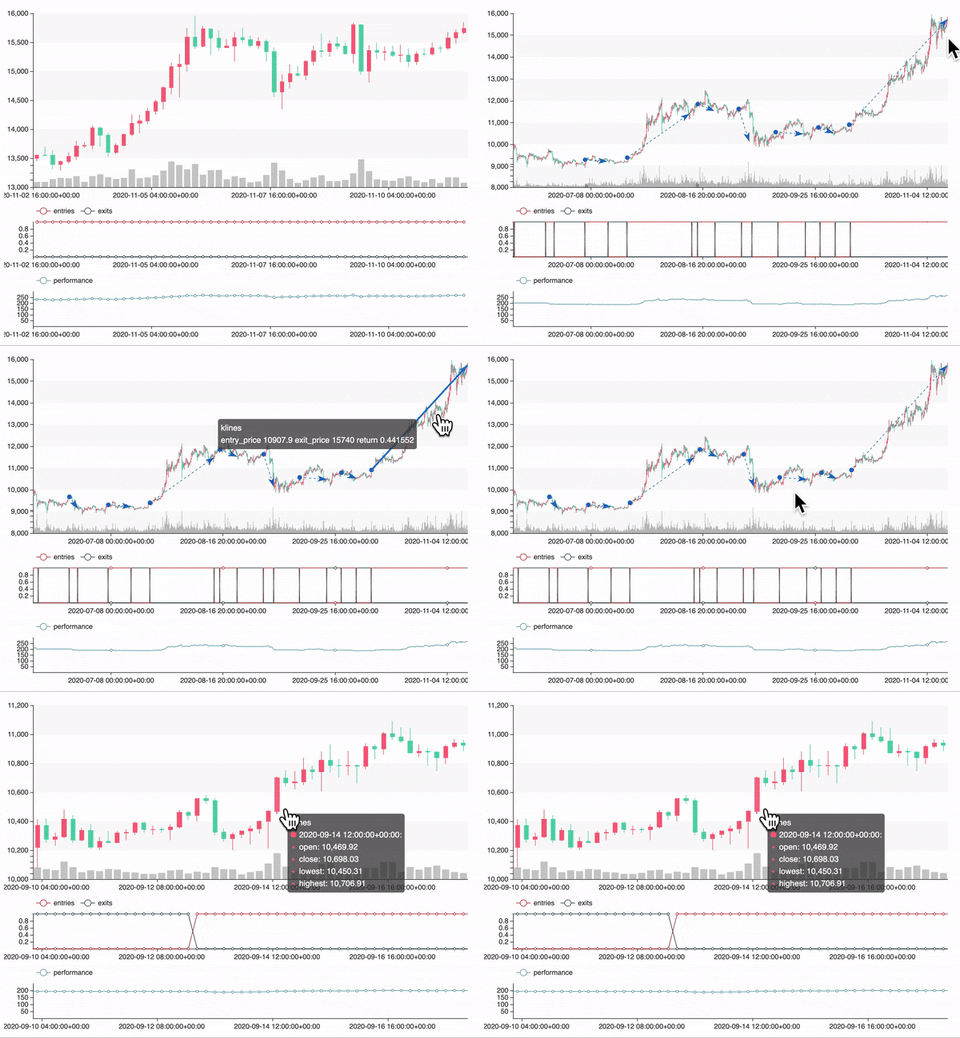
Stop-loss (sl_stop), take-profit (tp_stop) and trailing-stop (ts_stop) exits are strategy variables too:
portfolio = sma_strategy.backtest(ohlcv, {'n1': 20, 'n2': 60, 'sl_stop': 0.05}, freq='4h')
Optimization
import numpy as np

variables = {'n1': np.arange(10, 100, 5), 'n2': np.arange(10, 100, 5)}
portfolio = sma_strategy.backtest(ohlcv, variables, freq='4h', plot=True)
TA-Lib strategies and filters
from finlab_crypto.talib_strategy import TalibStrategy
from finlab_crypto.talib_filter import TalibFilter

macd_strategy = TalibStrategy('MACD',
                              entries=lambda ohlcv, macd: macd.macdhist > 0,
                              exits=lambda ohlcv, macd: macd.macdhist < 0)
angle_filter = TalibFilter('LINEARREG_ANGLE', lambda ohlcv, angle: angle > 0)

macd_strategy.backtest(ohlcv, {'fastperiod': 12}, filters={'angle': angle_filter.create({'timeperiod': 14})},
                       freq='4h', plot=True)
On-chain metrics
from finlab_crypto import onchain

hash_rate = onchain.coinmetrics(['HashRate']).HashRate   # Coin Metrics Community API
sopr = onchain.sopr()                                    # BGeometrics, latest ~4 years
hash_rate_4h = onchain.align(hash_rate, ohlcv.index)     # no look-ahead: known after the day closes
Live Trading
To perform live trading of a strategy, the following 3 sections should be executed when any candle is complete.
Placing orders uses api.binance.com, which answers HTTP 451 to US IP addresses (including Google Colab). Run live trading from your own computer or a server outside the US (e.g. a Cloud Function in asia-east1). Without API keys, TradingPortfolio runs as a dry run: signals, positions and orders are computed but nothing is sent.
1. Create TradingMethods
First, we need to encapsulate a strategy into TradingMethod
from finlab_crypto.online import TradingMethod, TradingPortfolio, render_html

# create TradingMethod for live trading
tm_sma = TradingMethod(
    name='live-strategy-sma',
    symbols=['ADAUSDT', 'DOTBTC', 'ETHBTC'], freq='4h', lookback=1200,
    strategy=sma_strategy,
    variables=dict(n1=35, n2=105),
    weight=5000,
    weight_unit='USDT',
    execution_price='close',  # trade at close or open price
)
2. register TradingMethods to TradingPortfolio
A TradingPortfolio can sync the virtual portfolio to your Binance trading account. A TradingPortfolio contains many TradingMethods, which should be executed whenever any new candle is (going to) closed. You can decide when to rebalance the portfolio by giving execute_before_candle_complete when creating the TradingPortfolio:
execute_before_candle_complete=True: rebalance right before a candle is closed (i.e. setting xx:59 for 1h frequency strategy), so you can execute orders faster than others. However, signal hazards may occur due to incomplete candles.execute_before_candle_complete=False(default): rebalance right after a candle is closed (i.e. setting xx:00 for 1h frequency strategy)
The above information is crucial to help TradingPortfolio decide whether to remove incomplete candles when generating trading signals or not. However, TradingPortfolio will not execute periodically for you. So, you should set up a crontab or cloud function to execute it.
We recommend you run the code by yourself before setting the crontab or cloud function.
import os

tp = TradingPortfolio(os.environ.get('BINANCE_KEY'), os.environ.get('BINANCE_SECRET'),
                      execute_before_candle_complete=False)
tp.register(tm_sma)
# additional trading methods can be registered
# tp.register(tm1)
3. view and execute orders
Finally, we could call tp.get_ohlcvs() to get history data of all trading assets and call tp.get_latest_signals to calculate the trading signals. The aggregate information is created using tp.calculate_position_size. All the information can be viewed by render_html.
ohlcvs = tp.get_ohlcvs()
signals = tp.get_latest_signals(ohlcvs)
position, position_btc, new_orders = tp.calculate_position_size(signals)
If the result makes sense, use tp.execute_orders to sync the position of your real account. Please make an issue if there is any bug:
# (order) mode can be either 'TEST', 'MARKET', 'LIMIT'
# TEST mode validates orders with Binance without executing them (or only prints them in a dry run).
order_results = tp.execute_orders(new_orders, mode='TEST')
render_html(signals, position, position_btc, new_orders, order_results)
Testing
git clone https://github.com/finlab-python/finlab_crypto.git
cd finlab_crypto
pip install -e ".[test]"
pytest                  # all tests
pytest -m "not network" # offline tests only
No API key is needed: market data comes from public endpoints and trading tests run as a dry run.
Release
python -m build
twine upload dist/*
See CHANGELOG.md for the version history.
1 maintainer

Metadata
1 maintainer
Release files for finlab-crypto 0.3.0
For a detailed explanation of source distributions (sdists) and built distributions (wheels), please see the package formats documentation.
Source distribution (sdist)
| File | Size | Uploaded | |
|---|---|---|---|
| finlab_crypto-0.3.0.tar.gz | 43.2 kB | Details |
Built distribution (wheel)
| File | Interpreter | ABI | Platform | Reset |
|---|---|---|---|---|
| finlab_crypto-0.3.0-py3-none-any.whl | Python 3 | none | any | Details |
Total release size: 87.3 kB
Release files / finlab_crypto-0.3.0.tar.gz
| Download URL | finlab_crypto-0.3.0.tar.gz |
|---|---|
| Size | 43.2 kB |
| Tags | Source |
|
SHA-256 checksum How to use checksums |
409016b2cb39a74f9491eb0150f1b2306bf12e38a853dc27b0719cbf1154b8f1
|
|
BLAKE2b-256 checksum How to use checksums |
61ccc9b11141651d21b1def1593f2b7d5e55bb458297da285c6de3a29845d5a5
|
| Upload date | |
|
Uploaded using Trusted Publishing? What is trusted publishing? |
No |
| Uploaded via |
twine/7.0.0 CPython/3.12.13
|
Release files / finlab_crypto-0.3.0-py3-none-any.whl
| Download URL | finlab_crypto-0.3.0-py3-none-any.whl |
|---|---|
| Size | 44.1 kB |
| Tags | Python 3 |
|
SHA-256 checksum How to use checksums |
7d9b556064bc48466e68e2cdbee004ddd70063269c893c9d8473228c22c44399
|
|
BLAKE2b-256 checksum How to use checksums |
9cdd52c3f0a56e728fb20c7ed8ca9e3615938ed34d332bf40f7a0a362a0b64fc
|
| Upload date | |
|
Uploaded using Trusted Publishing? What is trusted publishing? |
No |
| Uploaded via |
twine/7.0.0 CPython/3.12.13
|














