
finland2mc
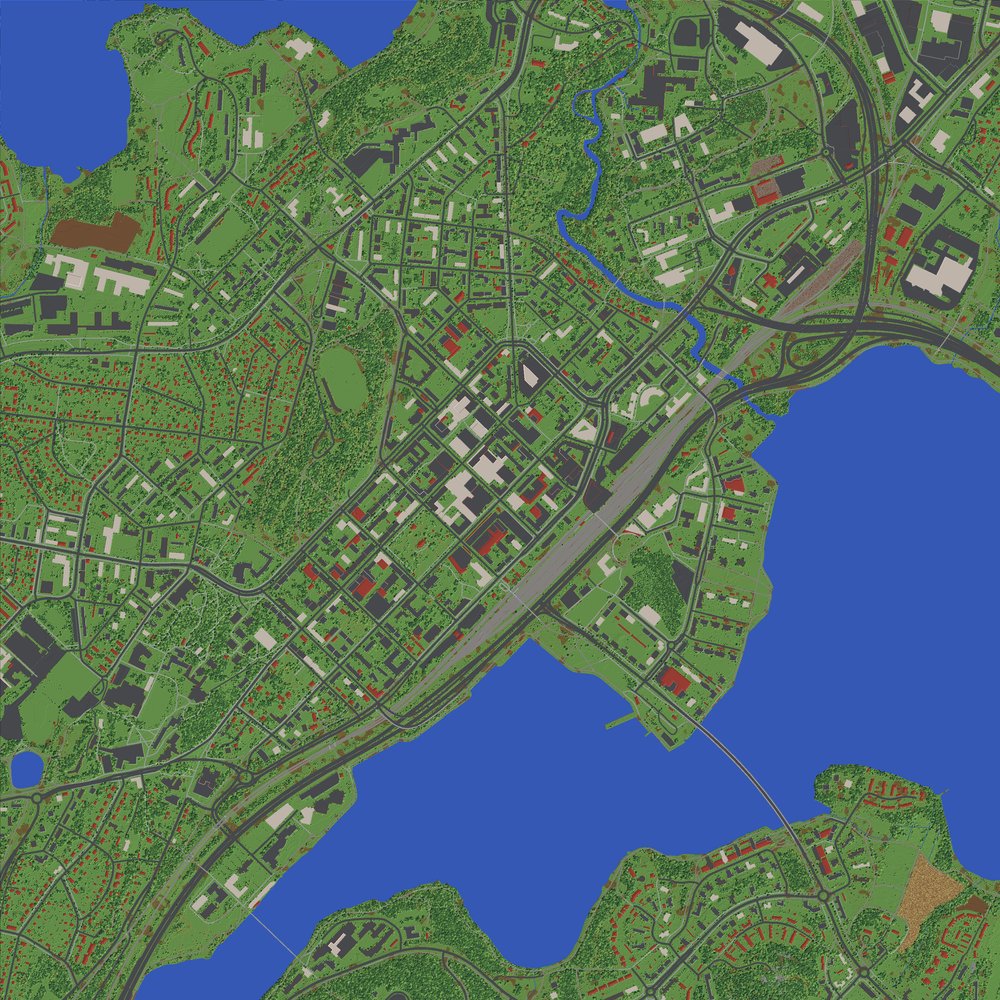
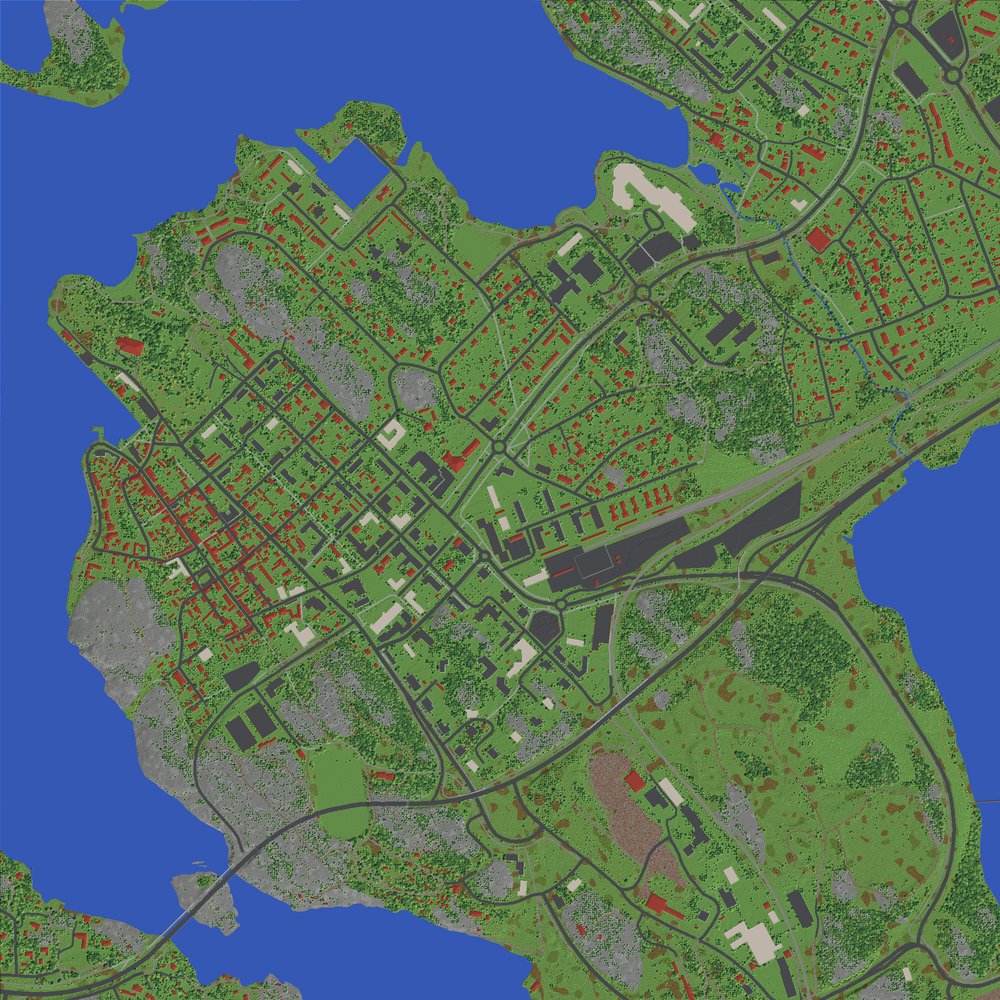
Give it a place in Finland and it builds a 1:1 Minecraft Java Edition world of it: one block is one metre, horizontally and vertically. Everything comes from the National Land Survey of Finland's open data: terrain, lakes and sea, roads, bridges, buildings, fields, and trees placed where laser scans found them.
| Jyväskylä | Naantali | Keuruu |
|---|---|---|
 |
 |
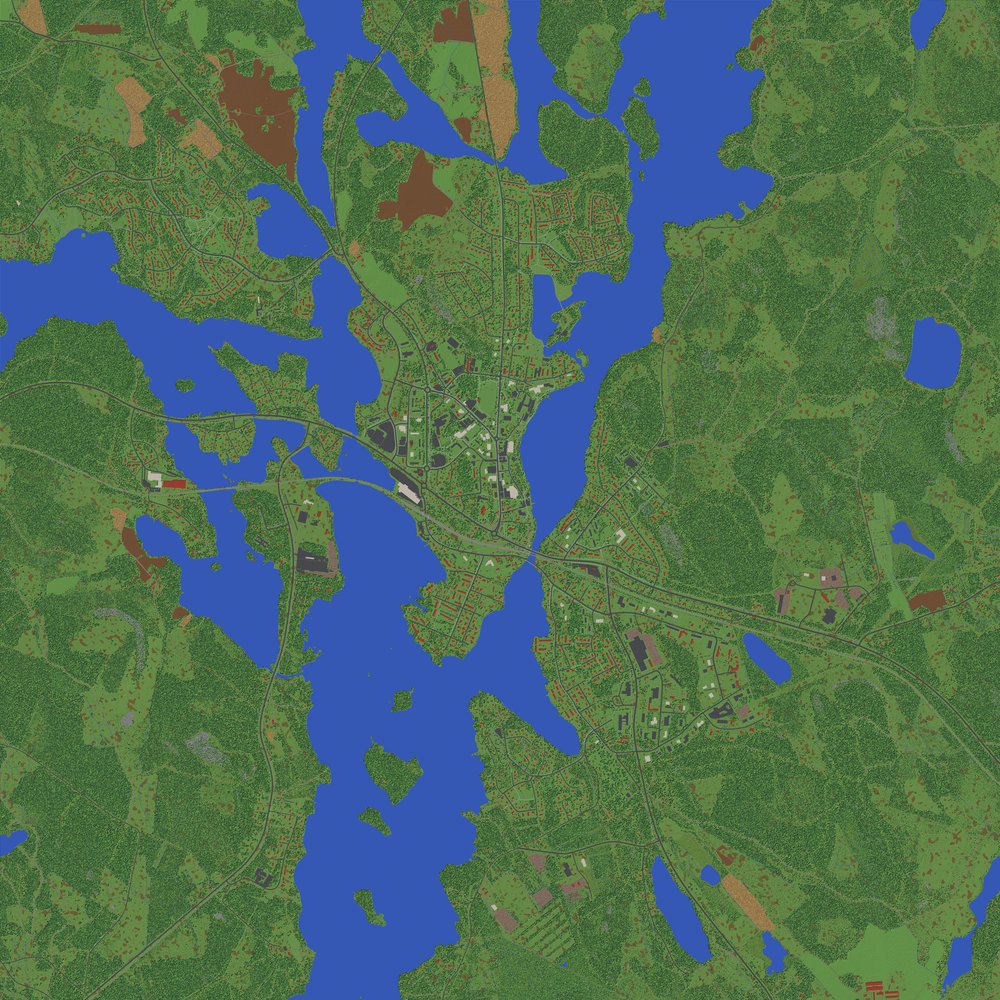 |
Top-down maps drawn from the generated world files.
Getting started
You need uv and Minecraft Java Edition 26.3 or newer.
uvx finland2mc "Jyväskylä"
uvx downloads finland2mc and the Python packages it needs on the first run. After that it keeps using the
version it downloaded; uvx finland2mc@latest gets the newest one. To get a plain finland2mc command, run
uv tool install finland2mc.
Run like that, it asks a few questions, each with a default you can accept with Enter:
- Which match you meant, if the name fits several places.
- How big an area to build (default 4 × 4 km).
- Whether to use laser scans for real tree and building heights. This is usually most of the download.
- Whether to install the world into Prism Launcher.
Then it prints the download size and a time estimate, and asks before starting.
To skip the questions, give the answers as options:
uvx finland2mc "Porvoo" --size 2 --yes                # defaults, no questions
uvx finland2mc "Kallio, Helsinki" --size 3 --prism    # also install into Prism Launcher
uvx finland2mc --at 61.4981,23.7608 --name "Tampere centre"
The finished world goes to worlds/<name> 1-1/, with a top-down map next to it (<name> 1-1.png).
It needs Minecraft 26.3 or newer.
Options
| Option | What it does |
|---|---|
place |
Town, district or address in Finland. Looked up with OpenStreetMap's Nominatim. |
--at LAT,LON |
Use an exact centre point instead of a name. ETRS-TM35FIN also works: --at E381000,N6905000. |
--size KM |
Side of the square area, 0.5–10 km. Default 4. |
--name NAME |
World name shown in Minecraft. Default: <place> 1:1. |
--out DIR |
Where the world goes. Default ./worlds. |
--no-lidar |
Skip laser scans. The download is much smaller, but trees are placed at random in forests and building heights are guessed from the building type. |
--prism [INSTANCE] |
Copy the world into a Prism Launcher instance. The default is Finland 1:1, which is created if it doesn't exist. It copies its Minecraft and Java setup from an instance you already have with 26.3, if there is one. |
--zip |
Also make a .zip of the world. |
--jobs N |
CPU cores to use. Default: all but one. |
-y, --yes |
Don't ask anything; use the defaults. |
How long it takes
Measured on 11 cores, with the data already downloaded:
| Place | Area | Time |
|---|---|---|
| Naantali (town and sea) | 2 × 2 km | 0.9 min |
| Jyväskylä (city centre) | 3 × 3 km | 1.3 min |
| Keuruu (mostly forest) | 6 × 6 km | about 25 min |
Dense forest is by far the slowest part. The program prints an estimate before it starts.
Downloads are cached in ~/.cache/finland2mc, which you can change with the FINLAND2MC_CACHE environment
variable. Neighbouring or repeated areas reuse the cache. Laser scans are the big part of a download: older
scans (about 1 point/m²) are about 50 MB per 3 × 3 km tile, and newer ones (5 points/m²) can be several
hundred MB per tile.
In the world
- You start in creative mode on peaceful difficulty, on a street near the middle of the area.
- A world border keeps you inside the area. There is only void beyond it.
- x = 0, z = 0 is the centre point. +x is east and +z is south.
- The most common water level (the sea, or the biggest lake) is at y = 62. The program prints how y relates to height above sea level.
- Far views look best with a level-of-detail mod such as Distant Horizons.
Where the data comes from
All map data is open data from the National Land Survey of Finland (Maanmittauslaitos), downloaded from the Funet mirror:
| Data | Used for |
|---|---|
| Elevation model 2 m | Terrain height |
| Topographic database 2025 | Sea, lakes, streams, roads, railways, bridges, buildings, fields, bogs, rock, parks |
| Depth contours | Lake depths, interpolated between the contours |
| Laser scanning (newest available per tile) | Individual trees and their heights, and building heights |
Some things are guesses, because the data doesn't say:
- Tree species are chosen from the terrain: pine on ridges, rock and bogs; spruce in hollows; birch near open land.
- Building colours and roof materials are picked at random from typical Finnish choices.
- Roofs are hip roofs on houses and flat roofs on large buildings. Interiors are empty floors with no doors.
- Sea depth isn't in the open data, so the sea gets deeper with distance from the shore, down to 10 m.
- Laser scans can be several years old, so newer clear-cuts and buildings won't match.
The biome is birch forest everywhere. In a superflat world the game thinks sea level is y = −63, so colder biomes such as taiga would freeze the lakes.
How it works
| File | What it does |
|---|---|
cli.py |
Asks the questions and runs the steps. |
geocode.py |
Turns a place name into coordinates. |
nls.py |
Works out the map sheet and tile names for the area (TM35 sheet division) and downloads them into the cache. |
prepare.py |
Turns the data into 1 m grids: ground and water heights, land cover, roads, bridge decks, building footprints and the tree list. |
generate.py |
Builds the chunks in parallel. |
mcformat.py |
Writes the 26.3 chunk and region format. Block names are checked against data/blocks_26.3.json, the official server's block report. |
world.py |
Adds level.dat and the other world files from data/template/ (an empty world saved by the 26.3 server), then sets the spawn point and the world border. |
render.py |
Draws the preview map from the finished world files. |
prism.py |
Installs the world into Prism Launcher. |
The world is written directly in the 26.3 format. Newer Minecraft versions upgrade it when they open it.
data/blocks_26.3.json and data/template/ were produced by the official 26.3 server: its data generator's
block report (trimmed to names, properties and default states), and an empty world it saved.
To work on the code, clone the repository and use uv run finland2mc in it. Run the tests with
uv run pytest.
Limits
- Finland only, because the data is Finnish.
- Areas up to 10 × 10 km. Memory use grows with area. 3 × 3 km measured about 1 GB, so expect roughly 4 GB for 6 × 6 km and 11 GB for 10 × 10 km.
- Places with more than about 370 m height difference within the area (some Lapland fells) don't fit Minecraft's 384-block world height. Use a smaller area there.
Credit and licence
The code is under the MIT licence (see LICENSE).
Worlds made with it contain data from the National Land Survey of Finland: Topographic Database, Elevation model 2 m, and Laser scanning data. Licence: CC BY 4.0. If you share a world, keep this credit with it.
Place search uses OpenStreetMap Nominatim (© OpenStreetMap contributors). Please keep to its usage policy; the program searches once per place name you enter.
NOT AN OFFICIAL MINECRAFT PRODUCT. NOT APPROVED BY OR ASSOCIATED WITH MOJANG OR MICROSOFT.
1 maintainer

Metadata
1 maintainer
Release files for finland2mc 0.1.0
For a detailed explanation of source distributions (sdists) and built distributions (wheels), please see the package formats documentation.
Source distribution (sdist)
| File | Size | Uploaded | Provenance | |
|---|---|---|---|---|
| finland2mc-0.1.0.tar.gz | 984.0 kB | With provenance | Details |
Built distribution (wheel)
| File | Interpreter | ABI | Platform | Reset |
|---|---|---|---|---|
| finland2mc-0.1.0-py3-none-any.whl | Python 3 | none | any | Details |
Total release size: 1.0 MB
Release files / finland2mc-0.1.0.tar.gz
| Download URL | finland2mc-0.1.0.tar.gz |
|---|---|
| Size | 984.0 kB |
| Tags | Source |
|
SHA-256 checksum How to use checksums |
ab04b56cdbb93ac1a83dbab301c681f39afcff8e15ca0b26cf222081385f996f
|
|
BLAKE2b-256 checksum How to use checksums |
389c93b35dc6785ec557aa8cd3a58171f5754268593814a183bedbad56f8c67f
|
| Upload date | |
|
Uploaded using Trusted Publishing? What is trusted publishing? |
Yes |
| Uploaded via |
twine/7.0.0 CPython/3.13.16
|
Provenance
Provenance describes where a file came from. On PyPI, provenance is shared via attestations, which provide a verifiable record of the build or publishing details. View details, limitations and caveats.


PyPI Publish Attestation
PyPI verified that this artifact, at this checksum, originated from the publisher listed below.
Signed by GitHub Actions, verified by PyPI on Oct 24, 2026.
Transparency logRelease files / finland2mc-0.1.0-py3-none-any.whl
| Download URL | finland2mc-0.1.0-py3-none-any.whl |
|---|---|
| Size | 56.7 kB |
| Tags | Python 3 |
|
SHA-256 checksum How to use checksums |
3c547221a0d0a433fce6850fd4ca457f2b074c9f5f0f3ba3e707069c8fd4a9f7
|
|
BLAKE2b-256 checksum How to use checksums |
27d740a9771e08be5851f2529eb1fccc3cfe1d2a65de93ac41dd01d6f78ecc13
|
| Upload date | |
|
Uploaded using Trusted Publishing? What is trusted publishing? |
Yes |
| Uploaded via |
twine/7.0.0 CPython/3.13.16
|
Provenance
Provenance describes where a file came from. On PyPI, provenance is shared via attestations, which provide a verifiable record of the build or publishing details. View details, limitations and caveats.
PyPI Publish Attestation
PyPI verified that this artifact, at this checksum, originated from the publisher listed below.
Signed by GitHub Actions, verified by PyPI on Oct 24, 2026.
Transparency logSecurity for finland2mc 0.1.0
Provenance
Provenance describes where a file came from. On PyPI, provenance is shared via attestations, which provide a verifiable record of the build or publishing details. View details, limitations and caveats.
Full provenance
All 2 files in this release have been uploaded with provenance metadata.
Attestation for finland2mc-0.1.0.tar.gz
PyPI Publish Attestation
PyPI verified that this artifact, at this checksum, originated from the publisher listed below.
Signed by GitHub Actions, verified by PyPI on Oct 24, 2026.
Transparency logA note on package security
PyPI is a repository for distributing packages, not a service for auditing them. While third-party security researchers and our staff do their best to detect and remove malicious packages, PyPI cannot guarantee the quality, security or suitability of any given package.
To learn more about protecting yourself from malicious actors, visit our package security documentation.













