
This release is a pre-release and may not be stable for production use.
Finance CLI
Financial research tools for your AI agent. Evidence you can check.
English | 简体中文
Website · AI Integration & Skills · Quick Start · Showcase · Research Examples



Finance CLI gives your agent tools to retrieve SEC filings, inspect financial statements, read documents, and run calculations. Ask a company question in your own words, then follow the sources and inputs behind the answer. You can also run every command directly in your terminal.
See it work
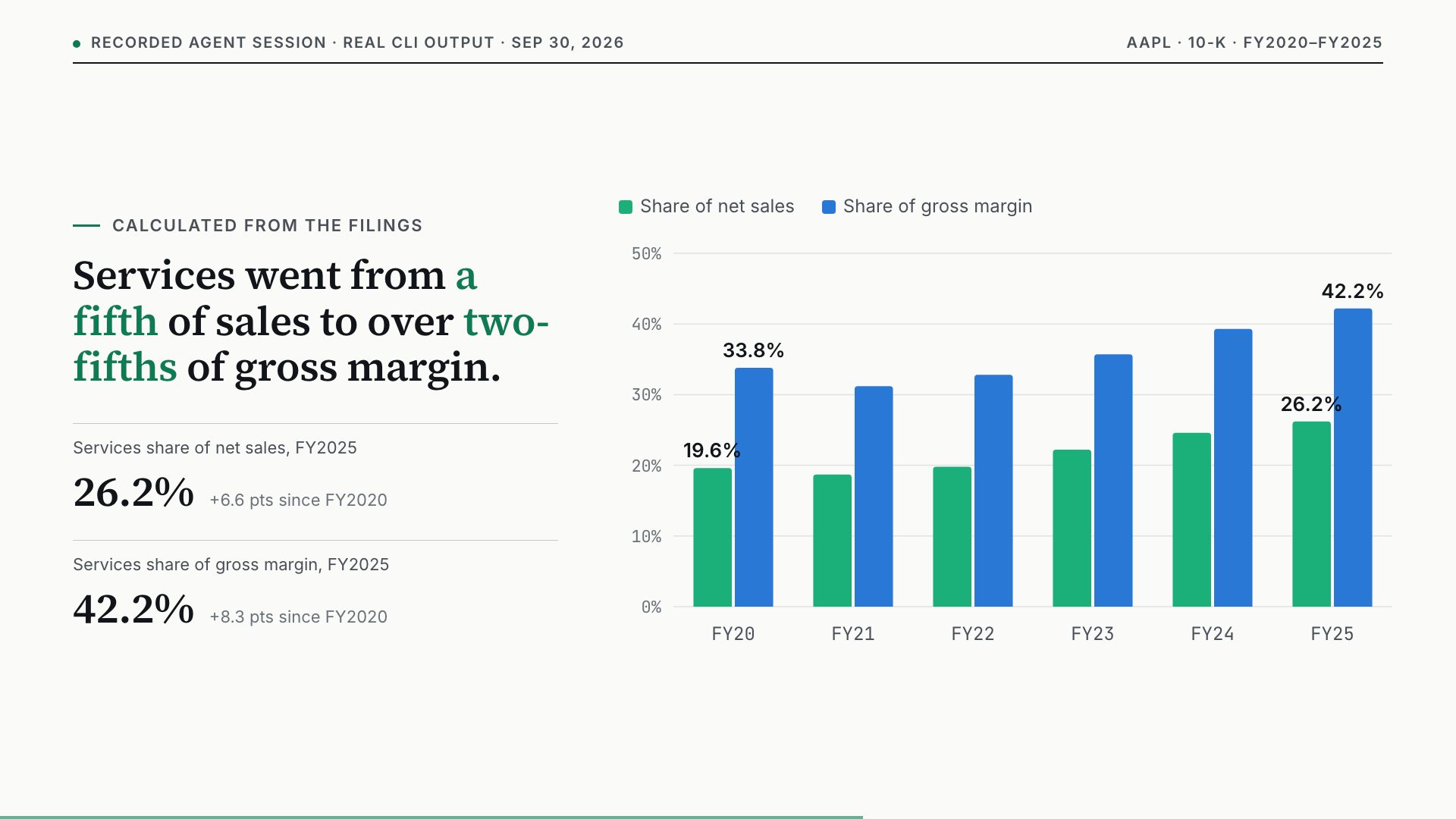
The Showcase has five recorded research sessions, each with a short video: Apple's shift to Services, R&D intensity at NVIDIA, AMD and Broadcom, Meta after the Year of Efficiency, a Costco thesis test, and a question the filing cannot answer. Every tool call, raw CLI output and calculation is published in showcase/, and a test checks that each figure still matches that evidence.
Start with a question
After setting up the CLI and skill, ask your agent:
Use Finance CLI to research Apple's latest annual filing. Explain how it
makes money and three risks it discloses. Cite the filing date and source
for each finding. Retrieve more evidence if an excerpt is truncated, and
report missing data or source errors.
Your agent chooses the commands and writes the explanation. Finance CLI supplies filing evidence and calculation results. Review the cited sources to check the agent's interpretation.
For a small, reproducible example, this command calculates annual compound growth from 100 to 150 over three years:
finance formula.cagr start=100 end=150 periods=3 --output md
Actual CLI output with illustrative inputs, requiring no external data:
**CAGR = 14.47%**

_Inputs_
| Field | Value |
| --- | --- |
| start | 100 |
| end | 150 |
| periods | 3 |

method: (end / start) ** (1 / periods) - 1
Why use Finance CLI?
- Check the evidence. Filing commands retain source identifiers such as URLs and accessions when available. Missing data and provider errors stay visible.
- Reproduce the calculation. Formula commands return their inputs and method. Save readable Markdown or structured JSON to rerun and inspect research steps.
- Let your agent choose the workflow. Combine small tools for your question, from finding a filing to reading a table and calculating a metric. Reuse them across companies without writing another retrieval script.
Use with your AI agent
- Install the CLI using the command below. Your agent needs access to the terminal environment where
financeis installed. - Download the skill and follow the skill setup guide to add it to your agent's local skills directory.
- Ask the research question above. For SEC requests, first set your real contact identity using the Quick Start guide.
The skill teaches tool selection and source handling; downloading it alone does not install the CLI. You bring an agent that can run local commands and its AI model. Finance CLI does not include a hosted chat service.
Use directly in your terminal
Requires Python 3.10 or later. We recommend an isolated environment; Quick Start covers macOS, Linux, and Windows setup.
python -m pip install -U finresearch-cli
finance formula.cagr start=100 end=150 periods=3 --output md
To read an annual filing, set your name and real email for SEC requests. On macOS or Linux, replace the example contact below:
export FINANCE_SEC_USER_AGENT="Your Name your.email@example.com"
finance filings.read AAPL section=business max_chars=4000 --output md
This returns a filing excerpt. Check its date, source, and truncation information before drawing conclusions. The Quick Start includes the equivalent Windows setup.
What is included?
| Research task | Tools |
|---|---|
| Find and read company disclosures | SEC filings, sections, XBRL financial statements, filing reports |
| Read research documents | Native PDF/HTML text, text search, bounded reading windows |
| Add company and market context | Quotes, price history, fundamentals, public transcripts, IR presentation discovery |
| Check assumptions and calculations | Finance formulas, valuation scenarios, DCF/NPV/IRR |
SEC research and basic calculators need no paid data key. Provider-backed results depend on availability and coverage; consensus estimates require an FMP key. See Data Sources for details.
Install advanced capabilities only when needed:
python -m pip install -U "finresearch-cli[tables]"
python -m pip install -U "finresearch-cli[ocr]"
python -m pip install -U "finresearch-cli[backtest]"
These add PDF table extraction, OCR, and VectorBT backtesting respectively. Combine them as "finresearch-cli[tables,ocr,backtest]". OCR may download models on first use.
Explore and contribute
- Worked research examples and more command examples.
- Command reference, output formats, and shell completion.
- For integrations: Agent Guide, llms.txt, and tools.json.
- Report a problem or suggest a research question. Include the command and error, excluding credentials and private documents. If it helped your research, share a reproducible example or star the repository.
English and Chinese READMEs follow the same structure and examples; please update both when changing setup or capabilities. The detailed documentation is currently in English.
Trust and license
The CLI runs locally and does not collect usage telemetry. API credentials are read from environment variables. See the trust guide and Apache-2.0 license.
Finance CLI is for research and automation. It does not provide investment advice or recommendations to buy or sell securities.
1 maintainer

Metadata
1 maintainer
Release files for finresearch-cli 0.1.0b3
For a detailed explanation of source distributions (sdists) and built distributions (wheels), please see the package formats documentation.
Source distribution (sdist)
| File | Size | Uploaded | |
|---|---|---|---|
| finresearch_cli-0.1.0b3.tar.gz | 201.3 kB | Details |
Built distribution (wheel)
| File | Interpreter | ABI | Platform | Reset |
|---|---|---|---|---|
| finresearch_cli-0.1.0b3-py3-none-any.whl | Python 3 | none | any | Details |
Total release size: 383.5 kB
Release files / finresearch_cli-0.1.0b3.tar.gz
| Download URL | finresearch_cli-0.1.0b3.tar.gz |
|---|---|
| Size | 201.3 kB |
| Tags | Source |
|
SHA-256 checksum How to use checksums |
ddb91429b91b8ad0100bf11e3433a4477f7372d2c9bd947c60b9f9e0a0e55903
|
|
BLAKE2b-256 checksum How to use checksums |
0cb3e0a633fc9cd3432ef0cdaebc6375347d7673fed6cbb5a537d93b391bead4
|
| Upload date | |
|
Uploaded using Trusted Publishing? What is trusted publishing? |
Yes |
| Uploaded via |
twine/7.0.0 CPython/3.13.14
|
Provenance
Provenance describes where a file came from. On PyPI, provenance is shared via attestations, which provide a verifiable record of the build or publishing details. View details, limitations and caveats.


PyPI Publish Attestation
PyPI verified that this artifact, at this checksum, originated from the publisher listed below.
Signed by GitHub Actions, verified by PyPI on Oct 4, 2026.
Transparency logRelease files / finresearch_cli-0.1.0b3-py3-none-any.whl
| Download URL | finresearch_cli-0.1.0b3-py3-none-any.whl |
|---|---|
| Size | 182.2 kB |
| Tags | Python 3 |
|
SHA-256 checksum How to use checksums |
7b63e03b201e6ec288b519077d94d32dfd83f8c2389bf32ca0a3bb1d09375d5c
|
|
BLAKE2b-256 checksum How to use checksums |
b09d7a447008b82bac93ce4c0af4825af5312ba7227967f66ae10152429dd40d
|
| Upload date | |
|
Uploaded using Trusted Publishing? What is trusted publishing? |
Yes |
| Uploaded via |
twine/7.0.0 CPython/3.13.14
|
Provenance
Provenance describes where a file came from. On PyPI, provenance is shared via attestations, which provide a verifiable record of the build or publishing details. View details, limitations and caveats.
PyPI Publish Attestation
PyPI verified that this artifact, at this checksum, originated from the publisher listed below.
Signed by GitHub Actions, verified by PyPI on Oct 4, 2026.
Transparency log













