
Firewall Testing-Framework



A framework for testing and troubleshooting firewall rulesets.
Documentation
You can find the documentation at: ftf.oxl.app
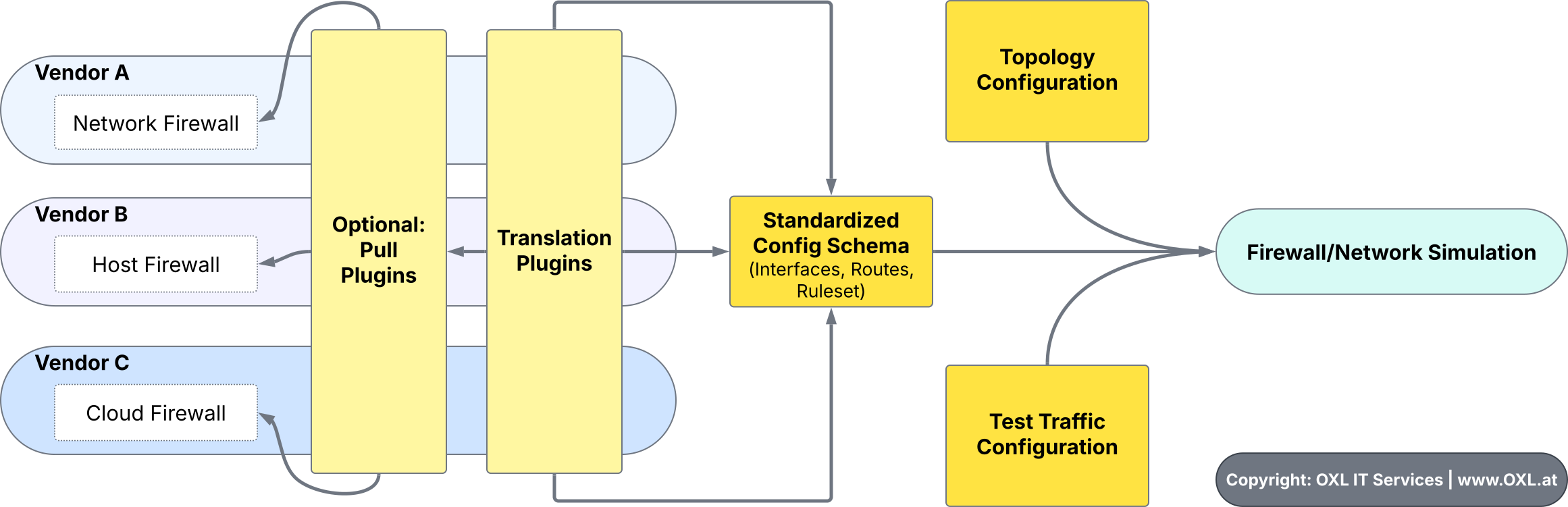
CLI Example
For more see: ftf.oxl.app - Usage - Run
ftf-cli --firewall-system 'linux_netfilter' \
        --file-interfaces 'testdata/plugin_translate_linux_interfaces.json' \
        --file-routes 'testdata/plugin_translate_linux_routes.json' \
        --file-route-rules 'testdata/plugin_translate_linux_route-rules.json' \
        --file-ruleset 'testdata/plugin_translate_netfilter_ruleset.json' \
        --src-ip 172.17.11.5 \
        --dst-ip 2.2.2.2

> 🛈 SYSTEM: Processing packet: [172.17.11.5]:50000 =tcp=> [2.2.2.2]:443
> 🛈 ROUTER: Packet inbound-interface: docker0
> 🛈 ROUTER: Packet inbound-route: 172.17.0.0/16, scope link
> 🛈 FIREWALL: Processing Chain: Table "nat" ip4 | Chain "PREROUTING" ip4 nat (1 rules)
> 🛈 FIREWALL: > Chain PREROUTING | Rule 0 | Match => jump
> 🛈 FIREWALL: > Chain PREROUTING | Sub-Chain: DOCKER (2 rules)
> 🛈 FIREWALL: > Chain DOCKER | Rule 0 | Match => return
> 🛈 ROUTER: Packet outbound-interface: wan
> 🛈 ROUTER: Packet outbound-route: 0.0.0.0/0, gw 10.255.255.254, metric 600, scope global
> 🛈 FIREWALL: Processing Chain: Table "filter" ip4 | Chain "FORWARD" ip4 filter (5 rules)
> 🛈 FIREWALL: > Chain FORWARD | Rule 0 | Match => jump
> 🛈 FIREWALL: > Chain FORWARD | Sub-Chain: DOCKER-USER (1 rules)
> 🛈 FIREWALL: > Chain DOCKER-USER | Rule 0 | Match => return
> 🛈 FIREWALL: > Chain FORWARD | Rule 1 | Match => drop
> ✖ FIREWALL: Packet blocked by rule: Seq 1, Action: drop, Rule: #101 "TEST IP4-DADDR DROP"
>              > Matches: {'proto_l3': {'==': 'ip4'}, 'ip_daddr': {'==': ['2.2.2.2/32']}}
Roadmap
2025
Core Simulator:
- Fundamental Features
- Routing
- Network Interfaces
- Firewall Tables
- Firewall Chains
- Sub-Chains (Jump, Goto)
- Firewall Rules
- System-Specific Translate-Plugins
- System-Specific Rule-Matching
- Destination-NAT
- Source-NAT
- Run modes:
- One-Shot CLI
- Basic interactive shell
- Automated/CI mode
- Run multiple Test-cases from config
- Defining basic config-schema (Topology, Rulesets, Tests)
- Option to Output results to JSON
- Supporting multiple Firewalls
- Generating Layer 3 Topology
- Detect Firewall-chaining (one firewall routes to another one - p.e. over VPN)
Development:
- Create Plugin Templates
- Create Guide on how to develop Plugins
- Netfilter (NFTables/IPTables)
- OPNsense (Information from Config-Backup-File and runtime-infos like routes from API)
Contribute
See: CONTRIBUTING
Credits
-
Thanks to the go-ftw (Web Application Firewall Testing Framework) project that inspired us to create this project
-
Thanks go to @MikPisula for some inspiration on how to simulate network-traffic over a firewall (MikPisula/packet-simulator)
1 maintainer

Metadata
1 maintainer
Release files for firewall-test 0.0.6
For a detailed explanation of source distributions (sdists) and built distributions (wheels), please see the package formats documentation.
Source distribution (sdist)
| File | Size | Uploaded | Provenance | Actions |
|---|---|---|---|---|
| firewall_test-0.0.6.tar.gz | 46.1 kB | Without provenance | Details for firewall_test-0.0.6.tar.gz |
Built distribution (wheel)
| File | Interpreter | ABI | Platform | Actions Reset |
|---|---|---|---|---|
| firewall_test-0.0.6-py3-none-any.whl | Python 3 | none | any | Details for firewall_test-0.0.6-py3-none-any.whl |
Total release size: 107.6 kB
Release files / firewall_test-0.0.6.tar.gz
| Download URL | firewall_test-0.0.6.tar.gz |
|---|---|
| Size | 46.1 kB |
| Tags | Source |
|
SHA-256 checksum How to use checksums |
ba9b689b984b8974a3be3867b84549f30e0937568df9b8a6ea76e58905059aa5
|
|
BLAKE2b-256 checksum How to use checksums |
b43b8ae57ea91ba30b93d22dcb4e0cf96a582b8bd7c6ddead955a9b7c4676e06
|
| Upload date | |
|
Uploaded using Trusted Publishing? What is trusted publishing? |
No |
| Uploaded via |
twine/6.1.0 CPython/3.11.2
|
Release files / firewall_test-0.0.6-py3-none-any.whl
| Download URL | firewall_test-0.0.6-py3-none-any.whl |
|---|---|
| Size | 61.5 kB |
| Tags | Python 3 |
|
SHA-256 checksum How to use checksums |
4f12eff32551081dc7d04be2e9f501d7ecb5280842aa7531f61c4e122e6f4660
|
|
BLAKE2b-256 checksum How to use checksums |
500e6f7be38eced6d7e222c735877faf252360dd72f5414d23d89c4700e8626d
|
| Upload date | |
|
Uploaded using Trusted Publishing? What is trusted publishing? |
No |
| Uploaded via |
twine/6.1.0 CPython/3.11.2
|
Security for firewall-test 0.0.6
Provenance
Provenance describes where a file came from. On PyPI, provenance is shared via attestations, which provide a verifiable record of the build or publishing details. View details, limitations and caveats.
No provenance found
None of the files in this release were uploaded with provenance metadata.
A note on package security
PyPI is a repository for distributing packages, not a service for auditing them. While third-party security researchers and our staff do their best to detect and remove malicious packages, PyPI cannot guarantee the quality, security or suitability of any given package.
To learn more about protecting yourself from malicious actors, visit our package security documentation.














