
Firewall Testing-Framework
A framework for testing and troubleshooting firewall Layer 3-4 rulesets.
WARNING: This project is still in the conception-phase.
Goal / Why?
When having to administer IT infrastructure and networks - we will often have multiple firewalls in place.
Maintaining these might be time-consuming. You might also face some challenges:
-
Troubleshooting & Analysis:
Even for senior network engineers it can be a challenge to find the source of an unexpected block/accept in large rulesets that are distributed across multiple systems and firewall vendors.
Infrastructure-as-Code does help to keep the rulesets in a consistent state - but it does not solve the issue of having to manually analyze/troubleshoot existing rulesets.
This project wants to provide one interface for simulating traffic over multiple firewall systems.
-
Automated Regression-Tests:
Why would you want to do ruleset-regression-tests?
- If you utilize Infrastructure-as-Code and change-reviews for updating your ruleset you might want to
- You may want/need to periodically verify that the currently active rulesets actually allow/deny the traffic you expect This can be a tedious task - you might overlook some edge-case.
- Especially when a ruleset is administered by teams of engineers over a long time period - it can be a challenge to:
- detect configuration errors/mistakes before they can be exploited
- make sure the design-choices for the ruleset are adhered to
How do regression-tests work?
- You define test-cases that simulate traffic over one or multiple firewalls
- You assert that the traffic was allowed/denied/rejected
- You might even want to assert that the traffic took a specific outbound route or was NATed to a specific IP
This way you can continuously extend these test-cases and easily verify that the currently active rulesets comply with them.
Idea
Take a look at this topology:
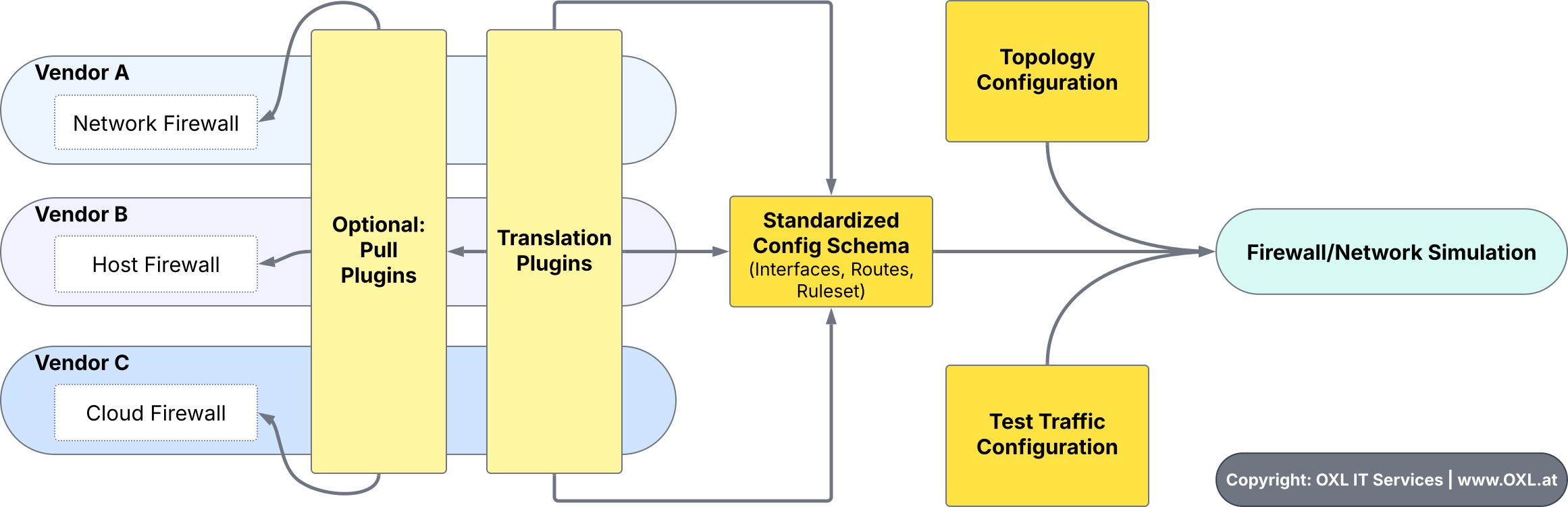
The flow is planned to be:
- Either:
- manually pull the current config from the existing firewalls
- or utilize existing
pull-pluginsto do so (p.e. via API)
-
The vendor-specific configuration gets parsed by
translation-pluginswhich output a standardized firewall config-schema. -
The user provides a high-level
topology-config -
If automated tests should be run: The user needs to provide a
test-traffic config
Else the user has the option to enter an interactive shell where traffic can be sent manually
- The
firewall/network simulator
- parses the provided config
- generates the network-topology
- finds where the packet originates from (or notifies the user if more information is required)
- finds the route the packet should take
- tests the traffic against the rulesets of firewalls that are hops of that route
Thanks already go to @MikPisula, the creator of the MikPisula/packet-simulator for creating a simulator for netfilter (IPTables/NFTables) firewalls.
Also thanks to the go-ftw (Web Application Firewall Testing Framework) project that inspired us to support regression-tests.
Principles
-
Strict separation of vendor-specific plugins from the core traffic-simulator.
Plugins CAN be used to pull the current configuration (rulesets, interfaces, routes) from a firewall system, but admins should always be able to manually provide this information.
Some might not want to trust some 'nice-to-have' tool with access to their firewalls.
-
The user should be able to choose the output verbosity.
We want to provide full transparency (show every rule the traffic interacts with) but if not required (p.e in automated/CI-mode) it should be brief.
Contribute
Contributions are welcome (:
What would be helpful for now:
-
Feel free to discuss the ideas and roadmap for this project with us: GitHub discussions or contact us directly
-
Open issues if you think you have found a problem with the existing code (be aware that it might not yet be in a usable state)
-
Please do not post any generic AI-slop.. thanks.
-
Be friendly and respectful
Roadmap
2025
Core Simulator:
- Generating Layer 3 Topology
- Generating multiple Firewalls
- Detect Firewall-chaining (one firewall routes to another one - p.e. over VPN)
- Run modes:
- Basic interactive shell
- Automated/CI mode
- Defining basic config-schema (Topology, Rulesets, Tests)
- Run multiple Test-cases from config (CLI pytest-like?)
- Option to Output results to JSON
- Security Features to protect users:
- Warn before executing non-verified (code review) plugin
Development:
- Create Plugin Templates
- Create Guide on how to develop Plugins
Firewall Support:
- Netfilter (NFTables/IPTables)
- OPNsense (Plugin that parses Config-Backup-File)
What will be out-of-scope for now
Why? Because we initially need to focus on building the core simulator!
- Transparent firewalls (layer 2 interception)
- Application-Level Protocols
- Connection-Tracking helpers (rules that use these CT-states)
- Non-static routing (dynamic routing, rule-based routing via fwmark and routing-table lookup)
1 maintainer

Release files for firewall-testing-framework 0.0.1
For a detailed explanation of source distributions (sdists) and built distributions (wheels), please see the package formats documentation.
Source distribution (sdist)
| File | Size | Uploaded | |
|---|---|---|---|
| firewall_testing_framework-0.0.1.tar.gz | 68.6 kB | Details |
Built distribution (wheel)
| File | Interpreter | ABI | Platform | Reset |
|---|---|---|---|---|
| firewall_testing_framework-0.0.1-py3-none-any.whl | Python 3 | none | any | Details |
Total release size: 139.0 kB
Release files / firewall_testing_framework-0.0.1.tar.gz
| Download URL | firewall_testing_framework-0.0.1.tar.gz |
|---|---|
| Size | 68.6 kB |
| Tags | Source |
|
SHA-256 checksum How to use checksums |
7a91abe01741b81240a11e469982f68190ab543d18e76e3fe2f1d3e368060b47
|
|
BLAKE2b-256 checksum How to use checksums |
4e85f07293bdf55fda9c13081206ba59e1700752cfc0d295eef9f610d5e8b493
|
| Upload date | |
|
Uploaded using Trusted Publishing? What is trusted publishing? |
No |
| Uploaded via |
twine/6.1.0 CPython/3.11.2
|
Release files / firewall_testing_framework-0.0.1-py3-none-any.whl
| Download URL | firewall_testing_framework-0.0.1-py3-none-any.whl |
|---|---|
| Size | 70.5 kB |
| Tags | Python 3 |
|
SHA-256 checksum How to use checksums |
092d7342931544aa0697a02f29585e75a229ceb3dd06b185439099ff49c3d5ac
|
|
BLAKE2b-256 checksum How to use checksums |
78e9767da5c6712e400a7bdbc22c5952dbc6d4f9a9cdbd90747d8b81635db692
|
| Upload date | |
|
Uploaded using Trusted Publishing? What is trusted publishing? |
No |
| Uploaded via |
twine/6.1.0 CPython/3.11.2
|













