
Access your Fitbit data at your terminal.

Project description
Fitbit CLI



This is not an official Fitbit CLI
Access your Fitbit data directly from your terminal 💻. View 💤 sleep logs, ❤️ heart rate, 🏋️♂️ activity levels, 🩸 SpO2, and more, all presented in a simple, easy-to-read table format!
AI agent-friendly 🤖 — since v1.6.0, use
--jsonfor minimized, token-efficient JSON output or--raw-jsonfor the full Fitbit API response. No spinners, pure JSON.

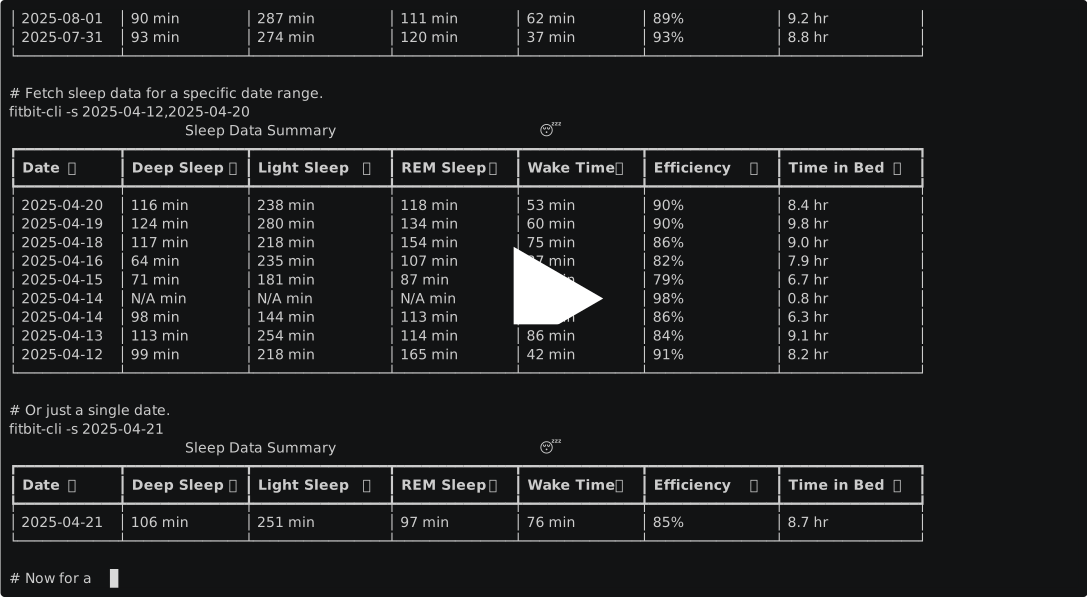
Supported Web APIs
Only
GETAPIs are supported!
Usage Guide
- Install the Fitbit CLI
python -m pip install fitbit-cli
- See Help
fitbit-cli -h
usage: fitbit-cli [-h] [-i] [-j] [-r] [-s [DATE[,DATE]|RELATIVE]] [-o [DATE[,DATE]|RELATIVE]] [-e [DATE[,DATE]|RELATIVE]] [-a [DATE[,DATE]|RELATIVE]]
                  [-b [DATE[,DATE]|RELATIVE]] [-t [DATE[,DATE]|RELATIVE]] [-u] [-d] [-v]

Fitbit CLI -- Access your Fitbit data at your terminal.

options:
  -h, --help            show this help message and exit
  -i, --init-auth       Initialize Fitbit iterative authentication setup
  -j, --json            Output table data as JSON.
  -r, --raw-json        Output raw JSON from the Fitbit API.
  -v, --version         Show fitbit-cli version

APIs:
  Specify a date, date range (YYYY-MM-DD[,YYYY-MM-DD]), or relative date.
  Relative dates: yesterday, last-week, last-month, last-N-days/weeks/months (e.g., last-2-days).
  If not provided, defaults to today's date.

  -s, --sleep [DATE[,DATE]|RELATIVE]
                        Show Sleep Log by Date Range.
  -o, --spo2 [DATE[,DATE]|RELATIVE]
                        Show SpO2 Summary by Interval.
  -e, --heart [DATE[,DATE]|RELATIVE]
                        Show Heart Rate Time Series by Date Range.
  -a, --active-zone [DATE[,DATE]|RELATIVE]
                        Show AZM Time Series by Interval.
  -b, --breathing-rate [DATE[,DATE]|RELATIVE]
                        Show Breathing Rate Summary by Interval.
  -t, --activities [DATE[,DATE]|RELATIVE]
                        Show Daily Activity Summary.
  -u, --user-profile    Show Profile.
  -d, --devices         Show Devices.
-
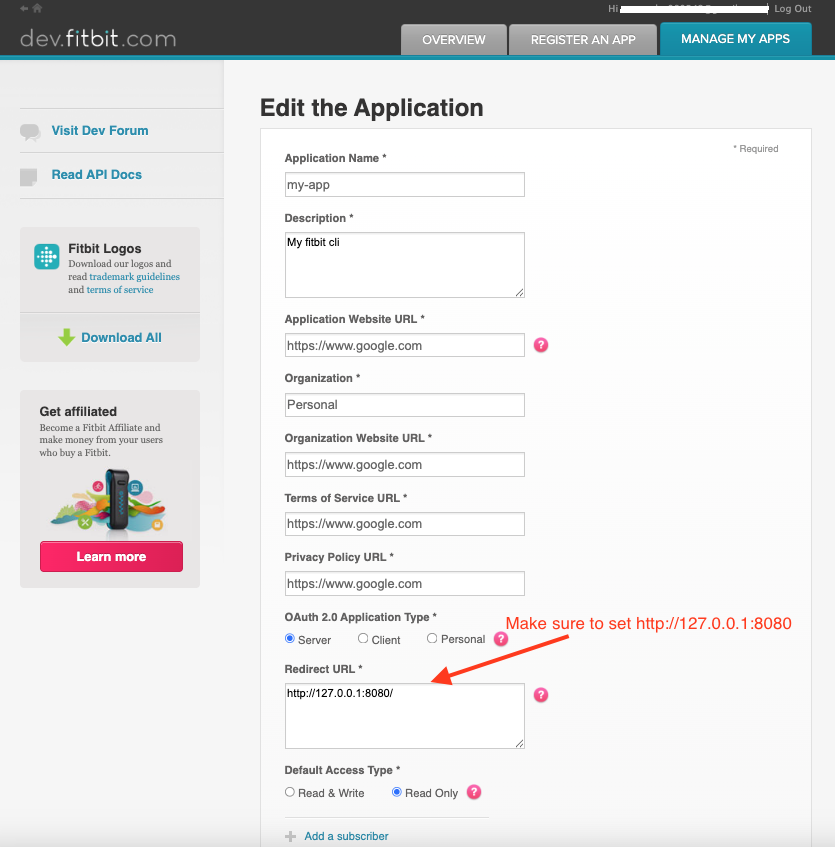
Register Fitbit App
- Go to https://dev.fitbit.com/apps
- Click on "REGISTER AN APP" tab
- Follow below example and register an app
-
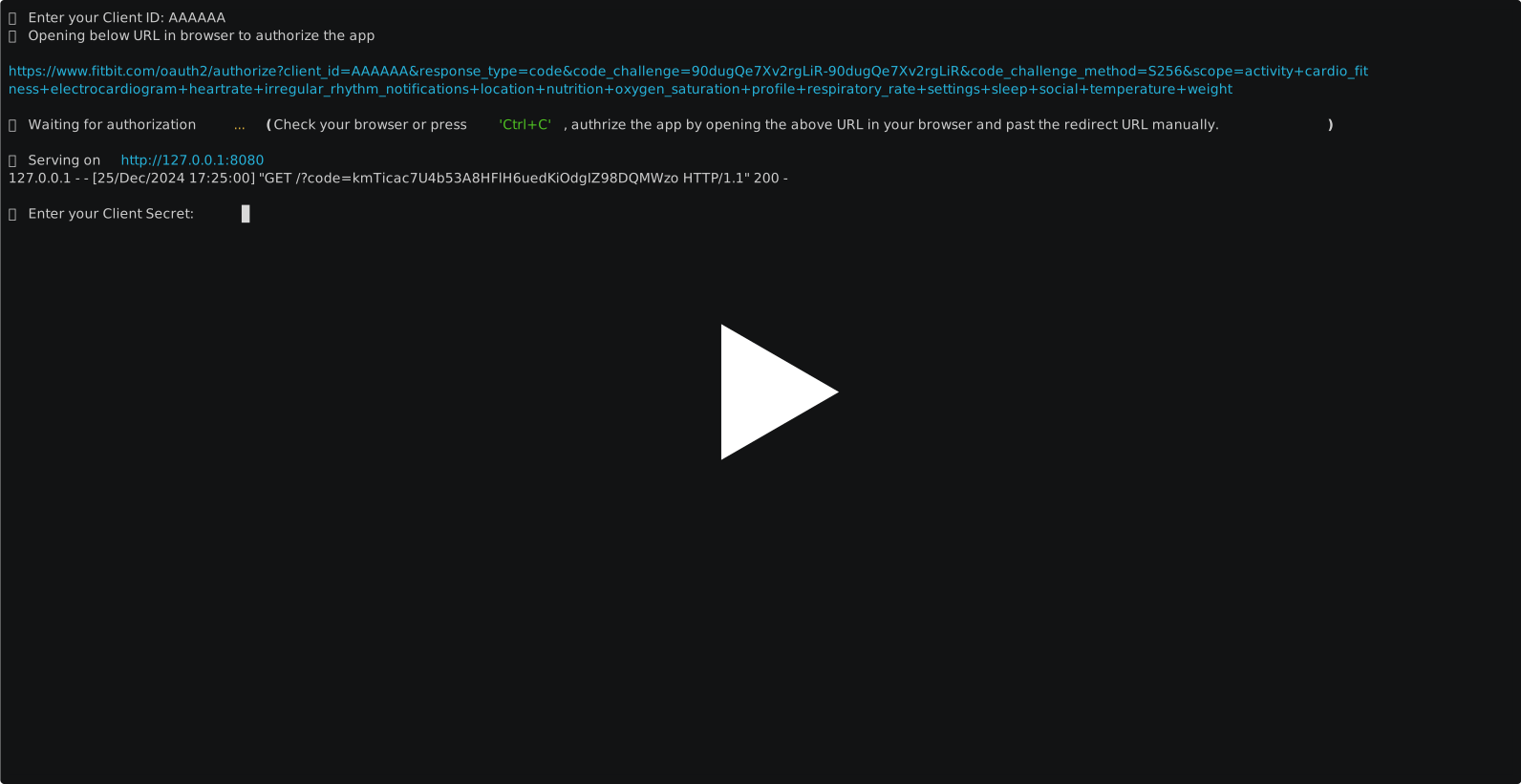
Run the following command to set up interactive authentication and store the Fitbit token locally
fitbit-cli --init-auth
-
Start using it 😎
fitbit-cli -s
                                            Sleep Data Summary 😴
┏━━━━━━━━━━━━┳━━━━━━━━━━━━━━┳━━━━━━━━━━━━━━━━┳━━━━━━━━━━━━━━┳━━━━━━━━━━━━━━┳━━━━━━━━━━━━━━━┳━━━━━━━━━━━━━━━━┓
┃ Date 📆    ┃ Deep Sleep 🛏 ┃ Light Sleep 💤 ┃ REM Sleep 🌙 ┃ Wake Time ⏰ ┃ Efficiency 💯 ┃ Time in Bed 🕐 ┃
┡━━━━━━━━━━━━╇━━━━━━━━━━━━━━╇━━━━━━━━━━━━━━━━╇━━━━━━━━━━━━━━╇━━━━━━━━━━━━━━╇━━━━━━━━━━━━━━━╇━━━━━━━━━━━━━━━━┩
│ 2025-05-03 │ 129 min      │ 271 min        │ 140 min      │ 66 min       │ 57%           │ 10.1 hr        │
└────────────┴──────────────┴────────────────┴──────────────┴──────────────┴───────────────┴────────────────┘
NOTE: The token is valid for only 8 hours, fitbit-cli automatically refreshes the token when it expires.
Local Development
git clone git@github.com:veerendra2/fitbit-cli.git
cd fitbit-cli

python -m venv venv
source venv/bin/activate
python -m pip install -e .

deactivate
Release history Release notifications | RSS feed


Download files
Download the file for your platform. If you're not sure which to choose, learn more about installing packages.
Source Distribution
File details
Details for the file fitbit_cli-1.6.0.tar.gz.
File metadata
- Download URL: fitbit_cli-1.6.0.tar.gz
- Upload date:
- Size: 17.1 kB
- Tags: Source
- Uploaded using Trusted Publishing? No
- Uploaded via: twine/6.2.0 CPython/3.14.3
File hashes
| Algorithm | Hash digest | |
|---|---|---|
| SHA256 |
d6c5f58da5bd0db68410d0c162e4fefdad73711138a4f1ffbb2a936541ca8839
|
|
| MD5 |
263e8a3e34ee7ef5c1409ef5e7056584
|
|
| BLAKE2b-256 |
860ab8d856b17ded41509469aa9a5e545eb6c9dc823a442b5fecd3f1bccb7e2e
|






