






Fitting Toolkit
This toolkit aims at providing flexible and powerful tools for preliminary data analysis and modelling, but remain easy to use. This toolkit is aimed primarily at my peers, students of physics at the university of bonn, and to a degree at professionals within my field. I am optimizing this toolkit to be used on the scale typical of lab courses and homework assignments but if possible it should be powerful enough to run decently sized datasets on an average laptop.
This package wraps numpy for fast data management and manipulation, scipy for curve_fit() and matplotlib for display options.
Quick Introduction
Installation
There are multiple ways to install this package. The easiest is via pip:
pip install fitting-toolkit
If you need a specific version (for example due to compatibillity issues) you can specify the version via fitting-toolkit==version, e.g:
pip install fitting-toolkit==1.0.1
Alternative Installation Methods
To install the current development version ahead of releases check out the development branches on GitHub.
| Branch | Purpose |
|---|---|
| development-1.0 | Bug fixes and documentation adding onto version 1.0.1 |
| development-1.1 | Development of new major features |
After downloading the desired version you can find the fitting_toolkit.py in the src folder and copy it into your project.
To build the project yourself and install it, make sure setuptools and wheel are installed, then run
python3 setup.py sdist bdist_wheel
pip install --no-deps --force-reinstall ./dist/fitting_toolkit-VERSION_NUMBER-py3-none-any.whl
pip show fitting-toolkit -v
Requirements
This project requires the following modules along with their dependencies:
- numpy
- matplotlib
- scipy
It is highly recommended that the user familiarizes themselves with the functionality of these modules first. A rudimentary understanding of numpy and matplotlib.pyplot is required.
If you install via pip the dependencies will automatically be installed. However if the project files are used directly you may want to install dependencies manually:
To install the dependencies, first a virtual environment should be created. requirements.txt lists all necessary packages. Run:
pip install -r requirements.txt
Getting Started
You can now import the relevant functions into your code:
from fitting_toolkit import curve_fit, plot_fit
import numpy as np
The curve_fit requires numpy-arrays. Therefore numpy has to be imported as well.
We can now start by defining our data.
x = np.array((1, 2, 3, 4, 5))
y = np.array((1, 2, 1.75, 2.25, 3))
dy = 0.1*y+0.05
dx = 0.1
We chose a simple linear model:
def f(x, a, b):
    return a * x + b
We can now fit the model to the data:
params, cov, lower_conf, upper_conf = curve_fit(f, x, y, yerror=dy)
This functions returns 4 arrays. First the parameters of the model, the covariance matrix of those parameters and then the lower and upper limits of the confidence interval around the fit. Note that the confidence interval is absolute. To get the error in relation to the fitted function you would need to find the difference at each point.
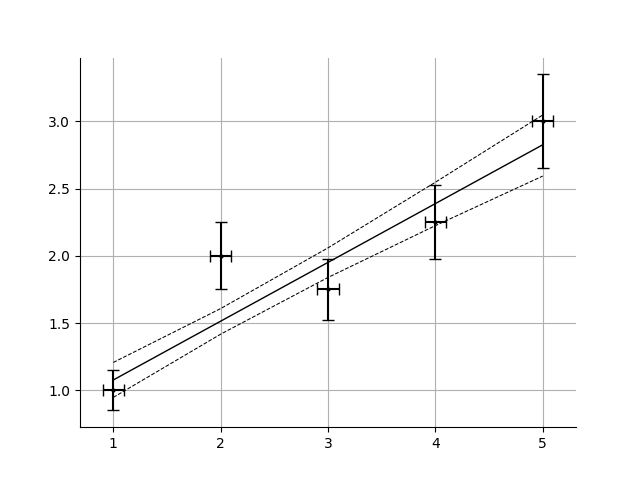
The resulting fit can now be plotted. This toolkit provides a premade function to generate plots:
from matplotlib import pyplot as plt
fig, ax = plot_fit(x, y, f, params, lower_conf, upper_conf, xerror=dx, yerror=dy)
plt.show()
Note that the fitted function is not automatically displayed. Instead the figure and axis-objects are returned.
1 maintainer

Metadata
1 maintainer
Release files for fitting-toolkit 1.1.0
For a detailed explanation of source distributions (sdists) and built distributions (wheels), please see the package formats documentation.
Source distribution (sdist)
| File | Size | Uploaded | |
|---|---|---|---|
| fitting_toolkit-1.1.0.tar.gz | 21.3 kB | Details |
Built distribution (wheel)
| File | Interpreter | ABI | Platform | Reset |
|---|---|---|---|---|
| fitting_toolkit-1.1.0-py3-none-any.whl | Python 3 | none | any | Details |
Total release size: 38.6 kB
Release files / fitting_toolkit-1.1.0.tar.gz
| Download URL | fitting_toolkit-1.1.0.tar.gz |
|---|---|
| Size | 21.3 kB |
| Tags | Source |
|
SHA-256 checksum How to use checksums |
b84fe0345590e4338035ff769c91590f36eb8e99f48562a450e7a0e348d97924
|
|
BLAKE2b-256 checksum How to use checksums |
f3f56051c007fc6b8485f3163e15f96997341d7a3b3df8cc77469c6794acbb2c
|
| Upload date | |
|
Uploaded using Trusted Publishing? What is trusted publishing? |
No |
| Uploaded via |
twine/6.0.1 CPython/3.13.0
|
Release files / fitting_toolkit-1.1.0-py3-none-any.whl
| Download URL | fitting_toolkit-1.1.0-py3-none-any.whl |
|---|---|
| Size | 17.3 kB |
| Tags | Python 3 |
|
SHA-256 checksum How to use checksums |
f1c955a9afa2bf11ec0746db43f8b3af4cf0b51441a9cdcbc6221afcc1881d43
|
|
BLAKE2b-256 checksum How to use checksums |
1a7e981479d9b65d914fd0df632569019e88f6ff1a5ff26158456de09b3a7601
|
| Upload date | |
|
Uploaded using Trusted Publishing? What is trusted publishing? |
No |
| Uploaded via |
twine/6.0.1 CPython/3.13.0
|














