



Finesse Python SDK
The official Python library for Finesse, Flam's voice platform. Clone a voice from a few seconds of audio, turn text into speech in that voice, and stream it in realtime to voice agents, with a few lines of code.
- Typed sync and async clients, built on
httpxand Pydantic. - Realtime over one WebSocket: stream text in as your LLM writes it, get audio back, cancel on barge-in.
- Safe by default: retries that never double-bill, typed errors, timeouts.
Documentation · API reference · Dashboard · Changelog
Contents
- Installation
- Get an API key
- Quickstart
- Voices
- Clone a voice
- Text to speech
- Streaming speech
- Realtime
- Direct sessions (lowest latency)
- Short-lived tokens
- Async usage
- Which method should I use?
- Audio formats
- Handling errors
- Retries
- Timeouts
- Per-request options
- Request IDs
- Advanced
- Requirements
Installation
pip install flam-finesse
# or
uv add flam-finesse
The package is flam-finesse; the import name is flam_finesse.
Get an API key
- Sign in to the Finesse dashboard.
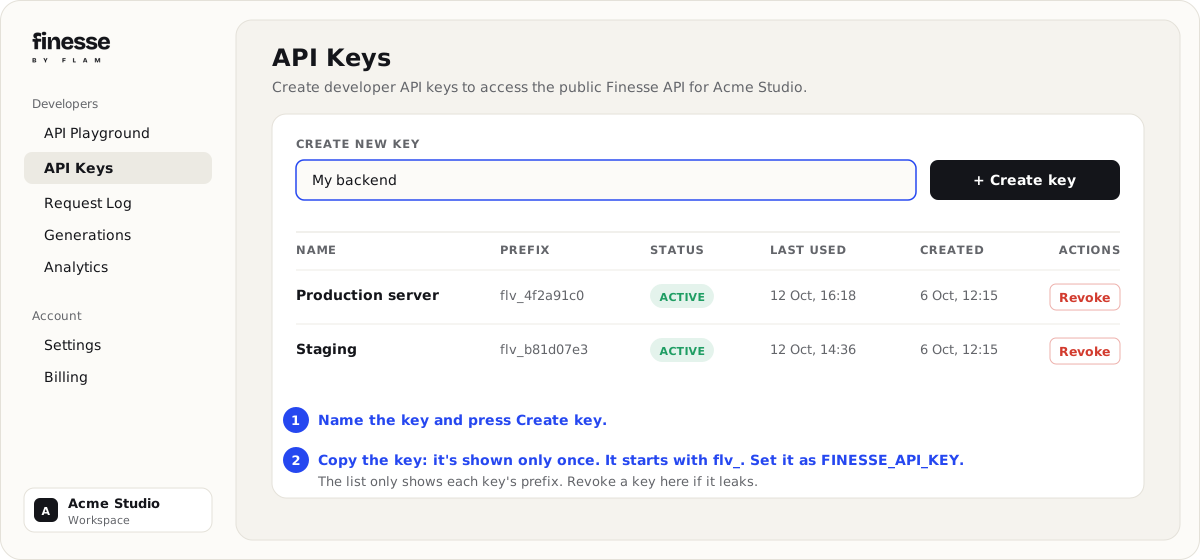
- Open Developers → API Keys and create a key. Copy it right away: it is shown only once,
and it starts with
flv_. - Put it in your environment, where the SDK finds it:
export FINESSE_API_KEY="flv_..."
Keep the key on your server. Anyone who has it can spend your workspace's credits.
Quickstart
from flam_finesse import Finesse

client = Finesse()  # reads FINESSE_API_KEY

# Pick any voice you can use: your own, or one from the public catalog.
voice = next(v for v in client.voices.list() if v.is_ready)

audio = client.speech.create(voice_id=voice.id, text="Hello from Finesse!")
audio.save("hello.wav")
hello.wav is a 24 kHz WAV file. That's it.
Voices
voices.list() returns your voices first (newest first), then the public platform voices.
Iterating it walks every page for you.
for voice in client.voices.list():
    print(voice.id, voice.name, voice.status, voice.language, voice.labels)

voice = client.voices.get("665f1a2b3c4d5e6f7a8b9c0d")

client.voices.update(voice.id, name="Narrator (UK)", labels={"accent": "british"})
client.voices.delete(voice.id)
Just the first page, with its totals:
page = client.voices.list(page_size=20)
print(page.total, page.has_more, [v.name for v in page.voices])
A voice can speak once voice.status == "ready" (voice.is_ready). Its alias (for example
narrator) also works as the voice on the
OpenAI-compatible endpoint.
Clone a voice
Upload a clean reference clip of one speaker (10-30 seconds of clear speech works best; at least
10 seconds, at most 20 MiB) and wait for the voice to be ready. Cloning requires consent=True:
you attest that you are the speaker or hold their explicit permission to clone their voice, and
the attestation is recorded on the voice.
voice = client.voices.clone_and_wait(
    name="Ana",
    file="reference.wav",  # a path, bytes, a binary file, or (filename, bytes, type)
    consent=True,
    language="en",
    labels={"gender": "female", "accent": "british"},
    ref_text="What the speaker says in the clip, if you have it.",
    on_update=lambda job: print("clone job:", job.status),
)

client.speech.create(voice_id=voice.id, text="This is my cloned voice.").save("ana.wav")
clone_and_wait creates the voice, uploads the clip, and polls the clone job until it finishes.
The first clone after the cloner has been idle can take a couple of minutes. To start the clone
now and wait later:
clone = client.voices.clone(name="Ana", file="reference.wav", consent=True)
print(clone.voice.status, clone.job_id)  # "processing", "6660aa00..."
voice = client.voices.wait_until_ready(clone, timeout=300)
Cloning raises CloneFailedError if the job fails and CloneTimeoutError if it doesn't finish in
time. To add a clip to a voice you already created, use
client.voices.enroll(voice_id, file=..., consent=True).
Text to speech
speech.create returns the whole clip in one response (up to 10,000 characters of text):
audio = client.speech.create(
    voice_id=voice.id,
    text="The quick brown fox jumps over the lazy dog.",
    language="en",  # optional; defaults to the voice's language
    output_format="wav",  # default; or raw PCM: "s16le", "s24le", "s32le", "f32le", "f64le", or "mulaw"
    num_step=32,  # optional, 1-32; fewer steps is faster, more is higher quality
)

audio.data  # bytes
audio.content_type  # "audio/wav"
audio.sample_rate  # 24000
audio.generation_id  # id of this clip in your generation history
audio.audio_url  # stored copy of the clip, when storage is enabled (may expire: download promptly)
audio.save("fox.wav")
Identical requests are served from a cache at no charge. Speech is billed per character of
text.
Streaming speech
speech.stream sends audio as it is generated, so playback can start before the whole clip is
ready. Chunks are raw PCM (s16le, 24 kHz, mono, unless you set output_format).
with client.speech.stream(voice_id=voice.id, text="Hello, streamed.") as stream:
    for chunk in stream:
        speaker.write(chunk.pcm)  # e.g. a sounddevice or pyaudio output stream

print(stream.done.audio_duration_s, stream.done.generation_id)
Or collect everything: pcm = client.speech.stream(voice_id=voice.id, text="...").read_all().
Errors before the stream starts raise the usual errors (for example PaymentRequiredError).
A failure after it starts raises StreamError.
Realtime
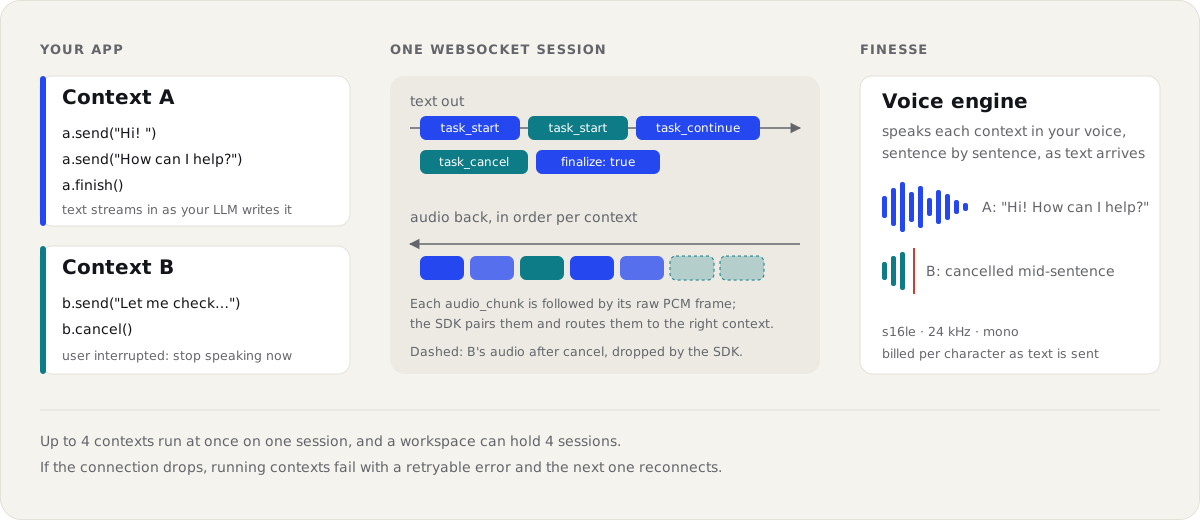
Realtime is for voice agents and anything conversational. One session is one WebSocket. You send text as it is produced and get audio back as fast as the engine makes it. Each turn of speech runs in a context, and a session can run several contexts at once.
Realtime uses the async client:
import asyncio
from flam_finesse import AsyncFinesse, AudioEvent


async def main() -> None:
    client = AsyncFinesse()
    async with client.realtime.connect() as rt:
        async for event in rt.say(voice_id=VOICE_ID, text="Hi! How can I help you today?"):
            if isinstance(event, AudioEvent):
                speaker.write(event.pcm)  # s16le, 24 kHz, mono


asyncio.run(main())
Stream text from an LLM
Send text a token or a sentence at a time, then finish() the turn:
ctx = rt.context(voice_id=VOICE_ID)


async def speak() -> None:
    async for pcm in ctx.audio():
        speaker.write(pcm)


player = asyncio.create_task(speak())
async for token in llm.stream(prompt):
    await ctx.send(token)
await ctx.finish()
await player
Interruptions (barge-in)
When the user starts talking, cancel the turn. Audio still on its way for that context is
dropped, and iterating the context ends with a TaskCancelled event.
await ctx.cancel()
Events
Iterating a context yields, in order:
| Event | When |
|---|---|
TaskStarted |
The turn began. Has the sample_rate and audio_format of its audio. |
AudioEvent |
A chunk of audio: pcm, sentence_index, chunk_index. |
SentenceDone |
A sentence finished: text, audio_duration_s. |
TaskDone |
The turn finished (last event): total_audio_duration_s. |
TaskCancelled |
The turn was cancelled (last event). |
A turn that fails raises RealtimeError (for example code == "voice_not_found").
Limits and reconnects
- A session runs up to 4 contexts at once, and holds one of your plan's concurrent-synthesis
slots until it closes. Opening one more than the plan allows raises
RateLimitErrorwithcode == "concurrency_limited"(waiterror.retry_afterseconds), so reuse a session. - If the connection drops, running contexts raise
RealtimeError. Checkerror.retryable. The next context reconnects automatically (turn this off withconnect(auto_reconnect=False)). - Running out of credits ends the session with
RealtimeError(code="insufficient_credits"). - The service accepts frames of up to 1 MiB. The SDK splits longer text across several frames.
- Text is billed per character as it is sent. A session reserves credits in blocks of up to 1,000 characters and returns what it doesn't use when it ends.
Direct sessions (lowest latency)
A direct session runs the realtime socket straight against the synthesis GPU in your account's server region, so audio never passes through the API and each sentence starts sooner. Contexts, events, cancel and limits work exactly as above.
from flam_finesse import AsyncFinesse

client = AsyncFinesse()

# A new session for the first connection and for every reconnect.
async with client.realtime.connect(
    get_session=lambda: client.realtime.sessions.create(voice_ids=[VOICE_ID])
) as rt:
    async for event in rt.say(voice_id=VOICE_ID, text="Hello, straight from the GPU."):
        ...
    print(rt.direct_session.region)  # "ap-south" or "us-east"
To run the socket somewhere that holds no API key (a device, a worker), create the session on
your server and hand it over; connect_direct opens it without a client:
# On your server (the sync client works too)
session = Finesse().realtime.sessions.create(voice_ids=[VOICE_ID])
return session.model_dump(mode="json")

# On the device
from flam_finesse import DirectSession, connect_direct


async def fetch_session() -> DirectSession:
    return DirectSession.model_validate(await my_backend.post("/finesse-session"))


async with connect_direct(get_session=fetch_session) as rt:
    ...
How it differs from a session through the API:
- Voices: only the
voice_idsyou list (1-16). A context for any other voice fails withvoice_not_found; the session keeps running. - Credits:
budget_chars(default 20,000) is reserved when the session is created and the rest is returned when it ends. Going past it ends the session withinsufficient_credits. - Lifetime: connect within 60 s of creating it (
connect_by), and a session runs at most an hour (ttl_seconds), then ends withsession_ended. - Single use: the session's token works for one connection. With
session=alone, a reconnect raisesRealtimeError(code="session_spent"); passget_sessionso each reconnect gets a new session. A refused token raisescode == "unauthorized". - Region: set by the account that owns the API key, not per request.
Short-lived tokens
Never ship an API key to a browser or a device. Your server mints a short-lived, single-use
token with an API key that has the tts scope, and hands only the token over:
# On your server
token = client.tokens.create(ttl_seconds=60, voice_ids=[VOICE_ID])
return {"token": token.token}
A token carries the tts scope only, works for one speech.create / speech.stream call or
one realtime session, and dies when the key that minted it is revoked or expires. To use one:
# Speech: the token is sent as "Authorization: Bearer fin_tok_..."
Finesse(access_token=token).speech.create(voice_id=VOICE_ID, text="Hi!")

# Realtime: the token rides in the WebSocket subprotocol list. A token is spent by the handshake
# that uses it, so pass a callback for reconnects to fetch a fresh one from your backend.
client = AsyncFinesse(access_token=await fetch_token_from_my_backend())
async with client.realtime.connect(get_access_token=fetch_token_from_my_backend) as rt:
    ...
A request refused before it runs (a 429 rate limit, a plan check) keeps its token, so you can
retry it. The SDK retries a token-authenticated request only on 429: a 5xx comes after the
token was spent, so it is raised as is. A spent, expired or unknown token raises AuthenticationError with
code == "token_invalid"; a voice outside voice_ids raises PermissionDeniedError with
code == "voice_not_allowed".
Async usage
AsyncFinesse has the same methods as Finesse, with await:
import asyncio
from flam_finesse import AsyncFinesse


async def main() -> None:
    async with AsyncFinesse() as client:
        async for voice in client.voices.list():
            print(voice.name)
        audio = await client.speech.create(voice_id=VOICE_ID, text="Hello!")
        async with client.speech.stream(voice_id=VOICE_ID, text="Streamed.") as stream:
            async for chunk in stream:
                ...


asyncio.run(main())
Which method should I use?
| You want to... | Use | Why |
|---|---|---|
| Make an audio file, or speak a fixed piece of text | speech.create |
Simplest. One request, one clip, cached. |
| Start playback fast for a known piece of text | speech.stream |
Audio starts before the clip is finished. |
| Build a voice agent, or speak text as an LLM writes it | realtime |
Text in, audio out, many turns on one connection, cancel on barge-in. |
Audio formats
output_format |
What you get | Default for |
|---|---|---|
wav |
WAV file | speech.create |
s16le |
Raw PCM, 16-bit signed little-endian | speech.stream, realtime |
s24le, s32le |
Raw PCM, 24- or 32-bit signed | |
f32le, f64le |
Raw PCM, 32- or 64-bit float | |
mulaw |
Raw G.711 µ-law, for telephony | needs sample_rate=8000 |
opus |
Opus | realtime only |
All audio is mono. The engine's native rate is 24 kHz. sample_rate accepts 8000 to 48000 Hz;
8000 (telephony) is produced as asked, but other rates below 24 kHz still come back at 24 kHz,
so always read the actual rate from audio.sample_rate, stream.sample_rate or
TaskStarted.sample_rate.
Phone calls (Twilio)
Twilio Media Streams play 8 kHz µ-law. Ask for exactly that and send each chunk as the media payload, base64-encoded; there is no WAV header to strip and nothing to resample:
import base64, json

ctx = rt.context(voice_id=VOICE_ID, output_format="mulaw", sample_rate=8000)

async for audio in ctx.audio():
    media = {"payload": base64.b64encode(audio).decode()}
    await twilio_ws.send(json.dumps({"event": "media", "streamSid": stream_sid, "media": media}))
Handling errors
Every error derives from flam_finesse.FinesseError. HTTP errors carry status_code,
message, a machine-readable code (branch on this, not on message), retry_after when the
service asks you to wait, billing_remaining and request_id.
import flam_finesse as ff

try:
    client.speech.create(voice_id=voice.id, text="Hello!")
except ff.PaymentRequiredError as e:
    print("Out of credits:", e.code, e.billing_remaining)
except ff.RateLimitError:
    print("Slow down and retry.")
except ff.APIStatusError as e:
    print(e.status_code, e.message)
except ff.APIConnectionError:
    print("Could not reach Finesse.")
| Error | Status | When |
|---|---|---|
BadRequestError |
400 | Invalid input, text over 10,000 characters, voice not enrolled |
AuthenticationError |
401 | Missing, unknown or revoked key; key_expired; token_invalid |
PaymentRequiredError |
402 | insufficient_credits, quota_exhausted or payment_required |
PermissionDeniedError |
403 | insufficient_scope (the key lacks the route's scope), voice_not_allowed (token), feature_disabled, plan_limit_reached (see .feature), or forbidden |
NotFoundError |
404 | No such voice or job, or not visible to your workspace |
ConflictError |
409 | idempotency_in_progress (a request with the same Idempotency-Key is still running) or conflict |
PayloadTooLargeError |
413 | Request body over 21 MiB |
UnprocessableEntityError |
422 | invalid_input (the engine could not use the text), or idempotency_key_reused |
RateLimitError |
429 | rate_limited / concurrency_limited (your plan's limits; see retry_after), or too_many_sessions |
InternalServerError |
5xx | internal_error, upstream_error (502), upstream_busy (503, see retry_after) or unavailable: retry |
APIConnectionError |
No response; APITimeoutError when it timed out |
|
StreamError |
A speech stream failed after it started | |
RealtimeError |
A realtime context or session failed | |
CloneFailedError, CloneTimeoutError |
Waiting for a clone |
Retries
Failed requests are retried twice with exponential backoff, honouring Retry-After: connection
errors, timeouts, 408, 429 and 5xx.
Calls that create something or cost credits (speech.create, voices.create, voices.clone,
voices.enroll) send an Idempotency-Key, the same one on every retry, so the service runs
them at most once. The SDK retries them this way only once the service has confirmed it
honours keys (it echoes the key back); against a service that doesn't, they keep the cautious
rules below, so nothing can run twice. A retry of a clone that already succeeded gets the first result back, and a
retried synthesis is served from the cache at no charge. If the first attempt is still running,
the SDK waits for it (up to the request timeout) without using up a retry. To choose the key
yourself, pass it in extra_headers={"Idempotency-Key": "..."}.
speech.stream has no key, so it is only retried when the server certainly did no work: the
connection never opened, 429, 502 or 503. These are also the rules for keyed calls until the
service confirms it honours keys.
client = Finesse(max_retries=5)  # every request
client.speech.create(voice_id=voice.id, text="Hello!", max_retries=0)  # one request
Timeouts
Requests time out after 120 seconds (10 seconds to connect). Synthesis on a cold engine can take a while to start, so keep this generous. For streams the timeout is the longest wait between chunks, not the whole stream.
import httpx

client = Finesse(timeout=60.0)  # seconds
client = Finesse(timeout=httpx.Timeout(60.0, connect=5.0))  # finer control
client.voices.get(voice.id, timeout=10.0)  # one request
A timeout raises APITimeoutError.
Per-request options
Every request method accepts timeout, max_retries and extra_headers for that call only:
client.speech.create(
    voice_id=voice.id,
    text="Hello!",
    timeout=30.0,
    max_retries=0,
    extra_headers={"X-Request-Id": "abc-123"},
)
On jobs.wait, voices.wait_until_ready and voices.clone_and_wait, timeout means the
overall time to wait for the clone.
Request IDs
Every response has an X-Request-Id. Errors carry it as error.request_id; quote it when you
contact support.
try:
    client.voices.get("665f1a2b3c4d5e6f7a8b9c0d")
except ff.NotFoundError as e:
    print(e.request_id)  # "req_3f9c..."
Advanced
Raw responses
client.with_raw_response has the same methods and returns the HTTP response with the result:
raw = client.with_raw_response.speech.create(voice_id=voice.id, text="Hello!")
print(raw.status_code, raw.request_id, raw.headers["X-Sample-Rate"])
audio = raw.parse()  # what speech.create returns
Logging
Set FINESSE_LOG=debug to log every request (method, URL, status, timing, request id), or
FINESSE_LOG=info to log only retries. The SDK logs to the standard logging module under the
flam_finesse logger, so you can also configure it yourself. It never logs your API key,
request bodies or audio.
Copying a client with other defaults
with_options returns a copy that shares the connection pool:
quick = client.with_options(timeout=10.0, max_retries=0)
quick.voices.list()
Configuration
| Argument | Environment variable | Default |
|---|---|---|
api_key |
FINESSE_API_KEY |
required |
timeout |
120 s (10 s to connect) | |
max_retries |
2 | |
default_headers |
none | |
http_client |
a new httpx.Client / httpx.AsyncClient |
Custom HTTP client
Pass your own httpx client for proxies, custom transports or connection limits. The SDK does
not close a client you pass in.
import httpx

client = Finesse(http_client=httpx.Client(proxy="http://proxy.internal:8080"))
Closing the client
The client holds a connection pool. Close it when you are done, or use it as a context manager:
with Finesse() as client:
    ...
Attribution
Requests identify the SDK with an X-Finesse-Client header. If you build an integration on top
of the SDK, name it so it shows up in your usage analytics:
client = Finesse(default_headers={"X-Finesse-Client": "my-app/1.0.0"})
Examples
Runnable scripts are in examples/: speak.py,
clone.py and realtime.py.
Requirements
Python 3.10 or newer. Dependencies: httpx, pydantic (v2) and websockets (14 or newer).
Versioning
The SDK follows semantic versioning. Before 1.0, minor versions may include breaking changes; they are listed in the changelog.
import flam_finesse

print(flam_finesse.__version__)
Contributing
uv sync
uv run pytest                     # unit tests, no network
uv run ruff check . && uv run ruff format --check . && uv run mypy src/flam_finesse
Contract tests run against a real API (they synthesize a few short sentences, which is billed) and refuse to run against production:
FINESSE_LIVE=1 FINESSE_API_KEY=flv_... \
FINESSE_BASE_URL=<non-production API URL> uv run pytest tests/live -v
1 maintainer

Metadata
1 maintainer
Release files for flam-finesse 0.1.1
For a detailed explanation of source distributions (sdists) and built distributions (wheels), please see the package formats documentation.
Source distribution (sdist)
| File | Size | Uploaded | Provenance | Actions |
|---|---|---|---|---|
| flam_finesse-0.1.1.tar.gz | 67.7 kB | Without provenance | Details for flam_finesse-0.1.1.tar.gz |
Built distribution (wheel)
| File | Interpreter | ABI | Platform | Actions Reset |
|---|---|---|---|---|
| flam_finesse-0.1.1-py3-none-any.whl | Python 3 | none | any | Details for flam_finesse-0.1.1-py3-none-any.whl |
Total release size: 121.5 kB
Release files / flam_finesse-0.1.1.tar.gz
| Download URL | flam_finesse-0.1.1.tar.gz |
|---|---|
| Size | 67.7 kB |
| Tags | Source |
|
SHA-256 checksum How to use checksums |
11a28c987f1cd33cd4d3b82a05cdcd6cb3cf884e240c28613b5f014e181aaa2b
|
|
BLAKE2b-256 checksum How to use checksums |
425aeb8d9e742b4bed5748664ed3d39cc2fa2fd0b058d435cd6906b3cf1dde04
|
| Upload date | |
|
Uploaded using Trusted Publishing? What is trusted publishing? |
Yes |
| Uploaded via |
uv/0.13.8 {"installer":{"name":"uv","version":"0.13.8","subcommand":["publish"]},"python":null,"implementation":{"name":null,"version":null},"distro":{"name":"Ubuntu","version":"26.04","id":"resolute","libc":null},"system":{"name":null,"release":null},"cpu":null,"openssl_version":null,"setuptools_version":null,"rustc_version":null,"ci":true}
|
Release files / flam_finesse-0.1.1-py3-none-any.whl
| Download URL | flam_finesse-0.1.1-py3-none-any.whl |
|---|---|
| Size | 53.8 kB |
| Tags | Python 3 |
|
SHA-256 checksum How to use checksums |
b9f6271a8126470e5b91c4776d5e2eebefb2fc3cea7240e7ce337e130301788d
|
|
BLAKE2b-256 checksum How to use checksums |
dbdb73f48124b605f232a77f30d0dab53581bfb05d5f3ded5eadeb9fb2b3e907
|
| Upload date | |
|
Uploaded using Trusted Publishing? What is trusted publishing? |
Yes |
| Uploaded via |
uv/0.13.8 {"installer":{"name":"uv","version":"0.13.8","subcommand":["publish"]},"python":null,"implementation":{"name":null,"version":null},"distro":{"name":"Ubuntu","version":"26.04","id":"resolute","libc":null},"system":{"name":null,"release":null},"cpu":null,"openssl_version":null,"setuptools_version":null,"rustc_version":null,"ci":true}
|
Security for flam-finesse 0.1.1
Provenance
Provenance describes where a file came from. On PyPI, provenance is shared via attestations, which provide a verifiable record of the build or publishing details. View details, limitations and caveats.
No provenance found
None of the files in this release were uploaded with provenance metadata.
A note on package security
PyPI is a repository for distributing packages, not a service for auditing them. While third-party security researchers and our staff do their best to detect and remove malicious packages, PyPI cannot guarantee the quality, security or suitability of any given package.
To learn more about protecting yourself from malicious actors, visit our package security documentation.













