
Flame analyzer

This package is an often used part of our debug environment at Publons. It helps benchmark and explain inefficiencies in pieces of code as well as our dependencies on different service response times.
There are four kinds of Context managers we support with this package
FileFlame
InlineFlame
DjangoFileFlame
DjangoInlineFlame
They all serve the same use case outputting a Flame graph to your machine for you to dive into and debug your code. FileFlame/DjangoFileFlame save the graph to an SVG for you to share, while InlineFlame/DjangoInlineFlame will render it in your IPython browser.
Examples
Saving a Flame graph to an SVG can be done with the following benchmarking
from flame_analyzer import FileFlame


with FileFlame('./file_flame_test.svg'):
    # Some expensive piece of code.
    [len(u.email) for u in  User.objects.all()]
Or directly to the IPython notebook
from flame_analyzer import InlineFlame


with InlineFlame():
    # Some expensive piece of code.
    [len(u.email) for u in  User.objects.all()]
You can also optionally configure the width by adding the width kwarg
with FileFlame(
    './file_flame_test.svg', flame_width=1200,
    options={'title': 'This is my test title'}
):
    # some expensive piece of code
    [len(u.email) for u in  User.objects.all()]
Extensions
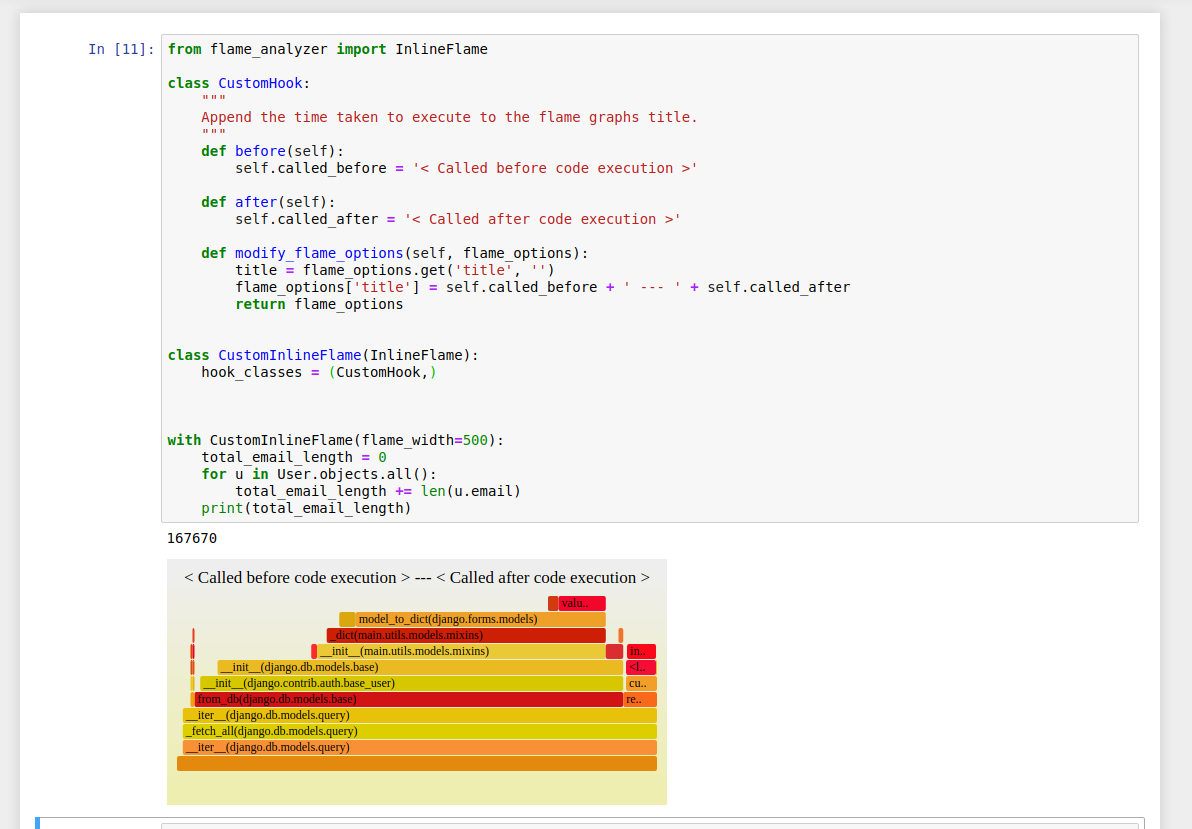
By default both IPython and Django are optional imports meaning you can install this library and use it in the terminal to debug your app code without them installed. Support can be added for other Database frameworks or if your wanting to hook into the context enter/exit methods by creating your own hooks and adding to the output flame type your wanting for example
from flame_analyzer import InlineFlame

class CustomHook:
    """
    Append the time taken to execute to the flame graphs title.
    """
    def before(self):
        self.called_before = '< Called before code execution >'

    def after(self):
        self.called_after = '< Called after code execution >'

    def modify_flame_options(self, flame_options):
        title = flame_options.get('title', '')
        flame_options['title'] = self.called_before + ' --- ' + self.called_after
        return flame_options


class CustomInlineFlame(InlineFlame):
    hook_classes = (CustomHook,)

with CustomInlineFlame(flame_width=500):
    total_email_length = 0
    for u in User.objects.all():
        total_email_length += len(u.email)
    print(total_email_length)
Outputs the IPython viewed Graph
- Credits to the following projects:
1 maintainer

Metadata
1 maintainer
Release files for flame-analyzer 0.1.5
For a detailed explanation of source distributions (sdists) and built distributions (wheels), please see the package formats documentation.
Source distribution (sdist)
| File | Size | Uploaded | Provenance | |
|---|---|---|---|---|
| flame-analyzer-0.1.5.tar.gz | 5.9 kB | Without provenance | Details |
Built distribution (wheel)
| File | Interpreter | ABI | Platform | Reset |
|---|---|---|---|---|
| flame_analyzer-0.1.5-py3-none-any.whl | Python 3 | none | any | Details |
Total release size: 25.3 kB
Release files / flame-analyzer-0.1.5.tar.gz
| Download URL | flame-analyzer-0.1.5.tar.gz |
|---|---|
| Size | 5.9 kB |
| Tags | Source |
|
SHA-256 checksum How to use checksums |
5e6761662252762fc8b702a30fbfb32f83dc46dc74716da579908ed027770b94
|
|
BLAKE2b-256 checksum How to use checksums |
7dd96a913058b6232602b1a256a145f6959dae027cfdb9cb711c6d26b979a3a8
|
| Upload date | |
|
Uploaded using Trusted Publishing? What is trusted publishing? |
No |
| Uploaded via |
twine/2.0.0 pkginfo/1.5.0.1 requests/2.22.0 setuptools/42.0.1 requests-toolbelt/0.9.1 tqdm/4.39.0 CPython/3.6.9
|
Release files / flame_analyzer-0.1.5-py3-none-any.whl
| Download URL | flame_analyzer-0.1.5-py3-none-any.whl |
|---|---|
| Size | 19.5 kB |
| Tags | Python 3 |
|
SHA-256 checksum How to use checksums |
ade02ab912d13ce8390b12ff217f0fa37a6632b4de3c35e250ff9a77d70560e4
|
|
BLAKE2b-256 checksum How to use checksums |
29202044c9abe18f012aca99d60560d5ca2c87d8fa68e0ceca42408865ef30d5
|
| Upload date | |
|
Uploaded using Trusted Publishing? What is trusted publishing? |
No |
| Uploaded via |
twine/2.0.0 pkginfo/1.5.0.1 requests/2.22.0 setuptools/42.0.1 requests-toolbelt/0.9.1 tqdm/4.39.0 CPython/3.6.9
|
Security for flame-analyzer 0.1.5
Provenance
Provenance describes where a file came from. On PyPI, provenance is shared via attestations, which provide a verifiable record of the build or publishing details. View details, limitations and caveats.
No provenance found
None of the files in this release were uploaded with provenance metadata.
A note on package security
PyPI is a repository for distributing packages, not a service for auditing them. While third-party security researchers and our staff do their best to detect and remove malicious packages, PyPI cannot guarantee the quality, security or suitability of any given package.
To learn more about protecting yourself from malicious actors, visit our package security documentation.














