
Flame-graph & treemap disk-usage visualiser
Verified details
These details have been verified by PyPIProject links
GitHub Statistics
Maintainers

Project description
flamedisk 🔥
Interactive disk-usage visualiser. Scan a directory and open a self-contained HTML report with a flame graph and sortable file tree — no server required.
Install
pip install flamedisk
Requires Python 3.9+. No runtime dependencies beyond the standard library.
Quick start
flamedisk /path/to/scan
The report opens in your default browser. The HTML file is fully self-contained — share it as a single file, no internet connection needed.
CLI
flamedisk [path] [options]
| Option | Default | Description |
|---|---|---|
path |
. |
Directory to scan |
-o FILE / --output FILE |
temp file | Write HTML to a specific path |
--depth N |
unlimited | Maximum scan depth |
--min-size BYTES |
0 |
Skip files smaller than this (e.g. 1MB, 512KB) |
--exclude NAME … |
— | Names or glob patterns to skip (e.g. .git node_modules '*.log') |
--follow-symlinks |
off | Follow symbolic links (cycles are detected and skipped) |
--actual-size |
off | Measure allocated disk blocks instead of apparent size, like du (Unix only) |
-x / --one-file-system |
off | Skip directories on a different filesystem, like du -x |
--dedup-links |
off | Count hard-linked files only once, like du |
--workers N |
auto | Thread-pool size. Auto = cpu_count × 4, max 32 |
-q / --no-browser |
off | Skip opening a browser window |
--json |
off | Print raw JSON tree to stdout instead of HTML |
--title TEXT |
— | Custom HTML page title |
--version |
— | Print version and exit |
Examples
# Scan home directory and open in browser
flamedisk ~

# Save report without opening browser
flamedisk /var/log -o report.html -q

# Limit depth, skip small files
flamedisk /usr --depth 4 --min-size 1MB

# Skip virtual filesystems
flamedisk / --exclude proc sys dev -q

# Skip files by glob pattern (quote so the shell doesn't expand them)
flamedisk . --exclude '*.log' '*.tmp'

# Path with spaces
flamedisk "/home/My Documents"

# Exclude list followed by a spaced path
flamedisk --exclude .git node_modules -- "/my project"

# Pipe JSON tree to jq
flamedisk . --json | jq '.children[0]'
Python API
from flamedisk import scan, write_html

tree = scan(
    "/home/user",
    max_depth=5,
    exclude=[".git", "node_modules"],
    workers=16,
)
write_html(tree, "report.html")
See docs/api.md for the full API reference.
The report
Tree + Flame view (default)
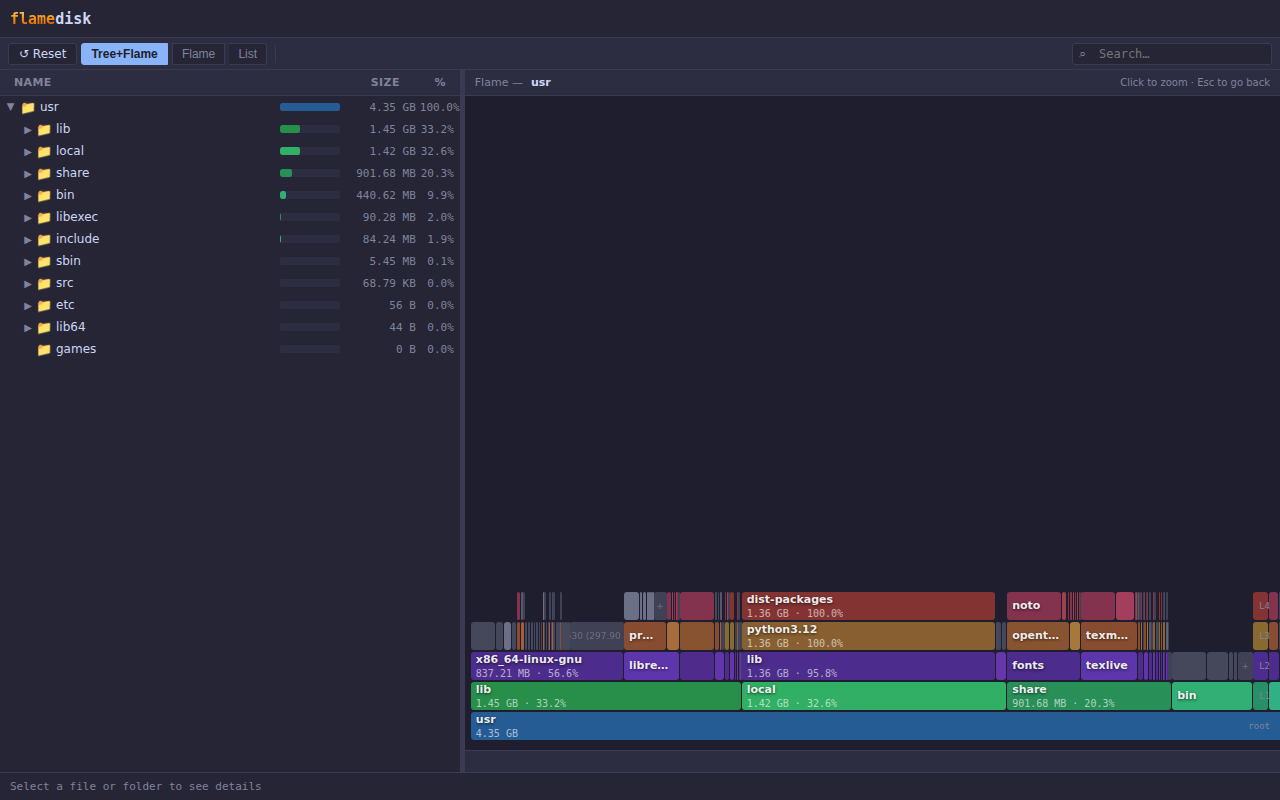
The left panel shows an expandable file tree. The right panel shows a flame graph — each row is a depth level, each cell is a file or directory sized proportionally to disk usage. The root sits at the bottom; deeper entries grow upward.
Flame view
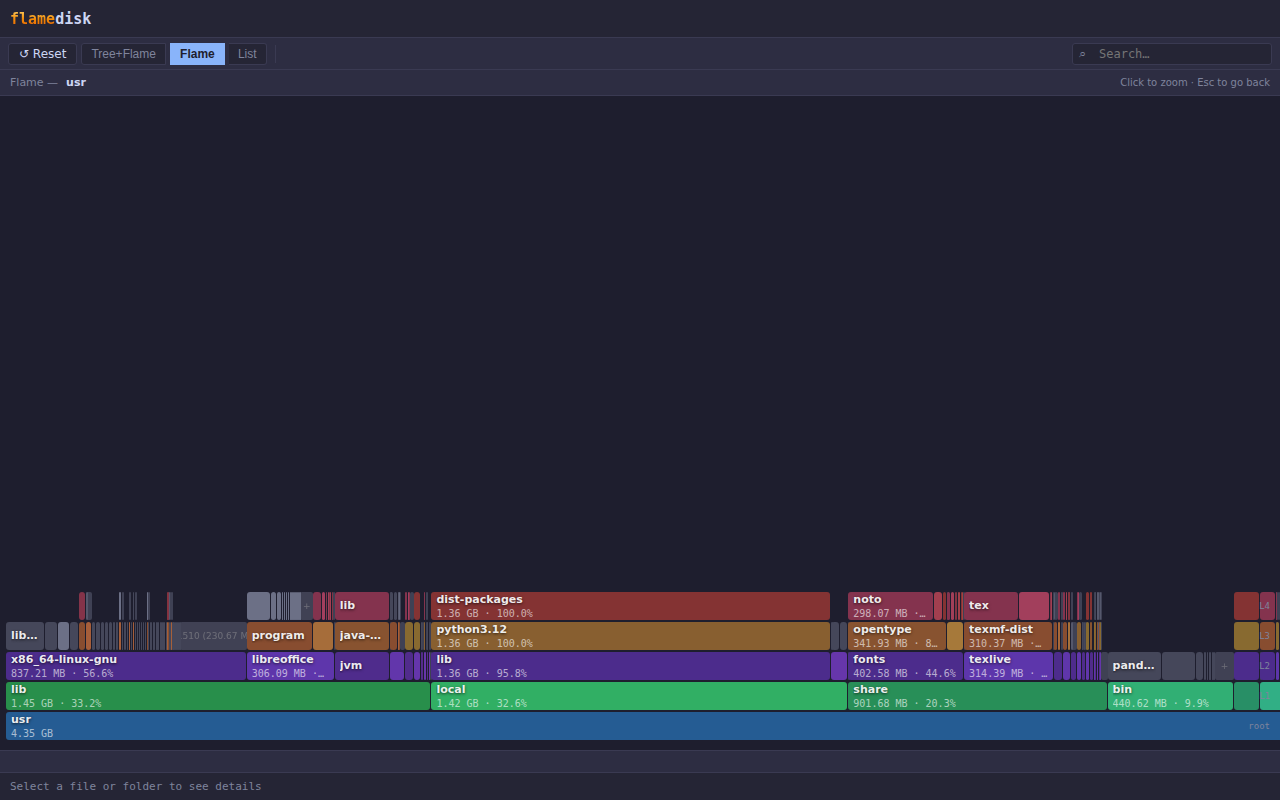
The flame graph fills the full window.
Zoom
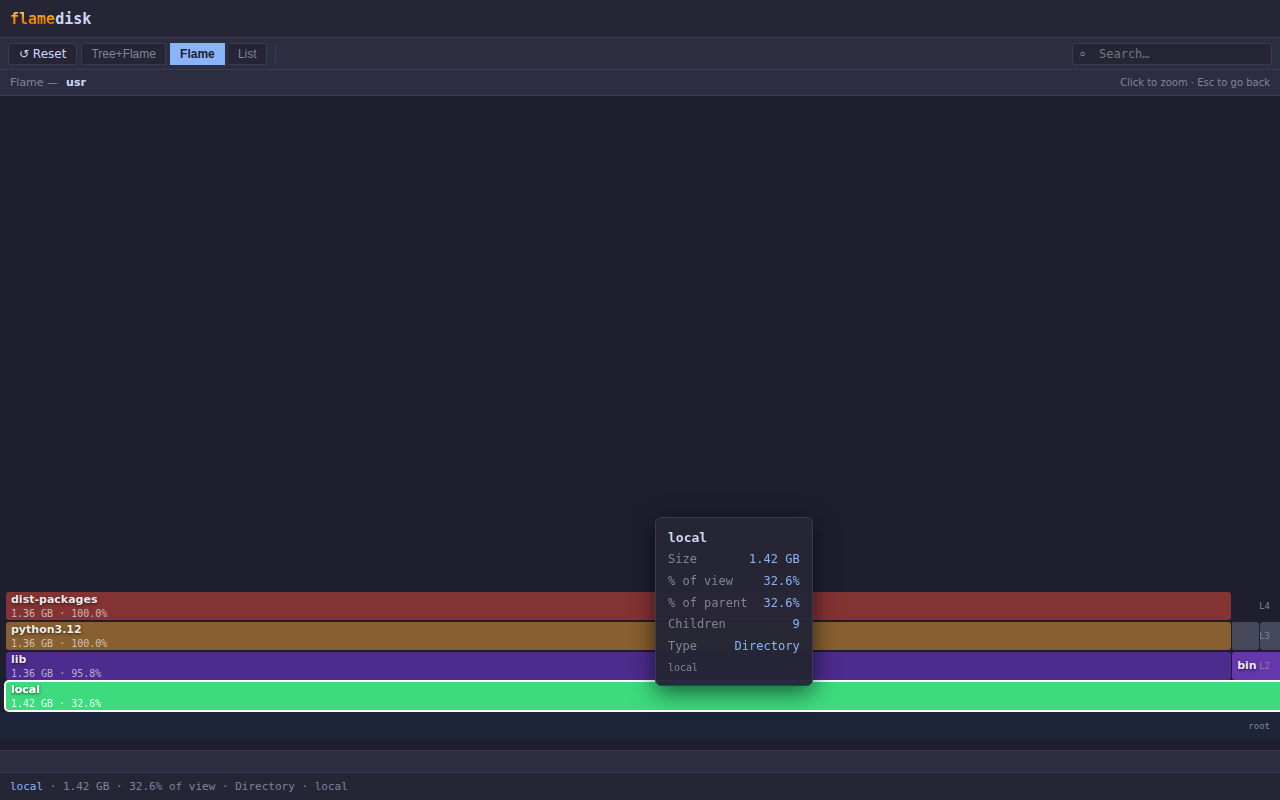
Click any directory cell in the flame graph to zoom into it. The original colours and depth levels are preserved — the view rescales so the selected directory fills the full width. Press Esc or click ↺ Reset to return.
List view
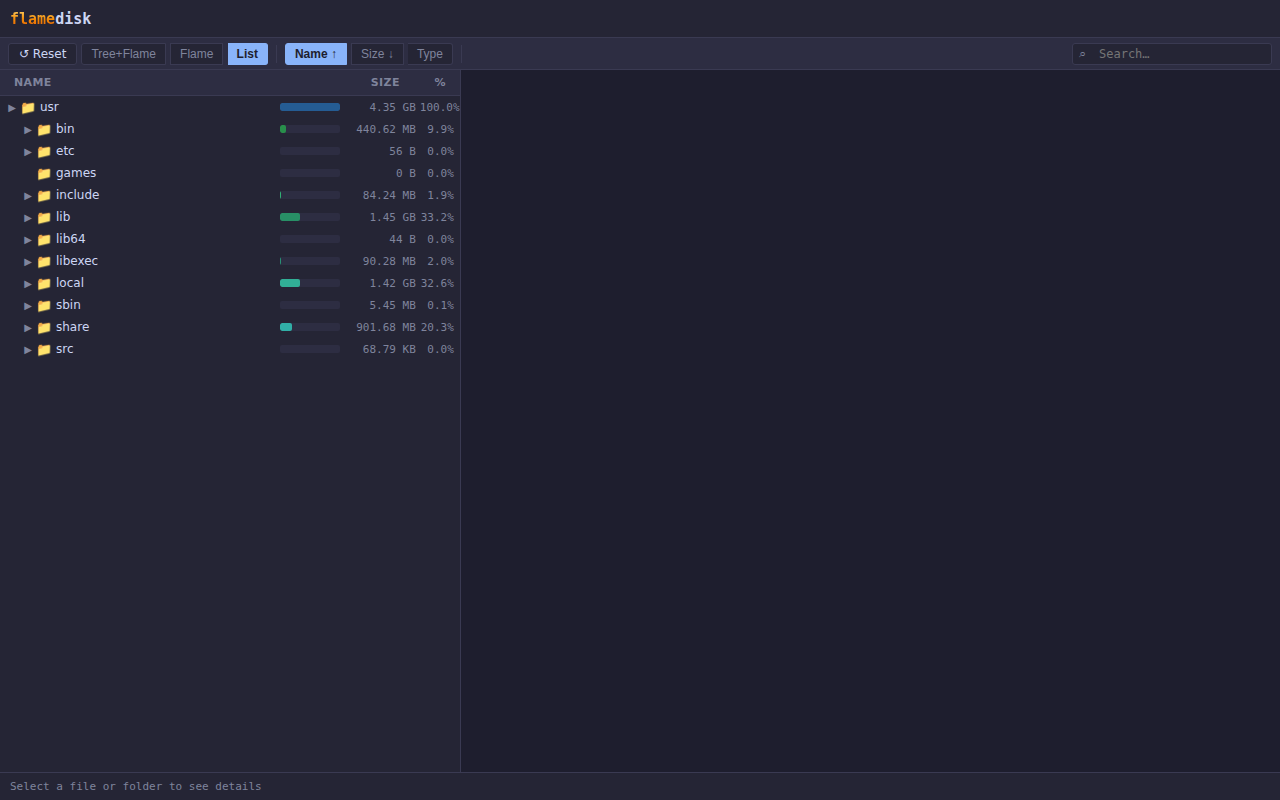
Flat sortable list of the current directory's immediate children. Sort by Name, Size, or Type. The size bar and percentage column always show each entry's share of the total root directory.
Search
Type in the search box (top-right) to highlight matching entries across all views. Matching cells are highlighted; non-matching entries are dimmed.
Unreadable entries
If an entry can't be read during the scan — permission denied, a directory that vanished mid-scan, a stale network handle — flamedisk records it and keeps going rather than aborting. A ⚠ banner in the header shows how many entries were skipped; hover it for the full path and OS error of each. Affected rows in the tree carry a ⚠ marker, and selecting one shows the error in the status bar. Because the contents of a skipped entry are never counted, the totals shown understate actual disk usage by that amount.
Keyboard shortcuts
| Key | Action |
|---|---|
Esc |
Clear zoom / exit search |
Install from source
git clone https://github.com/jrvannucci/flamedisk
cd flamedisk
pip install -e ".[dev]"
Development
pytest              # run the test suite
ruff check .        # lint
Tests run on Linux, macOS, and Windows across Python 3.9–3.13 in CI. Symlink tests skip automatically where the environment cannot create symlinks (Windows without Developer Mode).
License
MIT
Project details
Verified details
These details have been verified by PyPIProject links
GitHub Statistics
Maintainers


Download files
Download the file for your platform. If you're not sure which to choose, learn more about installing packages.
Source Distribution
Built Distribution
Filter files by name, interpreter, ABI, and platform.
If you're not sure about the file name format, learn more about wheel file names.
Copy a direct link to the current filters
File details
Details for the file flamedisk-1.2.1.tar.gz.
File metadata
- Download URL: flamedisk-1.2.1.tar.gz
- Upload date:
- Size: 43.5 kB
- Tags: Source
- Uploaded using Trusted Publishing? Yes
- Uploaded via: twine/6.1.0 CPython/3.13.14
File hashes
| Algorithm | Hash digest | |
|---|---|---|
| SHA256 |
a93ec3440006fa01367e604ee7d804d5ec2749ada772970388ac9f9702358329
|
|
| MD5 |
23b0cf0f80aa6c0391a0395fd7e074b4
|
|
| BLAKE2b-256 |
37e53ac10ca4be4af94293b3a7bc9518c125d61dfc4b7f5d978b0648eacdd195
|
Provenance
The following attestation bundles were made for flamedisk-1.2.1.tar.gz:
Publisher:
publish.yml on jrvannucci/flamedisk
-
Statement:
-
Statement type:
https://in-toto.io/Statement/v1 -
Predicate type:
https://docs.pypi.org/attestations/publish/v1 -
Subject name:
flamedisk-1.2.1.tar.gz -
Subject digest:
a93ec3440006fa01367e604ee7d804d5ec2749ada772970388ac9f9702358329 - Sigstore transparency entry: 2253568001
- Sigstore integration time:
-
Permalink:
jrvannucci/flamedisk@2155c6d216284d29daf75b2f302f283a42fa3d1f -
Branch / Tag:
refs/tags/1.2.1 - Owner: https://github.com/jrvannucci
-
Access:
public
-
Token Issuer:
https://token.actions.githubusercontent.com -
Runner Environment:
github-hosted -
Publication workflow:
publish.yml@2155c6d216284d29daf75b2f302f283a42fa3d1f -
Trigger Event:
push
-
Statement type:
File details
Details for the file flamedisk-1.2.1-py3-none-any.whl.
File metadata
- Download URL: flamedisk-1.2.1-py3-none-any.whl
- Upload date:
- Size: 29.7 kB
- Tags: Python 3
- Uploaded using Trusted Publishing? Yes
- Uploaded via: twine/6.1.0 CPython/3.13.14
File hashes
| Algorithm | Hash digest | |
|---|---|---|
| SHA256 |
967245efae815a6ab196000539b55890f2cd66fde6dc0f8edd132be1cac0923c
|
|
| MD5 |
629eeca5218413c013b1fdfb1a684b22
|
|
| BLAKE2b-256 |
d028c9865c09065c8243083f856ee146836653b4fe640ffe5459aa69e0ffb912
|
Provenance
The following attestation bundles were made for flamedisk-1.2.1-py3-none-any.whl:
Publisher:
publish.yml on jrvannucci/flamedisk
-
Statement:
-
Statement type:
https://in-toto.io/Statement/v1 -
Predicate type:
https://docs.pypi.org/attestations/publish/v1 -
Subject name:
flamedisk-1.2.1-py3-none-any.whl -
Subject digest:
967245efae815a6ab196000539b55890f2cd66fde6dc0f8edd132be1cac0923c - Sigstore transparency entry: 2253568068
- Sigstore integration time:
-
Permalink:
jrvannucci/flamedisk@2155c6d216284d29daf75b2f302f283a42fa3d1f -
Branch / Tag:
refs/tags/1.2.1 - Owner: https://github.com/jrvannucci
-
Access:
public
-
Token Issuer:
https://token.actions.githubusercontent.com -
Runner Environment:
github-hosted -
Publication workflow:
publish.yml@2155c6d216284d29daf75b2f302f283a42fa3d1f -
Trigger Event:
push
-
Statement type:






