
flAPI: Instant SQL based APIs
flAPI is a powerful service that automatically generates read-only APIs for datasets by utilizing SQL templates. Built on top of DuckDB and leveraging its SQL engine and extension ecosystem, flAPI offers a seamless way to connect to various data sources and expose them as RESTful APIs.
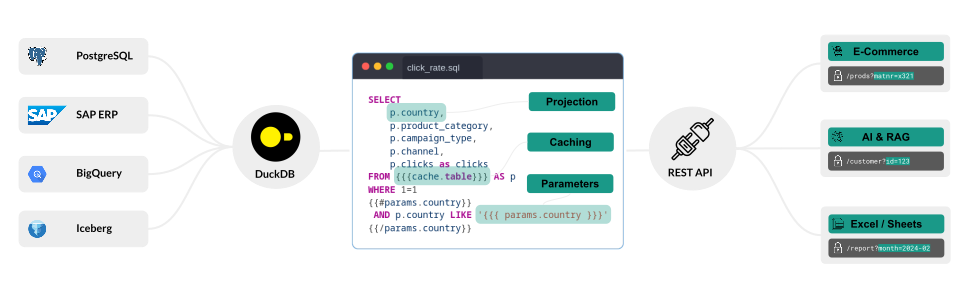
⚡ Features
- Automatic API Generation: Create APIs for your datasets without coding
- MCP (Model Context Protocol) Support: Declarative AI tools alongside REST endpoints, speaking the latest MCP
2026-07-28revision (dual-era: modern and legacy clients) — with the Tasks extension for long-running queries, typed schemas + structured results, OAuth discovery, per-tool RBAC, shadow/dry-run, response shaping, rate limiting, and a prompt-injection hygiene scanner - Multiple Data Sources: Connect to BigQuery, SAP ERP & BW (via ERPL), Parquet, Iceberg, Postgres, MySQL, and more
- SQL Templates: Mustache-like syntax. Typed
{{ params.X }}references onint/double/boolean/date/time/uuid/enum/email/stringfields are bound as DuckDB prepared statements — SQL injection is structurally impossible for those sites - Caching: DuckLake-backed cache with full refresh and incremental sync
- Production security: PBKDF2-SHA256 password hashing, config-driven CORS allowlist, per-user rate limiting, JSONL request audit log, TLS termination, startup config auditor — all opt-in via single-line YAML so
flapii project initdemos stay simple - Easy deployment: Deploy flAPI with a single binary file
- Self-packaging: Fold an entire flapi config tree (YAMLs + SQL templates + small data files) into the binary itself via
flapi pack.scp flapi-prod user@hostbecomes the whole deploy. Reproducible (SOURCE_DATE_EPOCH), notarisable on macOS via a reserved Mach-O segment, with a secret deny list (*.env,secrets/*,*.pem,*.key) enforced at pack time. - Privacy-respecting telemetry: Anonymous startup/shutdown analytics with easy opt-out via
--no-telemetryflag,FLAPI_NO_TELEMETRYenv var, orflapi.yaml
📦 Install
The fastest way to try flAPI — no download, no Docker:
# Run the flapi server (note: "flapi" is taken on PyPI, so the package is "flapi-io")
uvx --from flapi-io flapi -c flapi.yaml

# Run the flapii CLI client (also bundled in flapi-io)
uvx --from flapi-io flapii
Or install permanently — one package gives you both commands:
pip install flapi-io # installs both "flapi" and "flapii" commands
Pre-built binaries and Docker images are also available — see below.
🛠 Quick Start
The easiest way to get started with flAPI is to use the pre-built docker image.
1. Pull the docker image from the Github Container Registry:
> docker pull ghcr.io/datazoode/flapi:latest
The image is pretty small and mainly contains the flAPI binary which is statically linked against DuckDB v1.5.5. Details about the docker image can be found in the Dockerfile.
2. Run flAPI:
Once you have downloaded the binary, you can run flAPI by executing the following command:
> docker run -it --rm -p 8080:8080 -p 8081:8081 -v $(pwd)/examples/:/config ghcr.io/datazoode/flapi -c /config/flapi.yaml
The different arguments in this docker command are:
-it --rm: Run the container in interactive mode and remove it after the process has finished-p 8080:8080: Exposes port 8080 of the container to the host, this makes the REST API available athttp://localhost:8080-p 8081:8081: Exposes port 8081 for the MCP server (when enabled)-v $(pwd)/examples/:/config: This mounts the localexamplesdirectory to the/configdirectory in the container, this is where the flAPI configuration file is expected to be found.ghcr.io/datazoode/flapi: The docker image to use-c /config/flapi.yaml: This is an argument to the flAPI application which tells it to use theflapi.yamlfile in the/configdirectory as the configuration file.
2.1 Enable MCP Support:
To enable MCP support, you can either:
Option A: Use the command line flag
> docker run -it --rm -p 8080:8080 -p 8081:8081 -v $(pwd)/examples/:/config ghcr.io/datazoode/flapi -c /config/flapi.yaml --enable-mcp
Option B: Configure in flapi.yaml
mcp:
  enabled: true
  port: 8081
  # ... other MCP configuration
3.1 Test the API server:
If everything is set up correctly, you should be able to access the API at the URL specified in the configuration file.
> curl 'http://localhost:8080/'


         ___
     ___( o)>   Welcome to
     \ <_. )    flAPI
      `---'

    Fast and Flexible API Framework
    powered by DuckDB
3.2 Get an overview of the available endpoints:
The flAPI server creates embedded Swagger UI at which provides an overview of the available endpoints and allows you to test them. It can be found at
You should see the familiar Swagger UI page:
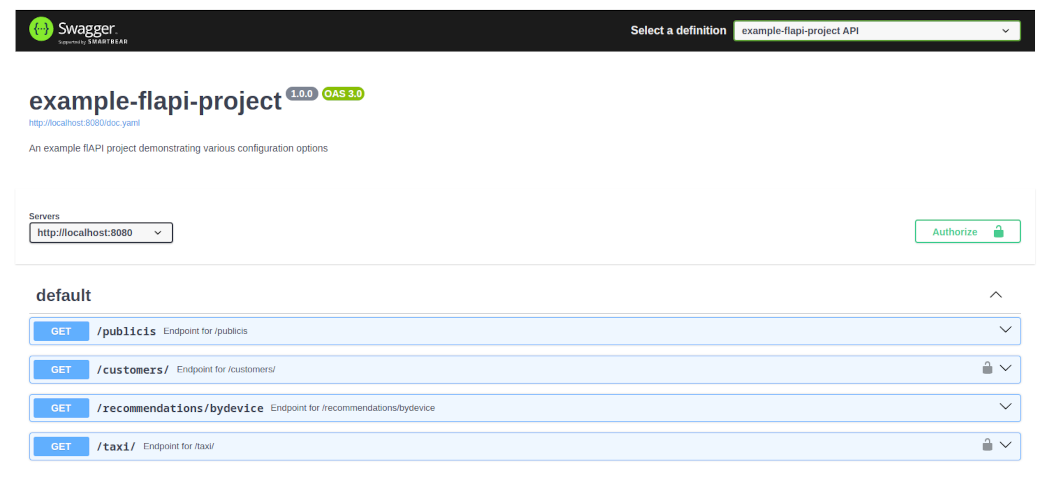
The raw yaml Swagger 2.0 is also available at http://localhost:8080/doc.yaml
3.3 Test the MCP server:
If MCP is enabled, you can test the MCP server as well:
# Check MCP server health
> curl 'http://localhost:8081/mcp/health'

{"status":"healthy","server":"flapi-mcp-server","version":"0.3.0","protocol_version":"2024-11-05","tools_count":0}

# Initialize MCP connection
> curl -X POST http://localhost:8081/mcp/jsonrpc \
  -H "Content-Type: application/json" \
  -d '{"jsonrpc": "2.0", "id": 1, "method": "initialize"}'

# List available tools
> curl -X POST http://localhost:8081/mcp/jsonrpc \
  -H "Content-Type: application/json" \
  -d '{"jsonrpc": "2.0", "id": 2, "method": "tools/list"}'
🤖 MCP (Model Context Protocol) Support
flAPI now supports the Model Context Protocol (MCP) in a unified configuration approach. Every flAPI instance automatically runs both a REST API server and an MCP server concurrently, allowing you to create AI tools alongside your REST endpoints using the same configuration files and SQL templates.
Key Features
- MCP
2026-07-28(dual-era): serves the latest stateless MCP revision (server/discover, per-request metadata, cacheable results, OAuth discovery via RFC 9728) alongside the legacyinitialize/session protocol — existing clients keep working unchanged - Long-running tools (Tasks extension): mark a tool
asyncand slow queries return a task handle immediately instead of blocking the connection; the durable task store survives a restart, withtasks/get/tasks/canceland per-caller isolation - Typed, structured tool contracts: tool parameters advertise real types and constraints (int ranges, dates, uuid, enum, …), results carry machine-readable
structuredContent, anoutputSchemais learned after first use, and failures return actionableisErrorresults the model can self-correct from - Unified Configuration: Single YAML files can define REST endpoints, MCP tools, and MCP resources
- Automatic Detection: Configuration type is determined by presence of
url-path(REST),mcp-tool(MCP tool), ormcp-resource(MCP resource) - Shared Components: MCP tools and resources use the same SQL templates, parameter validation, authentication, and caching as REST endpoints
- Security Integration: method authorization enforced on every request, per-tool/resource/prompt RBAC (
allowed-roles), shadow/dry-run (_dryRun), response shaping, per-tool rate limiting, and a tool-description hygiene scanner - Tool Discovery: automatic tool discovery, pagination, resource templates (
flapi://customers/{id}), andx-mcp-headerfor per-tenant edge routing
See docs/MCP_REFERENCE.md — the dual-era model and all new capabilities are documented in §11.
MCP Endpoints
POST /mcp/jsonrpc- Main JSON-RPC endpoint for tool callsGET /mcp/health- Health check endpoint
Unified Configuration
MCP is now automatically enabled - no separate configuration needed! Every flAPI instance runs both REST API and MCP servers concurrently.
Configuration files can define multiple entity types:
REST Endpoint + MCP Tool (Unified)
# Single configuration file serves as BOTH REST endpoint AND MCP tool
url-path: /customers/                    # Makes this a REST endpoint
mcp-tool:                                # Also makes this an MCP tool
  name: get_customers
  description: Retrieve customer information by ID
  result-mime-type: application/json

request:
  - field-name: id
    field-in: query
    description: Customer ID
    required: false
    validators:
      - type: int
        min: 1
        max: 1000000
        preventSqlInjection: true

template-source: customers.sql
connection: [customers-parquet]

rate-limit:
  enabled: true
  max: 100
  interval: 60

auth:
  enabled: true
  type: basic
  users:
    - username: admin
      password: secret
      roles: [admin]
MCP Resource Only
# MCP Resource example
mcp-resource:
  name: customer_schema
  description: Customer database schema definition
  mime-type: application/json

template-source: customer-schema.sql
connection: [customers-parquet]
Using MCP Tools
Once MCP is enabled, you can interact with tools using JSON-RPC 2.0:
# Check MCP server health
curl 'http://localhost:8081/mcp/health'

# Initialize MCP connection
curl -X POST http://localhost:8081/mcp/jsonrpc \
  -H "Content-Type: application/json" \
  -d '{"jsonrpc": "2.0", "id": 1, "method": "initialize"}'

# List available tools (discovered from unified configuration)
curl -X POST http://localhost:8081/mcp/jsonrpc \
  -H "Content-Type: application/json" \
  -d '{"jsonrpc": "2.0", "id": 2, "method": "tools/list"}'

# Call a tool (same SQL template used for both REST and MCP)
curl -X POST http://localhost:8081/mcp/jsonrpc \
  -H "Content-Type: application/json" \
  -d '{"jsonrpc": "2.0", "id": 3, "method": "tools/call", "params": {"name": "get_customers", "arguments": {"id": "123"}}}'
🎓 Learn by doing
The guides below are task-shaped — each one gets you to a working result, then links to the reference and to the implementation notes.
| I want to… | Guide |
|---|---|
| Serve my first endpoint | Getting started |
| Add validation, filters, pagination | Building a REST endpoint |
| Let an AI agent call it | Exposing an endpoint as an MCP tool |
| Make a slow query fast | Caching an expensive query |
| Require a token, restrict by role | Requiring authentication |
| Read from S3, GCS or Azure | Reading from cloud storage |
| Stop copy-pasting config blocks | Reusing config and reading the environment |
| Deploy one self-contained binary | Shipping one self-contained binary |
| Trace requests and keep an audit trail | Observability |
🏭 Building from source
The source code of flAPI is written in C++ and closely resembles the DuckDB build process. A good documentation of the build process is the GitHub action in build.yaml. In essecence a few prerequisites need to be met:
In essecence a few prerequisites need to be met:
- Install the dependencies:
sudo apt-get install -y build-essential cmake ninja-build - Checkout the repository and submodules:
git clone --recurse-submodules https://github.com/datazoode/flapi.git - Build the project:
make release
The build process will download and build DuckDB v1.5.5 and install the vcpkg package manager. We depend on the following vcpkg ports:
argparse- Command line argument parsercrow- Our REST-Web framework and JSON handlingyaml-cpp- YAML parserjwt-cpp- JSON Web Token libraryopenssl- Crypto librarycatch2- Testing framework
Note: MCP support is built-in and doesn't require additional dependencies beyond what's already included.
📚 Documentation
Start at the documentation index — it routes you from what you are trying to do to the right page.
- Guides — task-first walkthroughs
- Configuration Reference — every
flapi.yamland endpoint key - CLI Reference — server flags and subcommands
- MCP Reference — the MCP protocol as flAPI implements it
- Config Service API — runtime configuration over REST
- Observability — tracing, audit and log correlation
- Architecture & design — how it works inside, and why
MCP Registry
flAPI is listed in the official MCP Registry under the name below (this line also serves as the registry's PyPI ownership marker):
mcp-name: io.github.datazoode/flapi
📊 Telemetry
flAPI sends anonymous application_start and application_stop events to help the team understand adoption. No query data, credentials, or personal information is ever sent.
Opt out (any one of these is sufficient):
# One-off via CLI flag
./flapi --no-telemetry

# Per-session via environment variable
export FLAPI_NO_TELEMETRY=1
./flapi

# Permanently via config file (flapi.yaml)
telemetry:
  enabled: false
See CLI Reference and Configuration Reference for full details.
🤝 Contributing
We welcome contributions. Open an issue to discuss a change, or send a pull request.
📄 License
flAPI is licensed under the Business Source License (BSL) Version 1.1. The BSL is a source-available license that gives you the following permissions:
Allowed
- Copy, modify, and create derivative works: You can copy the software, modify it, and create derivative works.
- Redistribute and non-production use: Redistribution and non-production use of the software is permitted.
- Limited production use: You can use flAPI in production, but with one restriction (see below).
- Change License rights: After the Change Date (five years from first publication of the Licensed Work), the software automatically becomes available under the Change License (MPL 2.0).
Not allowed
- Offering to third parties on a hosted or embedded basis: The Additional Use Grant explicitly restricts using the software in a way that offers it to third parties as a hosted service or embedded component. If you want to do that, you need a commercial license.
- Violation of current license requirements: If your use does not comply with the BSL, you must either purchase a commercial license or stop using flAPI.
- Trademark usage: You do not have rights to the flAPI or DataZoo trademarks or logos, except as expressly required by the License.
For commercial licensing — embedding flAPI in a product, offering it as a hosted service, or any redistribution that the Additional Use Grant restricts — contact contact@data-zoo.de.
Licensing parameters
- Licensor: DataZoo GmbH
- Licensed Work: flAPI — SQL-to-API framework
- Change Date: five years from the first publication of each version
- Change License: MPL 2.0
See the LICENSE file for the full text.
🙋♀️ Support
If you have any questions or need help, please open an issue.
Feedback
If flAPI misbehaves — an endpoint that will not serve, a cache that will not invalidate,
an auth flow that will not complete — please
open an issue. Deployments differ in ways we
cannot reproduce here, so a report with your config is the fastest path to a fix. Every
JSON error response carries a report_issue link for exactly this reason.
If it saved you time, a star on the repo helps other people find it.
On an interactive start, a small banner says the same thing once a day. Under a container
or systemd there is no terminal, so it never prints — the startup log line carries the
pointer instead. Silence both with DATAZOO_NO_BANNER=1.
1 maintainer

Metadata
1 maintainer
Release files for flapi-io 26.9.18
For a detailed explanation of source distributions (sdists) and built distributions (wheels), please see the package formats documentation.
Built distributions (wheels)
| File | Reset | |||
|---|---|---|---|---|
| flapi_io-26.9.18-py3-none-win_amd64.whl | Python 3 | none | Windows x86-64 | Details |
| flapi_io-26.9.18-py3-none-manylinux_2_17_x86_64.whl | Python 3 | none | Linux glibc 2.17+ x86-64 | Details |
| flapi_io-26.9.18-py3-none-manylinux_2_17_aarch64.whl | Python 3 | none | Linux glibc 2.17+ ARM64 | Details |
| flapi_io-26.9.18-py3-none-macosx_11_0_arm64.whl | Python 3 | none | macOS 11.0+ ARM64 | Details |
Total release size: 216.6 MB
Release files / flapi_io-26.9.18-py3-none-win_amd64.whl
| Download URL | flapi_io-26.9.18-py3-none-win_amd64.whl |
|---|---|
| Size | 53.2 MB |
| Tags | Python 3 Windows x86-64 |
|
SHA-256 checksum How to use checksums |
e7fe16622486fcd6d3eecea362755dfaabf828258069fffbd98b4454ffd52488
|
|
BLAKE2b-256 checksum How to use checksums |
71c126efeb250fab130fcb3a106ca067f8d12ec9156a8cf86d73d9ac264f7296
|
| Upload date | |
|
Uploaded using Trusted Publishing? What is trusted publishing? |
Yes |
| Uploaded via |
twine/7.0.0 CPython/3.13.14
|
Provenance
Provenance describes where a file came from. On PyPI, provenance is shared via attestations, which provide a verifiable record of the build or publishing details. View details, limitations and caveats.


PyPI Publish Attestation
PyPI verified that this artifact, at this checksum, originated from the publisher listed below.
Signed by GitHub Actions, verified by PyPI on Sep 18, 2026.
Transparency logRelease files / flapi_io-26.9.18-py3-none-manylinux_2_17_x86_64.whl
| Download URL | flapi_io-26.9.18-py3-none-manylinux_2_17_x86_64.whl |
|---|---|
| Size | 59.4 MB |
| Tags | Linux glibc 2.17+ x86-64 Python 3 |
|
SHA-256 checksum How to use checksums |
db58a1f3553fc2c433ce23ac1e7a6b5efc0832b82a2bf15f6d943d08ade4418e
|
|
BLAKE2b-256 checksum How to use checksums |
3fb70fd290d2bf722d471094951344186991da488f837469bd355eb3d4eb8719
|
| Upload date | |
|
Uploaded using Trusted Publishing? What is trusted publishing? |
Yes |
| Uploaded via |
twine/7.0.0 CPython/3.13.14
|
Provenance
Provenance describes where a file came from. On PyPI, provenance is shared via attestations, which provide a verifiable record of the build or publishing details. View details, limitations and caveats.
PyPI Publish Attestation
PyPI verified that this artifact, at this checksum, originated from the publisher listed below.
Signed by GitHub Actions, verified by PyPI on Sep 18, 2026.
Transparency logRelease files / flapi_io-26.9.18-py3-none-manylinux_2_17_aarch64.whl
| Download URL | flapi_io-26.9.18-py3-none-manylinux_2_17_aarch64.whl |
|---|---|
| Size | 60.7 MB |
| Tags | Linux glibc 2.17+ ARM64 Python 3 |
|
SHA-256 checksum How to use checksums |
ce2b6a51d8ba74eb919ffd988a48358b9cab6315e0585884314b0cba01790af2
|
|
BLAKE2b-256 checksum How to use checksums |
c2394a82c859c6b6e10cff05d5fe46c0dfae5e2850075f87bace6a9e452d8d30
|
| Upload date | |
|
Uploaded using Trusted Publishing? What is trusted publishing? |
Yes |
| Uploaded via |
twine/7.0.0 CPython/3.13.14
|
Provenance
Provenance describes where a file came from. On PyPI, provenance is shared via attestations, which provide a verifiable record of the build or publishing details. View details, limitations and caveats.
PyPI Publish Attestation
PyPI verified that this artifact, at this checksum, originated from the publisher listed below.
Signed by GitHub Actions, verified by PyPI on Sep 18, 2026.
Transparency logRelease files / flapi_io-26.9.18-py3-none-macosx_11_0_arm64.whl
| Download URL | flapi_io-26.9.18-py3-none-macosx_11_0_arm64.whl |
|---|---|
| Size | 43.4 MB |
| Tags | Python 3 macOS 11.0+ ARM64 |
|
SHA-256 checksum How to use checksums |
c6a7f4a1c29a026e0f9650733883e3607018c86e94fabbff0778b8b33fd19d59
|
|
BLAKE2b-256 checksum How to use checksums |
0d390c66876f6abafc3d43bc30cfe21cd3d013a80875a2983755dacddd5f0b2b
|
| Upload date | |
|
Uploaded using Trusted Publishing? What is trusted publishing? |
Yes |
| Uploaded via |
twine/7.0.0 CPython/3.13.14
|
Provenance
Provenance describes where a file came from. On PyPI, provenance is shared via attestations, which provide a verifiable record of the build or publishing details. View details, limitations and caveats.
PyPI Publish Attestation
PyPI verified that this artifact, at this checksum, originated from the publisher listed below.
Signed by GitHub Actions, verified by PyPI on Sep 18, 2026.
Transparency log













