
⚡ Flash Todo
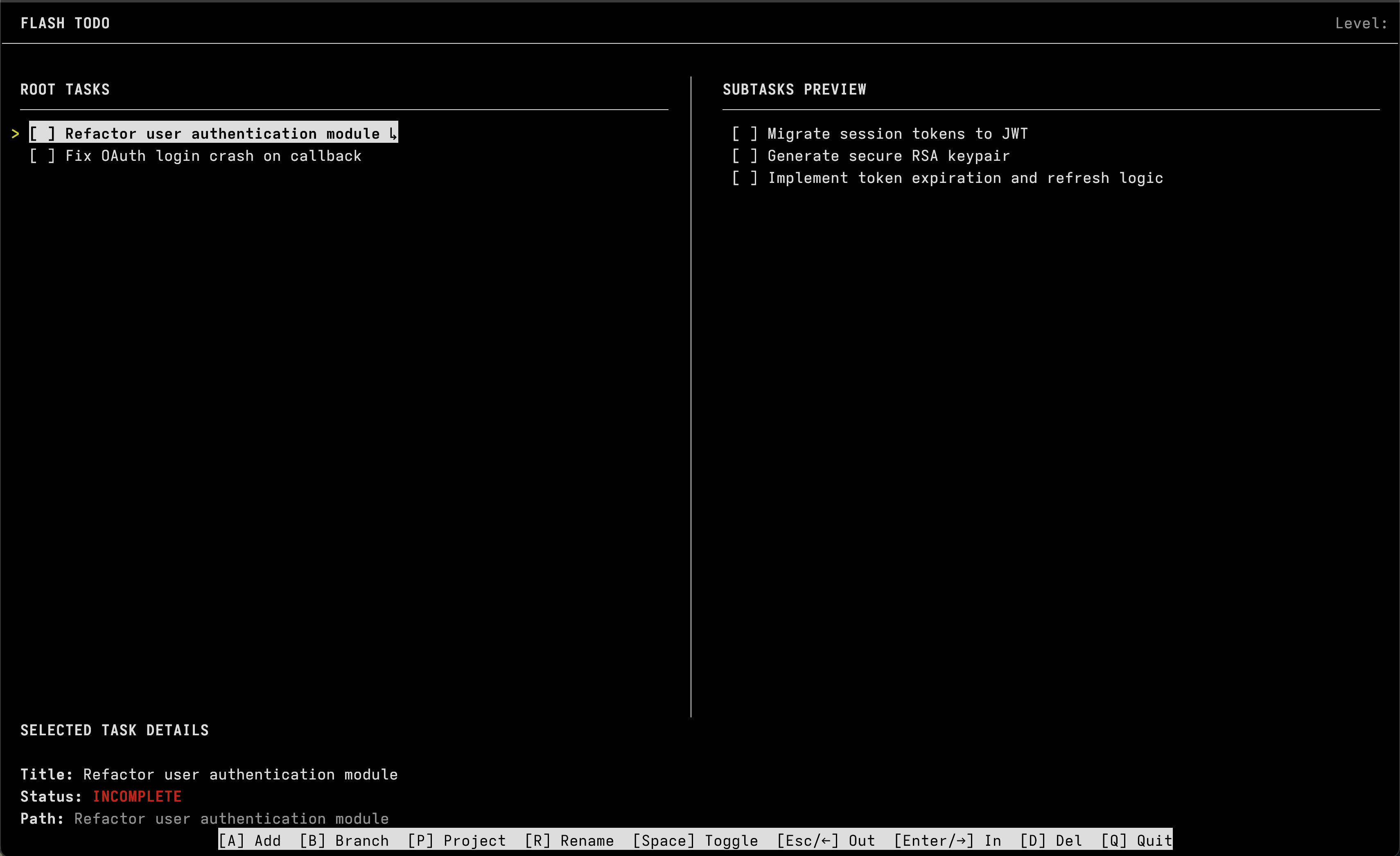
A minimal terminal task manager built to keep me on track when solving complex problems.
Why this exists
I kept losing focus. I'd be deep into a problem, branch off to fix something else, then forget what I was originally doing — or worse, forget the three things I uncovered along the way. Traditional todo apps didn't help because they're built for long-term planning, recurring schedules, and life organization. I didn't need any of that. I needed something I could pull up in a terminal, dump my current mental stack into, and get back to work.
Flash Todo is that. It's a scratchpad with structure, designed for short-term tasks, not weekly planning or habit tracking.
How it works
Tasks are organized as a tree. You start with root tasks, and when a task turns out to be more complex than expected, you branch it into subtasks. You can keep branching as deep as you need. When all branches of a task are done, the parent completes automatically.
Projects
Tasks can be grouped into projects for visual organization. Each project gets a unique color in the UI. You can assign a project with [P], or inline when creating a task using an @ tag:
buy milk @groceries
fix auth bug @backend
Controls
| Key | Action |
|---|---|
A |
Add a new task (root or branch, depending on current level) |
B |
Branch/divide the selected task into subtasks |
P |
Assign a project to the selected task |
R |
Rename the selected task |
Space |
Toggle completion (leaf tasks only) |
Enter / → / L |
Zoom into a task's branches |
Esc / ← / H |
Zoom out to the parent level |
↑ / K |
Move selection up |
↓ / J |
Move selection down |
D / Delete |
Delete a task and all its branches |
C |
Clear all completed root tasks |
Q |
Quit |
Instalation and Usage
pipx install flash-todo
flash-todo
Tasks are saved to ~/.branch_tasks/tasks.json.
1 maintainer

Download files
Download the file for your platform. If you're not sure which to choose, learn more about installing packages.
Source Distribution
Built Distribution
Filter files by name, interpreter, ABI, and platform.
If you're not sure about the file name format, learn more about wheel file names.
Copy a direct link to the current filters
File details
Details for the file flash_todo-0.1.3.tar.gz.
File metadata
- Download URL: flash_todo-0.1.3.tar.gz
- Upload date:
- Size: 9.9 kB
- Tags: Source
- Uploaded using Trusted Publishing? No
- Uploaded via:
twine/6.2.0 CPython/3.14.6
File hashes
| Algorithm | Hash digest | |
|---|---|---|
| SHA256 |
e8097cf4c26488db64d36d53e979e18c22aa5701411298f3dd415a6150037ea9
|
|
| MD5 |
1c3d960e415db0f5386d56e01dd2d18c
|
|
| BLAKE2b-256 |
08d6f376046ce94341147442166c351ff94a78e53c06d0ff8232a998c6a3decf
|
File details
Details for the file flash_todo-0.1.3-py3-none-any.whl.
File metadata
- Download URL: flash_todo-0.1.3-py3-none-any.whl
- Upload date:
- Size: 10.9 kB
- Tags: Python 3
- Uploaded using Trusted Publishing? No
- Uploaded via:
twine/6.2.0 CPython/3.14.6
File hashes
| Algorithm | Hash digest | |
|---|---|---|
| SHA256 |
dd98886f2857321c9ccdc6b42ff00a9f468151b9c611a8ee835814287ae0dfc7
|
|
| MD5 |
a81b69cf271d7daf02882012bfa0a09c
|
|
| BLAKE2b-256 |
4c3821d14d079163f7fe6325818204ab86253db98b8ace0b3d9a9f59a04a9b8d
|







