
Memory Efficient PyTorch optimizers

Project description
FlashOptim
This is the official implementation of FlashOptim: Optimizers for Memory Efficient Training
By Jose Javier Gonzalez Ortiz, Abhay Gupta, Christopher Rinard, and Davis Blalock.





TL;DR
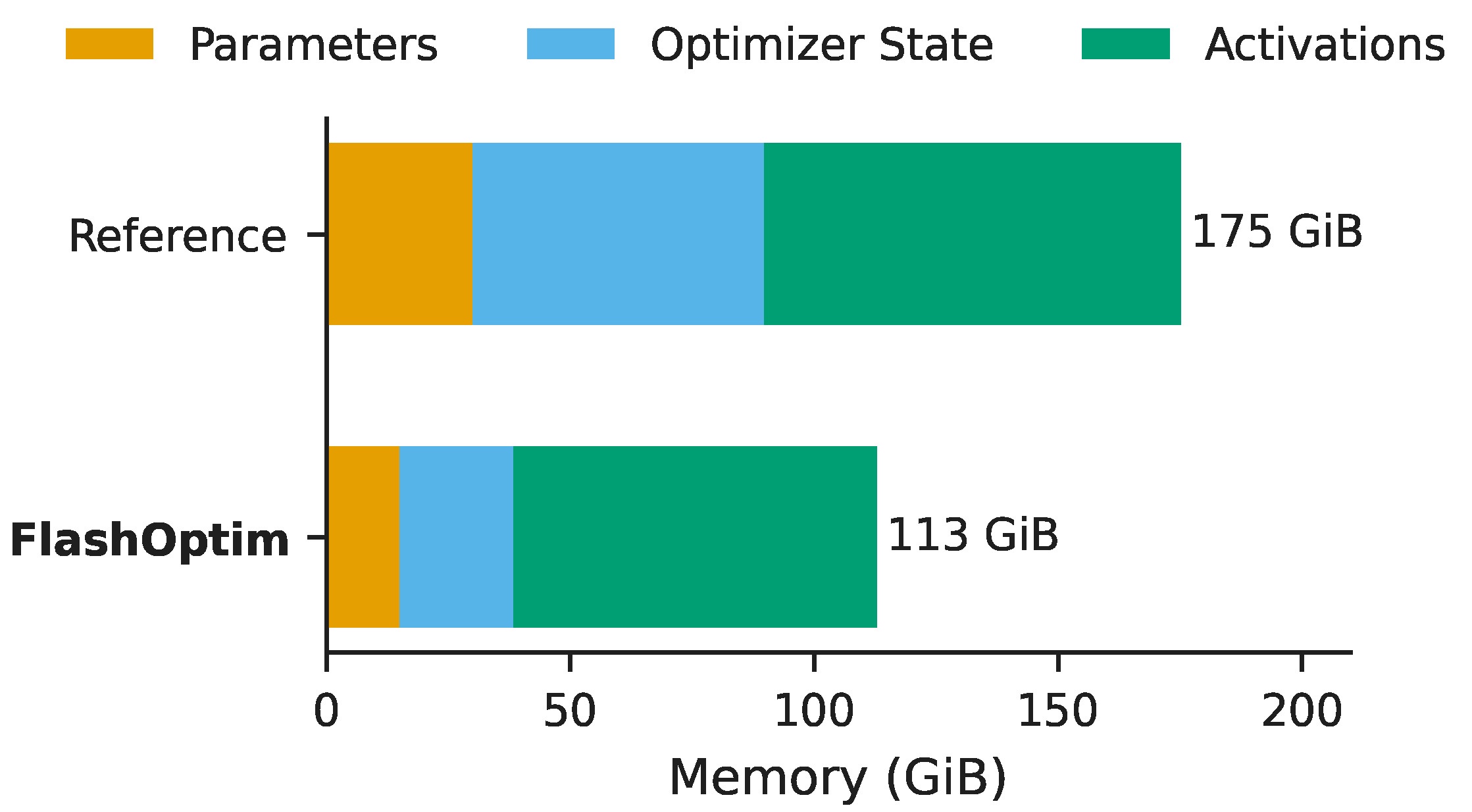
FlashOptim is a library implementing drop-in replacements for PyTorch optimizers that substantially reduces training memory by shrinking the footprint of optimizer states, master weights, and gradients.
For example, for finetuning an 8B model, FlashOptim requires 35% less peak memory and produces checkpoints that are 57% smaller.
1. Quickstart
To get started you can install flashoptim:
$ pip install flashoptim
Once installed, you can import FlashSGD, FlashAdam, FlashAdamW and FlashLion, which follow the standard PyTorch optimizer API. For example, to use FlashAdamW:
import torch
from torch import nn

from flashoptim import FlashAdamW

model = nn.Sequential(nn.Linear(128, 256), nn.ReLU(), nn.Linear(256, 10))
# model parameters must be in bf16 or fp16
model = model.to(torch.bfloat16).cuda()

# master_bytewidth=3 means we have 24-bit parameter semantics
optimizer = FlashAdamW(model.parameters(), lr=1e-3, master_bytewidth=3)

x = torch.randn(32, 128, device="cuda", dtype=torch.bfloat16)
loss = model(x).sum()
loss.backward()
optimizer.step()
optimizer.zero_grad()
That's it! You are now training with 50% less per-parameter memory! For more details on the API and advanced features, keep reading.
2. Key Features
- Memory Savings. By splitting the weight representation and quantizing the optimizer states, FlashOptim reduces per-parameter memory (e.g. 57% for Adam) and peak training memory without degrading convergence.
- Fused Triton Kernels. All compression operations are fused into the update kernel, introducing no practical overhead.
- Gradient Release. Optionally, parameters can be updated as soon as the gradients are computed, further reducing peak memory.
- Compressed Checkpoints. Checkpoints can optionally be stored using quantized optimizer states, producing >50% space savings.
- PyTorch API. The optimizers follow the standard
torch.optim.Optimizerinterface.
3. Installation
FlashOptim can be installed using pip or uv. Note that FlashOptim is only supported on Linux systems with NVIDIA CUDA GPUs.
# install stable version
pip install flashoptim

# install latest version from source
pip install git+https://github.com/databricks/flashoptim.git

# or install it locally in editable mode for development
git clone https://github.com/databricks/flashoptim.git
cd flashoptim
pip install -e .
4. Usage
Specifying Precision
FlashOptim's behavior depends on the dtype of the parameters passed to the optimizer:
- bf16/fp16 parameters: The optimizer works in reduced precision. Optimizer states (moments) are quantized to 8-bit, and error correction is controlled by
master_bytewidth.master_bytewidth=0(default): no error correction; optimizer states are still quantized, but parameters stay at their native precisionmaster_bytewidth=3uses 8-bit correction terms for 24-bit training semanticsmaster_bytewidth=4uses 16-bit correction terms for 32-bit training semantics
- fp32 parameters: The optimizer works in full precision. Optimizer states are still quantized to reduce memory, but no error correction is needed since the parameters themselves are already fp32.
To downcast a model's parameters and buffers to bf16, use the downcast_model helper. Unlike .to(bfloat16), downcast_model selectively keeps normalization layers in fp32 for training stability. It also registers forward pre-hooks on fp32 modules to automatically cast their inputs during the forward pass:
from flashoptim import downcast_model

# Downcast all parameters to bf16 (normalization layers kept in fp32 by default)
downcast_model(model, dtype=torch.bfloat16)

# Keep specific layers (e.g., the output head) in fp32
downcast_model(model, dtype=torch.bfloat16, full_precision_keywords=["lm_head", "head"])
[!NOTE] Keywords are matched against dot-separated name segments, so
"head"matchesmodel.head.weightbut notmodel.header.weight.
To enable error correction, set master_bytewidth when creating the optimizer:
from flashoptim import FlashAdamW

optimizer = FlashAdamW(model.parameters(), lr=1e-3, master_bytewidth=3)
Weight Decay
Unlike PyTorch's built-in optimizers, FlashOptim uses LR-decoupled weight decay. In PyTorch's AdamW, weight decay is coupled with the learning rate:
$$\theta_t \leftarrow \theta_{t-1} \cdot (1 - \eta_t \cdot \lambda)$$
In FlashOptim, the $\lambda$ value is the absolute per-step decay rate, scaled only by the LR ratio to track the schedule:
$$\theta_t \leftarrow \theta_{t-1} \cdot \left(1 - \lambda \cdot \frac{\eta_t}{\eta_0}\right)$$
At initialization $\eta_t = \eta_0$, so the effective decay is simply $\lambda$. This means you should use much smaller weight_decay values than with PyTorch. For example, if you were using torch.optim.AdamW(params, lr=1e-3, weight_decay=0.01) (effective decay $10^{-3} \times 0.01 = 10^{-5}$), the equivalent FlashOptim call is FlashAdamW(params, lr=1e-3, weight_decay=1e-5).
The LR-decoupled formulation ensures that weight decay remains stable regardless of learning rate schedule changes. See Loshchilov & Hutter (2019) and Schaipp (2024) for more details on decoupling LR and WD magnitudes.
Loading & Saving Models
FlashOptim represents full-precision parameters using two components:
- Low precision parameters. These are stored as
nn.Moduletensors. - Error correction terms. These are stored as optimizer state tensors under the
"error_bits"key inoptimizer.state[param].
FlashOptim provides methods for exporting and importing full-precision (FP32) checkpoints. For loading, the model must have been initialized with the desired precision (e.g. via downcast_model).
import torch
import torchvision

from flashoptim import FlashAdamW, downcast_model

model = torchvision.models.resnet18().cuda()
downcast_model(model, dtype=torch.bfloat16, full_precision_keywords=["fc"])
optimizer = FlashAdamW(model.parameters(), lr=1e-3, master_bytewidth=3)

# ... training ...

# Save: reconstruct fp32 from bf16 + error bits
fp32_state_dict = optimizer.get_fp32_model_state_dict(model)
torch.save(fp32_state_dict, "checkpoint.pt")

# Load: restore fp32 weights into a bf16 model (error bits recomputed automatically)
fp32_state_dict = torch.load("checkpoint.pt", weights_only=True)
optimizer.set_fp32_model_state_dict(model, fp32_state_dict)
Compressed Checkpoints
By default, optimizer state dicts are saved with states cast to bf16, which is already smaller than fp32. For additional savings, set compress_state_dict=True when constructing the optimizer to quantize states to int8, producing checkpoints ~50% smaller than bf16:
# Default: state_dict() saves states as bf16
optimizer = FlashAdamW(model.parameters(), lr=1e-3)
torch.save(optimizer.state_dict(), "checkpoint_bf16.pt")

# Compressed: state_dict() saves states as quantized int8
optimizer = FlashAdamW(model.parameters(), lr=1e-3, compress_state_dict=True)
torch.save(optimizer.state_dict(), "checkpoint_int8.pt")
[!NOTE] Compressed state dicts are not loadable by vanilla PyTorch optimizers. They can only be loaded back by FlashOptim optimizers using
optimizer.load_state_dict().
Distributed Training
FlashOptim is compatible with data parallelism strategies including DistributedDataParallel (DDP) and FSDP2. Wrap or shard your model as usual, then pass the resulting parameters to the optimizer:
[!WARNING] FlashOptim does not support FSDP1 (
FullyShardedDataParallel) due to design limitations in how FSDP1 manages parameter and optimizer state sharding. Please use FSDP2 (fully_shard) instead.
# DDP
model = DDP(model, device_ids=[device.index])
optimizer = FlashAdamW(model.parameters(), lr=1e-3, master_bytewidth=3)

# FSDP2
fully_shard(model)
optimizer = FlashAdamW(model.parameters(), lr=1e-3, master_bytewidth=3)
Gradient Release
FlashOptim supports gradient release, which updates parameters during the backward pass as soon as gradients are computed, further reducing memory usage. Gradient release is implemented via post-backward hooks and needs to be enabled explicitly:
from flashoptim import FlashAdamW, enable_gradient_release

optimizer = FlashAdamW(model.parameters(), lr=1e-3, master_bytewidth=3)
handle = enable_gradient_release(model, optimizer)

for x, y in dataloader:
    loss = loss_fn(model(x), y)
    loss.backward()
    # step() and zero_grad() are no-ops while gradient release is active;
    # parameters are updated during backward and gradients are freed immediately
    optimizer.step()
    optimizer.zero_grad()

# Call handle.remove() to restore normal optimizer behavior
handle.remove()
FlashOptim correctly handles gradient release for both DDP and FSDP2, registering hooks to ensure equivalent semantics to non-distributed training.
Limitations. Since the parameters are updated during the backward pass and gradients are freed immediately, gradient release is incompatible with:
- Microbatch Accumulation. Gradient release steps parameters immediately as gradients arrive, so gradients cannot be accumulated.
- Gradient Clipping. Global gradient clipping (e.g.
torch.nn.utils.clip_grad_norm_) cannot be applied. - Gradient Scaling.
torch.amp.GradScaleris not supported with gradient release.
Contributing
For contributing to FlashOptim, please see our contributing guidelines.
Citation
If you use FlashOptim in your research, please cite our paper:
@article{gonzalezblalock2026flashoptim,
  title={FlashOptim: Optimizers for Memory Efficient Training},
  author={Gonzalez Ortiz, Jose Javier and Gupta, Abhay and Rinard, Chris and Blalock, Davis},
  journal={arXiv preprint arXiv:2602.23349},
  year={2026}
}


Download files
Download the file for your platform. If you're not sure which to choose, learn more about installing packages.
Source Distribution
Built Distribution
Filter files by name, interpreter, ABI, and platform.
If you're not sure about the file name format, learn more about wheel file names.
Copy a direct link to the current filters
File details
Details for the file flashoptim-0.1.0.tar.gz.
File metadata
- Download URL: flashoptim-0.1.0.tar.gz
- Upload date:
- Size: 39.6 kB
- Tags: Source
- Uploaded using Trusted Publishing? No
- Uploaded via: uv/0.10.2 {"installer":{"name":"uv","version":"0.10.2","subcommand":["publish"]},"python":null,"implementation":{"name":null,"version":null},"distro":{"name":"macOS","version":null,"id":null,"libc":null},"system":{"name":null,"release":null},"cpu":null,"openssl_version":null,"setuptools_version":null,"rustc_version":null,"ci":null}
File hashes
| Algorithm | Hash digest | |
|---|---|---|
| SHA256 |
fe5f848b2d9b396c558291449912ce515a34180524f363c75a276ca2d0b80f4b
|
|
| MD5 |
797168abedc4a43e52bcfcb6328a9d58
|
|
| BLAKE2b-256 |
ab4585041314ca8e942ce12172d286c4d6c402848d0f8a28401c43046b0277d6
|
File details
Details for the file flashoptim-0.1.0-py3-none-any.whl.
File metadata
- Download URL: flashoptim-0.1.0-py3-none-any.whl
- Upload date:
- Size: 36.2 kB
- Tags: Python 3
- Uploaded using Trusted Publishing? No
- Uploaded via: uv/0.10.2 {"installer":{"name":"uv","version":"0.10.2","subcommand":["publish"]},"python":null,"implementation":{"name":null,"version":null},"distro":{"name":"macOS","version":null,"id":null,"libc":null},"system":{"name":null,"release":null},"cpu":null,"openssl_version":null,"setuptools_version":null,"rustc_version":null,"ci":null}
File hashes
| Algorithm | Hash digest | |
|---|---|---|
| SHA256 |
8dfcfdc1f4a14a410308cdc7a0871b0752ece33fc222b9d1271cee32a5b95b8b
|
|
| MD5 |
1c7bf91a6bcccea3bb84cd9a753f624a
|
|
| BLAKE2b-256 |
aa324b5162a5a8dfd3eb9ba1f278b221b0a216fe9d8245e8a8bb43e7f53e40c6
|






