
flask-lens




Real-time developer observability, SQL/N+1 profiler, EXPLAIN analyzer, cProfile flamegraph, request replayer, and Django-style assertNumQueries guardrails for Flask — in two lines of code.
Mount Lens(app, db=db) to open a zero-dependency DevTools console at /__lens that works across JSON REST APIs, HTMX, webhooks, SPAs, and server-rendered HTML.
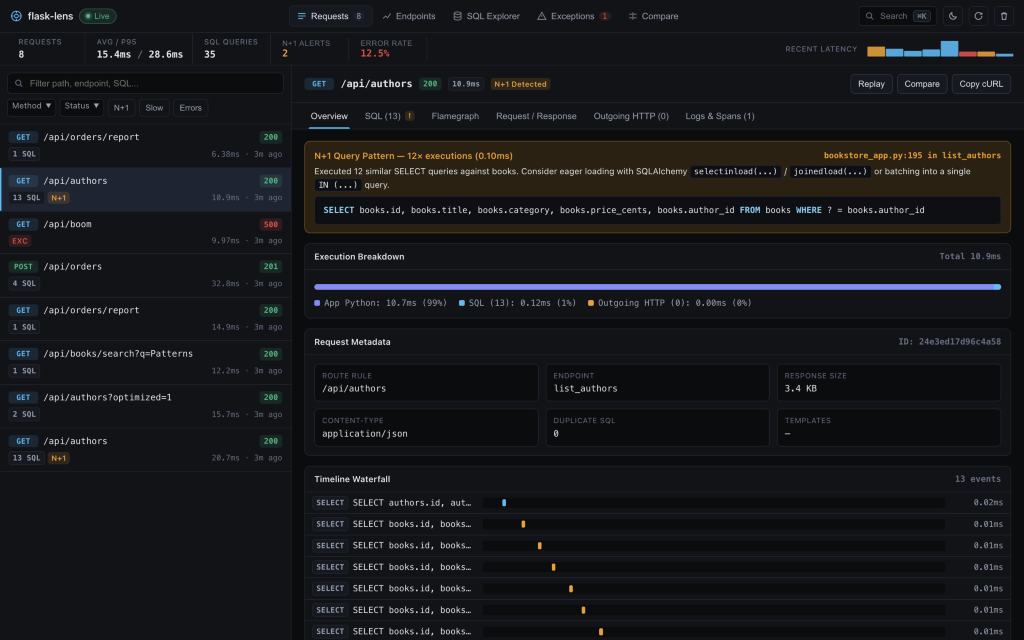
Why flask-lens?
Django ships assertNumQueries in core and has django-silk for persistent SQL and Python profiling; Laravel has Telescope. In Flask, Flask-DebugToolbar only injects a sidebar into text/html responses — leaving REST APIs, SPAs, redirects, and background webhooks blind and losing history on every request.
| Capability | flask-lens |
Flask-DebugToolbar |
django-silk / Django |
|---|---|---|---|
| Works on JSON APIs, HTMX & Webhooks | Yes | No (HTML only) | Yes |
| Persistent request history & live SSE stream | Yes (SQLite WAL / Memory) | No | Yes (DB tables) |
Automatic SQL N+1 & duplicate detection with file:line |
Yes | Duplicate count only | Manual inspection |
Safe read-only EXPLAIN + full-table-scan warnings |
Yes | SQLite/PG basic | Yes |
Per-request cProfile interactive SVG flamegraph |
Yes | Flat table only | cProfile graph |
Outgoing HTTP (requests/urllib3/httpx), logs & custom spans |
Yes | Logs only | Partial |
| Interactive Request Replay + Before/After Diff comparator | Yes | No | No |
assert_num_queries / @pytest.mark.no_n_plus_one CI guardrails |
Yes (built-in pytest plugin) | No | assertNumQueries |
| External infrastructure required | None | None | Database migrations |
Installation
pip install flask-lens
flask-lens depends only on flask and werkzeug. SQLAlchemy, Flask-SQLAlchemy, requests, and httpx integrations activate automatically when installed:
pip install "flask-lens[flask-sqlalchemy]"
Two-Line Quickstart
Direct initialization
from flask import Flask
from flask_sqlalchemy import SQLAlchemy
from flask_lens import Lens

app = Flask(__name__)
app.config["SQLALCHEMY_DATABASE_URI"] = "sqlite:///app.db"

db = SQLAlchemy(app)
lens = Lens(app, db=db)  # Console available at http://127.0.0.1:5000/__lens
Application factory pattern
from flask import Flask
from flask_sqlalchemy import SQLAlchemy
from flask_lens import Lens

db = SQLAlchemy()
lens = Lens()


def create_app() -> Flask:
    app = Flask(__name__)
    app.config["SQLALCHEMY_DATABASE_URI"] = "sqlite:///app.db"
    db.init_app(app)
    lens.init_app(app, db=db)
    return app
Run the interactive bookstore demo
Clone the repo and fire pre-built N+1, eager-load, full-table-scan, CPU flamegraph, secret redaction, and exception scenarios in seconds:
git clone https://github.com/duhanguler/flask-lens.git
cd flask-lens
uv venv && uv pip install -e ".[dev]"
python examples/bookstore_app.py
# Open http://127.0.0.1:5050/ and http://127.0.0.1:5050/__lens
Feature Tour
1. SQL Inspector, Source Context & One-Click EXPLAIN
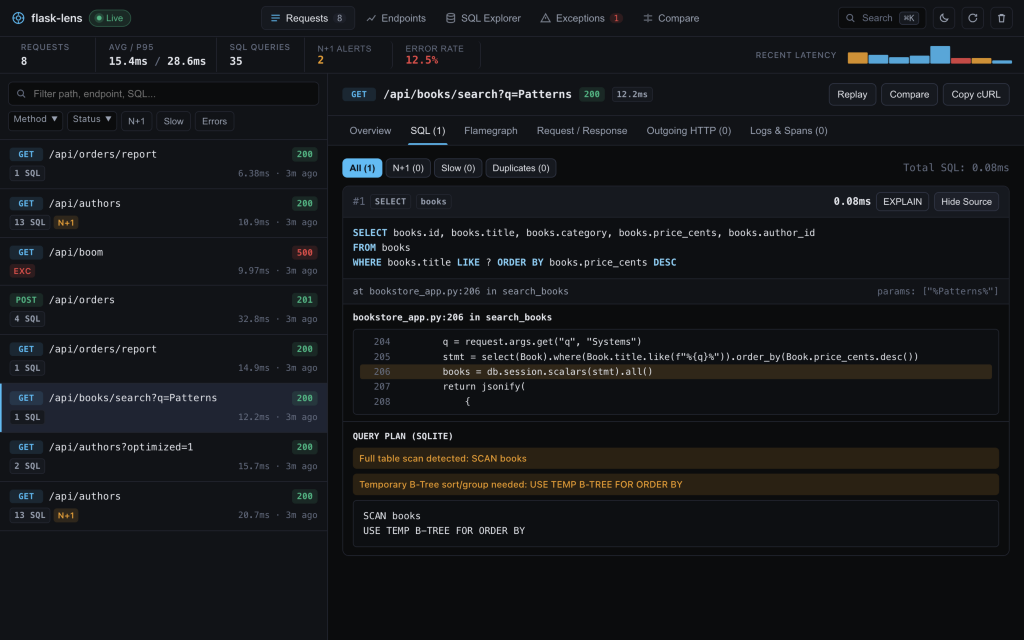
Every SQLAlchemy query is canonicalized into a normalized fingerprint, tagged for N+1, duplicate, and slow behavior, and mapped back to your exact application source line. Clicking EXPLAIN runs a read-only EXPLAIN / EXPLAIN QUERY PLAN (strictly rejecting mutating or multi-statement SQL) and highlights full table scans (SCAN / Seq Scan) and temporary sorts (USE TEMP B-TREE / filesort).
2. Interactive cProfile SVG Flamegraph
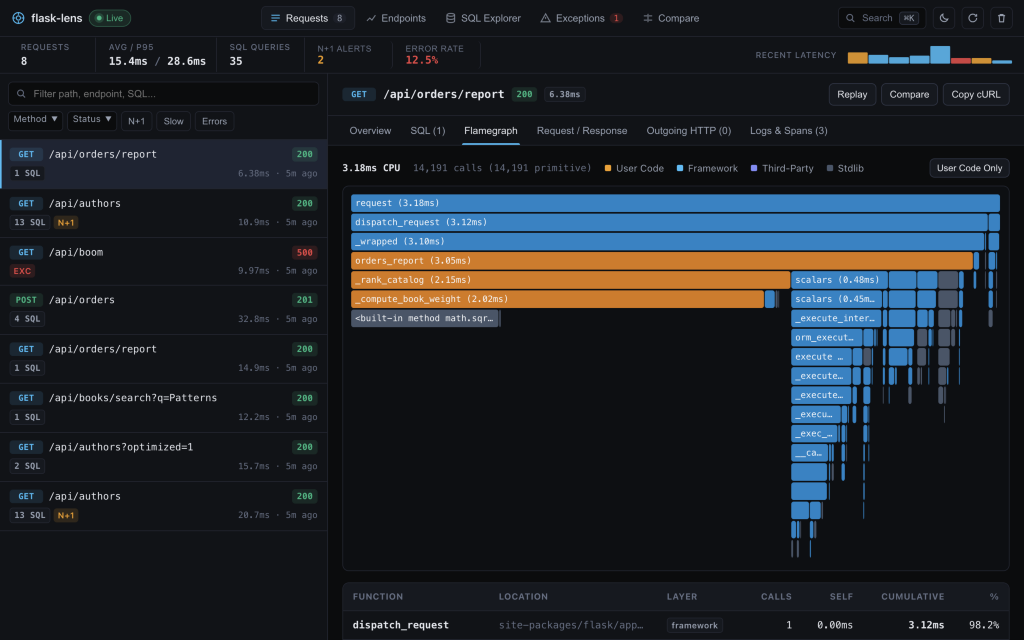
Inspect per-request CPU hotspots with a zoomable SVG flamegraph and flat function table color-coded by layer (User Code, Framework, Third-Party, Stdlib). Control profiling scope via profile_mode ("always", "slow", "on_demand", "off"), the @lens.profile view decorator, or the X-Lens-Profile: 1 request header.
3. Request Replay & Before/After Diff Comparator
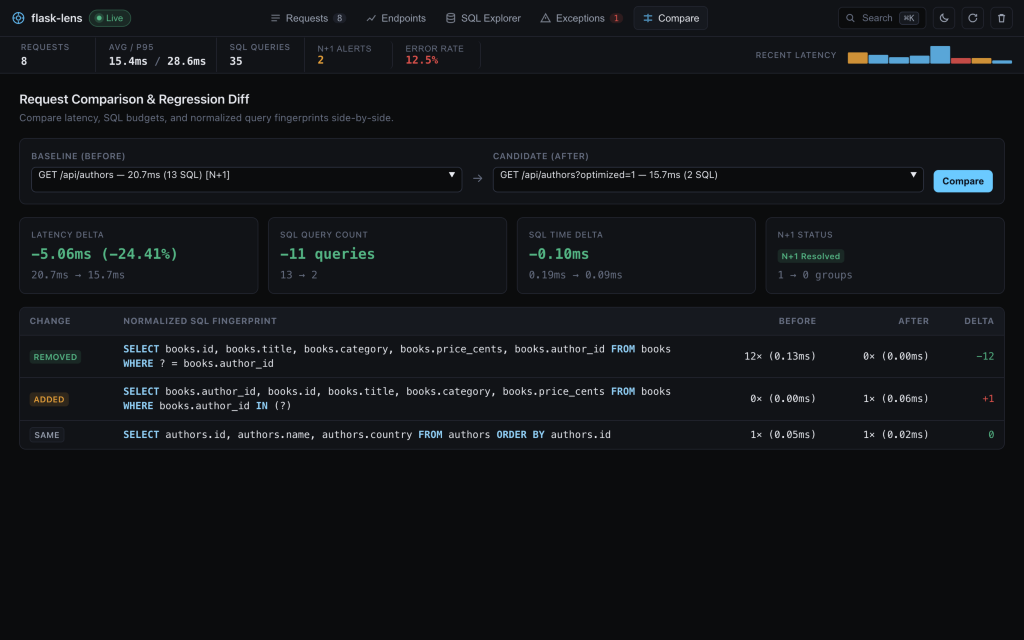
Edit headers, query parameters, or JSON payloads directly inside /__lens, replay the request against your live Flask app, and compare Before vs After latency, SQL query count, N+1 resolution status, and normalized SQL fingerprint diffs side by side.
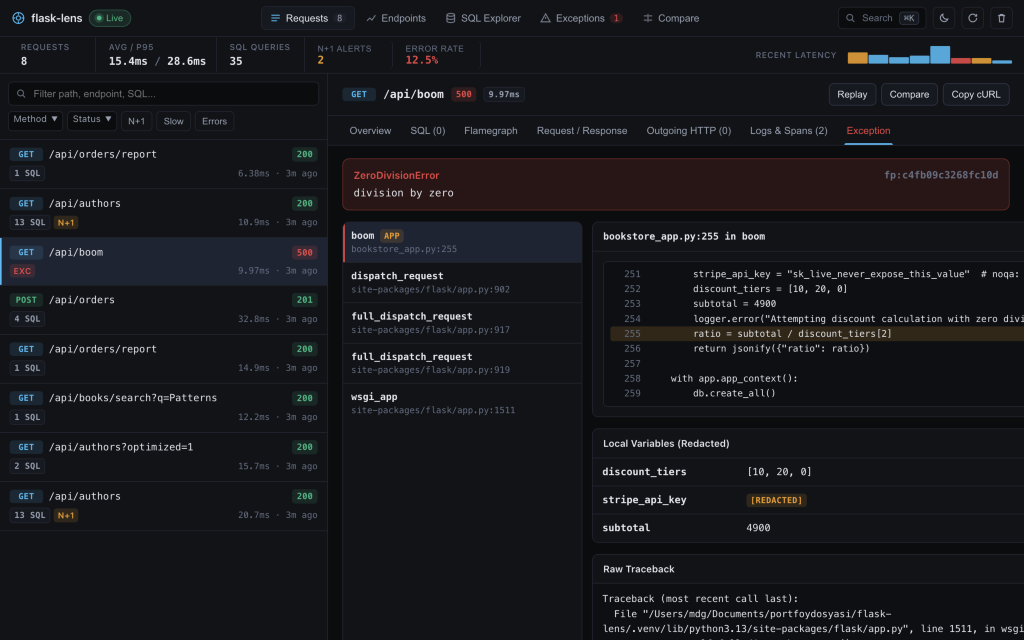
4. Structured Exception Inspector with Secret Redaction
Unhandled exceptions are captured in both debug/testing and production modes with clickable stack frames, source context lines, and a local-variable table where sensitive keys (password, token, api_key, secret, Authorization, Cookie, etc.) are automatically scrubbed to [REDACTED].
Django assertNumQueries & Pytest Guardrails
Lock in SQL query budgets and catch N+1 regressions directly in CI — without writing boilerplate SQLAlchemy event listeners:
import pytest
from flask_lens import assert_max_queries, assert_no_n_plus_one, assert_num_queries


def test_authors_endpoint(client, db):
    with assert_num_queries(db, 2):
        resp = client.get("/api/authors?optimized=1")
        assert resp.status_code == 200

    with assert_no_n_plus_one(db, threshold=3):
        client.get("/api/authors?optimized=1")


# Or declaratively via the auto-registered pytest11 plugin:
@pytest.mark.max_queries(2)
@pytest.mark.no_n_plus_one
def test_authors_declarative(client, db):
    assert client.get("/api/authors?optimized=1").status_code == 200
See docs/testing-guardrails.md for fixtures, custom thresholds, and failure reports.
Custom Spans, Events & Server-Timing
Annotate business logic on the request waterfall with zero ceremony:
@app.post("/api/orders")
@lens.profile  # Profile even when profile_mode="on_demand"
def create_order():
    with lens.span("payment.authorize", provider="stripe") as meta:
        charge = authorize_payment()
        meta["charge_id"] = charge.id

    lens.event("order.created", {"amount_cents": 4900})
    return jsonify({"ok": True}), 201
Every captured response also emits a standard W3C Server-Timing header so timings appear natively in Chrome DevTools:
Server-Timing: total;dur=10.90, sql;dur=0.12;desc="13 queries"
X-Lens-Request-Id: 24e3ed17d96c4a58
Flask CLI Integration
flask-lens registers a flask lens command group automatically:
flask lens status                     # Active config, watched engines, stored counts
flask lens stats --limit 15           # Per-endpoint p50/p95/p99 latency, SQL & N+1 table
flask lens slow --limit 10            # Top normalized SQL fingerprints by total time
flask lens export report.json         # Export full telemetry snapshot for bug reports
flask lens clear                      # Wipe stored ring-buffer telemetry
Measured Overhead Benchmarks
Measured locally with benchmarks/bench_overhead.py (CPython 3.13, macOS Apple Silicon, 300 iterations after 30 warmup iterations per scenario):
| Scenario | JSON Route (/ping) Mean |
JSON Delta | SQLAlchemy Route (/items) Mean |
SQLAlchemy Delta |
|---|---|---|---|---|
| Plain Flask (baseline) | 0.090 ms |
baseline | 0.202 ms |
baseline |
Lens(enabled=False) |
0.084 ms |
~0.000 ms |
0.200 ms |
~0.000 ms |
Lens(storage="memory", profile_mode="off") |
0.147 ms |
+0.057 ms |
0.375 ms |
+0.172 ms |
Lens(storage="sqlite", profile_mode="off") |
0.249 ms |
+0.159 ms |
0.604 ms |
+0.401 ms |
Lens(storage="sqlite", profile_mode="always") |
1.302 ms |
+1.212 ms |
6.339 ms |
+6.137 ms |
Reproduce on your hardware with make bench. For high-traffic staging runs, set profile_mode="on_demand" or profile_mode="slow" to keep request capture under 0.4 ms.
Architecture
flowchart LR
    Req["Flask HTTP Request"] --> Hooks["Lens Lifecycle Hooks<br/>(before / after / teardown / signals)"]
    Hooks --> Ctx["ContextVar RequestContext"]
    SQLA["SQLAlchemy Engine Events"] --> Ctx
    HTTP["urllib3 / httpx Wrappers"] --> Ctx
    Logs["Request-Scoped LogHandler"] --> Ctx
    Prof["cProfile Collector"] --> Ctx
    Ctx --> Analyzer["SQL Normalizer & N+1 Analyzer<br/>+ Secret Redactor"]
    Analyzer --> Store["SQLite WAL / Memory Ring-Buffer"]
    Analyzer --> SSE["SSE Broadcaster"]
    Store --> BP["/__lens Blueprint<br/>(REST API + Embedded SPA)"]
    SSE --> BP
Security & Production Guidance
- Access Control: Gate
/__lensoutside localhost usingauthorize=lambda req: .... - Automatic Redaction: Sensitive headers (
Authorization,Cookie,Set-Cookie,X-API-Key), JSON/form fields, SQL bind parameters, and exception locals are redacted to[REDACTED]by default before persistence. - Safe
EXPLAIN: Strictly limited to single, read-onlySELECTstatements; mutating DML/DDL and multi-statement queries are rejected. - Safe Replay: Restricted to relative application paths;
/__lensroutes and external URLs are rejected to prevent recursion and SSRF.
Read docs/configuration.md and SECURITY.md for full details.
Development
make install   # Create .venv via uv and install dev dependencies
make check     # ruff lint + format check + mypy --strict + pytest coverage
make bench     # Run reproducible WSGI overhead benchmarks
make build     # Build wheel & sdist via hatchling
License
MIT — see LICENSE.
1 maintainer

Metadata
1 maintainer
Release files for flask-lens 0.2.0
For a detailed explanation of source distributions (sdists) and built distributions (wheels), please see the package formats documentation.
Source distribution (sdist)
| File | Size | Uploaded | Provenance | Actions |
|---|---|---|---|---|
| flask_lens-0.2.0.tar.gz | 785.0 kB | With provenance | Details for flask_lens-0.2.0.tar.gz |
Built distribution (wheel)
| File | Interpreter | ABI | Platform | Actions Reset |
|---|---|---|---|---|
| flask_lens-0.2.0-py3-none-any.whl | Python 3 | none | any | Details for flask_lens-0.2.0-py3-none-any.whl |
Total release size: 872.9 kB
Release files / flask_lens-0.2.0.tar.gz
| Download URL | flask_lens-0.2.0.tar.gz |
|---|---|
| Size | 785.0 kB |
| Tags | Source |
|
SHA-256 checksum How to use checksums |
658dc627035335c8a1a5610d1da4100abf289e0498ff2f25ff8d8e340b5cc526
|
|
BLAKE2b-256 checksum How to use checksums |
9ed4ad7d7468573026bc764216b452dc33096e924a0bb386a3666a0e55a2830c
|
| Upload date | |
|
Uploaded using Trusted Publishing? What is trusted publishing? |
Yes |
| Uploaded via |
twine/7.0.0 CPython/3.13.16
|
Provenance
Provenance describes where a file came from. On PyPI, provenance is shared via attestations, which provide a verifiable record of the build or publishing details. View details, limitations and caveats.


PyPI Publish Attestation
PyPI verified that this artifact, at this checksum, originated from the publisher listed below.
Signed by GitHub Actions, verified by PyPI on Nov 21, 2026.
Transparency logRelease files / flask_lens-0.2.0-py3-none-any.whl
| Download URL | flask_lens-0.2.0-py3-none-any.whl |
|---|---|
| Size | 87.8 kB |
| Tags | Python 3 |
|
SHA-256 checksum How to use checksums |
aa727e3285c4540e21f5da3d711939258b7b996d5d5585a44adc1d6949ad8445
|
|
BLAKE2b-256 checksum How to use checksums |
57cd19557b0774a1e3be734e1750dc3e6bb356bfa9c1244bc19d00c54fd9bbd5
|
| Upload date | |
|
Uploaded using Trusted Publishing? What is trusted publishing? |
Yes |
| Uploaded via |
twine/7.0.0 CPython/3.13.16
|
Provenance
Provenance describes where a file came from. On PyPI, provenance is shared via attestations, which provide a verifiable record of the build or publishing details. View details, limitations and caveats.
PyPI Publish Attestation
PyPI verified that this artifact, at this checksum, originated from the publisher listed below.
Signed by GitHub Actions, verified by PyPI on Nov 21, 2026.
Transparency logSecurity for flask-lens 0.2.0
Provenance
Provenance describes where a file came from. On PyPI, provenance is shared via attestations, which provide a verifiable record of the build or publishing details. View details, limitations and caveats.
Full provenance
Both files in this release have been uploaded with provenance metadata.
Attestation for flask_lens-0.2.0.tar.gz
PyPI Publish Attestation
PyPI verified that this artifact, at this checksum, originated from the publisher listed below.
Signed by GitHub Actions, verified by PyPI on Nov 21, 2026.
Transparency logA note on package security
PyPI is a repository for distributing packages, not a service for auditing them. While third-party security researchers and our staff do their best to detect and remove malicious packages, PyPI cannot guarantee the quality, security or suitability of any given package.
To learn more about protecting yourself from malicious actors, visit our package security documentation.













