
flask admin, api, auth, forms and more with peewee

Project description
This package is in maintenance-only mode!
I’m sorry to announce that flask-peewee will now be in maintenance-only mode. This decision is motivated by a number of factors:
Flask-Admin provides a superior admin interface and has support for peewee models.
Flask-Security and Flask-Login both provide authentication functionality, and work well with Peewee.
Most importantly, though, I do not find myself wanting to work on flask-peewee.
I plan on rewriting the Database and REST API portions of flask-peewee and repackaging them as a new library, but flask-peewee as it stands currently will be in maintenance-only mode.
flask-peewee
provides a layer of integration between the flask web framework and the peewee orm.
batteries included:
admin interface
authentication
rest api
requirements:
python 2.5 or greater
check out the documentation.
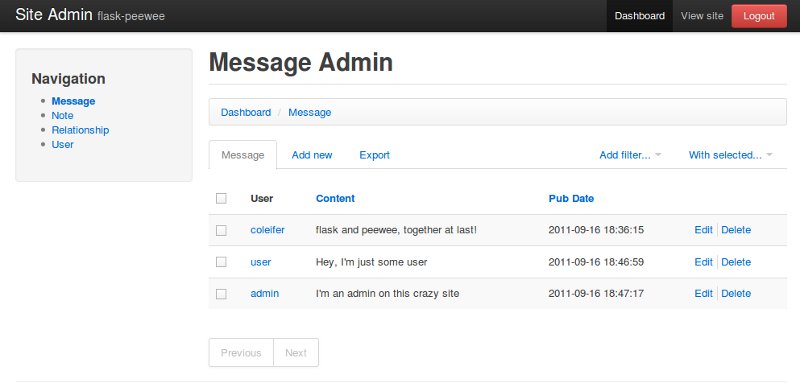
admin interface
influenced heavily by the django admin, provides easy create/edit/delete functionality for your project’s models.
rest api
influenced by tastypie, provides a way to expose a RESTful interface for your project’s models.
curl localhost:5000/api/user/
{
  "meta": {
    "model": "user",
    "next": "",
    "page": 1,
    "previous": ""
  },
  "objects": [
    {
      "username": "admin",
      "admin": true,
      "email": "",
      "join_date": "2011-09-16 18:34:49",
      "active": true,
      "id": 1
    },
    {
      "username": "coleifer",
      "admin": false,
      "email": "coleifer@gmail.com",
      "join_date": "2011-09-16 18:35:56",
      "active": true,
      "id": 2
    }
  ]
}
installing
I recommend installing in a virtualenv. to get started:
# create a new virtualenv
virtualenv --no-site-packages project
cd project/
source bin/activate

# install this project (will install dependencies as well)
pip install flask-peewee
example app
the project ships with an example app, which is a silly twitter clone. to start the example app, cd into the “example” directory and execute the run_example.py script:
cd example/
python run_example.py
if you would like to test out the admin area, log in as “admin/admin” and navigate to:
you can check out the REST api at the following url:
Release history Release notifications | RSS feed


Download files
Download the file for your platform. If you're not sure which to choose, learn more about installing packages.
Source Distribution
Built Distribution
Filter files by name, interpreter, ABI, and platform.
If you're not sure about the file name format, learn more about wheel file names.
Copy a direct link to the current filters
File details
Details for the file flask_peewee-3.1.0.tar.gz.
File metadata
- Download URL: flask_peewee-3.1.0.tar.gz
- Upload date:
- Size: 651.5 kB
- Tags: Source
- Uploaded using Trusted Publishing? No
- Uploaded via: twine/6.1.0 CPython/3.13.7
File hashes
| Algorithm | Hash digest | |
|---|---|---|
| SHA256 |
7957f0c216e7719a1287140e167dc281143fba1615771a48b2e09fab6401d52f
|
|
| MD5 |
5f480f117f8162f6eec804ad0897bf37
|
|
| BLAKE2b-256 |
403774b10ac45b33ac4086d76698b2825022715fcf51ec736d778abee34843cb
|
File details
Details for the file flask_peewee-3.1.0-py3-none-any.whl.
File metadata
- Download URL: flask_peewee-3.1.0-py3-none-any.whl
- Upload date:
- Size: 185.1 kB
- Tags: Python 3
- Uploaded using Trusted Publishing? No
- Uploaded via: twine/6.1.0 CPython/3.13.7
File hashes
| Algorithm | Hash digest | |
|---|---|---|
| SHA256 |
0a38066d23501c912b8f86909ab9d76140558176f19979175ba9f94cd96b0a99
|
|
| MD5 |
0c235ba059e23fd61e2526b8842ffcdc
|
|
| BLAKE2b-256 |
bbd481f1923f0009f47f2bfef8bc48d41a4967eeb06e7127da5dfddc3cde3f14
|






