
Package to collect statistics in Flask.

Project description
Flask-Statistics
Flask-Statistics is an extensions that collects data from requests send to the server to then display statistics like response-time, hits, unique hits, etc.
Installation
You can install the extensions with pip:
$ pip install flask-statistics
Usage
Below is a small example on how to use the extension.
from flask import Flask
from flask_sqlalchemy import SQLAlchemy
from flask_statistics import Statistics

app = Flask(__name__)
app.config["SQLALCHEMY_DATABASE_URI"] = "sqlite:///database.db"

db = SQLAlchemy(app)

class Request(db.Model):
    __tablename__ = "request"

    index = db.Column(db.Integer, primary_key=True, autoincrement=True)
    response_time = db.Column(db.Float)
    date = db.Column(db.DateTime)
    method = db.Column(db.String)
    size = db.Column(db.Integer)
    status_code = db.Column(db.Integer)
    path = db.Column(db.String)
    user_agent = db.Column(db.String)
    remote_address = db.Column(db.String)
    exception = db.Column(db.String)
    referrer = db.Column(db.String)
    browser = db.Column(db.String)
    platform = db.Column(db.String)
    mimetype = db.Column(db.String)

statistics = Statistics(app, db, Request)

@app.route("/")
def index():
    return "Hello World!"

if  __name__ == "__main__":
    app.run()
The script above sets up a basic SQLAlchemy Database.
When initalizing the statistics extensions, you will have to provide a model (here: Request) to store the data in.
Now, whenever a user requests an endpoint, it will be stored in the defined model.
If you are in debug mode and an exception occures, teardown of the request will not happen and therefore it won't be stored in the database. If you want to teardown it by force, set
PRESERVE_CONTEXT_ON_EXCEPTIONto False in the config.
Things that are stored
| Key | Type | Description |
|---|---|---|
| response_time | float |
The time it took the server to process the request. |
| date | datetime.datetime |
The date the request was send to the server (in UTC). |
| method | str |
The HTTP method that was used (e.g. GET, POST, ..). |
| size | int |
The body size in bytes that was send to the client. |
| status_code | int |
The status code that was returned by the request. |
| user_agent | str |
The User-Agent that was send with the request. |
| remote_address | str |
The ip address of the client. |
| exception | str |
If an error occured, this field will have the error message and the status_code will automatically be 500. Example: ZeroDivisionError('division by zero') |
| referrer | str |
Link to the website that referred the user to the endpoint. |
| browser | str |
The browser that was used to send the request. Example: firefox 72.0 |
| platform | str |
Operating System the request was send from. |
| mimetype | str |
Mimetype of the response send to the client (e.g. html/text). |
View the statistics
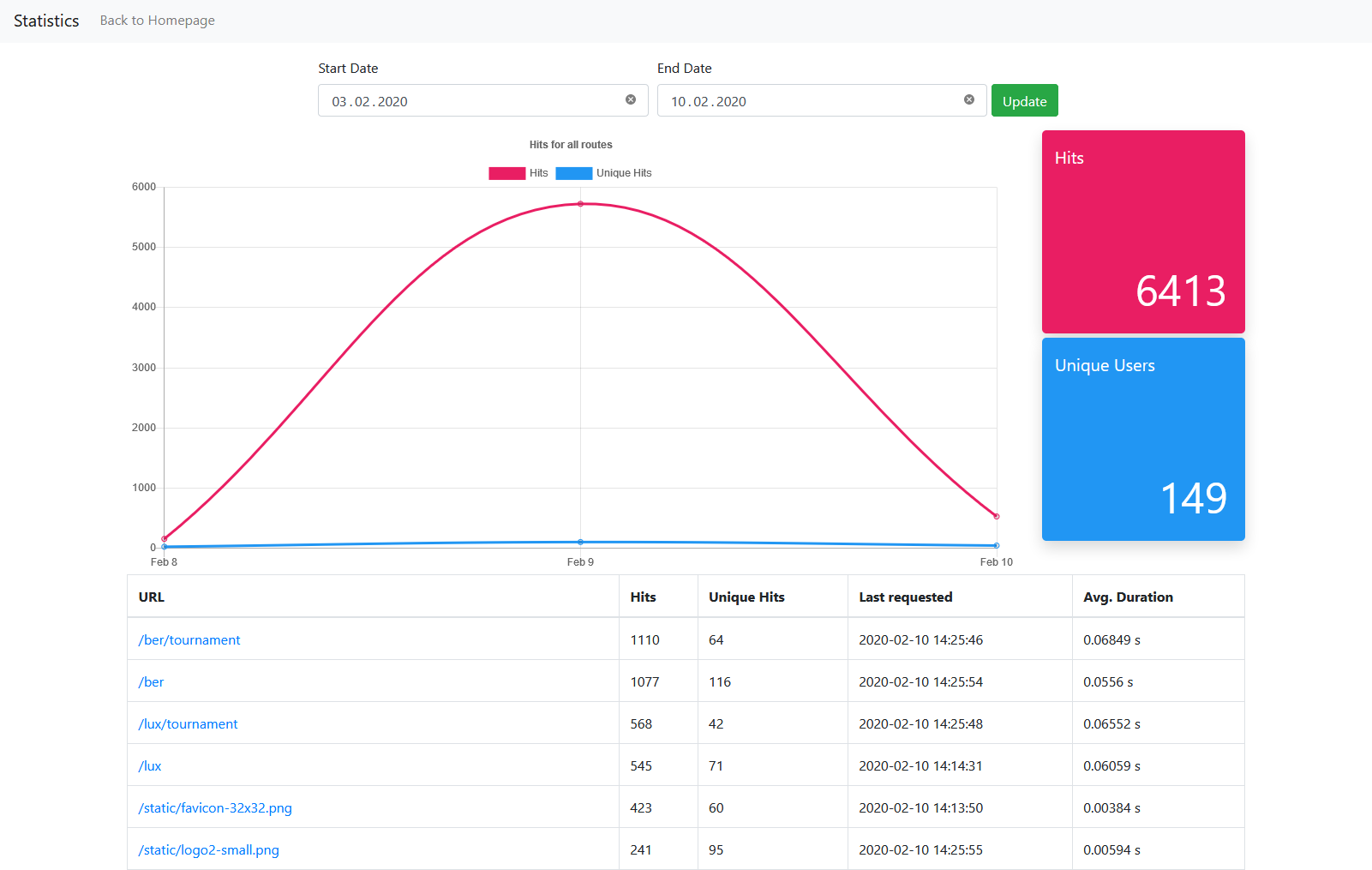
Flask-Statistics will add a blueprint with the prefix ../statistics to your app.
Config
| Name | Type | Description | Default |
|---|---|---|---|
| STATISTICS_DEFAULT_DATE_SPAN | datetime.timedelta |
If no date was selected, it will be set to today as end and today - option as start. | datetime.timedelta(days=7) |
Protect the route
Flask-Statistics accepts a fourth argument: A function that is called before any requests to the statistics blueprint.
...

def check_if_user_is_allowed():
    # check if user is allowed to
    # e.g. JWT Token, Flask Login etc.
    # ...
    if not allowed:
        return redirect(url_for("index"))

statistics = Statistics(app, db, Request, check_if_user_is_allowed)
There you can check if the user has the required permissions to view the statistics. If not, redirect him to another page.
Disable statistics
If a user has opt-out, request record can be disabled with custom function disable_f.
statistics = Statistics(app, db, Request, disable_f= lambda: current_user.has_optout() )
or
def has_disable_cookie():
    return request.cookies.get('disable_stat') == 'True'

statistics = Statistics(app, db, Request, disable_f=has_disable_cookie )
Release history Release notifications | RSS feed


Download files
Download the file for your platform. If you're not sure which to choose, learn more about installing packages.
Source Distribution
Built Distribution
Filter files by name, interpreter, ABI, and platform.
If you're not sure about the file name format, learn more about wheel file names.
Copy a direct link to the current filters
File details
Details for the file flask-statistics-1.0.2.tar.gz.
File metadata
- Download URL: flask-statistics-1.0.2.tar.gz
- Upload date:
- Size: 10.4 kB
- Tags: Source
- Uploaded using Trusted Publishing? No
- Uploaded via: twine/3.2.0 pkginfo/1.5.0.1 requests/2.24.0 setuptools/47.1.1 requests-toolbelt/0.9.1 tqdm/4.48.2 CPython/3.8.3
File hashes
| Algorithm | Hash digest | |
|---|---|---|
| SHA256 |
9f238767c0a0b39446180196761d1e8e9fe5a644268aa9465430446acd1c1bf0
|
|
| MD5 |
78f49250b2146d4718d708bdd5c93c50
|
|
| BLAKE2b-256 |
de315044f9b42ee8f62b9ddba0ed763ffdc5a584710fa7dfd9a36ec905dc143e
|
File details
Details for the file flask_statistics-1.0.2-py3-none-any.whl.
File metadata
- Download URL: flask_statistics-1.0.2-py3-none-any.whl
- Upload date:
- Size: 11.4 kB
- Tags: Python 3
- Uploaded using Trusted Publishing? No
- Uploaded via: twine/3.2.0 pkginfo/1.5.0.1 requests/2.24.0 setuptools/47.1.1 requests-toolbelt/0.9.1 tqdm/4.48.2 CPython/3.8.3
File hashes
| Algorithm | Hash digest | |
|---|---|---|
| SHA256 |
cc052049661ed9d166788050f134eb49d4d224aae57fec313da8b1b6c8cc207b
|
|
| MD5 |
8beb8088fd83178bc15d2c68b2028b8b
|
|
| BLAKE2b-256 |
d8982f78aa45fa0f90999fa8727ddbbfdba6ed7b12a9b1f2f799b88fcd749195
|






