
Flask-Terminal
Flask-Terminal is a bad idea wrapped in an even worse implementation Use this with care, it is a shell on your server
Genesis
While running a docker instance with the need to do adhoc commands to interact with a mounted volume We looked for some sort of terminal that would run in flask as a blueprint, none to be found. Wrote our own, heavily inspired by Chad Smith's https://github.com/cs01/pyxtermjs
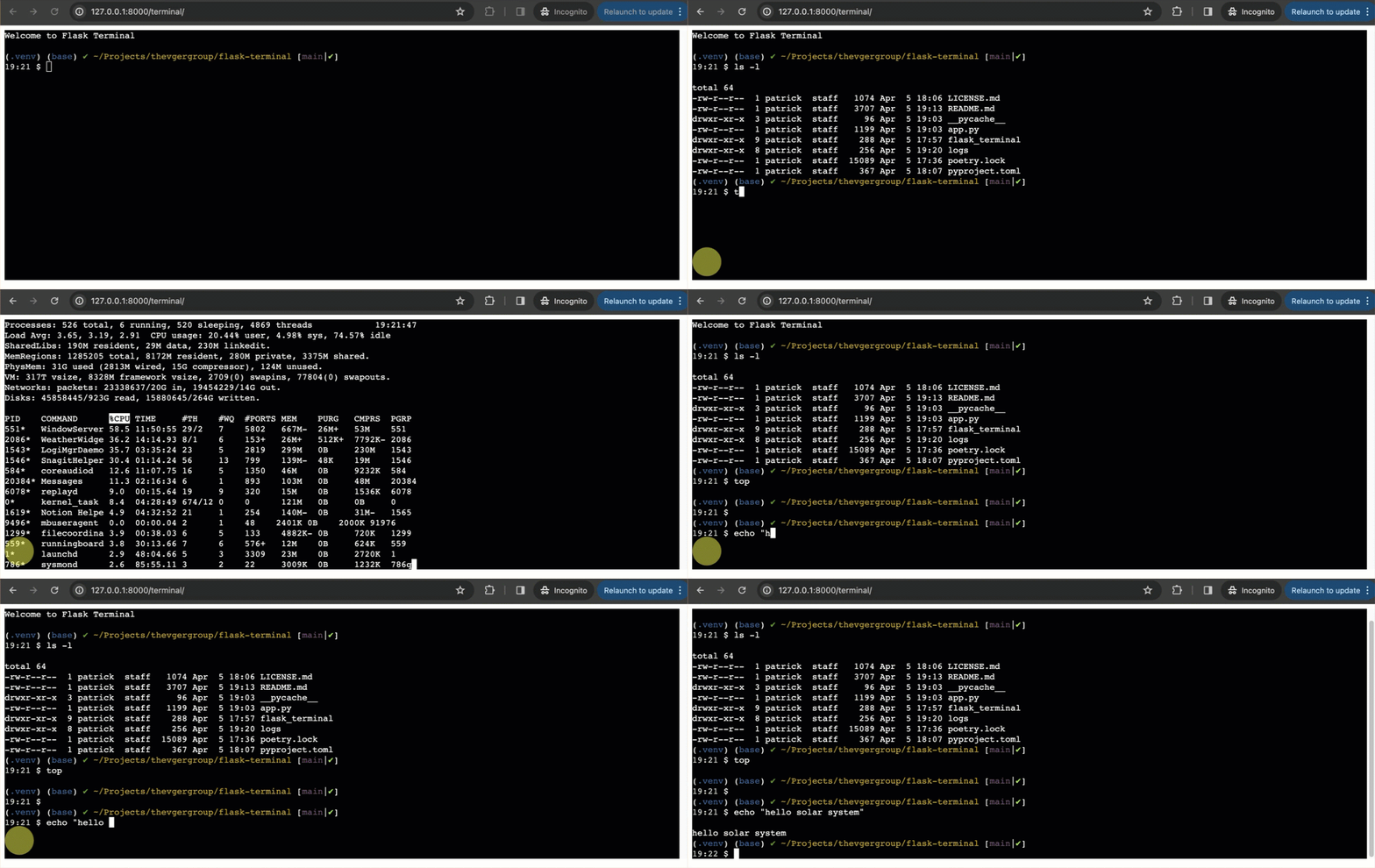
Flask-Terminal employs Flask and xterm.js to deliver a real-time terminal experience, enabling the execution of terminal within a web browser.
Overview
The backend of Flask-Terminal is built on Flask, utilizing python-pty for pseudo-terminal emulation, enabling shell command execution. The frontend leverages xterm.js for rendering the terminal interface. Communication is handled through HTTP polling, circumventing the need for WebSockets. The application is structured as a Flask Blueprint, allowing ease of integration into larger Flask applications.
Features
- Browser-based Terminal: Provides a terminal interface within the browser using xterm.js.
- Command Execution: Supports the execution of /bin/sh commands, including the capability to spawn additional shells.
- Real-time Output: Displays command execution output in real-time, facilitated by HTTP polling.
- Command Logging: Utilizes a Python logger to log terminal activities, aiding in audit and debugging.
Getting started
Security
We cannot stress how much you need to secure this application, and recommend to enable only as needed and disable immediately afterwards. To add security to a blueprint please review how we do this with Flask File Explorer
Requirements
- Python 3.9 or newer
- Flask web framework
- xterm.js
- A modern web browser
Quickstart
Installation
pip install flask-terminal
Configuration within flask Ensure you implement some level of authentication in your application
from flask import Flask
from flask_terminal import terminal_blueprint, configure_logger


app = Flask(__name__)
app.logger = configure_logger('flask_terminal')

app.config['SECRET_KEY'] = 'your_secret_key_here'

# Register the terminal blueprint
app.register_blueprint(terminal_blueprint, url_prefix='/terminal')

@app.route('/ping')
def ping():
    app.logger.info("Accessed /ping route")
    try:
        app.logger.info("Successfully returned 'pong'")
        return 'pong', 200
    except Exception as e:
        app.logger.error(f"Error in ping route: {e}", exc_info=True)
        return "An error occurred", 500

####
## IMPLEMENT SOME SORT OF SECURITY
## Around your application, below is an example
###
def is_authenticated():
    """Check if the user is authenticated based on a token stored in the session."""
    # Example logic for checking if a user is authenticated
    return 'user_token' in session and session['user_token'] == 'your_secure_token'

@terminal_blueprint.before_request
def before_request_func():
    if not is_authenticated():
        # Redirect to login page or return an error
        current_app.logger.info("User not authenticated, redirecting to login.")
        return redirect('/login')  # Adjusted to use a direct path


if __name__ == '__main__':
    app.run(port=8080)
Launch your flask app as normal
flask -A app.py --debug run --port 8000
This will now make the terminal available at http://localhost:8080/terminal The URL can be configured via the url_prefix
app.register_blueprint(terminal_blueprint, url_prefix='/terminal')
1 maintainer

Metadata
1 maintainer
Release files for flask-terminal 0.2.1
For a detailed explanation of source distributions (sdists) and built distributions (wheels), please see the package formats documentation.
Source distribution (sdist)
| File | Size | Uploaded | |
|---|---|---|---|
| flask_terminal-0.2.1.tar.gz | 8.2 kB | Details |
Built distribution (wheel)
| File | Interpreter | ABI | Platform | Reset |
|---|---|---|---|---|
| flask_terminal-0.2.1-py3-none-any.whl | Python 3 | none | any | Details |
Total release size: 16.8 kB
Release files / flask_terminal-0.2.1.tar.gz
| Download URL | flask_terminal-0.2.1.tar.gz |
|---|---|
| Size | 8.2 kB |
| Tags | Source |
|
SHA-256 checksum How to use checksums |
153e04dbcc7e9daf5d176f8adf198669f25acc9a47f8483bec44027d9e7c7546
|
|
BLAKE2b-256 checksum How to use checksums |
1403f449bdb4b12b6425e5f6123bc9158b8d4e119fef6dc7bad385af52abeb2f
|
| Upload date | |
|
Uploaded using Trusted Publishing? What is trusted publishing? |
Yes |
| Uploaded via |
twine/5.0.0 CPython/3.12.2
|
Release files / flask_terminal-0.2.1-py3-none-any.whl
| Download URL | flask_terminal-0.2.1-py3-none-any.whl |
|---|---|
| Size | 8.6 kB |
| Tags | Python 3 |
|
SHA-256 checksum How to use checksums |
39812d4c97e6f22f4177ec3ac2c5ff2b13f7f6969e975f32f3d906700c307870
|
|
BLAKE2b-256 checksum How to use checksums |
d5ba84852aff0b1402b6c25cff14a4af177490f699f26e260a991006ee44a26a
|
| Upload date | |
|
Uploaded using Trusted Publishing? What is trusted publishing? |
Yes |
| Uploaded via |
twine/5.0.0 CPython/3.12.2
|














