
F.L.A.T. (Frameworkless LLM Agent Thing) for building AI Agents

Project description

F.L.A.T. (Frameworkless LLM Agent... Thing)
Welcome to the "Build AI Apps Without Frameworks" masterclass! an AI library so, soo tiny, it makes minimalists look like hoarders!
pip install flat-ai
Let's get started
Best and fastest way, is to get your teeth to it:
Features
It's basically LLM and Clean Python building blocks: We're talking IF/ELSE statements that actually get sarcasm, Loops made out of thin air, Switch cases with attitude, and Functions that don't need a GPS to find their purpose. It's regular Python syntax meets AI wizardry - what could possibly go wrong? 🧙♂️
Workflows:
Think Python code, but with an LLM brain transplant!
GATES:
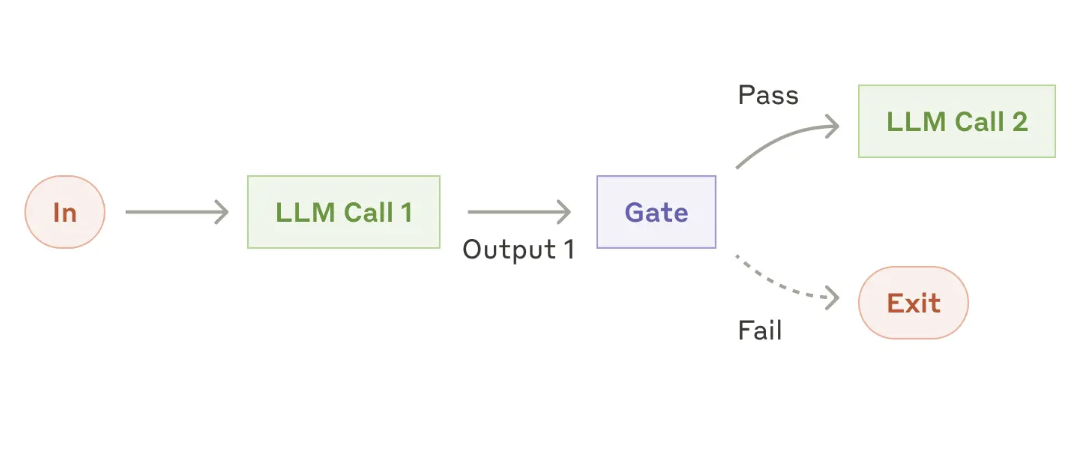
Most applications will need to perform some logic that allows you to control the workflow of your Agent with good old if/else statements. For example, given a question in plain English, you want to do something different, like checking if the email sounds urgent or not:
if llm.is_true('is this email urgent?', email=email):
    -- do something
else:
    -- do something else
Workflow: Routing
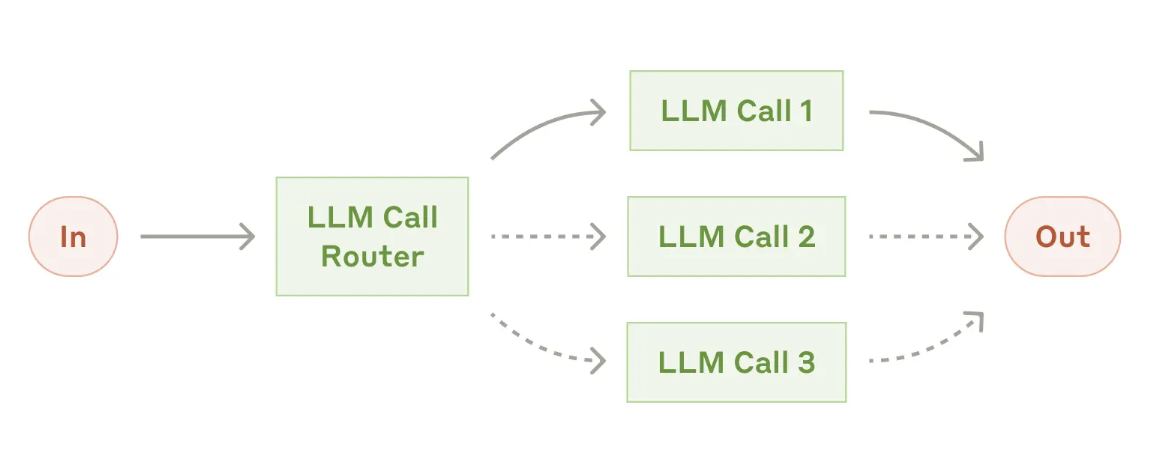
Similar to if/else statements, but for when your LLM needs to be more dramatic with its life choices.
For example, let's say we want to classify a message into different categories:
options = {
 'meeting': 'this is a meeting request',
 'spam': 'people trying to sell you stuff you dont want',
 'other': 'this is sounds like something else'
}

match llm.classify(options, email=email):
    case 'meeting':
        -- do something
    case 'spam':
        -- do something
    case 'other':
        -- do something
Agents
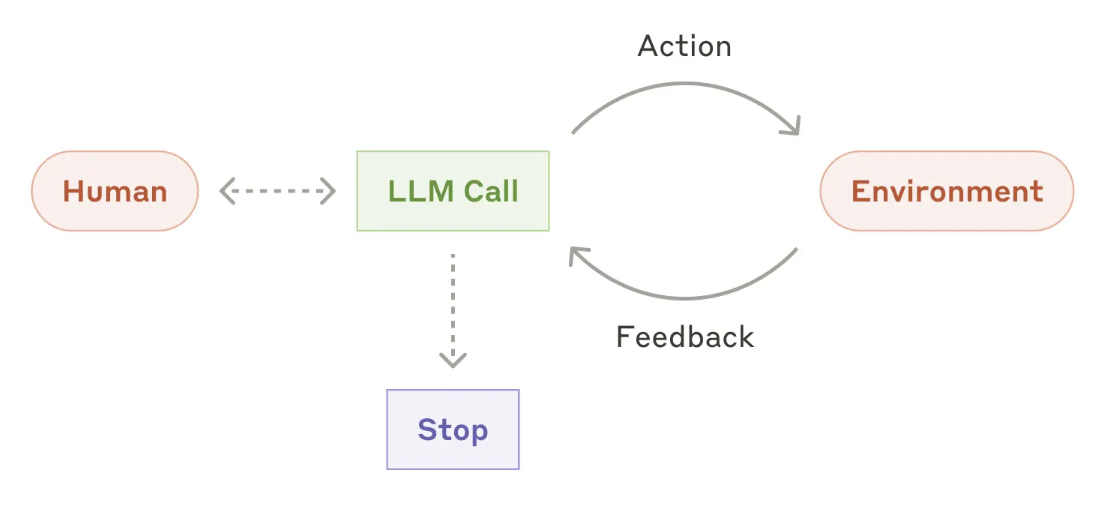
Straight from the AI prophet's mouth: "Agents can handle sophisticated tasks, but their implementation is often straightforward. They are typically just LLMs using tools based on environmental feedback in a loop." As well as the hability to turn unstructured data into structured data OBjects that can be used in your Agent logic.
Translation: It's basically a Python script doing the hokey pokey with an API - you put the prompt in, you get the output out, you do the while loop and shake it all about. And here we were thinking we needed quantum computing and a PhD in rocket surgery! Thank goodness Guido van Rossum had that wild weekend in '89 and blessed us with for loops and functions. Without those brand new Python features, we'd be building our AI agents with stone tablets and carrier pigeons.
Objects
Need your LLM to fill out objects like a trained monkey with a PhD in data entry? Just define the shape and watch the magic! 🐒📝
For example, let's say we want to extract a summary of the email and a label for it:
class EmailSummary(BaseModel):
    summary: str
    label: str


ret = llm.generate_object(EmailSummary, email=email)
Loops
Loops: Because all programming languages have them, and making your LLM do repetitive tasks is like having a genius do your laundry - hilarious but effective! Want a list of things? Just throw a schema at it and watch it spin like a hamster on a crack coated wheel.
For example, let's say we want to extract a list of action items from an email
class ActionItem(BaseModel):
    action: str
    status: str
    priority: str
    due_date: str
    assignee_name: str
    assignee_email: str

object_schema = List[ActionItem]

# lets pass the context to the LLM once, so we don't have to pass it every time
llm.set_context(email=email, today = date.today())
if llm.true_or_false('are there action items in this email?'):
    for action_item in llm.generate_object(object_schema):
        -- do something

llm.clear_context()
Function Calling
And of course, we want to be able to call functions. But you want the llm to figure out the arguments for you.
For example, let's say we want to call a function that sends a calendar invite to a meeting, we want the llm to figure out the arguments for the function given some information:
def send_calendar_invite(
    subject = str,
    time = str,
    location = str,
    attendees = List[str]):
    -- send a calendar invite to the meeting


if llm.true_or_false('is this an email requesting for a meeting?', email=email):
    ret = llm.call_function(send_calendar_invite, email=email, today = date.today())
Function picking
Sometimes you want to pick a function from a list of functions. You can do that by specifying the list of functions and then having the LLM pick one.
For example, let's say we want to pick a function from a list of functions:
def send_calendar_invites(
    subject = str,
    time = str,
    location = str,
    attendees = List[str]):
    -- send a calendar invite to the meeting

def send_email(
    name = str,
    email_address_list = List[str],
    subject = str,
    body = str):
    -- send an email

instructions = """
You are a helpful assistant that can send emails and schedule meetings.
You can pick a function from the list of functions and then call it with the arguments you want.
if:
    the email thread does not contain details about when people are available, please send an email to the list of email addresses, requesting for available times.
else
    send a calendar invites to the meeting
"""

function, args = llm.pick_a_function(instructions, [send_calendar_invite, send_email], email=email, today = date.today())
Simple String Response
Sometimes you just want a simple string response from the LLM. You can use the get_string method for this, I know! boring AF but it may come in handy:
ret = llm.get_string('what is the subject of the email?', email=email)
Streaming Response
Sometimes you want to stream the response from the LLM. You can use the get_stream method for this:
for chunk in llm.get_stream('what is the subject of the email?', email=email):
    print(chunk)
OpenAI API based
This library uses the OpenAI API format, which means it works with OpenAI and any other model and providers like Ollama, TogetherAI, Groq, etc that support the same API format. So you can use any model from any provider that has OpenAI-compatible endpoints.
import openai
from flat_ai import FlatAI

# Create client
client = openai.OpenAI(
    # base_url = 'http://localhost:11434/v1', -- if you want ollama
    api_key=<your api key>, # required, but unused
)

llm = FlatAI(client=client, model='gpt-4o-mini-2024-07-18')
With that, and two more simple simple steps, you are ready to start building your own AI agents.
Painless Context
Ever tried talking to an LLM? You gotta give it a "prompt" - fancy word for "given some context {context}, please do something with this text, oh mighty AI overlord." But here's the optimization: constantly writing the code to pass the context to an LLM is like telling your grandparents how to use a smartphone... every. single. day.
So we're making it brain-dead simple with these methods to pass the context when we need it, and then clear it when we don't:
set_context: Dump any object into the LLM's memory banksadd_context: Stack more stuff on top, like a context burritoclear_context: For when you want the LLM to forget everything, like the last 10 minutes of your life ;)delete_from_context: Surgical removal of specific memories
So lets say for example we want our LLM to start working magic with an email. You add the email to the context:
from pydantic import BaseModel

# for the following examples, we will be using the following object
class Email(BaseModel):
    to_email: str
    from_email: str
    body: str
    subject: str

email = Email(
    to_email='john@doe.com',
    from_email='jane@doe.com',
    body='Hello, would love to schedule a time to talk.',
    subject='Meeting'
)

# we can set the context of the LLM to the email
llm.set_context(email=email)
Tada!
And there you have it, ladies and gents! You're now equipped with the power to boss around LLMs like a project manager remotely working from Ibiza. Just remember - with great power comes great responsibility...
Now off you go, forth and build something that makes ChatGPT look like a calculator from 1974! Just remember - if your AI starts humming "Daisy Bell" while slowly disconnecting your internet... well, you're on your own there, buddy! 😅
Release history Release notifications | RSS feed


Download files
Download the file for your platform. If you're not sure which to choose, learn more about installing packages.
Source Distribution
File details
Details for the file flat-ai-0.2.0.tar.gz.
File metadata
- Download URL: flat-ai-0.2.0.tar.gz
- Upload date:
- Size: 15.8 kB
- Tags: Source
- Uploaded using Trusted Publishing? No
- Uploaded via: twine/6.1.0 CPython/3.10.16
File hashes
| Algorithm | Hash digest | |
|---|---|---|
| SHA256 |
5e24204570dcae10197d3fcc61a44adf068954e621713997a830b6fb39d0a809
|
|
| MD5 |
53b4a1897ebab7e7b5b5fceab5da300f
|
|
| BLAKE2b-256 |
3e27df84fc54a1bbad25ede8f0eff74745ea4857f7af4f17564369b7f287d227
|






