
Python module to generate flat (uncorrugated) graphene configurations with one or more layers, as well as twisted bilayer graphene.
Returns ASE atoms objects, which may be converted to your file format of choice (LAMMPS, xyz, etc.) in one line.
Installation
Install using pip
$ pip install flatgraphene
Help and Documentation
Use the package's help function to print out the docstrings of the main functions to terminal
import flatgraphene as fg
fg.help() #prints documentation of user facing functions to terminal
Examples
Shift
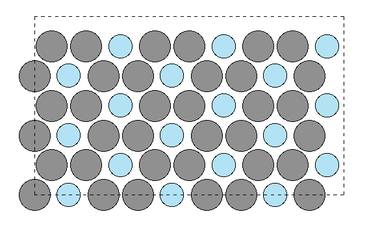
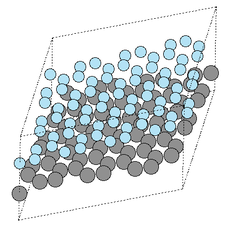
This example creates an ABA trilayer graphene system with rectangular unit cell. Any stacking designation (A,B,SP) is defined relative to the origin of the unit cell.
import ase
from ase.visualize import view
import flatgraphene as fg
#note the inputs are all given with variable name for clarity,
#  but this is not necessary for required inputs
#the nearest neighbor distance (in-plane) a_nn is optional, and
#  overrides the lat_con variable  meaning the value of lat_con is unused
atoms=fg.shift.make_graphene(stacking=['A','B','A'],cell_type='rect',n_1=3,n_2=3,
                             lat_con=0.0,n_layer=3,sep=2.0,a_nn=1.5,
                             sym='C',mass=12,h_vac=3.0)
ase.visualize.view(atoms)
This example gives the same result as the above, but specifies the relevant properties per layer using lists (instead of with a single value to be assumed for all layers).
When lists are used, all must have length n_layer.
Interlayer separation is relative to the layer below, with sep[i] giving spacing between layer i and i+1.
The last element last element defines the spacing between top layer and top of supercell box (if no vacuum is added).
See the documentation in the section below for more information on fine grained options.
import ase
from ase.visualize import view
import flatgraphene as fg
#the comments from the above example apply here as well
atoms=fg.shift.make_graphene(stacking=['A','B','A'],cell_type='rect',n_1=3,n_2=3,
                             lat_con=0.0,n_layer=3,sep=[2.0,2.0,2.0],a_nn=1.5,
                             sym=['C','C','C'],mass=[12,12,12],h_vac=3.0)
ase.visualize.view(atoms)
Twist
This example creates a 9.43 degree twisted system by first computing the proper p,q, then using these as inputs to make_graphene.
All of the properties from the shifted case which can be set here also allow the same variety of input formats (scalar, list, etc.) as above.
import ase
from ase.visualize import view
import flatgraphene as fg
p_found, q_found, theta_comp = fg.twist.find_p_q(9.43)
atoms=fg.twist.make_graphene(cell_type='hex',n_layer=2,
                             p=p_found,q=q_found,lat_con=0.0,a_nn=1.5,
                             sep=3.35,h_vac=3)
ase.visualize.view(atoms)
1 maintainer

Metadata
1 maintainer
Release files for flatgraphene 0.3.6
For a detailed explanation of source distributions (sdists) and built distributions (wheels), please see the package formats documentation.
Built distribution (wheel)
| File | Interpreter | ABI | Platform | Reset |
|---|---|---|---|---|
| flatgraphene-0.3.6-py3-none-any.whl | Python 3 | none | any | Details |
Release files / flatgraphene-0.3.6-py3-none-any.whl
| Download URL | flatgraphene-0.3.6-py3-none-any.whl |
|---|---|
| Size | 18.4 kB |
| Tags | Python 3 |
|
SHA-256 checksum How to use checksums |
8eb5bbbf0ccb2de01e011b7dcff629897f2b3b5dc43035a3bf85d5cb775e980e
|
|
BLAKE2b-256 checksum How to use checksums |
886ac457daf751b126909445cbb282bbcd76c8e0aec8c068591e3f3e61018472
|
| Upload date | |
|
Uploaded using Trusted Publishing? What is trusted publishing? |
No |
| Uploaded via |
twine/0.0.0 importlib_metadata/4.8.1 pkginfo/1.7.1 requests/2.26.0 requests-toolbelt/0.9.1 tqdm/4.62.3 CPython/3.9.5
|














