




What is flect?
flect is a Python framework for building full-stack web applications. It constructs user interfaces by utilizing Pydantic models in the backend that correspond to the properties of React components in the frontend. This integration enables quick development of interactive and beautiful UIs using Python.
The key features are:
- Fast development: Write your entire app with Python, seamlessly integrating backend logic and frontend UI.
- Easy Form Validation: Define a single Pydantic model for seamless and consistent form validation across your app, enhancing development speed and reducing potential errors.
- Folder-Based Routing: Easy route management through folder structure.
- Client-Side Routing: Fast, smooth page transitions without reloads.
- SEO Friendly: Supports server-side rendering for better search engine visibility.
- Custom Components: You can conveniently use your own built React components in flect.
You can also view the documentation website, which is completely built with flect, source code can be found here.
Why use flect?
flect enables developers to harness the combined power of Python and JavaScript ecosystems, facilitating the creation of web applications with efficiency and ease:
If you're a Python developer — you can build responsive web applications using React without writing a single line of JavaScript, or touching npm.
If you're a frontend developer — you can concentrate on building magical components that are truly reusable, no copy-pasting components for each view.
For everyone — a true separation of concerns, the backend defines the entire application; while the frontend is free to implement just the user interface.
— From FastUI
Example
In this example, we will demonstrate how to build a simple to-do application using flect. As flect is built on top of FastAPI, so you can define your routes using FastAPI’s syntax.
Note: In real-world flect applications, define page routes and post routes in separate files for better organization.
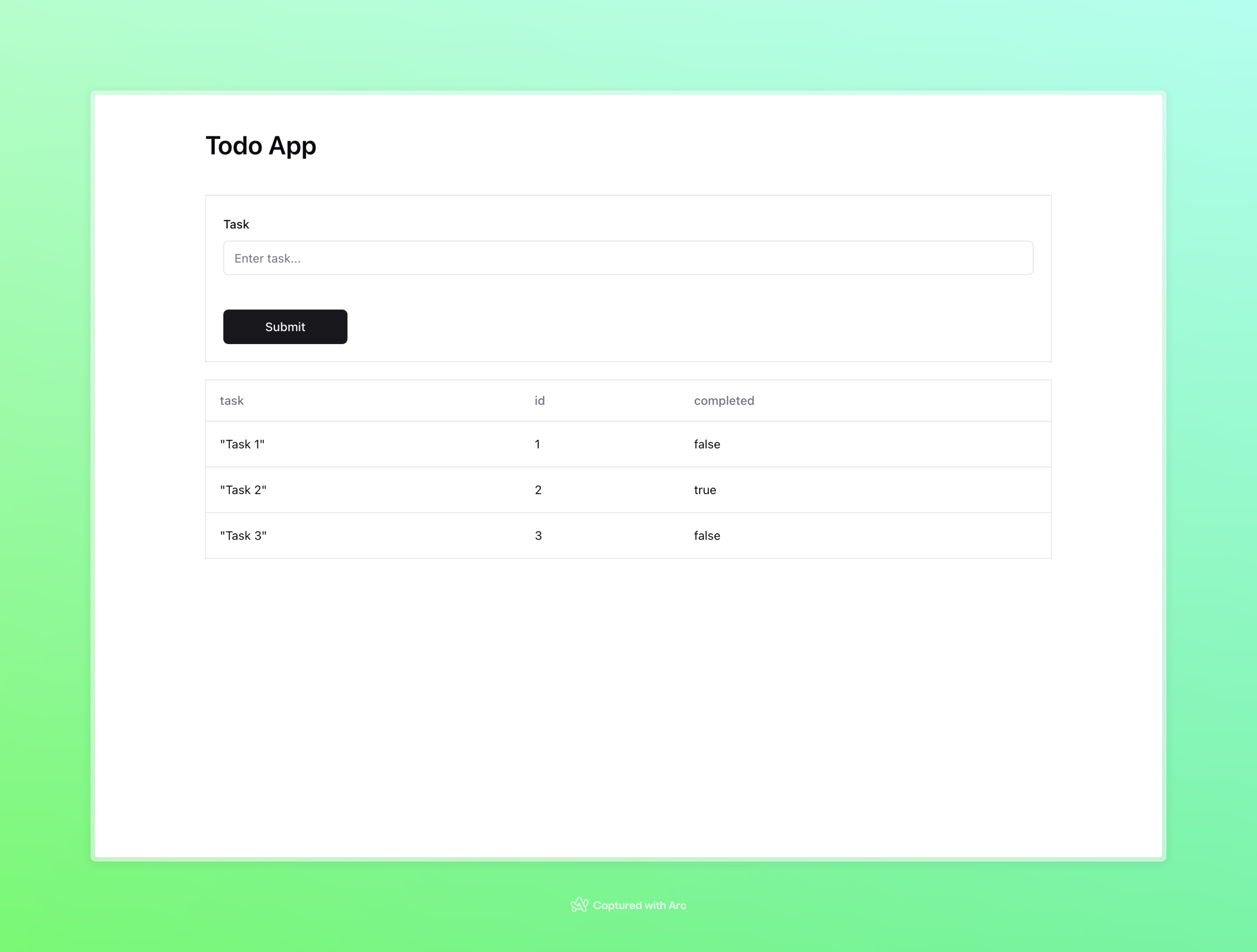
Below is a simple to-do application.
import json
from typing import Optional

from fastapi.encoders import jsonable_encoder
from pydantic import BaseModel
from flect import PageResponse, ActionResponse
from flect import components as c
from flect import form as f
from flect.actions import Notify

# Define a model for creating new todo items with a single 'task' field
class TodoInCreate(BaseModel):
    task: str = f.Input(placeholder="Enter task...")

# Define a model for todo items stored in the database, extending the creation model with an 'id' and 'completed' field
class TodoInDB(TodoInCreate):
    id: int
    completed: Optional[bool] = False

# Initialize a list of todo items
todos = [
    TodoInDB(id=1, task="Task 1", completed=False),
    TodoInDB(id=2, task="Task 2", completed=True),
    TodoInDB(id=3, task="Task 3", completed=False),
]

# Define the page
async def page() -> PageResponse:
    return PageResponse(
        body=c.Container(
            # support tailwind css
            class_name="container mx-auto px-32 py-10",
            children=[
                # Add a heading to the page
                c.Heading(
                    level=1,
                    text="Todo App",
                    class_name="text-3xl mb-10",
                ),
                # Add a form for creating new todo items
                c.Form(
                    model=TodoInCreate,
                    submit_url="/",
                    class_name="mb-5 border p-5",
                ),
                # Add a table displaying all todo items
                c.Table(
                    datasets=todos,
                    class_name="border p-5",
                    model=TodoInDB
                )
            ]
        )
    )

# Define the form handling logic
async def post(form: TodoInCreate) -> ActionResponse:
    todos.append(
        TodoInDB(
            id=len(todos) + 1,
            task=form.task,
            completed=False,
        )
    )
    # Return a notification with the submitted form values
    return ActionResponse(
        action=Notify(
            title="You submitted the following values:",
            description=json.dumps(jsonable_encoder(form), indent=2),
        )
    )
Which renders like this:
Learn More
Credits
This project draws inspiration from the following frameworks:
License
This project is licensed under the terms of the MIT license.
1 maintainer

Release files for flect 0.2.10
For a detailed explanation of source distributions (sdists) and built distributions (wheels), please see the package formats documentation.
Source distribution (sdist)
| File | Size | Uploaded | |
|---|---|---|---|
| flect-0.2.10.tar.gz | 18.8 kB | Details |
Built distribution (wheel)
| File | Interpreter | ABI | Platform | Reset |
|---|---|---|---|---|
| flect-0.2.10-py3-none-any.whl | Python 3 | none | any | Details |
Total release size: 42.3 kB
Release files / flect-0.2.10.tar.gz
| Download URL | flect-0.2.10.tar.gz |
|---|---|
| Size | 18.8 kB |
| Tags | Source |
|
SHA-256 checksum How to use checksums |
8c5f12863c8b4d68f6338cdd41513334559276add6f9c49c4772dcb1d884a367
|
|
BLAKE2b-256 checksum How to use checksums |
6e7d2de4dd1e80b32497f4b9063ac8dd46ba32e82e2f1f0ea9a3a5d8354971c4
|
| Upload date | |
|
Uploaded using Trusted Publishing? What is trusted publishing? |
No |
| Uploaded via |
twine/4.0.2 CPython/3.12.2
|
Release files / flect-0.2.10-py3-none-any.whl
| Download URL | flect-0.2.10-py3-none-any.whl |
|---|---|
| Size | 23.6 kB |
| Tags | Python 3 |
|
SHA-256 checksum How to use checksums |
c87c0c4a19ccc8a6f1e6fb86a90ce2270f45bf40f9df9f471ef32d1c45a72d5e
|
|
BLAKE2b-256 checksum How to use checksums |
54bd200a0cc276be6ede47fd56e79fc9b7edfc11be32051c33c0872005dec4ab
|
| Upload date | |
|
Uploaded using Trusted Publishing? What is trusted publishing? |
No |
| Uploaded via |
twine/4.0.2 CPython/3.12.2
|














