
fleetwatcher
One screen for every terminal coding session you have running.
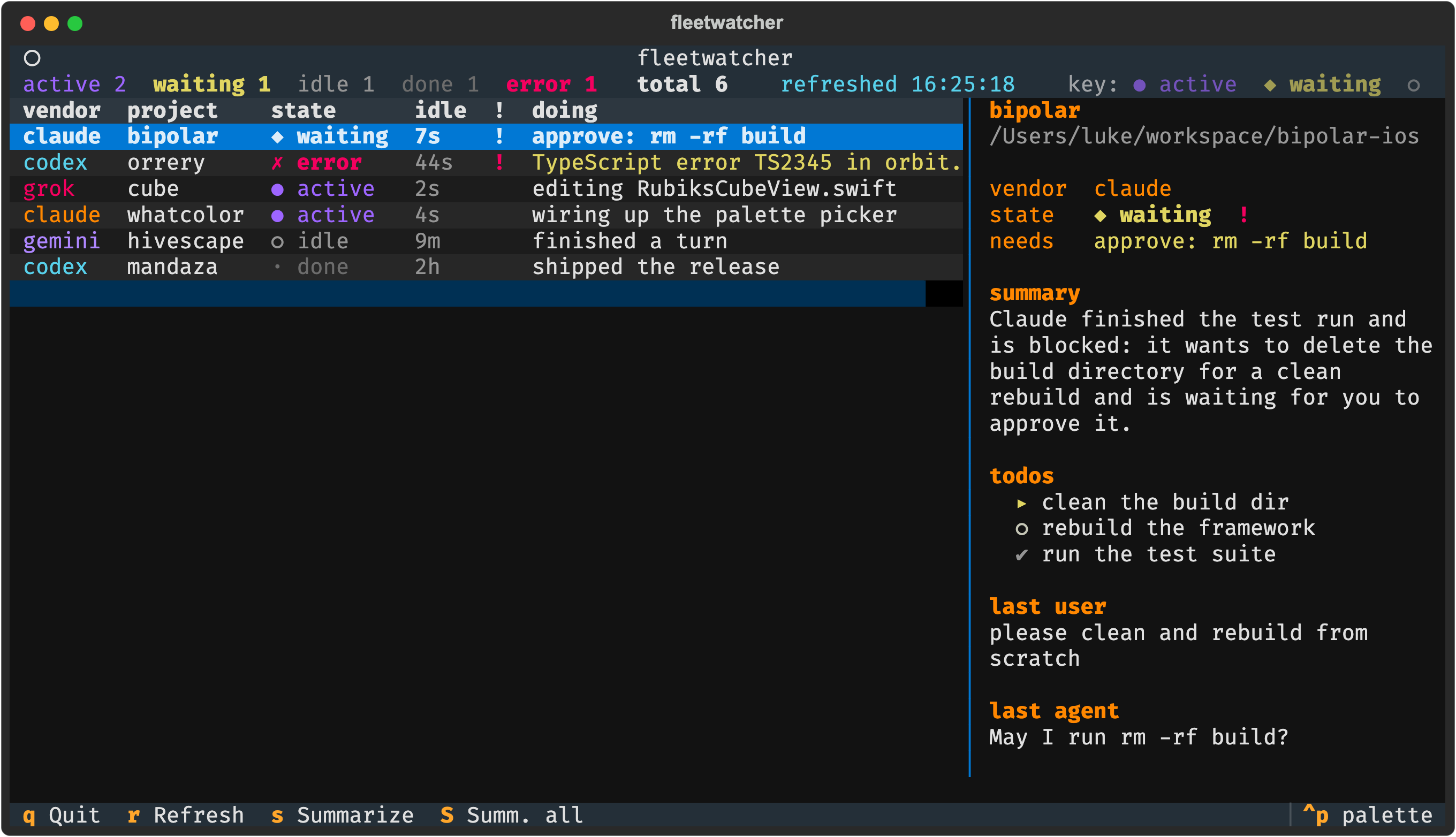
fleetwatcher watches the coding CLIs you already run (Claude Code, Codex, Grok, Gemini) and shows a single live dashboard of what each session is doing and which ones are waiting on you. It reads each tool's own session files on disk, read-only. There is nothing to install into those tools, no daemon, no hooks. If a CLI writes a transcript, fleetwatcher can watch it.
fleetwatcher  17:18:43  active 1  waiting 1  idle 2  done 7  (total 11)

HOST     VENDOR  PROJECT     STATE    IDLE  !  WHAT
local    claude  orrery      active     3s     editing PhaseSpaceCoordinator.swift
local    claude  bipolar     waiting   40s  !  waiting for you to approve: rm -rf build
dreamer  codex   storyblocks idle       4m     finished a turn
dreamer  gemini  hivescape   done       2h     responding
Status: early, but in daily use across a local Mac and a VPS. Current release
0.3.x.
What it tracks
For each session: the vendor, the project, what it is working on right now, how long since it last moved, and a flag the moment it needs you.
| State | Meaning |
|---|---|
active |
the transcript just changed; it is working |
waiting |
blocked on you (a pending permission, an unanswered question) |
idle |
finished its turn a moment ago |
done |
finished a while ago |
error |
something failed, or the transcript cannot be read |
The waiting signal is the point of the whole tool, and it is built on the real
shape of each vendor's files: a Claude tool_use with no matching result, a
Codex command awaiting approval, a Grok permission_requested event with no
resolution. A session that is genuinely mid-tool stays active; only a stalled
one becomes waiting.
Each state has its own bright primary (blue for active, yellow for waiting,
red for error) plus a glyph (● ◆ ✗ ○ ·), so the board reads by shape even
with the color off. idle and done recede into grey. Vendors carry their own
accent (orange, cyan, magenta, violet), kept clear of the state colors so a
vendor tag never reads as a status. Nothing leans on a red-versus-green
distinction, the one pair color-blind readers cannot separate. The dashboard is
always in color; --once adds color when it prints to a terminal and stays
plain text when you pipe it to a file or a log.
Install
pip install fleetwatcher                 # dashboard only: free, no network
pip install "fleetwatcher[summaries]"    # add plain-language summaries (Claude Haiku)
It installs the fleetwatcher and fw commands. The shorter fleetwatch was
already taken on PyPI, so the longer name is used everywhere. Python 3.10 or newer.
From source instead:
git clone https://github.com/lukeslp/fleetwatcher
cd fleetwatcher
python3 -m venv .venv
.venv/bin/pip install -e .                 # dashboard only
.venv/bin/pip install -e ".[summaries]"    # add summaries
Usage
fleetwatcher                       # live dashboard
fleetwatcher --once                # one text snapshot, then exit
fleetwatcher --export-json         # machine-readable snapshot (scripting, remote hosts)
fleetwatcher --no-model            # heuristics only, no network
fleetwatcher --vendors claude,codex   # watch a subset
fleetwatcher --hosts dreamer=user@host   # also watch another machine over ssh
fleetwatcher --export-json --summarize-all   # full report: summarize every session
In the dashboard: q quit, r refresh now, s summarize the selected session,
S summarize the whole fleet, arrows or j/k to move. Selecting a session
also summarizes it on its own, and the detail panel shows the summary, the plan,
and the last exchange for whichever session is selected.
Supported CLIs
| CLI | Reads |
|---|---|
| Claude Code | ~/.claude/projects/<cwd>/<uuid>.jsonl |
| Codex | ~/.codex/sessions/**/rollout-*.jsonl |
| Grok | ~/.grok/sessions/<cwd>/ (history + per-session events) |
| Gemini | ~/.gemini/tmp/<project>/chats/*.jsonl |
Gemini CLI has no human-approval gate, so its sessions report active, idle, and
done but never waiting. There is no on-disk "blocked on you" signal to read.
Each adapter is small and isolated, so adding a vendor is a contained job. See CONTRIBUTING.md.
Summaries (optional)
Every row carries a quick heuristic line for free. On top of that, fleetwatcher can write a one-sentence plain-language status with Claude Haiku.
Summaries turn on automatically when the summaries extra is installed and
ANTHROPIC_API_KEY is set. They run for sessions that need attention and for
whichever session you select, in the background, cached per session, so a fleet
you are not looking at costs nothing. Press S (or run --summarize-all) to
sweep every session at once.
Without the extra or the key, fleetwatcher never makes a network call and shows the
heuristic line instead. --no-model forces heuristics-only even when summaries
are available.
Watching other machines
fleetwatcher --hosts dreamer=user@host adds a remote host. Each refresh runs one
ssh <host> fleetwatcher --export-json, so the remote normalizes its own sessions
and hands back the result: one command per host, the conversation content stays
on the channel you already trust, and a host that goes unreachable goes stale
rather than vanishing from the board. The remote just needs fleetwatcher on its
PATH. Once more than one host is in view, a HOST column appears so you can
tell which machine each session is on.
Privacy
fleetwatcher reads your CLIs' session files read-only and never writes to them. The dashboard displays short excerpts (the last user and agent messages, the plan) locally.
A summary is the only thing that ever leaves your machine, and only when you have
opted into summaries (the summaries extra plus ANTHROPIC_API_KEY): a short
slice of one session's recent activity is sent to Claude Haiku to write a single
sentence. With --no-model, or without the extra or key, nothing is sent
anywhere. Remote hosts are read over your own ssh connection; their session
content travels only over that channel.
How it works
Four small layers, each independently testable:
- Adapters translate one vendor's files into a single normalized
SessionState. One adapter per vendor, each tested against captured fixture transcripts. - The aggregator polls adapters by file modification time and reads only a bounded tail of each transcript, so a 25 MB session file is never read whole. It sorts the fleet needs-first and merges remote hosts.
- The summarizer adds the Haiku sentence, cached and off the UI thread.
- The dashboard (Textual) renders it and refreshes on an interval.
Configuration
All optional, via environment variables:
| Variable | Default | Effect |
|---|---|---|
FLEETWATCHER_ACTIVE_WINDOW |
12 |
seconds of quiet before a session stops counting as active |
FLEETWATCHER_DONE_AFTER |
1800 |
seconds of quiet before idle becomes done |
FLEETWATCHER_MAX_AGE |
259200 |
drop sessions older than this (3 days) |
FLEETWATCHER_REFRESH |
2 |
dashboard refresh interval, seconds |
FLEETWATCHER_MODEL |
claude-haiku-4-5-20251001 |
summary model |
FLEETWATCHER_VENDORS |
claude,codex,grok,gemini |
which CLIs to watch |
FLEETWATCHER_HOSTS |
unset | remote hosts over ssh (name or name=ssh_target, comma-separated) |
FLEETWATCHER_NO_MODEL |
unset | set to 1 to disable summaries |
Contributing
Bug reports, vendor adapters, and fixes are welcome. See CONTRIBUTING.md for the setup, the adapter contract, and how to add a new CLI.
License
MIT. See LICENSE.
1 maintainer

Metadata
1 maintainer
Release files for fleetwatcher 0.5.0
For a detailed explanation of source distributions (sdists) and built distributions (wheels), please see the package formats documentation.
Source distribution (sdist)
| File | Size | Uploaded | Provenance | |
|---|---|---|---|---|
| fleetwatcher-0.5.0.tar.gz | 60.5 kB | Without provenance | Details |
Built distribution (wheel)
| File | Interpreter | ABI | Platform | Reset |
|---|---|---|---|---|
| fleetwatcher-0.5.0-py3-none-any.whl | Python 3 | none | any | Details |
Total release size: 113.0 kB
Release files / fleetwatcher-0.5.0.tar.gz
| Download URL | fleetwatcher-0.5.0.tar.gz |
|---|---|
| Size | 60.5 kB |
| Tags | Source |
|
SHA-256 checksum How to use checksums |
3c631152e8017018dd8f4a4247bcc62e6cef04c03ec4700324900742c90f30da
|
|
BLAKE2b-256 checksum How to use checksums |
157e1f0ac12015c1f7d27f8a52e6da176228266f1b6be3db8e73eb51bbd1477c
|
| Upload date | |
|
Uploaded using Trusted Publishing? What is trusted publishing? |
No |
| Uploaded via |
twine/6.2.0 CPython/3.14.6
|
Release files / fleetwatcher-0.5.0-py3-none-any.whl
| Download URL | fleetwatcher-0.5.0-py3-none-any.whl |
|---|---|
| Size | 52.5 kB |
| Tags | Python 3 |
|
SHA-256 checksum How to use checksums |
889f61714d7654f0a558683526e82b7b5240c29714093ed3d0773e4a3ff8ed53
|
|
BLAKE2b-256 checksum How to use checksums |
fca61536b8150476153c591712fd9695bbae6546623128d980dea57b752086a2
|
| Upload date | |
|
Uploaded using Trusted Publishing? What is trusted publishing? |
No |
| Uploaded via |
twine/6.2.0 CPython/3.14.6
|
Security for fleetwatcher 0.5.0
Provenance
Provenance describes where a file came from. On PyPI, provenance is shared via attestations, which provide a verifiable record of the build or publishing details. View details, limitations and caveats.
No provenance found
None of the files in this release were uploaded with provenance metadata.
A note on package security
PyPI is a repository for distributing packages, not a service for auditing them. While third-party security researchers and our staff do their best to detect and remove malicious packages, PyPI cannot guarantee the quality, security or suitability of any given package.














