
flet-android-notifications
Native Android notifications for Flet apps — a Flet extension bridging Python to the flutter_local_notifications plugin.
Flet has no built-in notifications, and Python-side approaches (plyer, Pyjnius) fail because Flet's Python process is sandboxed from Android APIs.
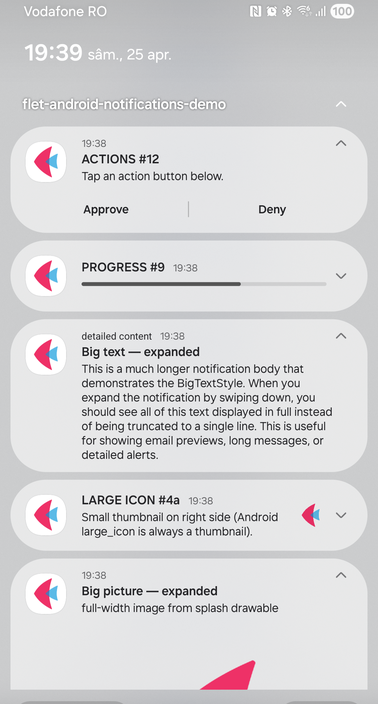
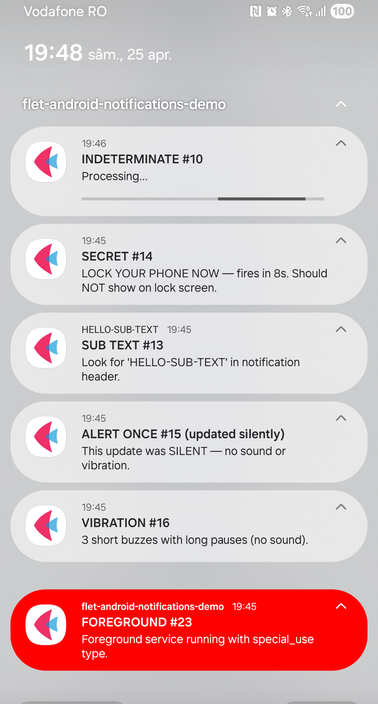
Left: action buttons, determinate progress, BigTextStyle, large icon thumbnail, BigPictureStyle. Right: indeterminate progress, scheduled secret, sub-text header, only-alert-once, custom vibration, and a foreground service with colorized=True (full red background observed on one Samsung OneUI device). All from the demo app in main.py.
Install
pip install flet-android-notifications
For a normal app, add the PyPI dependency and Android permissions to your pyproject.toml:
[project]
dependencies = ["flet>=0.82.0", "flet-android-notifications"]

[tool.flet.android.permission]
"android.permission.POST_NOTIFICATIONS" = true
"android.permission.SCHEDULE_EXACT_ALARM" = true      # for scheduled/periodic
"android.permission.RECEIVE_BOOT_COMPLETED" = true     # survive reboots
After flet build apk generates build/flutter, run the package patcher once per clean build directory:
flet-android-notifications-patch --project-root build/flutter
The patcher adds the flutter_local_notifications receivers/service plus Gradle desugaring/multidex required by scheduled notifications, action callbacks, and foreground services.
Do not copy the demo app's local-development settings into your app:
[tool.flet.app]
exclude = ["flet_android_notifications"]

[tool.flet.dev_packages]
flet-android-notifications = "flet_android_notifications"
Those are only for building this repo's demo against the local checkout. In a PyPI-installed app, tool.flet.dev_packages makes flet build apk pass flet-android-notifications @ flet_android_notifications to pip, which pip rejects as an invalid URL when no local flet_android_notifications directory exists.
Quick start
from datetime import datetime, timedelta
import flet as ft
from flet_android_notifications import FletAndroidNotifications

def main(page: ft.Page):
    notifications = FletAndroidNotifications()

    async def send(e):
        await notifications.request_permissions()
        await notifications.show_notification(
            notification_id=1, title="Hello", body="It works!",
        )

    page.add(ft.Button(content="Send", on_click=send))

ft.run(main)
Instantiate FletAndroidNotifications once. Don't add it to page.overlay or page.controls — it's a service, not a visual control.
See examples/ for more: simple, action buttons, scheduled, styles, periodic, timeout, query, foreground service.
API overview
Core methods
| Method | Description |
|---|---|
show_notification(id, title, body, ...) |
show a notification immediately |
schedule_notification(id, title, body, scheduled_time, ...) |
fire at a future time via AlarmManager |
periodically_show(id, title, body, repeat_interval, ...) |
repeat every minute / hour / day / week |
periodically_show_with_duration(id, title, body, duration_seconds, ...) |
repeat at a custom interval |
start_foreground_service(id, title, body, ...) |
start a foreground service with persistent notification |
stop_foreground_service() |
stop the foreground service and remove its notification |
cancel(notification_id) |
cancel one notification |
cancel_all() |
cancel all notifications |
Query methods
| Method | Returns |
|---|---|
get_active_notifications() |
list[dict] — currently displayed (id, title, body, channel_id, payload) |
get_pending_notifications() |
list[dict] — scheduled/periodic (id, title, body, payload) |
get_notification_app_launch_details() |
dict with did_notification_launch_app and the launching tap's notification_response |
Permission & status methods
| Method | Returns |
|---|---|
request_permissions() |
bool — request POST_NOTIFICATIONS (Android 13+) |
request_exact_alarm_permission() |
bool — request SCHEDULE_EXACT_ALARM (Android 14+) |
request_full_screen_intent_permission() |
bool — request USE_FULL_SCREEN_INTENT (Android 14+) |
are_notifications_enabled() |
bool — are notifications enabled for the app |
can_schedule_exact_notifications() |
bool — may the app schedule exact alarms |
has_notification_policy_access() |
bool — has do-not-disturb policy access (gates channel_bypass_dnd) |
request_notification_policy_access() |
opens the system DND-access screen; confirm afterwards with has_notification_policy_access() |
Use the status checks (are_notifications_enabled, can_schedule_exact_notifications,
has_notification_policy_access) to tell why a notification didn't appear instead of guessing.
open_app_notification_settings() opens the Android notification-settings screen
for this app, so users can re-enable notifications or adjust channels.
Channel management methods
Channel sound/vibration/importance are immutable after creation — delete and recreate a channel to change them.
| Method | Description |
|---|---|
create_notification_channel(channel_id, channel_name, ...) |
create/configure a channel up front (sound, importance, vibration, bypass_dnd, group_id, …) |
delete_notification_channel(channel_id) |
delete a channel (so it can be recreated with new settings) |
get_notification_channels() |
list[dict] — id, name, description, importance, play_sound, enable_vibration, bypass_dnd, show_badge |
create_notification_channel_group(group_id, name, ...) |
create a channel group |
delete_notification_channel_group(group_id) |
delete a channel group and its channels |
Tap callback
import json

def on_tap(e):
    data = json.loads(e.data)  # {"payload": "...", "action_id": "..."}

notifications = FletAndroidNotifications(on_notification_tap=on_tap)
action_id is "" when the body is tapped (not an action button). Inline reply text is returned as data["input"].
Register the handler when creating the service. Queued background taps replay at initialization; delivery is best-effort and interrupted replay can repeat an event.
Rich Android actions
from flet_android_notifications import NotificationAction, NotificationActionInput

await notifications.show_notification(
    notification_id=10,
    title="Message",
    body="Reply from the notification shade.",
    actions=[
        NotificationAction(
            "reply",
            "Reply",
            semantic_action="reply",
            allow_generated_replies=True,
            inputs=[NotificationActionInput(label="Type a reply")],
        ),
        NotificationAction(
            "archive",
            "Archive",
            semantic_action="archive",
            shows_user_interface=False,
        ),
    ],
)
Existing dict actions still work. NotificationAction additionally supports title_color, icon, icon_type, contextual, allow_generated_replies, inputs, semantic_action, and invisible. Android requires contextual actions to include a valid icon. Visual rendering of some action details is OEM-dependent, so verify on target devices.
Notification parameters
show_notification, schedule_notification, periodically_show, and periodically_show_with_duration all share a common set of parameters. Only the required ones differ per method.
Required parameters
| Parameter | show |
schedule |
periodically_show |
periodically_show_with_duration |
|---|---|---|---|---|
notification_id |
int | int | int | int |
title |
str | str | str | str |
body |
str | str | str | str |
scheduled_time |
— | datetime | — | — |
repeat_interval |
— | — | str | — |
duration_seconds |
— | — | — | int|float |
repeat_interval is one of "every_minute", "hourly", "daily", "weekly".
Common optional parameters
These work on all four methods above (exceptions are noted in the Description column).
Basics:
| Parameter | Type | Default | Description |
|---|---|---|---|
payload |
str |
"" |
returned in tap callback |
actions |
list[NotificationAction|dict] |
None |
action buttons and optional inline reply inputs |
importance |
str |
"high" |
none, min, low, default, high, max |
timeout_after |
int|None |
None |
auto-dismiss after N milliseconds |
category |
str|None |
None |
notification type hint for DND filtering |
full_screen_intent |
bool |
False |
launch a full-screen / high-priority heads-up UI. show_notification and schedule_notification only. Needs USE_FULL_SCREEN_INTENT (Android 14+, see request_full_screen_intent_permission()) |
Channel:
| Parameter | Type | Default |
|---|---|---|
channel_id |
str |
"flet_notifications" |
channel_name |
str |
"Flet Notifications" |
channel_description |
str |
"Notifications from Flet app" |
channel_bypass_dnd |
bool |
False |
channel_bypass_dnd only takes effect when the app has do-not-disturb policy access — check with
has_notification_policy_access() and request it via request_notification_policy_access(). A
channel's sound/importance/vibration are fixed at creation; use the channel-management methods to
configure or replace a channel (see below).
Appearance:
| Parameter | Type | Default | Description |
|---|---|---|---|
icon |
str|None |
None |
drawable resource for small icon |
large_icon |
str|None |
None |
thumbnail on right side |
large_icon_type |
str |
"drawable_resource" |
or "file_path" |
color |
str|None |
None |
hex accent color, e.g. "#FF5722" |
colorized |
bool |
False |
color as background — only takes effect on start_foreground_service calls |
sub_text |
str|None |
None |
small text below content |
visibility |
str|None |
None |
"public", "private", or "secret" |
Behavior:
| Parameter | Type | Default | Description |
|---|---|---|---|
play_sound |
bool |
True |
play notification sound |
enable_vibration |
bool |
True |
vibrate |
sound |
str|None |
None |
raw resource name (e.g. "alert_tone") |
vibration_pattern |
list[int]|None |
None |
e.g. [0, 500, 200, 500] |
ongoing |
bool |
False |
sticky on Android 13 and below, dismissible on 14+ (see note) |
auto_cancel |
bool |
True |
dismiss on tap |
silent |
bool |
False |
suppress sound and vibration |
only_alert_once |
bool |
False |
alert on first show only |
Android 14+ note: the OS deliberately lets users swipe away
ongoing=Truenotifications (platform change). The flag still resists "Clear all" and lock screen dismissal. For a truly non-dismissible notification usestart_foreground_service(see below).
Styles and progress:
| Parameter | Type | Default | Description |
|---|---|---|---|
style |
BigTextStyle|BigPictureStyle|InboxStyle|MessagingStyle|None |
None |
rich expandable style |
show_progress |
bool |
False |
show progress bar |
max_progress |
int |
0 |
max value |
progress |
int |
0 |
current value |
indeterminate |
bool |
False |
spinning progress bar |
Grouping:
| Parameter | Type | Default | Description |
|---|---|---|---|
group_key |
str|None |
None |
bundle notifications together |
set_as_group_summary |
bool |
False |
this is the group summary |
group_alert_behavior |
str |
"all" |
"all", "summary", "children" |
Scheduling parameters
| Parameter | Applies to | Type | Default | Description |
|---|---|---|---|---|
schedule_mode |
schedule_notification, periodically_show, periodically_show_with_duration |
str |
"inexact_allow_while_idle" |
see modes below |
match_date_time_components |
schedule_notification only |
str|None |
None |
"time" (daily), "day_of_week_and_time" (weekly), "day_of_month_and_time" (monthly), "date_and_time" (yearly) |
schedule_mode lets the periodic methods choose an exact mode too (previously they were hardcoded
to inexact_allow_while_idle). Exact modes require SCHEDULE_EXACT_ALARM — check first with
can_schedule_exact_notifications(), otherwise the OS rejects them with exact_alarms_not_permitted.
Schedule modes:
| Mode | Exact alarm permission? | Fires in Doze? |
|---|---|---|
"inexact" |
no | no |
"inexact_allow_while_idle" |
no | yes |
"exact" |
yes | no |
"exact_allow_while_idle" |
yes | yes |
"alarm_clock" |
yes | yes |
Foreground service
For persistent background tasks (music, GPS tracking, uploads) that require a visible notification:
await notifications.start_foreground_service(
    notification_id=1,  # must not be 0
    title="Uploading",
    body="3 files remaining...",
    foreground_service_types=["special_use"],
    ongoing=True,
)

# when done:
await notifications.stop_foreground_service()
Parameters specific to foreground service:
| Parameter | Type | Default | Description |
|---|---|---|---|
start_type |
str |
"start_sticky" |
start_sticky, start_not_sticky, start_sticky_compatibility, start_redeliver_intent |
foreground_service_types |
list[str]|None |
None |
e.g. ["special_use"], ["location"], ["media_playback"] |
when |
datetime|None |
None |
Header timestamp / timer base; Android uses now if omitted. Naive datetimes use local time. |
show_when |
bool |
True |
Show the header timestamp or timer |
uses_chronometer |
bool |
False |
Show a live elapsed-time counter in place of the timestamp |
chronometer_count_down |
bool |
False |
With uses_chronometer=True, count down toward a future when |
The timer options above are available starting in 0.11.0; their defaults
preserve existing timestamp behavior. They expose native functionality already
provided by flutter_local_notifications, without a fork or custom layout.
All other notification parameters (channel, appearance, behavior, etc.) are the same as show_notification.
Important:
notification_idmust not be 0 (Android constraint)- The notification is not removed by
cancel()orcancel_all()— usestop_foreground_service() - Requires
FOREGROUND_SERVICEpermission plus a type-specific permission (e.g.FOREGROUND_SERVICE_SPECIAL_USE)
AndroidManifest.xml — add inside <application>:
The package patcher can add this entry automatically.
<service android:name="com.dexterous.flutterlocalnotifications.ForegroundService"
    android:exported="false"
    android:foregroundServiceType="specialUse" />
Adjust foregroundServiceType to match your use case (e.g. location, mediaPlayback).
pyproject.toml permissions:
[tool.flet.android.permission]
"android.permission.FOREGROUND_SERVICE" = true
"android.permission.FOREGROUND_SERVICE_SPECIAL_USE" = true
Styles
from flet_android_notifications import (
    BigTextStyle, BigPictureStyle, InboxStyle,
    MessagingStyle, NotificationMessage, NotificationPerson,
)

# expandable long text
style=BigTextStyle("Full text here...", content_title="Expanded title")

# full-width image when expanded
style=BigPictureStyle(drawable_resource="splash")

# list of lines
style=InboxStyle(["Line 1", "Line 2", "Line 3"], summary_text="3 items")

# chat style with per-message senders (first person is the user themselves;
# messages with person=None are attributed to them)
style=MessagingStyle(
    NotificationPerson("Me"),
    conversation_title="Team chat",
    messages=[
        NotificationMessage("hi", datetime.now(), person=NotificationPerson("Alex")),
        NotificationMessage("hello back", datetime.now()),
    ],
)
Building the APK
The current notification plugin requires Android 7.0 / API 24 or newer, compile SDK 36 or newer, and Java 17. Current Flet Android templates satisfy these requirements.
# first build — generates Flutter template, may fail at Gradle
flet build apk -v

# patch AndroidManifest.xml receivers/services and Gradle desugaring:
flet-android-notifications-patch --project-root build/flutter

# rebuild
flet build apk -v
Needed because flutter_local_notifications requires Java 17 desugaring, and action/scheduling/foreground-service support requires app-level manifest entries. Apply once per clean build directory.
AndroidManifest.xml entries
Register BroadcastReceivers inside <application> in build/flutter/android/app/src/main/AndroidManifest.xml. Required for schedule_notification and the periodically_show* methods to fire at all — not just for reboots: without them AlarmManager fires but has no listener and the notification is silently dropped.
<receiver android:exported="false"
    android:name="com.dexterous.flutterlocalnotifications.ScheduledNotificationReceiver" />
<receiver android:exported="false"
    android:name="com.dexterous.flutterlocalnotifications.ScheduledNotificationBootReceiver">
    <intent-filter>
        <action android:name="android.intent.action.BOOT_COMPLETED" />
        <action android:name="android.intent.action.MY_PACKAGE_REPLACED" />
        <action android:name="android.intent.action.QUICKBOOT_POWERON" />
        <action android:name="com.htc.intent.action.QUICKBOOT_POWERON" />
    </intent-filter>
</receiver>
<receiver android:exported="false"
    android:name="com.dexterous.flutterlocalnotifications.ActionBroadcastReceiver" />
<service android:name="com.dexterous.flutterlocalnotifications.ForegroundService"
    android:exported="false"
    android:foregroundServiceType="specialUse" />
Installing on device
Install updates without clearing app data or notification permissions:
adb install -r path/to/app.apk
On Windows, set PYTHONIOENCODING=utf-8 before building to avoid Unicode crashes.
For this repo's demo, use python build.py (Flet CLI and Flutter required).
Use --skip-flet for Python/Dart source-only rebuilds of an existing project;
rerun the full build after dependency, asset, or packaging changes. Use
--skip-install to build without touching a device.
Custom resources
- Small icons: vector drawable XML in
res/drawable/(24dp, white on transparent) - Sounds: audio files in
res/raw/, reference by name without extension:sound="alert_tone"
Add res/raw/keep.xml to prevent resource stripping:
<?xml version="1.0" encoding="utf-8"?>
<resources xmlns:tools="http://schemas.android.com/tools"
    tools:keep="@raw/*,@drawable/ic_*" />
A channel's sound is fixed at creation. Change it with a new channel_id, or
delete_notification_channel(id) then create_notification_channel(id, ..., sound=...) to reuse
the same id.
OEM rendering notes
coloron regular notifications: reaches the OS but may not render visibly on every skin. Verify per device before relying on it.colorizedon regular notifications: silently ignored everywhere — per Android contract it only applies to foreground-service / media-style notifications.colorizedonstart_foreground_service: observed working on one Samsung OneUI device (demo button 23).- Bottom line: if visible color matters, test both regular and foreground-service colorized notifications on your target devices.
- On-device audit: every demo button was verified on a Galaxy S25 (One UI, Android 16).
Limitations
- Android only. iOS support would need
DarwinNotificationDetailsin the Dart layer. - Desktop: the service instantiates without error but notifications won't appear.
How it works
Python app → FletAndroidNotifications (ft.Service)
  → _invoke_method() over Flet protocol
    → NotificationsService (FletService, Dart)
      → flutter_local_notifications plugin → Android NotificationManager
The extension ships as a Python package with a flutter/ directory containing the Dart code. flet build apk discovers it in site-packages and includes it as a Flutter path dependency.
License
MIT
1 maintainer

Metadata
1 maintainer
Release files for flet-android-notifications 0.11.1
For a detailed explanation of source distributions (sdists) and built distributions (wheels), please see the package formats documentation.
Source distribution (sdist)
| File | Size | Uploaded | |
|---|---|---|---|
| flet_android_notifications-0.11.1.tar.gz | 29.8 kB | Details |
Built distribution (wheel)
| File | Interpreter | ABI | Platform | Reset |
|---|---|---|---|---|
| flet_android_notifications-0.11.1-py3-none-any.whl | Python 3 | none | any | Details |
Total release size: 62.6 kB
Release files / flet_android_notifications-0.11.1.tar.gz
| Download URL | flet_android_notifications-0.11.1.tar.gz |
|---|---|
| Size | 29.8 kB |
| Tags | Source |
|
SHA-256 checksum How to use checksums |
84a2d0c29446eae45eaa73eb8ba14cc6c0841e66e0573d072e7a18da08335ac1
|
|
BLAKE2b-256 checksum How to use checksums |
85e436c6491cff3a1841fcbdaf4e3ff916bcc7199dc982d08d3f799f38cd3ead
|
| Upload date | |
|
Uploaded using Trusted Publishing? What is trusted publishing? |
No |
| Uploaded via |
twine/7.0.0 CPython/3.12.14
|
Release files / flet_android_notifications-0.11.1-py3-none-any.whl
| Download URL | flet_android_notifications-0.11.1-py3-none-any.whl |
|---|---|
| Size | 32.8 kB |
| Tags | Python 3 |
|
SHA-256 checksum How to use checksums |
752a6cd6bf909077bf2411fbffea3afe1f7812fc915e317fac4e63eb3a105d45
|
|
BLAKE2b-256 checksum How to use checksums |
f9eb75433f626aa35886d919a88267ca3718d949c9aab0a22f1420c678b9c7f4
|
| Upload date | |
|
Uploaded using Trusted Publishing? What is trusted publishing? |
No |
| Uploaded via |
twine/7.0.0 CPython/3.12.14
|














