
Flutter OneSignal package integration for Python Flet.

Project description

Flet OneSignal
OneSignal SDK integration for Flet applications







Overview
Flet OneSignal is an extension that integrates the OneSignal Flutter SDK with Flet applications. It provides a complete Python API for:
- Push Notifications — send and receive on iOS and Android (OneSignal Docs)
- In-App Messages — targeted messages within your app (OneSignal Docs)
- User Management — identity, tags, aliases, email, SMS (OneSignal Docs)
- Location — geo-targeted messaging (OneSignal Docs)
- Outcomes — track actions and conversions (OneSignal Docs)
- Live Activities — iOS real-time updates (iOS 16.1+) (OneSignal Docs)
- Privacy & Consent — GDPR compliance (OneSignal Docs)
- Debugging — log levels and error handling
Version 0.4.0 - Built for Flet 0.80.x with a modular architecture that mirrors the OneSignal SDK structure.
Buy Me a Coffee
If you find this project useful, please consider supporting its development:

Requirements
| Component | Minimum Version |
|---|---|
| Python | 3.10+ |
| Flet | 0.80.x+ |
Platform Requirements
| Platform | Minimum Version | Notes |
|---|---|---|
| iOS | 12.0+ | Requires Xcode 14+ |
| Android | API 24 (Android 7.0)+ | Requires compileSdkVersion 33+ |
Installation
Step 1: Install the Package
Choose your preferred package manager:
# Using UV (Recommended)
uv add flet-onesignal

# Using pip
pip install flet-onesignal

# Using Poetry
poetry add flet-onesignal
Step 2: Configure pyproject.toml
Add the dependency to your project configuration:
[project]
name = "my-flet-app"
version = "1.0.0"
requires-python = ">=3.10"

dependencies = [
    "flet>=0.80.5",
    "flet-onesignal>=0.4.0",
]

[tool.flet.app]
path = "src"
Step 3: OneSignal Dashboard Setup (Android)
-
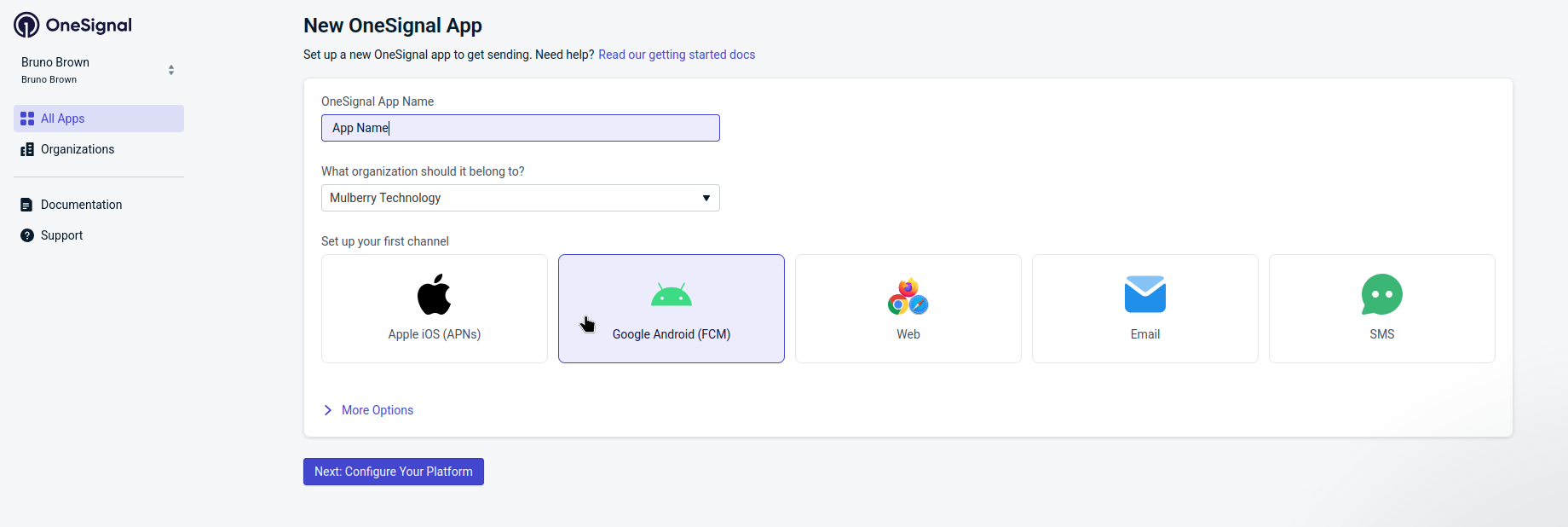
Create an account at OneSignal.com, then click + Create > New App.
-
Enter your App Name, select the organization, choose Google Android (FCM) as the channel, and click Next: Configure Your Platform.
-
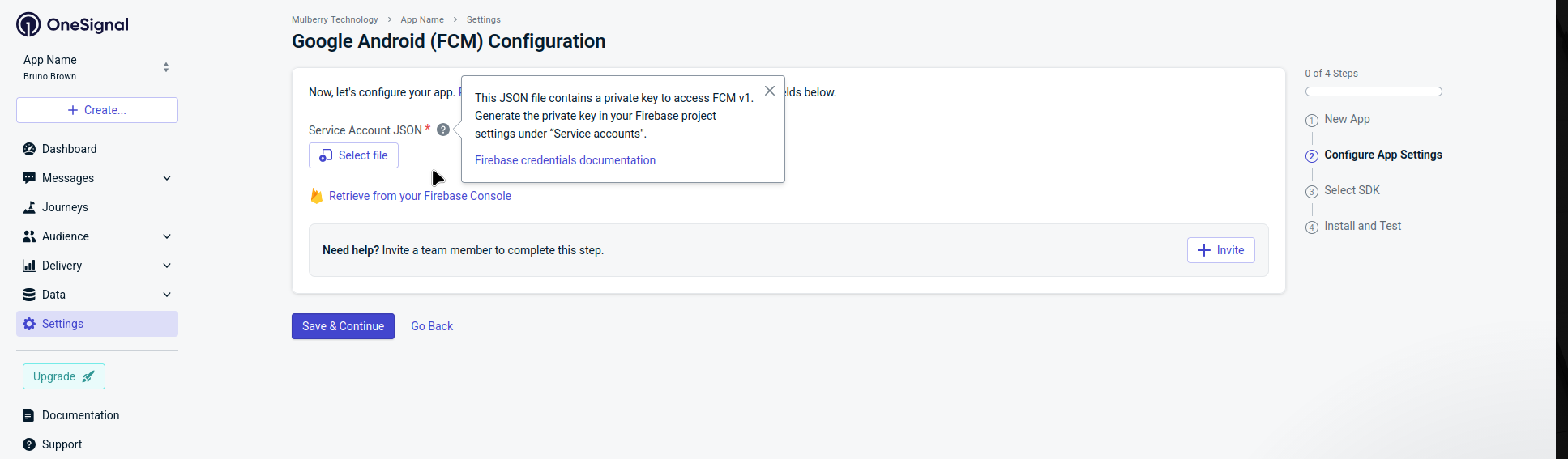
Upload your Service Account JSON file. To generate it, go to the Firebase Console > Project Settings > Service accounts > Generate new private key. See the OneSignal Android credentials guide for detailed instructions. Click Save & Continue.
-
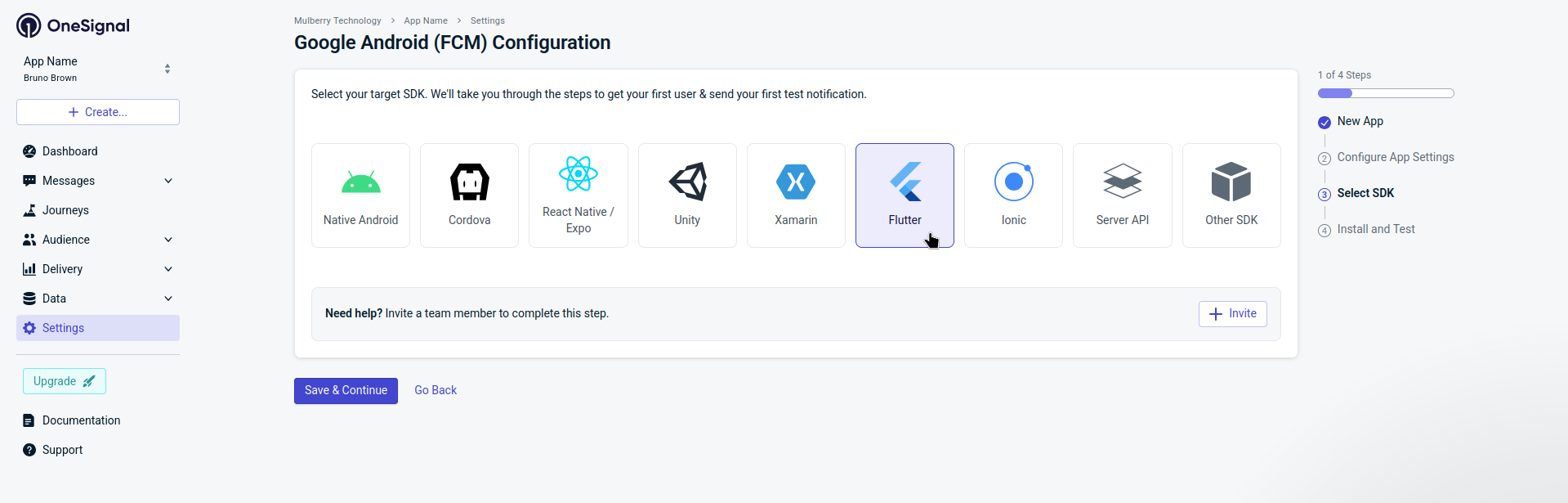
Select Flutter as the target SDK, then click Save & Continue.
-
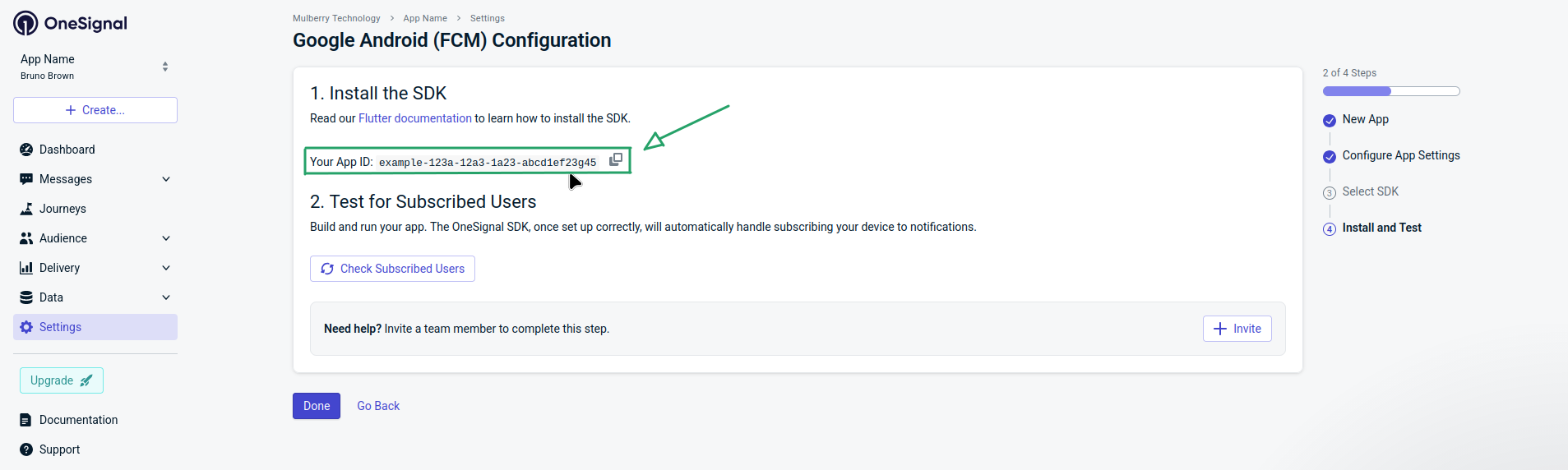
Copy the App ID displayed on the screen and click Done. You will use this ID in your Flet app.
Step 4: iOS Configuration
- Enable Push Notifications capability in Xcode
- Enable Background Modes > Remote notifications
- Add your APNs certificate to the OneSignal dashboard
Quick Start
import flet as ft
import flet_onesignal as fos

# Your OneSignal App ID from the dashboard
ONESIGNAL_APP_ID = "xxxxxxxx-xxxx-xxxx-xxxx-xxxxxxxxxxxx"


async def main(page: ft.Page):
    page.title = "My App"
    page.vertical_alignment = ft.CrossAxisAlignment.CENTER
    page.horizontal_alignment = ft.MainAxisAlignment.CENTER

    # Initialize OneSignal
    onesignal = fos.OneSignal(
        app_id=ONESIGNAL_APP_ID,
        log_level=fos.OSLogLevel.DEBUG,  # Enable debug logging
    )

    # Add to page services (required for Flet 0.80.x services)
    page.services.append(onesignal)

    # Request notification permission
    permission_granted = await onesignal.notifications.request_permission()
    print(f"Notification permission: {permission_granted}")

    # Identify the user (optional but recommended)
    await onesignal.login("user_12345")

    page.add(ft.Text("OneSignal is ready!"))


if __name__ == "__main__":
    ft.run(main)
Note:
OneSignalis a service, not a visual control. You must add it usingpage.services.append(onesignal)— notpage.overlay.append(onesignal). Usingoverlaywill not initialize the SDK correctly.
Architecture
The SDK follows a modular architecture that mirrors the official OneSignal SDK:
fos.OneSignal
│
├── .debug              # Logging and debugging
├── .user               # User identity, tags, aliases, email, SMS
├── .notifications      # Push notification management
├── .in_app_messages    # In-app message triggers and lifecycle
├── .location           # Location sharing (optional)
├── .session            # Outcomes and analytics
└── .live_activities    # iOS Live Activities (iOS 16.1+)
Each module provides focused functionality and can be accessed as a property of the main OneSignal instance.
User Management
Login and Logout
Associate users with their account in your system using an External User ID:
# Login - Associates the device with your user ID
await onesignal.login("user_12345")

# Logout - Removes the association, creates anonymous user
await onesignal.logout()
Best Practice: Call
login()when the user signs into your app andlogout()when they sign out.
Get User IDs
# Get the OneSignal-generated user ID
onesignal_id = await onesignal.user.get_onesignal_id()
print(f"OneSignal ID: {onesignal_id}")

# Get the External User ID (set via login)
external_id = await onesignal.user.get_external_id()
print(f"External ID: {external_id}")
Tags
Tags are key-value pairs used for segmentation and personalization:
# Add a single tag
await onesignal.user.add_tag("subscription_type", "premium")

# Add multiple tags at once
await onesignal.user.add_tags({
    "favorite_team": "barcelona",
    "notification_frequency": "daily",
    "app_version": "2.1.0",
})

# Remove a tag
await onesignal.user.remove_tag("old_tag")

# Remove multiple tags
await onesignal.user.remove_tags(["tag1", "tag2", "tag3"])

# Get all tags
tags = await onesignal.user.get_tags()
print(f"User tags: {tags}")
Aliases
Aliases allow you to associate multiple identifiers with a single user:
# Add an alias (e.g., CRM ID, database ID)
await onesignal.user.add_alias("crm_id", "CRM_98765")

# Add multiple aliases
await onesignal.user.add_aliases({
    "database_id": "DB_12345",
    "analytics_id": "GA_67890",
})

# Remove an alias
await onesignal.user.remove_alias("old_alias")
Email Subscriptions
Add email addresses for omnichannel messaging:
# Add an email subscription
await onesignal.user.add_email("user@example.com")

# Remove an email subscription
await onesignal.user.remove_email("user@example.com")
SMS Subscriptions
Add phone numbers for SMS messaging (use E.164 format):
# Add SMS subscription (E.164 format: +[country code][number])
await onesignal.user.add_sms("+5511999999999")

# Remove SMS subscription
await onesignal.user.remove_sms("+5511999999999")
Language
Set the user's preferred language for localized notifications:
# Set language using ISO 639-1 code
await onesignal.user.set_language("pt")  # Portuguese
await onesignal.user.set_language("es")  # Spanish
await onesignal.user.set_language("en")  # English

# You can also use the Language enum for auto-complete support
await onesignal.user.set_language(fos.Language.PORTUGUESE.value)
await onesignal.user.set_language(fos.Language.SPANISH.value)
Push Notifications
Requesting Permission
You must request permission before sending push notifications:
# Request permission with fallback to settings
granted = await onesignal.notifications.request_permission(
    fallback_to_settings=True  # Opens settings if previously denied
)

if granted:
    print("User granted notification permission!")
else:
    print("User denied notification permission")
Check Permission Status
# Check if permission can be requested (not yet prompted)
can_request = await onesignal.notifications.can_request_permission()

# Check current permission status
has_permission = await onesignal.notifications.get_permission()
iOS Provisional Authorization
Request provisional (quiet) authorization on iOS 12+:
# Notifications will be delivered quietly to Notification Center
authorized = await onesignal.notifications.register_for_provisional_authorization()
Managing Notifications
# Clear all notifications from the notification center
await onesignal.notifications.clear_all()

# Remove a specific notification (Android only)
await onesignal.notifications.remove_notification(notification_id)

# Remove a group of notifications (Android only)
await onesignal.notifications.remove_grouped_notifications("group_key")
Foreground Display Control
Control whether notifications are shown when the app is in the foreground:
# Inside on_notification_foreground handler:
# Prevent a notification from being displayed
await onesignal.notifications.prevent_default(e.notification_id)

# Later, allow display if needed
await onesignal.notifications.display(e.notification_id)
Push Subscription Control
# Opt user into push notifications
await onesignal.user.opt_in_push()

# Opt user out of push notifications
await onesignal.user.opt_out_push()

# Check if user is opted in
is_opted_in = await onesignal.user.is_push_opted_in()

# Get push subscription details
subscription_id = await onesignal.user.get_push_subscription_id()
push_token = await onesignal.user.get_push_subscription_token()
Handling Notification Events
def on_notification_click(e: fos.OSNotificationClickEvent):
    """Called when user taps on a notification."""
    print(f"Notification clicked: {e.notification}")
    print(f"Action ID: {e.action_id}")  # If action buttons were used


def on_notification_foreground(e: fos.OSNotificationWillDisplayEvent):
    """Called when notification received while app is in foreground."""
    print(f"Notification received: {e.notification}")
    print(f"Notification ID: {e.notification_id}")

    # Optionally prevent display and handle manually:
    # await onesignal.notifications.prevent_default(e.notification_id)
    # Later, allow display if needed:
    # await onesignal.notifications.display(e.notification_id)


def on_permission_change(e: fos.OSPermissionChangeEvent):
    """Called when notification permission status changes."""
    print(f"Permission granted: {e.permission}")


# Register handlers when creating OneSignal instance
onesignal = fos.OneSignal(
    app_id=ONESIGNAL_APP_ID,
    on_notification_click=on_notification_click,
    on_notification_foreground=on_notification_foreground,
    on_permission_change=on_permission_change,
)
In-App Messages
In-App Messages (IAMs) are messages displayed within your app based on triggers.
Triggers
Triggers determine when IAMs are displayed:
# Add a trigger
await onesignal.in_app_messages.add_trigger("level_completed", "5")

# Add multiple triggers
await onesignal.in_app_messages.add_triggers({
    "screen": "checkout",
    "cart_value": "50",
})

# Remove a trigger
await onesignal.in_app_messages.remove_trigger("old_trigger")

# Remove multiple triggers
await onesignal.in_app_messages.remove_triggers(["trigger1", "trigger2"])

# Clear all triggers
await onesignal.in_app_messages.clear_triggers()
Pausing In-App Messages
Temporarily prevent IAMs from displaying:
# Pause IAM display
await onesignal.in_app_messages.pause()

# Resume IAM display
await onesignal.in_app_messages.resume()

# Check if paused
is_paused = await onesignal.in_app_messages.is_paused()
IAM Event Handlers
def on_iam_click(e: fos.OSInAppMessageClickEvent):
    """Called when user interacts with an IAM."""
    print(f"IAM clicked - Action: {e.result.action_id}")
    print(f"URL: {e.result.url}")
    print(f"Closing message: {e.result.closing_message}")


def on_iam_will_display(e: fos.OSInAppMessageWillDisplayEvent):
    """Called before an IAM is displayed."""
    print(f"IAM will display: {e.message}")


def on_iam_did_display(e: fos.OSInAppMessageDidDisplayEvent):
    """Called after an IAM is displayed."""
    print("IAM displayed")


def on_iam_will_dismiss(e: fos.OSInAppMessageWillDismissEvent):
    """Called before an IAM is dismissed."""
    print("IAM will dismiss")


def on_iam_did_dismiss(e: fos.OSInAppMessageDidDismissEvent):
    """Called after an IAM is dismissed."""
    print("IAM dismissed")


onesignal = fos.OneSignal(
    app_id=ONESIGNAL_APP_ID,
    on_iam_click=on_iam_click,
    on_iam_will_display=on_iam_will_display,
    on_iam_did_display=on_iam_did_display,
    on_iam_will_dismiss=on_iam_will_dismiss,
    on_iam_did_dismiss=on_iam_did_dismiss,
)
Location
Share user location for geo-targeted messaging:
# Request location permission
granted = await onesignal.location.request_permission()

# Enable location sharing
await onesignal.location.set_shared(True)

# Disable location sharing
await onesignal.location.set_shared(False)

# Check if location is being shared
is_shared = await onesignal.location.is_shared()
Android Setup
On Android, the OneSignal Location module is not included by default. Without it, set_shared(True) will log no location dependency found and location will not work.
To enable it, you need to build your app using the fos-build CLI, which automatically injects the required Gradle dependencies (com.onesignal:location, play-services-location, and ProGuard rules).
1. Install the CLI:
# Using UV (Recommended)
uv add flet-onesignal[cli]

# Using pip
pip install flet-onesignal[cli]

# Using Poetry
poetry add flet-onesignal[cli]
2. Add location permissions to your pyproject.toml:
# pyproject.toml
[tool.flet.android]
permission."android.permission.ACCESS_FINE_LOCATION" = true
permission."android.permission.ACCESS_COARSE_LOCATION" = true
These permissions are required in the Android Manifest for the app to access the device's GPS. ACCESS_FINE_LOCATION enables precise GPS positioning, while ACCESS_COARSE_LOCATION enables approximate location via Wi-Fi/cell towers. Without them, the system will deny location access at runtime even if the user grants permission in the dialog.
3. Enable the OneSignal Location module via pyproject.toml or CLI flag:
# pyproject.toml
[tool.flet.onesignal.android]
location = true
# Or pass the flag directly
fos-build apk --location
4. Build with fos-build:
fos-build apk
Note: Using
flet build apkdirectly (withoutfos-build) will not inject the location module and the feature will silently fail at runtime.
Outcomes
Track user actions and conversions attributed to notifications:
# Track a simple outcome
await onesignal.session.add_outcome("product_viewed")

# Track a unique outcome (counted once per notification)
await onesignal.session.add_unique_outcome("app_opened")

# Track an outcome with a value (e.g., purchase amount)
await onesignal.session.add_outcome_with_value("purchase", 29.99)
Live Activities (iOS)
Update iOS Live Activities in real-time (iOS 16.1+):
# Enter a Live Activity
await onesignal.live_activities.enter(
    activity_id="delivery_12345",
    token="live_activity_push_token"
)

# Exit a Live Activity
await onesignal.live_activities.exit("delivery_12345")

# Set push-to-start token for a Live Activity type
await onesignal.live_activities.set_push_to_start_token(
    activity_type="DeliveryActivityAttributes",
    token="push_to_start_token"
)

# Remove push-to-start token
await onesignal.live_activities.remove_push_to_start_token("DeliveryActivityAttributes")

# Setup default Live Activity options
await onesignal.live_activities.setup_default()
Privacy & Consent
For GDPR and other privacy regulations, you can require user consent before collecting data:
# Create OneSignal with consent requirement
onesignal = fos.OneSignal(
    app_id=ONESIGNAL_APP_ID,
    require_consent=True,  # SDK won't collect data until consent is given
)

# After user accepts your privacy policy
await onesignal.consent_given(True)

# If user declines
await onesignal.consent_given(False)
Important:
require_consent=Truemust be set in the constructor for the consent methods to work. Without it, the SDK is fully active from initialization and callingconsent_given()has no practical effect.
Debugging
Log Levels
Configure SDK logging for development:
# Set log level during initialization
onesignal = fos.OneSignal(
    app_id=ONESIGNAL_APP_ID,
    log_level=fos.OSLogLevel.VERBOSE,
)

# Or change it dynamically
await onesignal.debug.set_log_level(fos.OSLogLevel.DEBUG)

# Set alert level (visual alerts for errors)
await onesignal.debug.set_alert_level(fos.OSLogLevel.ERROR)
Available log levels:
| Level | Description |
|---|---|
NONE |
No logging |
FATAL |
Only fatal errors |
ERROR |
Errors and fatal errors |
WARN |
Warnings and above |
INFO |
Informational messages and above |
DEBUG |
Debug messages and above |
VERBOSE |
All messages including verbose details |
Error Handling
def on_error(e: fos.OSErrorEvent):
    """Called when an error occurs in the SDK."""
    print(f"Error in {e.method}: {e.message}")
    if e.stack_trace:
        print(f"Stack trace: {e.stack_trace}")


onesignal = fos.OneSignal(
    app_id=ONESIGNAL_APP_ID,
    on_error=on_error,
)
Debug Console
A built-in visual console for viewing application logs during development:
import flet as ft
import flet_onesignal as fos

# Setup file-based logging (writes to FLET_APP_CONSOLE or debug.log)
logger = fos.setup_logging()

async def main(page: ft.Page):
    debug_console = fos.DebugConsole()

    page.appbar = ft.AppBar(
        title=ft.Text("My App"),
        actions=[debug_console.icon],  # Bug icon opens the console
    )

    # Or use a floating action button instead
    # page.floating_action_button = debug_console.fab

    logger.info("App started")
    page.add(ft.Text("Hello World"))

ft.run(main)
The DebugConsole reads log entries written by setup_logging() and displays them in a filterable dialog with color-coded levels (fos.LogLevel.DEBUG, INFO, WARNING, ERROR, CRITICAL).
Android Logcat Scripts
The scripts/ directory includes two logcat viewer scripts that display Android logs with Android Studio-style colors and formatting. They auto-detect the focused app, filter by its PID, and highlight Flet/Flutter, Python errors and exceptions.
Bash version (Linux/macOS — requires adb in PATH):
# Default filter (flutter, python, Error, Exception, Traceback)
./scripts/flet_log.sh

# Add extra filters
./scripts/flet_log.sh "OneSignal|Firebase"
Python version (cross-platform):
python scripts/flet_log.py

python scripts/flet_log.py "OneSignal|Firebase"
Requirement: A device or emulator connected via
adb. The scripts clear the logcat buffer on each app restart so you only see fresh output.
API Reference
OneSignal (Main Class)
fos.OneSignal(
    app_id: str,                          # Required: Your OneSignal App ID
    log_level: OSLogLevel = None,         # Optional: SDK log level
    visual_alert_level: OSLogLevel = None, # Optional: Visual alert level (iOS)
    require_consent: bool = False,        # Optional: Require user consent
    on_notification_click: Callable = None,
    on_notification_foreground: Callable = None,
    on_permission_change: Callable = None,
    on_user_change: Callable = None,
    on_push_subscription_change: Callable = None,
    on_iam_click: Callable = None,
    on_iam_will_display: Callable = None,
    on_iam_did_display: Callable = None,
    on_iam_will_dismiss: Callable = None,
    on_iam_did_dismiss: Callable = None,
    on_error: Callable = None,
)
Event Types
| Event Class | Properties |
|---|---|
OSNotificationClickEvent |
notification, action_id |
OSNotificationWillDisplayEvent |
notification, notification_id |
OSPermissionChangeEvent |
permission |
OSUserChangedEvent |
state.onesignal_id, state.external_id |
OSPushSubscriptionChangedEvent |
id, token, opted_in |
OSInAppMessageClickEvent |
message, result.action_id, result.url, result.url_target, result.closing_message |
OSInAppMessageWillDisplayEvent |
message |
OSInAppMessageDidDisplayEvent |
message |
OSInAppMessageWillDismissEvent |
message |
OSInAppMessageDidDismissEvent |
message |
OSErrorEvent |
method, message, stack_trace |
Enums
class OSLogLevel(Enum):
    NONE = "none"
    FATAL = "fatal"
    ERROR = "error"
    WARN = "warn"
    INFO = "info"
    DEBUG = "debug"
    VERBOSE = "verbose"
Migration from v0.3.x
If upgrading from version 0.3.x, note these breaking changes:
| v0.3.x (Old) | v0.4.0 (New) |
|---|---|
fos.OneSignalSettings(app_id=...) |
fos.OneSignal(app_id=...) |
onesignal.get_onesignal_id() |
await onesignal.user.get_onesignal_id() |
onesignal.get_external_user_id() |
await onesignal.user.get_external_id() |
onesignal.login(id) |
await onesignal.login(id) |
onesignal.logout() |
await onesignal.logout() |
onesignal.set_language(code) |
await onesignal.user.set_language(code) |
onesignal.add_alias(alias, id) |
await onesignal.user.add_alias(label, id) |
onesignal.request_permission() |
await onesignal.notifications.request_permission() |
onesignal.clear_all_notifications() |
await onesignal.notifications.clear_all() |
on_notification_opened |
on_notification_click |
on_notification_received |
on_notification_foreground |
on_click_in_app_messages |
on_iam_click |
ft.app(target=main) |
ft.run(main) |
Key changes:
- All methods are now async-only (no
_asyncsuffix) - Methods are organized into sub-modules (
.user,.notifications, etc.) - Uses
ft.Servicebase class instead ofControl - New event types with structured data
Troubleshooting
Notifications not appearing
- Verify your OneSignal App ID is correct
- Check that you've requested and received notification permission
- Ensure platform certificates (APNs/FCM) are configured in OneSignal dashboard
- Check device logs for any SDK errors
App crashes on startup
- Verify minimum SDK versions are met
- Check that the OneSignal is added to
page.services - Review the
on_errorhandler for any initialization errors
Tags not syncing
- Tags are synced asynchronously - allow a few seconds
- Check your network connection
- Verify tags in the OneSignal dashboard under Users
Examples
Two complete examples are available in the examples directory:
Example App
Interactive demo with pages for each module — login, notifications, tags, aliases, in-app messages, location, session outcomes and more — built with Flet's declarative UI.
cd examples/flet_onesignal_example
uv sync
uv run python src/main.py
Test Runner
Automated test app that exercises every SDK method with a single tap and displays real-time results in a checklist + log panel. Useful for validating the integration on a real device after building with fos-build or flet build.
cd examples/flet_onesignal_test
uv sync
fos-build apk          # recommended (injects location module)
# or: uv run python src/main.py   # desktop preview (no location)
Learn more
Flet Community
Join the community to contribute or get help:
Support
If you like this project, please give it a GitHub star ⭐
Contributing
Contributions and feedback are welcome!
- Fork the repository
- Create a feature branch
- Submit a pull request with detailed explanation
For feedback, open an issue with your suggestions.
Try flet-onesignal today and enhance your Flet apps with push notifications!

Commit your work to the LORD, and your plans will succeed. Proverbs 16:3
Release history Release notifications | RSS feed


Download files
Download the file for your platform. If you're not sure which to choose, learn more about installing packages.
Source Distribution
Built Distribution
Filter files by name, interpreter, ABI, and platform.
If you're not sure about the file name format, learn more about wheel file names.
Copy a direct link to the current filters
File details
Details for the file flet_onesignal-0.4.4.tar.gz.
File metadata
- Download URL: flet_onesignal-0.4.4.tar.gz
- Upload date:
- Size: 53.1 kB
- Tags: Source
- Uploaded using Trusted Publishing? No
- Uploaded via: uv/0.10.9 {"installer":{"name":"uv","version":"0.10.9","subcommand":["publish"]},"python":null,"implementation":{"name":null,"version":null},"distro":{"name":"Linux Mint","version":"22.3","id":"zena","libc":null},"system":{"name":null,"release":null},"cpu":null,"openssl_version":null,"setuptools_version":null,"rustc_version":null,"ci":null}
File hashes
| Algorithm | Hash digest | |
|---|---|---|
| SHA256 |
e775e605d900c3e880c577554fc4a3e73ca3d315e5ff733ff6e26d9d69d56302
|
|
| MD5 |
353cd271b46b7e2aee1c4061619c8d18
|
|
| BLAKE2b-256 |
21a545a700fccb233c848d64d79a264295fc9912aff089e683732d74bde50645
|
File details
Details for the file flet_onesignal-0.4.4-py3-none-any.whl.
File metadata
- Download URL: flet_onesignal-0.4.4-py3-none-any.whl
- Upload date:
- Size: 46.9 kB
- Tags: Python 3
- Uploaded using Trusted Publishing? No
- Uploaded via: uv/0.10.9 {"installer":{"name":"uv","version":"0.10.9","subcommand":["publish"]},"python":null,"implementation":{"name":null,"version":null},"distro":{"name":"Linux Mint","version":"22.3","id":"zena","libc":null},"system":{"name":null,"release":null},"cpu":null,"openssl_version":null,"setuptools_version":null,"rustc_version":null,"ci":null}
File hashes
| Algorithm | Hash digest | |
|---|---|---|
| SHA256 |
79b8219c52d66b43a0b91ec8c52df089a84b40487378ca6804b2816a64cde8af
|
|
| MD5 |
4edf96841b7d1e2e077c0b24b54f00d4
|
|
| BLAKE2b-256 |
7db7b2e239fa06ea8e16d6b0580c4cb61ed7ecfc18a71e4dcbd00bd7d8dfbe14
|






