
Flet - quickly build interactive apps for web, desktop and mobile in Python
Flet is a rich User Interface (UI) framework to quickly build interactive web, desktop and mobile apps in Python without prior knowledge of web technologies like HTTP, HTML, CSS or JavaSscript. You build UI with controls based on Flutter widgets to ensure your programs look cool and professional.
Requirements
- Python 3.7 or above on Windows, Linux or macOS
Installation
pip install flet
Hello, world!
import flet
from flet import Page, Text

def main(page: Page):
    page.add(Text("Hello, world!"))

flet.app(target=main)
Run the sample above and the app will be started in a native OS window:
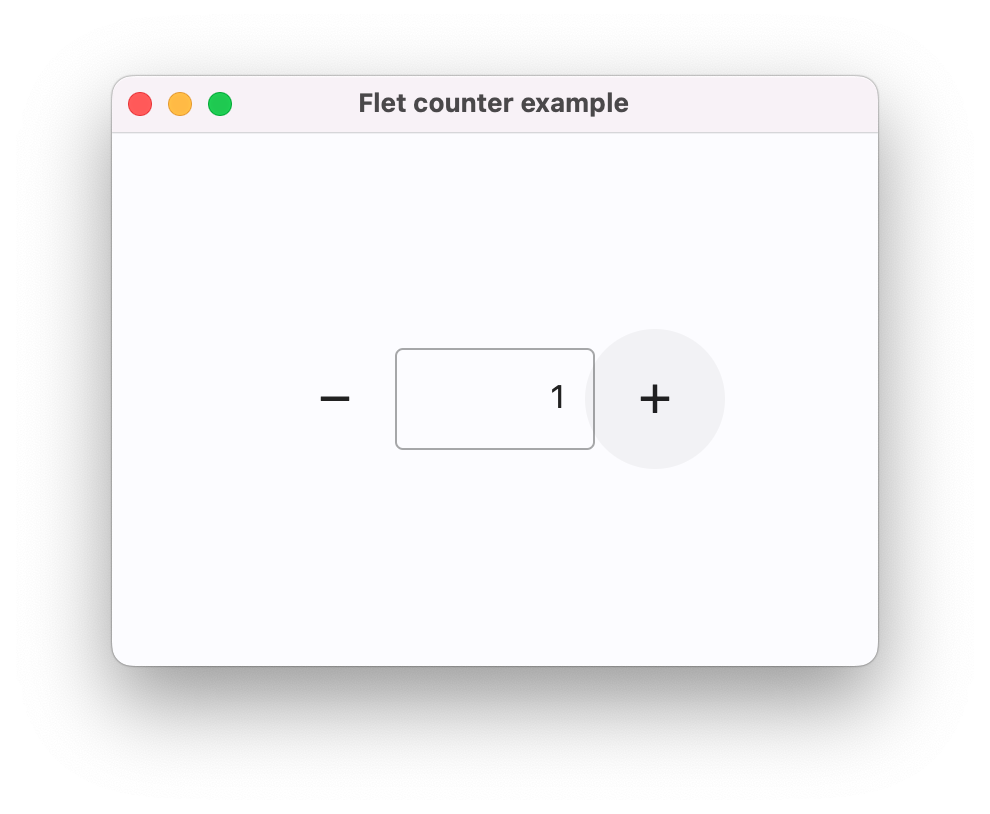
Continue with Python guide to learn how to make a real app.
Browse for more Flet examples.
Join to a conversation on Flet Discord server.
1 maintainer

Metadata
1 maintainer
Release files for flet 0.1.56
For a detailed explanation of source distributions (sdists) and built distributions (wheels), please see the package formats documentation.
Source distribution (sdist)
| File | Size | Uploaded | Provenance | Actions |
|---|---|---|---|---|
| flet-0.1.56.tar.gz | 122.9 kB | Without provenance | Details for flet-0.1.56.tar.gz |
Built distributions (wheels)
Total release size: 152.3 MB
Release files / flet-0.1.56.tar.gz
| Download URL | flet-0.1.56.tar.gz |
|---|---|
| Size | 122.9 kB |
| Tags | Source |
|
SHA-256 checksum How to use checksums |
77a7cf65a25bfccf5c6354726a2eb555b16f21bb363672b82cb58bf37a66d99e
|
|
BLAKE2b-256 checksum How to use checksums |
31e7ee4c887d458255a61ca253bfb30e7294ff9ece528cbcde5f0425117c31e8
|
| Upload date | |
|
Uploaded using Trusted Publishing? What is trusted publishing? |
No |
| Uploaded via |
twine/4.0.1 CPython/3.10.6
|
Release files / flet-0.1.56-py3-none-win_amd64.whl
| Download URL | flet-0.1.56-py3-none-win_amd64.whl |
|---|---|
| Size | 19.7 MB |
| Tags | Python 3 Windows x86-64 |
|
SHA-256 checksum How to use checksums |
ecf765672f33c2f4c155368b1529eeee93e45746d319c71c0f103535845df508
|
|
BLAKE2b-256 checksum How to use checksums |
6212ffb3cc5912b1a4dcb5d678b183b15280bd0ace3ca5f0c2b1b13bd6b87462
|
| Upload date | |
|
Uploaded using Trusted Publishing? What is trusted publishing? |
No |
| Uploaded via |
twine/4.0.1 CPython/3.10.6
|
Release files / flet-0.1.56-py3-none-win32.whl
| Download URL | flet-0.1.56-py3-none-win32.whl |
|---|---|
| Size | 19.6 MB |
| Tags | Python 3 Windows x86-32 |
|
SHA-256 checksum How to use checksums |
b2ccc8dd6a5557b9b6ec228defd5674bb0dbeb7d0569ef37a636143a61954560
|
|
BLAKE2b-256 checksum How to use checksums |
f9bdf2aaf800009fb47d22f2a1f887eb58b9ed26e0d0575a4c76dcb4be4803fe
|
| Upload date | |
|
Uploaded using Trusted Publishing? What is trusted publishing? |
No |
| Uploaded via |
twine/4.0.1 CPython/3.10.6
|
Release files / flet-0.1.56-py3-none-musllinux_1_2_x86_64.whl
| Download URL | flet-0.1.56-py3-none-musllinux_1_2_x86_64.whl |
|---|---|
| Size | 8.2 MB |
| Tags | Linux musl 1.2+ x86-64 Python 3 |
|
SHA-256 checksum How to use checksums |
2930cd1d643506d4f1d6438c38c4703b82f3070e5263671bf9189721cca8b288
|
|
BLAKE2b-256 checksum How to use checksums |
3e653553d2efcbc4ef5c06f98fa2d0f336f9ccb847823037f275507d39669dc4
|
| Upload date | |
|
Uploaded using Trusted Publishing? What is trusted publishing? |
No |
| Uploaded via |
twine/4.0.1 CPython/3.10.6
|
Release files / flet-0.1.56-py3-none-manylinux_2_17_x86_64.manylinux2014_x86_64.whl
| Download URL | flet-0.1.56-py3-none-manylinux_2_17_x86_64.manylinux2014_x86_64.whl |
|---|---|
| Size | 18.2 MB |
| Tags | Linux glibc 2.17+ x86-64 Python 3 |
|
SHA-256 checksum How to use checksums |
06748405a70455e0888e135fbfc8fe787c8cbbba556d0c36edffb3c4425f8983
|
|
BLAKE2b-256 checksum How to use checksums |
2c2c299ea0c66c463ee61fbe5033bc574374af072d0755a2d8aaef64ba97323b
|
| Upload date | |
|
Uploaded using Trusted Publishing? What is trusted publishing? |
No |
| Uploaded via |
twine/4.0.1 CPython/3.10.6
|
Release files / flet-0.1.56-py3-none-manylinux_2_17_armv7l.manylinux2014_armv7l.whl
| Download URL | flet-0.1.56-py3-none-manylinux_2_17_armv7l.manylinux2014_armv7l.whl |
|---|---|
| Size | 7.8 MB |
| Tags | Linux glibc 2.17+ ARMv7l Python 3 |
|
SHA-256 checksum How to use checksums |
6821e090c8bebc4df50ddb36b7023d845503a7c3912bf21e014c87ab588933b4
|
|
BLAKE2b-256 checksum How to use checksums |
d964ff216865948ec02a0c8455bb86b72201c5d7cb2be53960be3544277a58cf
|
| Upload date | |
|
Uploaded using Trusted Publishing? What is trusted publishing? |
No |
| Uploaded via |
twine/4.0.1 CPython/3.10.6
|
Release files / flet-0.1.56-py3-none-manylinux_2_17_aarch64.manylinux2014_aarch64.whl
| Download URL | flet-0.1.56-py3-none-manylinux_2_17_aarch64.manylinux2014_aarch64.whl |
|---|---|
| Size | 16.9 MB |
| Tags | Linux glibc 2.17+ ARM64 Python 3 |
|
SHA-256 checksum How to use checksums |
8c46f3f88518ac153d7aebb249aa658f69501ff2ee0828a0d9f7a8019808245a
|
|
BLAKE2b-256 checksum How to use checksums |
0a64f4ab4a0a5e74b077164e9a20559cf58139a5343ecabb305217bbd3fecac5
|
| Upload date | |
|
Uploaded using Trusted Publishing? What is trusted publishing? |
No |
| Uploaded via |
twine/4.0.1 CPython/3.10.6
|
Release files / flet-0.1.56-py3-none-macosx_12_0_arm64.whl
| Download URL | flet-0.1.56-py3-none-macosx_12_0_arm64.whl |
|---|---|
| Size | 30.7 MB |
| Tags | Python 3 macOS 12.0+ ARM64 |
|
SHA-256 checksum How to use checksums |
bc14ab652a0eeae9c250af25330b62a2998748db9ab56845a41a890a09a53a35
|
|
BLAKE2b-256 checksum How to use checksums |
430cd1d1d2b4b63117e70605906714b0fecc670f513e9313bf3c31b96d00c977
|
| Upload date | |
|
Uploaded using Trusted Publishing? What is trusted publishing? |
No |
| Uploaded via |
twine/4.0.1 CPython/3.10.6
|
Release files / flet-0.1.56-py3-none-macosx_10_14_x86_64.whl
| Download URL | flet-0.1.56-py3-none-macosx_10_14_x86_64.whl |
|---|---|
| Size | 30.9 MB |
| Tags | Python 3 macOS 10.14+ x86-64 |
|
SHA-256 checksum How to use checksums |
516a800550f888c3538aceebcba782d2fd90e08c86ca322e420c8ed2cbc1d8da
|
|
BLAKE2b-256 checksum How to use checksums |
f25de0b8658e67a1ad8a84d6a1bdcea33c57ef5acf88abee50e2b90b1aa0360e
|
| Upload date | |
|
Uploaded using Trusted Publishing? What is trusted publishing? |
No |
| Uploaded via |
twine/4.0.1 CPython/3.10.6
|
Release files / flet-0.1.56-py3-none-any.whl
| Download URL | flet-0.1.56-py3-none-any.whl |
|---|---|
| Size | 157.6 kB |
| Tags | Python 3 |
|
SHA-256 checksum How to use checksums |
988198e965af7d053464f8de4907984d6e5da2e65eb56b2f6a9e12f6e5dfcad4
|
|
BLAKE2b-256 checksum How to use checksums |
34a98dec63bc6031a23824221abb3764429a2f64ab1c4013fedd39f10d175b13
|
| Upload date | |
|
Uploaded using Trusted Publishing? What is trusted publishing? |
No |
| Uploaded via |
twine/4.0.1 CPython/3.10.6
|
Security for flet 0.1.56
Provenance
Provenance describes where a file came from. On PyPI, provenance is shared via attestations, which provide a verifiable record of the build or publishing details. View details, limitations and caveats.
No provenance found
None of the files in this release were uploaded with provenance metadata.
A note on package security
PyPI is a repository for distributing packages, not a service for auditing them. While third-party security researchers and our staff do their best to detect and remove malicious packages, PyPI cannot guarantee the quality, security or suitability of any given package.
To learn more about protecting yourself from malicious actors, visit our package security documentation.














