

Fast, dependency-free terminal tables for Python.
54 border styles · ANSI colours · cell merges · decimal alignment · width fitting · CSV / Markdown / HTML / Excel / LaTeX I/O







flexablelib turns rows and columns into readable tables for terminals, logs, reports and docs. It has no runtime dependencies, ships prebuilt wheels with an optional C speed-up, and is covered by 1,000+ tests on Python 3.8 – 3.14.
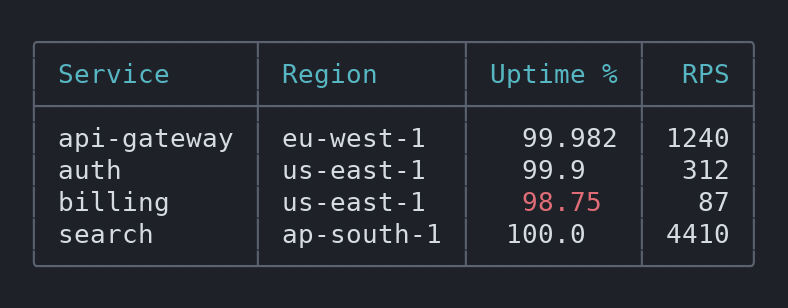
Install
pip install flexablelib
Optional extras: pip install "flexablelib[pandas]", "flexablelib[excel]",
"flexablelib[html]" or "flexablelib[all]". The base install stays
dependency-free.
30-second quickstart
from flexablelib import Table

table = Table(
    rows=[
        ["api-gateway", "eu-west-1", 99.982, 1240],
        ["auth", "us-east-1", 99.9, 312],
        ["billing", "us-east-1", 98.75, 87],
    ],
    headers=["Service", "Region", "Uptime %", "RPS"],
)
table.style_name = "rounded"            # 54 styles, see style_examples.md
table.header_color = "bold cyan"
table.color_rule = lambda value, row, column: (
    "red" if column == "Uptime %" and value < 99.5 else None
)
print(table)
╭─────────────┬───────────┬──────────┬──────╮
│ Service     │ Region    │ Uptime % │  RPS │
├─────────────┼───────────┼──────────┼──────┤
│ api-gateway │ eu-west-1 │   99.982 │ 1240 │
│ auth        │ us-east-1 │   99.9   │  312 │
│ billing     │ us-east-1 │   98.75  │   87 │
╰─────────────┴───────────┴──────────┴──────╯
Numbers align on the decimal point, colours never break alignment, and the same table exports anywhere:
table.to_markdown()                # GitHub / docs
table.to_html("report.html")       # self-contained, sortable, offline
table.to_csv("out.csv"); table.to_latex(); table.to_rst(); table.to_asciidoc()
table.to_excel("report.xlsx")      # pip install "flexablelib[excel]"
Table.from_csv("sales.csv"); Table.from_markdown(md); Table.from_pandas(df)
Feature gallery
Styles — 54 presets, from ascii_rows to borderless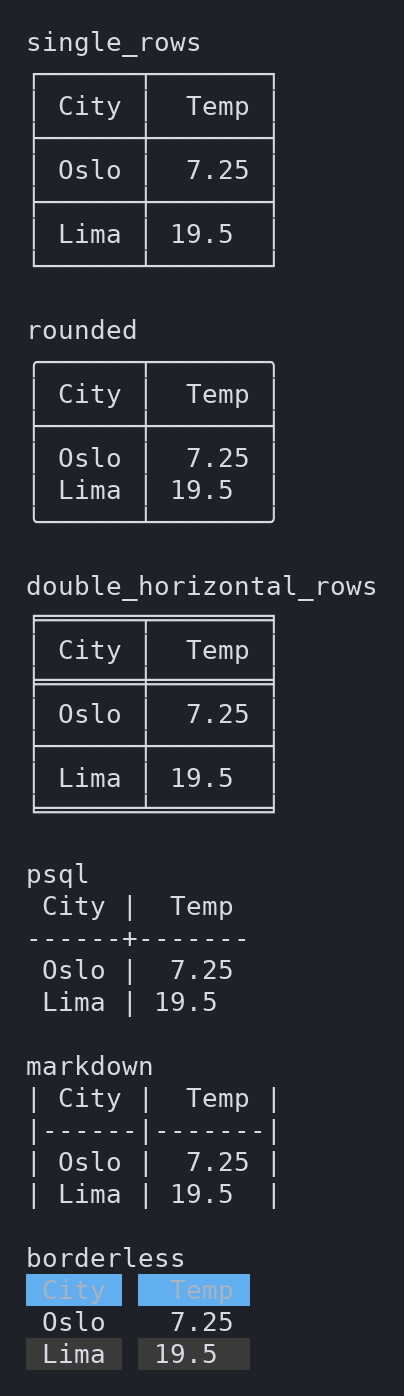 |
Themes — table.apply_theme("ocean")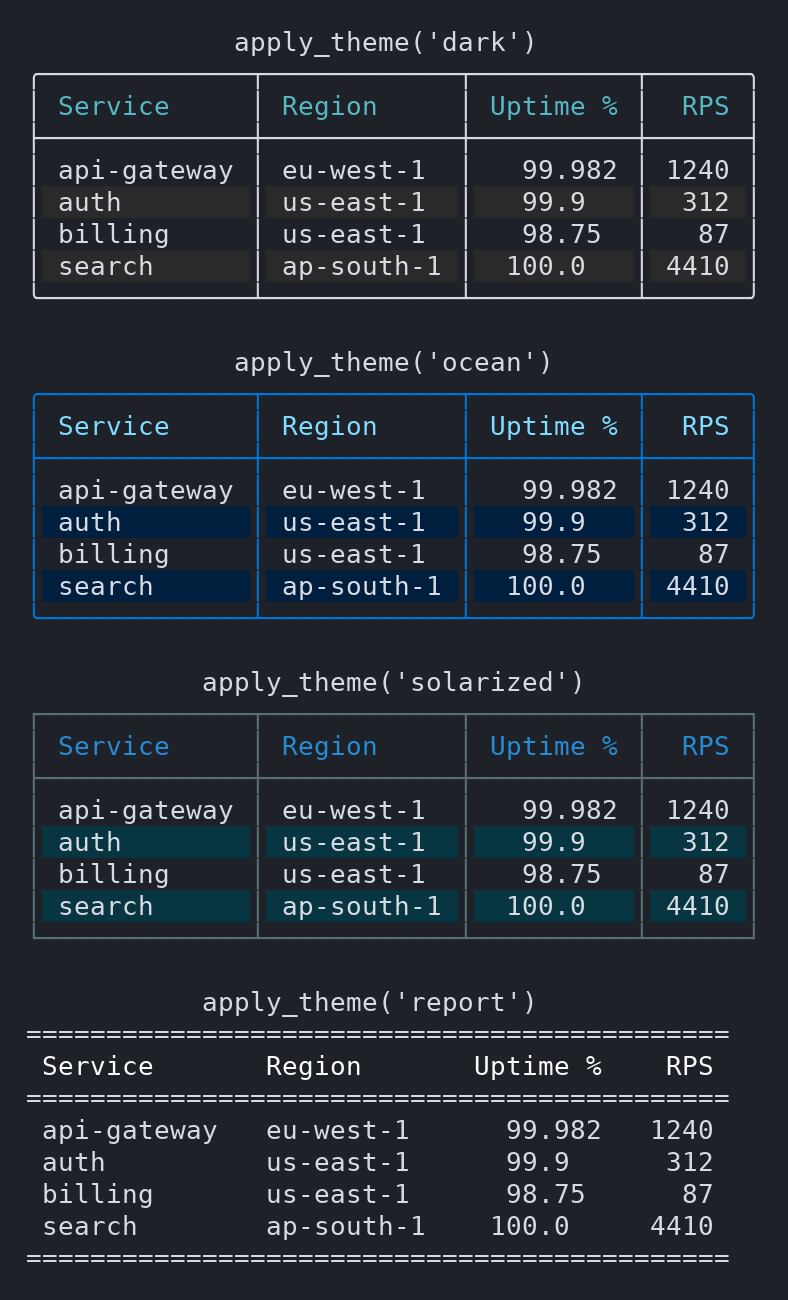 |
Text on borders — table.border_text("Production", where="top")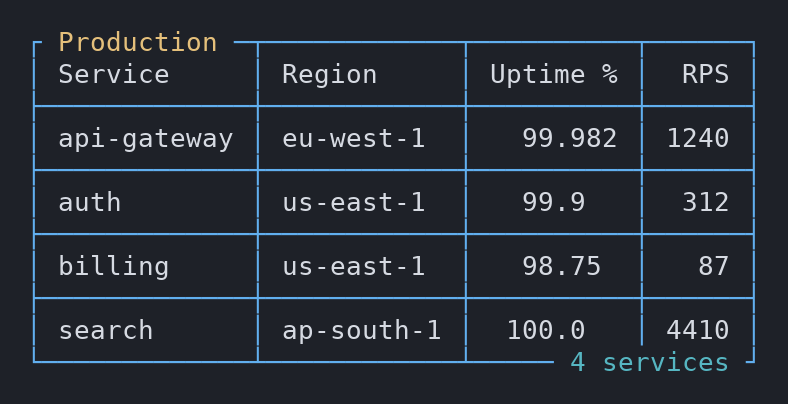 |
Cell merges — table.merge_cells(0, 0, last_row=1)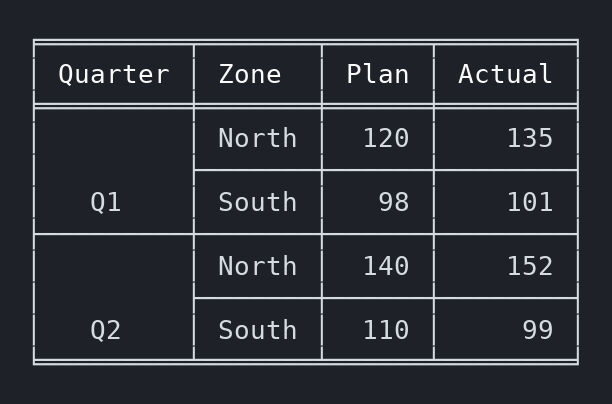 |
Zebra rows, footer, caption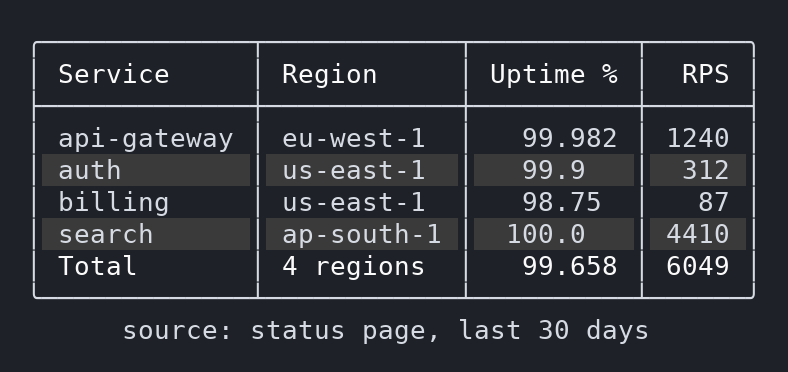 |
Decimal alignment — floats and scientific notation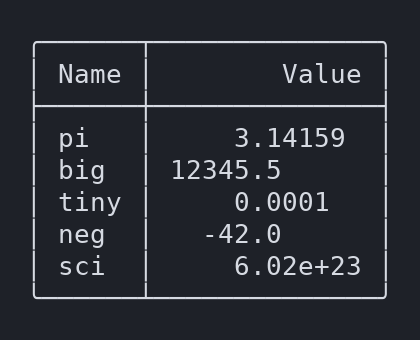 |
More: all 54 styles ·
wrapping and ellipsis overflow · per-column / per-cell colour and alignment ·
vertical alignment · paginate() · stream() for live rows · transpose() ·
nested tables · fit_terminal() · hide_columns · sort_by · Roman / custom
index.
How it compares
A factual feature matrix from our survey of 89 table libraries. A dash means the feature was not found in that library's documentation during the survey, not a claim that it is impossible there.
| flexablelib | tabulate | prettytable | rich | |
|---|---|---|---|---|
| Runtime dependencies | none | none | wcwidth |
markdown-it-py, pygments |
| Border style presets | 54 | many tablefmt |
— (hrules/vrules toggles) | box styles |
| Decimal-point alignment | ✓ | ✓ | — | — |
| Row and column cell merges | ✓ | — | — | — |
| ANSI colours (header, rows, cells, borders) | ✓ | — | — | ✓ |
| Zebra rows / caption / footer | ✓ | — | — | ✓ |
| Text written on borders | ✓ | — | — | — |
| Wrap / truncate / ellipsis overflow | ✓ | — | max width | ✓ |
| Sorting, pagination | ✓ | — | ✓ | — |
| Exports | CSV, MD, HTML, Excel, RST, AsciiDoc, LaTeX | HTML, LaTeX, MD, RST, org, jira, … | HTML, CSV, JSON, LaTeX | — (console) |
| Readers | CSV, Markdown, HTML, dicts, pandas, Excel | — | CSV, DB cursor, HTML | — |
| Nested tables | ✓ | — | — | ✓ (renderables) |
rich is a full terminal-rendering toolkit (markup, live displays, progress bars) and tabulate covers many more markup dialects; pick flexablelib when you want a dependency-free, table-focused library with styling, merges and I/O in one place.
Production notes
- Zero runtime dependencies. Readers/writers that need a third-party
package (
pandas,openpyxl,lxml) are opt-in extras and imported lazily. - Performance. Rendering 10,000 rows × 6 columns takes ~157 ms with the C
extension (~172 ms pure Python), on par with prettytable, ~1.3× faster than
tabulate and ~18× faster than rich's table. pandas
to_string()is faster still (~85 ms). Full method and numbers: docs/BENCHMARKS.md. - Wheels. Prebuilt for CPython 3.8 – 3.14 on Linux (manylinux, musllinux),
Windows x64 and macOS arm64. Anywhere else it builds from source or falls
back to pure Python — installation never fails for want of a compiler.
from flexablelib.fast import implementation; implementation()tells you which backend is live. - Colour safety. Escape sequences are emitted only to a TTY by default,
never when
NO_COLORis set;FORCE_COLORortable.use_colors = Trueoverrides. Logs and files stay clean. - Unicode. Widths are measured in terminal columns, so CJK, emoji and coloured text stay aligned.
- Windows. Box-drawing styles need a UTF-8 console (
chcp 65001orPYTHONUTF8=1; Windows Terminal is usually UTF-8 already). ASCII styles (ascii_rows,ascii_double_underline_rows,psql,markdown, …) work on any code page. - Typed. Ships
py.typed(PEP 561). - Stability. flexablelib follows semantic versioning:
within 2.x, public
Tableattributes and methods are not removed or renamed without a deprecation period; new features arrive in minor/patch releases and every release is listed in the CHANGELOG. - Support. Bugs and requests: issues. Security reports: SECURITY.md. Contributions: CONTRIBUTING.md.
Windows console encoding
chcp 65001
set PYTHONUTF8=1
(PowerShell: $env:PYTHONUTF8=1.)
Guide
Usage
Creating a table is simple.
Code Example
from flexablelib import Table

new_table = Table()
print(new_table)
Output
++
++
++
This is an empty table. It has no data so it only displays this strange thing.
A table that has columns but no rows — a query that came back empty — shows its headers rather than raising:
┌──────┬───────┐
│ name │ value │
╞══════╪═══════╡
└──────┴───────┘
It's possible to add data as columns or rows, or even alternating each one. Any untitled column will be named automatically.
Code Example
new_table.add_column('Name', ['Jade', 'John', 'Jane'])
new_table.add_column('Age', [20, 30, 40])
new_table.add_column('Results', [9.651, 3, 245.7])
print(new_table)
Output
+----------------------+
| Name   Age   Results |
+======+=====+=========+
| Jade |  20 |   9.651 |
| John |  30 |   3     |
| Jane |  40 | 245.7   |
+------+-----+---------+
Code Example
new_table = Table()
new_table.add_column('Name', ['Jade', 'John', 'Jane'])
new_table.add_column('Age', [20, 30, 40])
new_table.add_column('Test\nResults', [9.651, 3, 245.7])
new_table.add_row(['Piotr\nBaltimore', 27, 3.5])
new_table.add_row(['Sam', 21, 0.6519])
print(new_table)
Output
+----------------------------+
| Name        Age       Test |
|                    Results |
+===========+=====+==========+
| Jade      |  20 |   9.651  |
| John      |  30 |   3      |
| Jane      |  40 | 245.7    |
| Piotr     |  27 |   3.5    |
| Baltimore |     |          |
| Sam       |  21 |   0.6519 |
+-----------+-----+----------+
As it is visible, the table will format automatically new lines and data types, for now without trying to parse strings that could be converted to another type.
The Table class offers a variety of options that allow things like showing the index of each row, changing the style of the table, hiding the headers, etc.
See style examples here.
Code Example
new_table = Table()
new_table.add_column('Name', ['Jade', 'John'])
new_table.add_column('Age', [20, 30])
new_table.add_column('Test\nResults', [9.651, 3, 245.7])
new_table.add_row(['Piotr\nBaltimore', 27, 3.5])
new_table.add_row(['Sam', 21])
new_table.show_index = True
new_table.style_name = 'double_horizontal'
new_table.missing_value = '?'
print(new_table)
Output
╒═══╤═══════════╤═════╤═════════╕
│ i │ Name      │ Age │    Test │
│   │           │     │ Results │
╞═══╪═══════════╪═════╪═════════╡
│ 0 │ Jade      │  20 │   9.651 │
│ 1 │ John      │  30 │   3     │
│ 2 │ ?         │   ? │ 245.7   │
│ 3 │ Piotr     │  27 │   3.5   │
│   │ Baltimore │     │         │
│ 4 │ Sam       │  21 │       ? │
╘═══╧═══════════╧═════╧═════════╛
The missing value aligns as if it was of the same type of the other data in the column.
Changed in 2.3.0: an explicit None is a missing cell, just like a
padding gap or table.missing. It displays missing_value (blank by default),
not the text "None". Set table.missing_value = '?' to show gaps explicitly.
Use the string "None" if you want that literal text. This applies to printing,
compose(), pagination, streaming, and transposition in every style.
Missing cells do not turn numeric columns into text: numeric alignment and
the decimal axis are preserved, and overflow='wrap' does not split floats
because a column contains None. Raw rows and exports still represent gaps
as None; rendering Table(rows=table.rows) reproduces the same cells (copy
headers and display settings too if you changed them).
table = Table(rows=[[924.87], [None], [1.25]])
assert 'None' not in table.compose()
assert Table(rows=table.rows).compose() == table.compose()
table.missing_value = '?'  # changes the display, not stored None values
See missing-cell semantics for migration details.
This shows how to get the row and column count. If the index is shown, this count remains unaffected by that column, although, you can get the internal count.
Code Example
new_table.show_index = False
new_table.show_headers = False
print(new_table)
print('row:', new_table.row_count)
print('columns:', new_table.column_count)
new_table.show_index = True
print(new_table)
print('internal_row_count:', new_table.internal_row_count)
print('internal_column_count:', new_table.internal_column_count)
Output
╒═══════════╤════╤═════════╕
│ Jade      │ 20 │   9.651 │
│ John      │ 30 │   3     │
│ ?         │  ? │ 245.7   │
│ Piotr     │ 27 │   3.5   │
│ Baltimore │    │         │
│ Sam       │ 21 │       ? │
╘═══════════╧════╧═════════╛
row: 5
columns: 3
╒═══╤═══════════╤════╤═════════╕
│ 0 │ Jade      │ 20 │   9.651 │
│ 1 │ John      │ 30 │   3     │
│ 2 │ ?         │  ? │ 245.7   │
│ 3 │ Piotr     │ 27 │   3.5   │
│   │ Baltimore │    │         │
│ 4 │ Sam       │ 21 │       ? │
╘═══╧═══════════╧════╧═════════╛
internal_row_count: 5
internal_column_count: 4
Colour
Colour the header, the borders, whole columns, whole rows, or individual cells. Specs accept names, attributes, 256-colour indexes and hex triples.
table.header_color = 'bold cyan'
table.border_color = 'grey'
table.column_colors = {'Service': 'bright_white'}
table.color_rule = lambda value, row, column: (
    'red' if column == 'Delta' and value < 0 else None
)
color_rule receives the original value, so numeric comparisons work directly.
Colour is emitted only to a terminal by default, and never when NO_COLOR is
set. FORCE_COLOR or table.use_colors = True overrides that. Because
compose() returns a string you may send anywhere, the default errs toward not
embedding escape sequences in something bound for a file.
Widths are measured in terminal columns, not characters, so coloured cells and CJK or emoji data stay aligned.
Reading and writing
Table.from_csv('sales.csv')          # numeric columns parsed and aligned
Table.from_html(markup)              # standard library parser, no dependency
Table.from_dicts(records)
Table.from_pandas(dataframe)         # pip install flexablelib[pandas]
Table.from_excel('report.xlsx')      # pip install flexablelib[excel]

table.to_csv('out.csv')
table.to_markdown()
table.to_html('report.html', paginate=25)
table.to_excel('report.xlsx')
Since 2.2.0 every export writes the table as print(table) shows it: rows in
sort_by order (with sort_reverse and callables), row_filter applied,
hide_columns left out, and the text formats (to_csv, to_markdown,
to_html, to_rst, to_asciidoc, to_latex) hold the formatted strings —
float_format, int_format, leading_zeros, custom_format, strip_cells —
without padding or colour. Empty cells are empty strings.
table.sort_by, table.sort_reverse = 'Uptime', True
table.row_filter = lambda row: row[1] < 99.9
table.float_format = '.1f'
table.to_markdown()                  # same rows, order and numbers as print(table)
to_records() keeps the stored Python values (numbers stay numbers, gaps are
None) in display order; to_records(formatted=True) gives the printed
strings. to_excel() writes numbers as numbers and turns simple format specs
(',d', '.2f', '.1%', '{:,.2f}'…) into the cell's Excel number format.
to_html writes one self-contained file — the stylesheet and the sorting,
filtering and pagination script are inline — so it works offline and from a
file:// URL.
Text formats deliver everything as strings, and a column of strings is
left-aligned. parse_str_numbers converts numeric-looking text so it aligns as
numbers; the readers turn it on for you:
table.parse_str_numbers = True
Values with leading zeros are left alone, so '007' stays a string.
table.rows is a copy of the stored data, in insertion order and with None
in empty cells (sorting, filtering and formats do not touch it), so editing it
does not change the table. Use add_row and
set_cell instead:
table.set_cell(0, 'Uptime', 98.2)    # row position, column position or header
table.set_cell(1, 2, table.missing)  # empty a cell
Merging cells
Render a rectangular block as a single cell, across columns, down rows, or both. Coordinates are inclusive, zero-based, and ignore the index column.
table.merge_cells(0, 0, last_column=2, value='Quarter summary')
table.merge_cells(1, 0, last_row=3)                # keeps the top-left content
table.merge_cells(0, 0, 2, 2, value='Total', align='r')
A merge never widens the table -- columns are still sized by their unmerged content -- so text longer than its span is truncated.
Cards, grids and responsive tables
Card draws one record in a frame, in any of the table styles. The title goes
into the top border when the style draws one:
from flexablelib import Card

card = Card(title='Ana', subtitle='Norte',
            fields={'Edad': 28, 'Ciudad': 'Guadalajara'},
            footer='actualizado hoy')
print(card.render(width=30))
╭─ Ana ──────────────────────╮
│ Norte                      │
├────────────────────────────┤
│ Edad    28                 │
│ Ciudad  Guadalajara        │
├────────────────────────────┤
│ actualizado hoy            │
╰────────────────────────────╯
field_columns=2 (or 'auto') lays the fields out as a grid of tiles, and
actions adds [ Action ] chips:
╭─ Pedido 42 ────────────────────╮
│ Cliente         Total          │
│ José            $1,200         │
│ Estado          Fecha          │
│ Enviado         11/11          │
├────────────────────────────────┤
│             [ Ver ] [ Editar ] │
╰────────────────────────────────╯
Cards take style_name, theme (the table themes), border_color,
title_color, label_color, value_colors, color (a background for the
whole card), zebra, panel and shadow.
table.render(width) makes a table responsive: the normal table when it fits,
without its low-priority columns next, squeezed and wrapped after that, and
one card per row when nothing else fits. width defaults to
max_width, then the terminal width; responsive=True makes print(table) do
the same.
table.title, table.title_position = 'Personas', 'border'
table.column_priority = {'Correo': 3}          # hidden first
table.card_options = {'subtitle_field': 'Grupo', 'fields': ['Edad', 'Ciudad']}
table.render(width=80)    # table
table.render(width=46)    # table without "Correo"
table.render(width=30)    # cards
╭─────────┬────────┬──────┬─ Personas ──┬──────────────────╮
│ Nombre  │ Grupo  │ Edad │ Ciudad      │ Correo           │
├─────────┼────────┼──────┼─────────────┼──────────────────┤
│ Ana     │ Norte  │   28 │ Guadalajara │ ana@example.com  │
│ Luna 🌸 │ Centro │   22 │ Mérida      │ luna@example.com │
╰─────────┴────────┴──────┴─────────────┴──────────────────╯

           Personas
╭─ Ana ──────────────────────╮
│ Norte                      │
├────────────────────────────┤
│ Edad    28                 │
│ Ciudad  Guadalajara        │
╰────────────────────────────╯
Grid places cards, tables, text and other grids in columns that reflow with
the width -- a grid of cards or a whole terminal screen:
from flexablelib import Grid, GridCell

Grid(table.to_cards(), min_width=28).render(width=100)   # 3 columns, 2 at 62, 1 at 40
Grid([GridCell('Ventas de noviembre', span=3),
      GridCell(table, span=2), Grid(cards, columns=1)], columns=3)
More in docs/LAYOUT.md.
Notes
- A column named
"i"does not collide with the index column (utils.IndexColumnTitle). - Exponential numbers align on the decimal / exponent axis with the rest of the float column.
- Shrinking a float column drops decimals instead of chopping characters, so decimal alignment survives a terminal fit (#23).
Open work and the issue map: docs/ISSUES.md.
Project Layout
flexablelib/                 # GitHub repository
├── flexablelib/            the Python package (no runtime dependencies)
│   ├── __init__.py          public API: Table, TableComposition, SeparatorLine
│   ├── table.py             the Table class — state and render orchestration
│   ├── columns.py           type inference, alignment, column widths
│   ├── style_compositions.py   the 54 border styles, as data
│   ├── table_strings.py     separator lines and data rows
│   ├── cells.py             cell padding, justification, wrapping
│   ├── options.py           constants and defaults
│   └── utils.py             type predicates and small helpers
├── tests/                   pytest suite — see ARCHITECTURE.md#testing
├── docs/                    issue history and design notes
├── logos/                   brand assets — see logos/README.md
├── ARCHITECTURE.md          how it all fits together
├── style_examples.md        all 54 styles rendered
├── package.json             canonical version number (no npm deps)
└── setup.py                 reads the version from package.json
Run the tests from the repository root:
pip install -r requirements-dev.txt
python -m pytest
See ARCHITECTURE.md for the rendering pipeline, how styles are defined, and how to add one.
1 maintainer

Metadata
1 maintainer
Release files for flexablelib 3.1.0
For a detailed explanation of source distributions (sdists) and built distributions (wheels), please see the package formats documentation.
Source distribution (sdist)
| File | Size | Uploaded | Provenance | Actions |
|---|---|---|---|---|
| flexablelib-3.1.0.tar.gz | 284.0 kB | Without provenance | Details for flexablelib-3.1.0.tar.gz |
Built distributions (wheels)
Total release size: 5.3 MB
Release files / flexablelib-3.1.0.tar.gz
| Download URL | flexablelib-3.1.0.tar.gz |
|---|---|
| Size | 284.0 kB |
| Tags | Source |
|
SHA-256 checksum How to use checksums |
6ce958b789f9998b05431b0b9559b498ce491bd0990690465c13518cdcdc30ab
|
|
BLAKE2b-256 checksum How to use checksums |
ac2222368d22c7c89204b80915d4b630dbe460bce48a34b7be4ee080f3a49933
|
| Upload date | |
|
Uploaded using Trusted Publishing? What is trusted publishing? |
No |
| Uploaded via |
twine/7.0.0 CPython/3.13.16
|
Release files / flexablelib-3.1.0-cp314-cp314-win_amd64.whl
| Download URL | flexablelib-3.1.0-cp314-cp314-win_amd64.whl |
|---|---|
| Size | 175.8 kB |
| Tags | CPython 3.14 Windows x86-64 |
|
SHA-256 checksum How to use checksums |
f732b05af561760dc5799fee681685f0bed76e4f98fecc6994b76f71fd19314b
|
|
BLAKE2b-256 checksum How to use checksums |
1141dcb4e30a781277bce1437d6695e1033fbc984d5cea1a643a7ad93fe4078e
|
| Upload date | |
|
Uploaded using Trusted Publishing? What is trusted publishing? |
No |
| Uploaded via |
twine/7.0.0 CPython/3.13.16
|
Release files / flexablelib-3.1.0-cp314-cp314-musllinux_1_2_x86_64.whl
| Download URL | flexablelib-3.1.0-cp314-cp314-musllinux_1_2_x86_64.whl |
|---|---|
| Size | 188.0 kB |
| Tags | CPython 3.14 Linux musl 1.2+ x86-64 |
|
SHA-256 checksum How to use checksums |
32a88c91a468a0ce605368a22b2002f4f0417e43b6f8982828cd1e0c8dd6cf97
|
|
BLAKE2b-256 checksum How to use checksums |
59f9bf9bc176b269801a961efb313c84cca199acbe807bb04d37cb6c7c8d60fd
|
| Upload date | |
|
Uploaded using Trusted Publishing? What is trusted publishing? |
No |
| Uploaded via |
twine/7.0.0 CPython/3.13.16
|
Release files / flexablelib-3.1.0-cp314-cp314-manylinux1_x86_64.manylinux_2_28_x86_64.manylinux_2_5_x86_64.whl
| Download URL | flexablelib-3.1.0-cp314-cp314-manylinux1_x86_64.manylinux_2_28_x86_64.manylinux_2_5_x86_64.whl |
|---|---|
| Size | 188.4 kB |
| Tags | CPython 3.14 Linux glibc 2.28+ x86-64 Linux glibc 2.5+ x86-64 |
|
SHA-256 checksum How to use checksums |
48ff38f43b09ad9a7ce8f14dd201a2297b316bc62d901d8ebac0bc3d84db6118
|
|
BLAKE2b-256 checksum How to use checksums |
a948bda3b6d0b3c15243d659dd46c6a6320252fff6abf285ddfb0b01f707f8b4
|
| Upload date | |
|
Uploaded using Trusted Publishing? What is trusted publishing? |
No |
| Uploaded via |
twine/7.0.0 CPython/3.13.16
|
Release files / flexablelib-3.1.0-cp314-cp314-macosx_11_0_arm64.whl
| Download URL | flexablelib-3.1.0-cp314-cp314-macosx_11_0_arm64.whl |
|---|---|
| Size | 171.5 kB |
| Tags | CPython 3.14 macOS 11.0+ ARM64 |
|
SHA-256 checksum How to use checksums |
d70525b8f0a87bd9278e3dbc650696f4df915e9e0ea288ead758cd0ad9926e54
|
|
BLAKE2b-256 checksum How to use checksums |
7c19a3451a1b9702381aff1a5a1a2bd2c7f20689ac7e3c4b73aa850cd441e850
|
| Upload date | |
|
Uploaded using Trusted Publishing? What is trusted publishing? |
No |
| Uploaded via |
twine/7.0.0 CPython/3.13.16
|
Release files / flexablelib-3.1.0-cp313-cp313-win_amd64.whl
| Download URL | flexablelib-3.1.0-cp313-cp313-win_amd64.whl |
|---|---|
| Size | 174.3 kB |
| Tags | CPython 3.13 Windows x86-64 |
|
SHA-256 checksum How to use checksums |
1b3c1004991ce766578e75a9af6ac1a16f9358176f9c2feeb30598ca145e7b2d
|
|
BLAKE2b-256 checksum How to use checksums |
26acf42e67ea2d0856f18b6afa8dc0fe22b7077f9ee10c055d496a80c55644ce
|
| Upload date | |
|
Uploaded using Trusted Publishing? What is trusted publishing? |
No |
| Uploaded via |
twine/7.0.0 CPython/3.13.16
|
Release files / flexablelib-3.1.0-cp313-cp313-musllinux_1_2_x86_64.whl
| Download URL | flexablelib-3.1.0-cp313-cp313-musllinux_1_2_x86_64.whl |
|---|---|
| Size | 188.0 kB |
| Tags | CPython 3.13 Linux musl 1.2+ x86-64 |
|
SHA-256 checksum How to use checksums |
5589e74812e7465e391d53c1b6438e723b1dfb798811c3178bda2c2252f9562b
|
|
BLAKE2b-256 checksum How to use checksums |
cb40cb712d0293f22d0c691ad222c18c3706b5dd8cb0fd3715cabdc27ddf940b
|
| Upload date | |
|
Uploaded using Trusted Publishing? What is trusted publishing? |
No |
| Uploaded via |
twine/7.0.0 CPython/3.13.16
|
Release files / flexablelib-3.1.0-cp313-cp313-manylinux1_x86_64.manylinux_2_28_x86_64.manylinux_2_5_x86_64.whl
| Download URL | flexablelib-3.1.0-cp313-cp313-manylinux1_x86_64.manylinux_2_28_x86_64.manylinux_2_5_x86_64.whl |
|---|---|
| Size | 188.4 kB |
| Tags | CPython 3.13 Linux glibc 2.28+ x86-64 Linux glibc 2.5+ x86-64 |
|
SHA-256 checksum How to use checksums |
3bcafdceadaae7b358af51d0eb7a0e0ab010c3ab62dd3f809c4e07cf9351efa9
|
|
BLAKE2b-256 checksum How to use checksums |
73dcc06d84dfa52342f26232b12cebcf4fa3baa5db37bb5d19902ac450f84fa0
|
| Upload date | |
|
Uploaded using Trusted Publishing? What is trusted publishing? |
No |
| Uploaded via |
twine/7.0.0 CPython/3.13.16
|
Release files / flexablelib-3.1.0-cp313-cp313-macosx_11_0_arm64.whl
| Download URL | flexablelib-3.1.0-cp313-cp313-macosx_11_0_arm64.whl |
|---|---|
| Size | 171.4 kB |
| Tags | CPython 3.13 macOS 11.0+ ARM64 |
|
SHA-256 checksum How to use checksums |
6e9053635a000ad6c1a4b62b019cef6847ea8243c99d70d39df7924acc7b7f6c
|
|
BLAKE2b-256 checksum How to use checksums |
b940d149476722c51596401f49469df1778c36018bd25a6800e025d5c4185d05
|
| Upload date | |
|
Uploaded using Trusted Publishing? What is trusted publishing? |
No |
| Uploaded via |
twine/7.0.0 CPython/3.13.16
|
Release files / flexablelib-3.1.0-cp312-cp312-win_amd64.whl
| Download URL | flexablelib-3.1.0-cp312-cp312-win_amd64.whl |
|---|---|
| Size | 174.3 kB |
| Tags | CPython 3.12 Windows x86-64 |
|
SHA-256 checksum How to use checksums |
24554336382fee8b0906c09b97691c678cd1da336df70319a2381d25e9946561
|
|
BLAKE2b-256 checksum How to use checksums |
4366bb8436bed0430b91bfe3a5657a16353acedd9275016799924e9b1b6cab25
|
| Upload date | |
|
Uploaded using Trusted Publishing? What is trusted publishing? |
No |
| Uploaded via |
twine/7.0.0 CPython/3.13.16
|
Release files / flexablelib-3.1.0-cp312-cp312-musllinux_1_2_x86_64.whl
| Download URL | flexablelib-3.1.0-cp312-cp312-musllinux_1_2_x86_64.whl |
|---|---|
| Size | 187.9 kB |
| Tags | CPython 3.12 Linux musl 1.2+ x86-64 |
|
SHA-256 checksum How to use checksums |
d2ec320d2c8956dc3729f4077240ddec28b29501962ef1ebf63a3d6684a935f5
|
|
BLAKE2b-256 checksum How to use checksums |
28a23fa5112d232d0991437b91e31480117d3e3ecf9fb2475a2da8a8e61ad379
|
| Upload date | |
|
Uploaded using Trusted Publishing? What is trusted publishing? |
No |
| Uploaded via |
twine/7.0.0 CPython/3.13.16
|
Release files / flexablelib-3.1.0-cp312-cp312-manylinux1_x86_64.manylinux_2_28_x86_64.manylinux_2_5_x86_64.whl
| Download URL | flexablelib-3.1.0-cp312-cp312-manylinux1_x86_64.manylinux_2_28_x86_64.manylinux_2_5_x86_64.whl |
|---|---|
| Size | 188.4 kB |
| Tags | CPython 3.12 Linux glibc 2.28+ x86-64 Linux glibc 2.5+ x86-64 |
|
SHA-256 checksum How to use checksums |
91897b90528c27b1df043888d1b0fc2953c6e6066b5d356f44b7f726a8533f02
|
|
BLAKE2b-256 checksum How to use checksums |
9d0e33452c98b988845e17acd3d70de1f92f013774df9e9ee9185c0ddc12f3c2
|
| Upload date | |
|
Uploaded using Trusted Publishing? What is trusted publishing? |
No |
| Uploaded via |
twine/7.0.0 CPython/3.13.16
|
Release files / flexablelib-3.1.0-cp312-cp312-macosx_11_0_arm64.whl
| Download URL | flexablelib-3.1.0-cp312-cp312-macosx_11_0_arm64.whl |
|---|---|
| Size | 171.4 kB |
| Tags | CPython 3.12 macOS 11.0+ ARM64 |
|
SHA-256 checksum How to use checksums |
c07050800c6badaf3e43940cc12864aa178f46310d9980d9a18308026065d805
|
|
BLAKE2b-256 checksum How to use checksums |
2d28e0c5ad7b41e9c25ae7ee96f7572a6ab2be9114f441b57d861a091525893f
|
| Upload date | |
|
Uploaded using Trusted Publishing? What is trusted publishing? |
No |
| Uploaded via |
twine/7.0.0 CPython/3.13.16
|
Release files / flexablelib-3.1.0-cp311-cp311-win_amd64.whl
| Download URL | flexablelib-3.1.0-cp311-cp311-win_amd64.whl |
|---|---|
| Size | 174.3 kB |
| Tags | CPython 3.11 Windows x86-64 |
|
SHA-256 checksum How to use checksums |
8cb04d59c75f6b61d080e89235ccc2222026a0276ab9c299080c901faa2c629c
|
|
BLAKE2b-256 checksum How to use checksums |
cbf402f99bdbd22f7354cee883bd729956736d431c3dffca67b24c5f7c3f6d69
|
| Upload date | |
|
Uploaded using Trusted Publishing? What is trusted publishing? |
No |
| Uploaded via |
twine/7.0.0 CPython/3.13.16
|
Release files / flexablelib-3.1.0-cp311-cp311-musllinux_1_2_x86_64.whl
| Download URL | flexablelib-3.1.0-cp311-cp311-musllinux_1_2_x86_64.whl |
|---|---|
| Size | 187.9 kB |
| Tags | CPython 3.11 Linux musl 1.2+ x86-64 |
|
SHA-256 checksum How to use checksums |
fa747d132f606087dd0ea80e808288495e90f80d89d57c770219e598f3e0b07b
|
|
BLAKE2b-256 checksum How to use checksums |
886281dc83e15735caa7e75ad18b4f3b63d20d7496114566fc5853faa9557d48
|
| Upload date | |
|
Uploaded using Trusted Publishing? What is trusted publishing? |
No |
| Uploaded via |
twine/7.0.0 CPython/3.13.16
|
Release files / flexablelib-3.1.0-cp311-cp311-manylinux1_x86_64.manylinux_2_28_x86_64.manylinux_2_5_x86_64.whl
| Download URL | flexablelib-3.1.0-cp311-cp311-manylinux1_x86_64.manylinux_2_28_x86_64.manylinux_2_5_x86_64.whl |
|---|---|
| Size | 188.3 kB |
| Tags | CPython 3.11 Linux glibc 2.28+ x86-64 Linux glibc 2.5+ x86-64 |
|
SHA-256 checksum How to use checksums |
73d7c5c33edae0aa38fb2cda19c4afe85ad495fd2e6d407c70e6c3a87ceaf02a
|
|
BLAKE2b-256 checksum How to use checksums |
3fe6a4e81ed8b5dcef07338494a2d580db262773f7ad701c6955b050b6cf0aa4
|
| Upload date | |
|
Uploaded using Trusted Publishing? What is trusted publishing? |
No |
| Uploaded via |
twine/7.0.0 CPython/3.13.16
|
Release files / flexablelib-3.1.0-cp311-cp311-macosx_11_0_arm64.whl
| Download URL | flexablelib-3.1.0-cp311-cp311-macosx_11_0_arm64.whl |
|---|---|
| Size | 171.5 kB |
| Tags | CPython 3.11 macOS 11.0+ ARM64 |
|
SHA-256 checksum How to use checksums |
2f18ced529d5d6bdeb65cc992878d834413c65accfcca83061e06d76e1e51e43
|
|
BLAKE2b-256 checksum How to use checksums |
61e12077bf45f26ecbb8c8974d4d3824d11304899e375f78691415f2aedda71d
|
| Upload date | |
|
Uploaded using Trusted Publishing? What is trusted publishing? |
No |
| Uploaded via |
twine/7.0.0 CPython/3.13.16
|
Release files / flexablelib-3.1.0-cp310-cp310-win_amd64.whl
| Download URL | flexablelib-3.1.0-cp310-cp310-win_amd64.whl |
|---|---|
| Size | 174.3 kB |
| Tags | CPython 3.10 Windows x86-64 |
|
SHA-256 checksum How to use checksums |
6795ae96c6ecaf6d8cb5588510b21e693a0bddc42b9d87402863338a25cd77b5
|
|
BLAKE2b-256 checksum How to use checksums |
bb74942073e595430271d82049e73f9258f78917af882cbc15eb97fc91180aab
|
| Upload date | |
|
Uploaded using Trusted Publishing? What is trusted publishing? |
No |
| Uploaded via |
twine/7.0.0 CPython/3.13.16
|
Release files / flexablelib-3.1.0-cp310-cp310-musllinux_1_2_x86_64.whl
| Download URL | flexablelib-3.1.0-cp310-cp310-musllinux_1_2_x86_64.whl |
|---|---|
| Size | 185.5 kB |
| Tags | CPython 3.10 Linux musl 1.2+ x86-64 |
|
SHA-256 checksum How to use checksums |
225ac5a34b752be736ac13639204b80efc89e9b46e546cf0f1947063d981e2a9
|
|
BLAKE2b-256 checksum How to use checksums |
e29e3b5f0e2898ed6846c24162165831e2a782f5479d2eb8f2587d93b5f9a0a2
|
| Upload date | |
|
Uploaded using Trusted Publishing? What is trusted publishing? |
No |
| Uploaded via |
twine/7.0.0 CPython/3.13.16
|
Release files / flexablelib-3.1.0-cp310-cp310-manylinux1_x86_64.manylinux_2_28_x86_64.manylinux_2_5_x86_64.whl
| Download URL | flexablelib-3.1.0-cp310-cp310-manylinux1_x86_64.manylinux_2_28_x86_64.manylinux_2_5_x86_64.whl |
|---|---|
| Size | 185.8 kB |
| Tags | CPython 3.10 Linux glibc 2.28+ x86-64 Linux glibc 2.5+ x86-64 |
|
SHA-256 checksum How to use checksums |
64bf14e2c4734a73a6305be4800709b18a240c5f7e73d575c279f4ac3cff3074
|
|
BLAKE2b-256 checksum How to use checksums |
61243a04e8ff333e8a632d130e0f70eb5e5ae251730ca5b84502d7dfbecc28a9
|
| Upload date | |
|
Uploaded using Trusted Publishing? What is trusted publishing? |
No |
| Uploaded via |
twine/7.0.0 CPython/3.13.16
|
Release files / flexablelib-3.1.0-cp310-cp310-macosx_11_0_arm64.whl
| Download URL | flexablelib-3.1.0-cp310-cp310-macosx_11_0_arm64.whl |
|---|---|
| Size | 171.5 kB |
| Tags | CPython 3.10 macOS 11.0+ ARM64 |
|
SHA-256 checksum How to use checksums |
abedd7cb0c5ff5e83c0e18b49d787fea1e457f02e8fe4ab7d6c576602386356c
|
|
BLAKE2b-256 checksum How to use checksums |
b21e641c4e43c1dbd659e1d447041936cb18556d71963c7181e0f98fbea78632
|
| Upload date | |
|
Uploaded using Trusted Publishing? What is trusted publishing? |
No |
| Uploaded via |
twine/7.0.0 CPython/3.13.16
|
Release files / flexablelib-3.1.0-cp39-cp39-win_amd64.whl
| Download URL | flexablelib-3.1.0-cp39-cp39-win_amd64.whl |
|---|---|
| Size | 174.3 kB |
| Tags | CPython 3.9 Windows x86-64 |
|
SHA-256 checksum How to use checksums |
2adf6ab0c3ecbb584d9fa3de3702ceea23f7a3dc05f272aae73a415818cc581e
|
|
BLAKE2b-256 checksum How to use checksums |
3171280ab36081bb152cb368c18e463f62d3e14e05306965559e0d77bbece91d
|
| Upload date | |
|
Uploaded using Trusted Publishing? What is trusted publishing? |
No |
| Uploaded via |
twine/7.0.0 CPython/3.13.16
|
Release files / flexablelib-3.1.0-cp39-cp39-musllinux_1_2_x86_64.whl
| Download URL | flexablelib-3.1.0-cp39-cp39-musllinux_1_2_x86_64.whl |
|---|---|
| Size | 185.4 kB |
| Tags | CPython 3.9 Linux musl 1.2+ x86-64 |
|
SHA-256 checksum How to use checksums |
90319521693c14476d85d87b895db34c6bace802159cc2231bf55a1663a72adb
|
|
BLAKE2b-256 checksum How to use checksums |
c24454312dd737c9a102c124468ca5fbc96231d9992befaf91667e7521052983
|
| Upload date | |
|
Uploaded using Trusted Publishing? What is trusted publishing? |
No |
| Uploaded via |
twine/7.0.0 CPython/3.13.16
|
Release files / flexablelib-3.1.0-cp39-cp39-manylinux1_x86_64.manylinux_2_28_x86_64.manylinux_2_5_x86_64.whl
| Download URL | flexablelib-3.1.0-cp39-cp39-manylinux1_x86_64.manylinux_2_28_x86_64.manylinux_2_5_x86_64.whl |
|---|---|
| Size | 185.6 kB |
| Tags | CPython 3.9 Linux glibc 2.28+ x86-64 Linux glibc 2.5+ x86-64 |
|
SHA-256 checksum How to use checksums |
41230e64344548e5365494f1ab0c95d4ea41e14389a792e1abb8047ed2732098
|
|
BLAKE2b-256 checksum How to use checksums |
592906bdfe6b45675ea5b61e5451b8065bd25df726ac7ca65ee621167d04fe6b
|
| Upload date | |
|
Uploaded using Trusted Publishing? What is trusted publishing? |
No |
| Uploaded via |
twine/7.0.0 CPython/3.13.16
|
Release files / flexablelib-3.1.0-cp39-cp39-macosx_11_0_arm64.whl
| Download URL | flexablelib-3.1.0-cp39-cp39-macosx_11_0_arm64.whl |
|---|---|
| Size | 171.5 kB |
| Tags | CPython 3.9 macOS 11.0+ ARM64 |
|
SHA-256 checksum How to use checksums |
4c00703e1a356980f76f3ca718ffc3fd55563272a740338a1d719fdceab63769
|
|
BLAKE2b-256 checksum How to use checksums |
c5773348dde6fb8be820d2bd6152c8eca54597c3d841e24e004482f9f6066b49
|
| Upload date | |
|
Uploaded using Trusted Publishing? What is trusted publishing? |
No |
| Uploaded via |
twine/7.0.0 CPython/3.13.16
|
Release files / flexablelib-3.1.0-cp38-cp38-win_amd64.whl
| Download URL | flexablelib-3.1.0-cp38-cp38-win_amd64.whl |
|---|---|
| Size | 174.2 kB |
| Tags | CPython 3.8 Windows x86-64 |
|
SHA-256 checksum How to use checksums |
91dc52d409d539e20a0fa35a7a3cea754a82ceac2ce7c2c7e4e758fd274a8527
|
|
BLAKE2b-256 checksum How to use checksums |
50d4bb02b8b3e13aa6083204e9ed462fa8215b163ca1bfb22c3abc1343e61467
|
| Upload date | |
|
Uploaded using Trusted Publishing? What is trusted publishing? |
No |
| Uploaded via |
twine/7.0.0 CPython/3.13.16
|
Release files / flexablelib-3.1.0-cp38-cp38-musllinux_1_2_x86_64.whl
| Download URL | flexablelib-3.1.0-cp38-cp38-musllinux_1_2_x86_64.whl |
|---|---|
| Size | 185.1 kB |
| Tags | CPython 3.8 Linux musl 1.2+ x86-64 |
|
SHA-256 checksum How to use checksums |
6879c4f19917f0c5f75fedca4a25a9ed35f0c1a3fe3b913128ae4b583d3a6109
|
|
BLAKE2b-256 checksum How to use checksums |
5a080e90c79609e0b589c365097839a5045fb05dbeaada2019cdecd26f97f9e8
|
| Upload date | |
|
Uploaded using Trusted Publishing? What is trusted publishing? |
No |
| Uploaded via |
twine/7.0.0 CPython/3.13.16
|
Release files / flexablelib-3.1.0-cp38-cp38-manylinux1_x86_64.manylinux_2_28_x86_64.manylinux_2_5_x86_64.whl
| Download URL | flexablelib-3.1.0-cp38-cp38-manylinux1_x86_64.manylinux_2_28_x86_64.manylinux_2_5_x86_64.whl |
|---|---|
| Size | 185.9 kB |
| Tags | CPython 3.8 Linux glibc 2.28+ x86-64 Linux glibc 2.5+ x86-64 |
|
SHA-256 checksum How to use checksums |
16121076badb7439e3ddbe2f34ab26d3119c09133b752189d08b915945d1e530
|
|
BLAKE2b-256 checksum How to use checksums |
b536569a4e7c54c46e7cbd48dea5811eaa2082fa65d239d8c3f96ad4d22b7e6a
|
| Upload date | |
|
Uploaded using Trusted Publishing? What is trusted publishing? |
No |
| Uploaded via |
twine/7.0.0 CPython/3.13.16
|
Release files / flexablelib-3.1.0-cp38-cp38-macosx_11_0_arm64.whl
| Download URL | flexablelib-3.1.0-cp38-cp38-macosx_11_0_arm64.whl |
|---|---|
| Size | 171.2 kB |
| Tags | CPython 3.8 macOS 11.0+ ARM64 |
|
SHA-256 checksum How to use checksums |
2695856422337d064a4ed2b7857037f4860b3af1a10734bb38898d11018fabde
|
|
BLAKE2b-256 checksum How to use checksums |
84b37df2cc6b2a810c29138f124946fa3f12908a7d19fc27f3fd080c7ea5595c
|
| Upload date | |
|
Uploaded using Trusted Publishing? What is trusted publishing? |
No |
| Uploaded via |
twine/7.0.0 CPython/3.13.16
|
Security for flexablelib 3.1.0
Provenance
Provenance describes where a file came from. On PyPI, provenance is shared via attestations, which provide a verifiable record of the build or publishing details. View details, limitations and caveats.
No provenance found
None of the files in this release were uploaded with provenance metadata.
A note on package security
PyPI is a repository for distributing packages, not a service for auditing them. While third-party security researchers and our staff do their best to detect and remove malicious packages, PyPI cannot guarantee the quality, security or suitability of any given package.
To learn more about protecting yourself from malicious actors, visit our package security documentation.














