

flexlayout-dash
IDE-style dockable, resizable and floatable window panels for Plotly Dash.
Drag tabs between tabsets · split rows and columns · collapsible edge borders · maximize · pop out into a real browser window · automatic Mantine light/dark theming · full Dash callback interoperability.






Documentation · PyPI · Discord · GitHub
Maintained by Pip Install Python LLC.
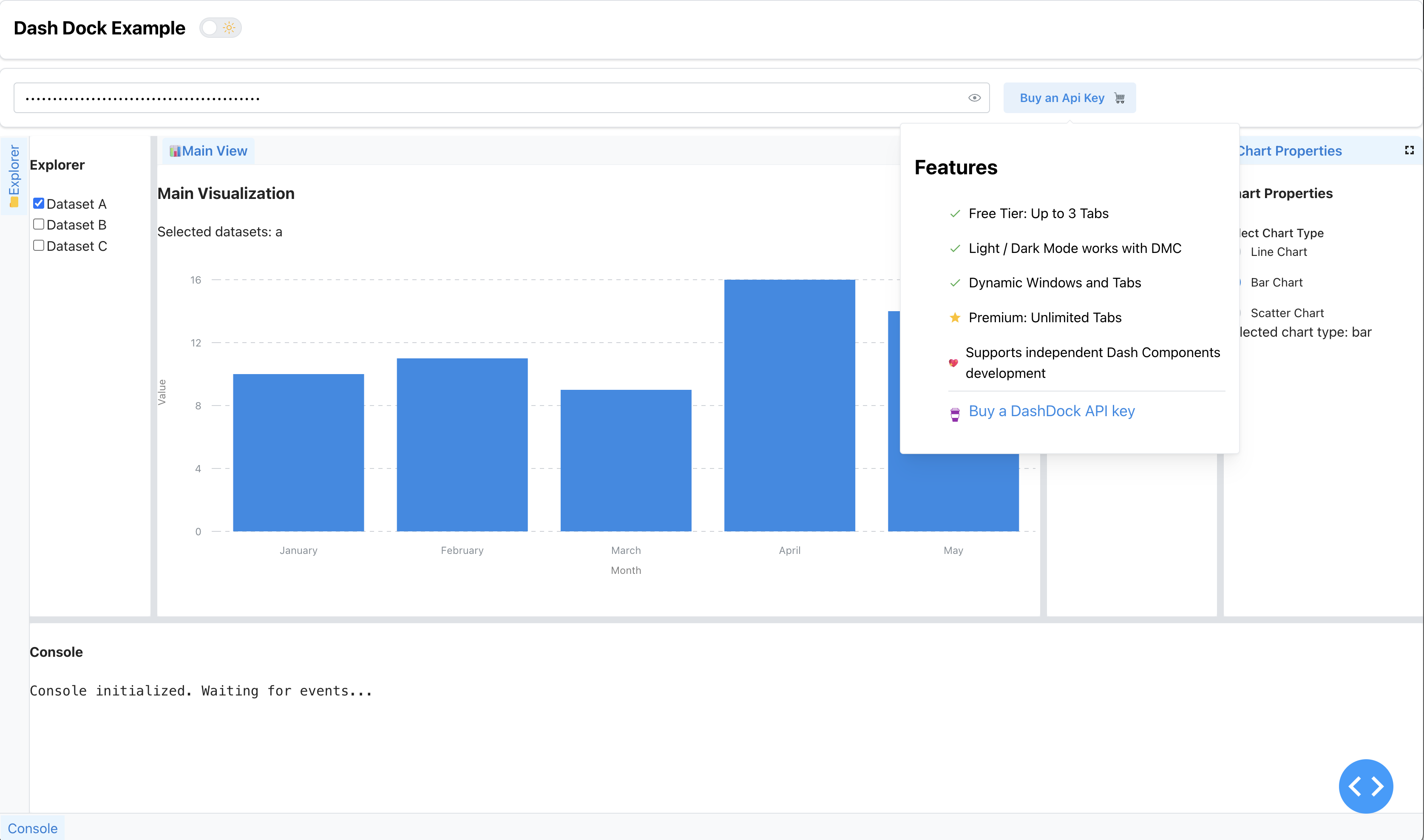
Overview
Dash gives you one page. flexlayout-dash gives you a workspace: a dock where
every panel is a tab the user can drag, split, resize, collapse into an edge
border, maximize, or tear off into its own browser window — the layout model a
code editor or a trading terminal has, driven entirely from Python.
It wraps FlexLayout-React, and the part that makes it usable from Dash is how tab content is rendered:
- Portal-based rendering. FlexLayout owns the panel DOM, but each
Tab's children are rendered through a React portal from the Dash tree. Your components keep their real identity, so ordinary@callbacks work inside a panel — including one that is currently hidden behind another tab, docked in a collapsed border, or popped out into a separate window. - Content is matched by id, not by position. A
Tab(id="editor")fills the{"type": "tab", "id": "editor"}node wherever it currently lives in the model. Dragging a tab to a different tabset never re-mounts its content and never breaks its callbacks. - Theme follows Mantine automatically. With no
colorSchemeprop the component readsdata-mantine-color-schemeoff the document and re-styles itself, so a Dash Mantine Components theme toggle drives the dock for free.
The package ships the compiled JS bundle — FlexLayout-React and the theme CSS
all live inside flexlayout_dash.min.js. A normal pip install needs no Node
and no external_scripts.
One build, no tiers. There is no tab limit, no licence-key check and no paid edition — the whole component is MIT. Releases up to 1.0.0 were described on PyPI as a free build "limited to 3 tabs" alongside a premium one; that split no longer exists anywhere in the package or the compiled bundle.
Installation
pip install flexlayout-dash
The import name matches the distribution: import flexlayout_dash. (Releases
before 2.0.0 imported as dash_flex_layout; that name is gone.)
Quick Start
from dash import Dash, html
import flexlayout_dash as dfl

app = Dash(__name__)

model = {
    "global": {"tabEnableClose": False, "tabEnableFloat": True},
    "layout": {
        "type": "row",
        "children": [
            {"type": "tabset", "weight": 50, "children": [
                {"type": "tab", "name": "Editor", "id": "editor"},
            ]},
            {"type": "tabset", "weight": 50, "children": [
                {"type": "tab", "name": "Output", "id": "output"},
            ]},
        ],
    },
}

app.layout = html.Div([
    dfl.DashFlexLayout(
        id="dock",
        model=model,
        useStateForModel=True,
        # REQUIRED — the dock has no intrinsic height. See below.
        style={"height": "600px"},
        children=[
            dfl.Tab(id="editor", children=html.H3("Editor panel")),
            dfl.Tab(id="output", children=html.H3("Output panel")),
        ],
    ),
])

if __name__ == "__main__":
    app.run(debug=True)
Drag the Output tab onto the left panel and the two become one tabset. Drag it to an edge and the dock splits. Neither re-mounts the content.
The height requirement
Set an explicit height in the component's own style. FlexLayout renders
its panels with position: absolute; .dash-dock-container is
position: relative with overflow: hidden and has no height of its own, so
without one it collapses to zero and nothing renders.
# ✓ height on the component itself — style is applied to .dash-dock-container
dfl.DashFlexLayout(..., style={"height": "600px"})

# ✗ height on an outer wrapper — the container still collapses
html.Div(dfl.DashFlexLayout(...), style={"height": "600px"})
"100%", "70vh" and "calc(100vh - 60px)" all work, as long as the value
lands on the component.
Documentation
Full documentation, with a live interactive dock on every page:
📚 flexlayout.2plot.dev
| Page | What it covers |
|---|---|
| Getting Started | Your first dockable layout, end to end |
| Basic Layouts | Rows, columns, nested splits, multi-tab tabsets |
| Borders & Sidebars | Collapsible left / right / bottom edge panels |
| Callbacks | Reading layout state and driving panel content |
| Theming | Automatic Mantine light/dark integration |
| Component Reference | Every prop, plus the full model schema |
Every page also serves /<page>/llms.txt — the prose plus the complete example
source, directive-expanded and ready to paste into a chat window. The whole site
is at /llms.txt.
Run the docs locally:
pip install -r requirements.txt
pip install --no-deps markdown2dash==0.1.2   # see requirements.txt: gunicorn CVE pin
python run.py                          # http://localhost:8055
run.py sits beside the built flexlayout_dash/, so that local build is what
the docs exercise — no install step, and edits to the component show up on the
next reload. The site needs Python 3.10+; the package does not.
Components
Two components. DashFlexLayout is the dock; Tab holds one panel's content.
DashFlexLayout
| Prop | Type | Description |
|---|---|---|
id |
string |
Component id for callbacks. |
model |
dict required |
The FlexLayout JSON model — global, borders and layout. Read back after every user rearrangement. |
children |
list required |
Tab components. Matched to model tabs by id; a Tab with no matching model node is silently not rendered (its callbacks still run). |
modelAction |
dict |
Apply one imperative action to the live model without replacing it — see below. {type, nonce, ...args}. |
useStateForModel |
boolean (False) |
Let the component own the model internally, so drags survive without a Python round-trip. Turn it off when a callback is the source of truth. |
style |
dict |
Applied to .dash-dock-container. Must carry a height — see above. |
colorScheme |
'light' | 'dark' |
Overrides theme detection. Omit to follow data-mantine-color-scheme. |
headers |
dict[str, component] |
Custom rendered header per tab id, via FlexLayout's onRenderTab. Prefer CSS classes where styling is all you need. |
font |
dict |
Tab font override, e.g. {"size": "12px", "style": "italic"}. |
supportsPopout |
boolean |
Allow tearing a tab out into its own browser window. |
popoutURL |
string ('/assets/popout.html') |
The document the popped-out window loads. |
realtimeResize |
boolean |
Re-layout continuously while a splitter is dragged, instead of on release. |
debugMode |
boolean (False) |
Verbose console logging from the component. |
Tab
| Prop | Type | Description |
|---|---|---|
id |
string required |
Must equal the id of a tab node in model. |
children |
component |
Any Dash content. Rendered through a portal into the panel. |
The generated prop tables — including the complete nested model schema, which
is large — live in the flexlayout_dash/DashFlexLayout.py docstring and are
rendered on the reference page.
The model
model = {
    "global": {                 # defaults applied to every node
        "tabEnableClose": False,
        "tabEnableFloat": True,
    },
    "borders": [                # collapsible edge panels
        {"type": "border", "location": "left", "size": 240, "children": [
            {"type": "tab", "name": "Files", "id": "files"},
        ]},
    ],
    "layout": {                 # the dock itself
        "type": "row",          # "row" | "column"
        "weight": 100,
        "children": [
            {"type": "tabset", "weight": 60, "children": [
                {"type": "tab", "name": "Chart", "id": "chart"},
            ]},
        ],
    },
}
rowlays children out horizontally,columnvertically; nest them for any split arrangement.weightis a share, not a pixel size — siblings divide the space in proportion.- Every
tabnode needs anid, and that id is the contract withTab.
The data boundary
-
modelround-trips. The user drags a tab, the component writes the new model back tomodel, and a callback withInput("dock", "model")sees the rearrangement. Push a new model in from Python and the dock re-arranges to match. -
useStateForModeldecides who owns the layout.Truekeeps the model in the component, so drags are instant and never wait on a callback — the right default for a UI the user rearranges freely.Falsemakes Python the owner, which is what you want when the layout is computed, persisted, or restored. -
modelActionchanges the layout without replacing it. Writing a whole newmodelis the blunt instrument: underuseStateForModel=Trueit is ignored outright, and otherwise it re-mounts every tab.modelActionapplies a single FlexLayout action to the live model, so sibling panels keep their DOM and their state:@callback(Output("dock", "modelAction"), Input("open-editor", "n_clicks")) def open_editor(n): return { "type": "addNode", "nonce": n, # nonce MUST change to fire "json": {"type": "tab", "name": "Editor", "id": "editor"}, "toNodeId": "main-tabset", "select": True, }
Types:
addNode,deleteTab,selectTab,renameTab,updateNodeAttributes,adjustWeights.nonceguards against a re-render re-applying the same action, andaddNodewith an id already in the model selects that tab instead of raising. Keep theTabchildren for dynamically-added tabs inchildrenpermanently — aTabwhose id is not in the model is simply not rendered, soaddNode/deleteTabcontrol visibility on their own. -
Hidden panels stay live. A tab behind another tab, in a collapsed border, or popped out is still mounted in the Dash tree, so its callbacks keep firing and its
dcc.Storekeeps its data. Nothing needs re-hydrating when the user brings it back. -
Only JSON crosses the boundary. The FlexLayout instance and the panel DOM stay in the browser.
Dash compatibility
Verified, not assumed. scripts/compat_matrix.py builds a throwaway virtualenv
per Dash version, installs the documentation site into each, and runs the smoke
suite there:
python scripts/compat_matrix.py                     # 4.1.0, 4.2.0, 4.3.0, 4.4.1
python scripts/compat_matrix.py 4.4.1 --component-only
python scripts/compat_matrix.py --report COMPATIBILITY.md
Results land in COMPATIBILITY.md. The same harness runs on
every push in .github/workflows/ci.yml, across the
Dash matrix and across Python 3.9–3.13 against the built wheel.
The per-version harness is scripts/smoke_test.py, which also runs standalone:
python scripts/smoke_test.py              # component + documentation site
python scripts/smoke_test.py --component  # component only
It checks that flexlayout_dash imports, that its JS bundle shipped and every
_js_dist entry resolves, and that a dock model with a row, a tabset and a
border survives Dash's JSON encoder — then that every markdown page registered a
route with no duplicate paths, that every page layout builds and serialises, and
that every route plus /_dash-layout, /_dash-dependencies, /healthz,
/llms.txt, /robots.txt and /sitemap.xml answers over Flask's test client.
No socket, no browser.
It does not verify that FlexLayout paints panels in a real browser. That layer is exercised by hand against the documentation site.
Development
# Install dependencies
npm install                              # TypeScript + webpack toolchain
pip install -r requirements.txt          # docs-site + build deps
pip install --no-deps markdown2dash==0.1.2   # second command on purpose — see requirements.txt

# Build the JS bundle + regenerate the Python wrappers
npm run build                            # webpack bundle + dash-generate-components
npm run build:js                         # webpack only (after .tsx edits)
npm run build:backends                   # regenerate Python classes only

# Run
python run.py                            # documentation site → http://localhost:8055

# Test
python scripts/smoke_test.py
python scripts/check_release.py          # version drift, stale bundle, packaging

# Build a distribution
python -m build                          # → dist/*.tar.gz + *.whl
- TypeScript source of truth is
src/lib/—components/DashFlexLayout.tsxandcomponents/Tab.tsxare the public surface;utils/dash3.tsis the Dash 2/3 compatibility shim andutils/theme.tsthe Mantine bridge;styles/theme.csscarries the dock CSS. - After editing
src/lib/**/*.tsxyou mustnpm run build— the Python classes and the JS bundle are generated artifacts, and both are committed sopip install -e .works without npm. - ⚠️
flexlayout_dash/__init__.pyis hand-maintained. On a build where that file is absent, dash's R-package generator dies with aTypeErroringenerate_js_metadataafter writing the Python components but before writing__init__.py, leaving the package unimportable. With the file already present the generator completes normally (verified 2026-07-29) — so this is an initial-build hazard, not an every-build one. Never delete it: it must setpackage_name = 'flexlayout_dash'and registerflexlayout_dash.min.jsin_js_dist.scripts/check_release.pyasserts both. - The version lives in
pyproject.toml— that is what the wheel is named. Three files must agree with it:package.json(whichdash-generate-componentscopies intoflexlayout_dash/package-info.json, the fileflexlayout_dash.__version__actually reads at runtime) andlib/constants.py. Runscripts/check_release.pyafter any bump — a drift produces a wheel that installs cleanly and reports the wrong version, which is exactly the kind of thing no test catches. - The CSS classes
dash-dock-container/dash-dock-light/dash-dock-darkare load-bearing public API from the project's former name and must not be renamed.
Releasing
Push a v* tag. .github/workflows/release.yml
verifies the tag matches package.json, runs the release checks and the smoke
suite, builds, publishes to PyPI via OIDC trusted publishing (no stored token),
and opens a GitHub Release with that version's CHANGELOG.md section.
Documentation site
The docs site lives at the repo root — run.py, docs/, pages/, lib/,
components/, templates/, assets/ — the same layout as every other
*.2plot.dev satellite. Each page is a docs/<slug>/<slug>.md with frontmatter
plus a docs/<slug>/example.py exporting a component; pages/markdown.py
walks them and registers each as a Dash page. .. exec:: embeds a live demo, .. source::
renders the example source, .. toc:: builds the aside, and
.. kwargs::flexlayout_dash.DashFlexLayout generates the prop table. Adding a
page is one file and no routing code.
The deployed site at flexlayout.2plot.dev also runs as a
2plot network satellite — a cross-host directory, an ad slot
and traffic rollups. All are dormant without their environment keys, so a local
python run.py is just the docs. See DEPLOYMENT.md.
Requirements
- Python >= 3.9
- Dash >= 4.1
- Node.js >= 16 — only to rebuild the JS bundle
The package needs only Python 3.9+ and Dash 4.1+; every combination in that
range is verified in CI. Running the documentation site from source
additionally needs Python 3.10+, because python-frontmatter imports
typing.TypeGuard. That floor does not apply to pip install flexlayout-dash.
Community & support
- 💬 Discord — discord.gg/WEnZR35mrK
- ▶️ YouTube — @pipinstallpython
- 🐛 Issues — github.com/pip-install-python/dash-flex-layout/issues
More from Pip Install Python LLC
flexlayout-dash is one of several tools built and maintained by Pip Install Python LLC:
| Project | What it is |
|---|---|
| 📚 Pip Install Python | Open-source documentation index for the Python & Dash ecosystem |
| 🗺️ dash-leaflet2 | Leaflet 2-native mapping components for Dash 4 |
| 🎞️ dash-nle-timeline | Frame-accurate NLE timeline & scene compositor for Dash |
| 🔀 PiratesBargain.com | E-commerce / digital commerce |
| 🧠 ai-agent.buzz | Infinite AI canvas |
| 🎬 2plot.media | Videography application |
License
MIT — see LICENSE. Built by Pip Install Python LLC to bring a real docking workspace into the Dash framework.
1 maintainer

Metadata
1 maintainer
Release files for flexlayout-dash 2.0.0
For a detailed explanation of source distributions (sdists) and built distributions (wheels), please see the package formats documentation.
Source distribution (sdist)
| File | Size | Uploaded | |
|---|---|---|---|
| flexlayout_dash-2.0.0.tar.gz | 204.6 kB | Details |
Built distribution (wheel)
| File | Interpreter | ABI | Platform | Reset |
|---|---|---|---|---|
| flexlayout_dash-2.0.0-py3-none-any.whl | Python 3 | none | any | Details |
Total release size: 393.7 kB
Release files / flexlayout_dash-2.0.0.tar.gz
| Download URL | flexlayout_dash-2.0.0.tar.gz |
|---|---|
| Size | 204.6 kB |
| Tags | Source |
|
SHA-256 checksum How to use checksums |
5f6035f29657f6bdb0d2cdf1804d4f9dfd1d3096df108963e09e85ca4da78f85
|
|
BLAKE2b-256 checksum How to use checksums |
2ba4607dddd97afde965270a05efbe69e4a01ba8fdf8674b1233f5943f28d465
|
| Upload date | |
|
Uploaded using Trusted Publishing? What is trusted publishing? |
Yes |
| Uploaded via |
twine/7.0.0 CPython/3.13.14
|
Provenance
Provenance describes where a file came from. On PyPI, provenance is shared via attestations, which provide a verifiable record of the build or publishing details. View details, limitations and caveats.


PyPI Publish Attestation
PyPI verified that this artifact, at this checksum, originated from the publisher listed below.
Signed by GitHub Actions, verified by PyPI on Aug 2, 2026.
Transparency logRelease files / flexlayout_dash-2.0.0-py3-none-any.whl
| Download URL | flexlayout_dash-2.0.0-py3-none-any.whl |
|---|---|
| Size | 189.1 kB |
| Tags | Python 3 |
|
SHA-256 checksum How to use checksums |
0d5b9b6b1878baa439c31e6b9a0d9189bb5be9a0ea9240a83e7cb18d16fb8c0f
|
|
BLAKE2b-256 checksum How to use checksums |
01b34de552628ef3000903056729903f5a4a10d8cec363c40deae277635df415
|
| Upload date | |
|
Uploaded using Trusted Publishing? What is trusted publishing? |
Yes |
| Uploaded via |
twine/7.0.0 CPython/3.13.14
|
Provenance
Provenance describes where a file came from. On PyPI, provenance is shared via attestations, which provide a verifiable record of the build or publishing details. View details, limitations and caveats.
PyPI Publish Attestation
PyPI verified that this artifact, at this checksum, originated from the publisher listed below.
Signed by GitHub Actions, verified by PyPI on Aug 2, 2026.
Transparency log













