
This project has been archived by its maintainers, and is no longer receiving any updates.
Flexpass
A simple yet flexible library (and command-line application) to access passwords from various backends (GPG/pass, Linux SecretService, Windows Credentials Manager, etc).
See full documentation and API reference on Read the Docs.
Installation
Flexpass package is available on PyPI.org:
pip install flexpass
Usage
Flexpass may be used as a library in your Python code:
import flexpass
flexpass.list_passwords()
flexpass.set_password(name, password)
flexpass.get_password(name)
flexpass.delete_password(name)
Flexpass may also be invoked as a command-line application (flexpass executable is installed with the package):
flexpass --help
Flexpass may also be invoked as a Python module:
python -m flexpass --help
Main features
This library provides read and write access to passwords, identified by a name, through the following functions:
def get_password(name: str) -> str|None:
    ...

def set_password(name: str, password: str, **options) -> None:
    ...

def delete_password(name: str) -> bool:
    ...

def list_passwords() -> list[PasswordInfo]:
    ...
Function get_password scans all registered backends, ordered by decreasing priority, and returns the first password found with the given name.
Function set_password sets the given password in the writable backend with the highest priority.
Function delete_password deletes the given password in all writable backends where the password was set. Returns True if the password was deleted from at least one backend, False otherwise.
Function list_passwords lists all available passwords.
Access to passwords is also possible for a specific backend, by using this backend method. Examples:
backend = get_backend('gpg')
backend.get_password('my/password')
Example of invokation of flexpass command-line application with the list command (which is the default command when no argument is given).
It retrives passwords using function list_passwords and format the results:
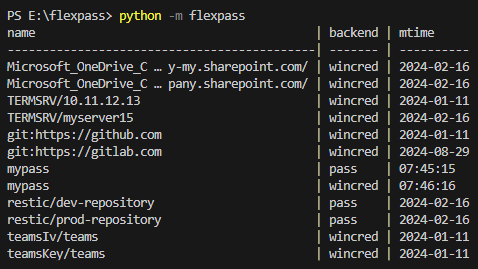
N.B.: by default, names are displayed truncated to 40 characters. Add option --full to disable truncation.
Backends
The following backends are included in Flexpass package:
| Name | Priority | Description |
|---|---|---|
gpg |
80 | GPG encrypted files following the layout defined by pass, the standard unix password manager. |
secretservice |
60 | Secret Service D-Bus API, a FreeDesktop.org standard usually accessed through libsecret and its frontends (secret-tool, Gnome Keyring, KDE Wallet Manager or KeyPassXC). |
wincred |
50 | Windows Credential Manager, the password manager integrated in Windows. |
These backends are planned to be added later (ROADMAP):
| Name | Priority | Description |
|---|---|---|
dockersecrets |
30 | Docker Compose secrets, made available in the containers at path /run/secrets/{name} or in /run/secrets/misc (or at local path secrets/{name}.txt or in secrets/misc.ini: usefull during development). Read-only. |
dir |
20 | Unencrypted files in a root directory (by default /root/passwords). |
env |
10 | Environment variables. Read-only. |
Custom backends may be registered in your Python code using the register_backend function. Example:
from flexpass import register_backend
register_backend(MyCustomBackend, priority=70)
Pre-defined priorities may be modified by calling the register_backend with the new priority value. Example:
register_backend(WincredBackend, priority=5, replace_if_exists=True)
License
This project is licensed under the terms of the MIT license.
Credits
Inspired by:
- pass: the standard unix password manager based on GPG. It has very few requirements and may be installed on most workstations and servers. It is cross-platform because only GPG is actually required to read or write passwords.
- keyring: a most wildly used Python library to access passwords.
Logo based on a creation by Pixel perfect on Flaticon.
1 maintainer

Metadata
1 maintainer
Release files for flexpass 0.1.2
For a detailed explanation of source distributions (sdists) and built distributions (wheels), please see the package formats documentation.
Built distribution (wheel)
| File | Interpreter | ABI | Platform | Actions Reset |
|---|---|---|---|---|
| flexpass-0.1.2-py3-none-any.whl | Python 3 | none | any | Details for flexpass-0.1.2-py3-none-any.whl |
Release files / flexpass-0.1.2-py3-none-any.whl
| Download URL | flexpass-0.1.2-py3-none-any.whl |
|---|---|
| Size | 21.3 kB |
| Tags | Python 3 |
|
SHA-256 checksum How to use checksums |
96c5f9345bfbfe1e4c3aaffd1168af1f7a6bb68c5eddd922587337dc2b4a2264
|
|
BLAKE2b-256 checksum How to use checksums |
ee4e2a089b489131d8585d2648e559acf687802aa486172f06a79768eaa84be4
|
| Upload date | |
|
Uploaded using Trusted Publishing? What is trusted publishing? |
No |
| Uploaded via |
twine/5.0.0 CPython/3.11.2
|
Security for flexpass 0.1.2
Provenance
Provenance describes where a file came from. On PyPI, provenance is shared via attestations, which provide a verifiable record of the build or publishing details. View details, limitations and caveats.
No provenance found
None of the files in this release were uploaded with provenance metadata.
A note on package security
PyPI is a repository for distributing packages, not a service for auditing them. While third-party security researchers and our staff do their best to detect and remove malicious packages, PyPI cannot guarantee the quality, security or suitability of any given package.
To learn more about protecting yourself from malicious actors, visit our package security documentation.














